Solved I upgraded from Vista to Win 7 with upgrade disk, Now a problem

It seems you missed the most important step in Clean Reinstall - Factory OEM Windows 7: the way Win7 as the first driver-complete OS delivers its drivers. After install the first thing to do is enable Automatically deliver drivers via Windows Update (Step 3) then run all rounds of Important and Optional Windows Updates to completion.

After each requested reboot, go back to Check for Updates. It may go on for several days until there are no more.

Only then import any drivers missing in Device manager from the Support Downloads webpage for your model.

I don't use Norton bloatware so can't advise and don't recommend. We see only problems with it.

You can Custom install any Office component but I'd install all tools to avoid future probs. You need a Product key. All of those should have been audited when you did the preparations provided so you don't miss anything

You'll get and keep a perfect install to the extend you stick with the steps in Clean Reinstall - Factory OEM Windows 7 which is based on what's worked best with tens of thousands of installs we've helped with here.
http://www.sevenforums.com/tutorials/219487-clean-reinstall-factory-oem-windows-7-a.html#post1839164
 
Well Grocker, I had to bust down the back door, go down the hall, into kitchen, down to cellar and out the cellar window, but I have a clean install now.

I went to local library with my daughters laptop. Said it would take 6 hrs to down load the file. I cancelled. Went home took my Windows 7 Home Premium x64 disk and stuck it in and chose Custom. It took forever, but finally booted up into Windows 7 Home Premium, no updates at all.

I checked the Programs and Features and it said there were no programs installed on this computer. I think that qualifies as a clean install.

I downloaded Chrome, my browser of choice.

I installed Greenshot, my favorite screen capture tool.

I installed Microsoft Security Essentials and downloaded the definitions.

Then I registered with the number that came with the CD, surprisingly it worked. Then I went to anytime upgrade and chose I have a Product Key to get Professional. I entered the Key, and now she is to the point of downloading 99 updates. Do not know how long that will take, but I will keep you posted. Wont be long until I have a clean install with Win 7 Pro and all the updates.

Then I will install Quicken Beta, and get the Data folder into Documents.

I will check it out and make sure all is well.

Then I have questions for you.

Like, can I custom Install Microsoft Office with just Excel from an old CD I have? I am sure I will need Adobe Reader, then I have to go find 7zip and a few other little programs I use.

Then I want to do an ISO of just this basic setup. I used Norton Ghost for XP to do this. What can I use in Win 7?

Thanks
Now that you're up and running, take the time to image your system. It's so much easier to restore an image, than having to start from scratch again. Consider downloading Macrium Reflect, it's free for personal use!

Download Macrium Reflect Software
 

My Computer My Computer

At a glance

64-bit Windows 8.1 ProCore(TM) i5 CPU 4330 Haswell @ 3.20GHz12.00 GBIntel(R) HD Graphics
Computer type
PC/Desktop
Computer Manufacturer/Model Number
LENOVO K450 @3.0GHZ
OS
64-bit Windows 8.1 Pro
CPU
Core(TM) i5 CPU 4330 Haswell @ 3.20GHz
Motherboard
LENOVO
Memory
12.00 GB
Graphics Card(s)
Intel(R) HD Graphics
Sound Card
Intel HD integtrated
Monitor(s) Displays
HP 25' ISP Monitor
Screen Resolution
1900/1020
Hard Drives
(1) ST1000DM003-1CH162 (2) Generic STORAGE DEVICE USB Device (3) Generic STORAGE DEVICE USB Device
Internet Speed
100mb down/10mb up
I am up to step 17 of the clean install instructions. I am studying what to do about the System Image. Seems like if I just use Create System Image, I will have what I need except it will be on an external hard drive and so will the image, if I use Macrium.

What if the Hard Drive dies and I can not boot up?

Can I create a boot CD so I can get to the Control Panel to recover from the external hard drive?
 

My Computer My Computer

At a glance

Microsoft Windows 7 Professional 64-bit 7601 ...Intel(R) Core(TM)2 Quad CPU Q8200 @ 2.33GHz6.00 GB(1) Intel(R) G45/G43 Express Chipset (Microso...
Computer type
PC/Desktop
Computer Manufacturer/Model Number
Dell Studio
OS
Microsoft Windows 7 Professional 64-bit 7601 Multiprocessor Free Service Pack 1
CPU
Intel(R) Core(TM)2 Quad CPU Q8200 @ 2.33GHz
Motherboard
Dell Inc. 0M017G
Memory
6.00 GB
Graphics Card(s)
(1) Intel(R) G45/G43 Express Chipset (Microsoft Corporation
Sound Card
(1) High Definition Audio Device (2) High Definition Audio
Monitor(s) Displays
HP2009m
Screen Resolution
1600 x 900 x 32 bits (4294967296 colors) @ 60 Hz
Hard Drives
(1) SAMSUNG HD642JJ ATA Device (2) Generic- Compact Flash USB Device (3) Generic- MS/MS-Pro USB Device (4) Generic- SD/MMC USB Device (5) Generic- SM/xD Picture USB Device
Yes, using Win7 Backup Imaging to Backup Complete Computer - Create an Image Backup you would boot to the Win7 installer or System Repair Disk to do a System Image Recovery.

Using Macrium you'd want to make it's Linux boot disk to boot to reimage from the stored image.

This replaces the Dell Recovery image with your own clean customized image but on an external HD so that it isn't lost with the OS HD if it should ever fail.

If you have a WD or Seagate HD you can also use their free premium Acronis imaging app which provides a boot disk.
 
I created a Repair Disk and made sure it booted the computer as the Help file said it would. Then I Created a System Image on the WD external drive. I do not need one of those programs that let you look at your image in the Explorer environment. If I delete something I want back, I just go to C drive properties and find what I want in the Previous Version Tab. I once deleted all my libraries because I thought I would save some disk space. Then I found out that wiped out username/My Doucments, My Music, My Videos, My Pictures. I was able to get it all back with the Previous Version.

I lucked out reading all this information you direct me to. Instead of installing my Printer from the CD that came with it, I went to the Web Site and downloaded just the drivers and installed them. Now I have a printer that works and no JUNK programs on my computer.

My router is working, but I did not use the install CD and I do not think I will since everything works and WIFI is available for everyone in the house with their various laptops and other devices.

I think that I will install the Virtual Machine software and use the VM for experiments and programming. That way I do not have all that Junk on the real computer. What you think about that?

Thanks
 

My Computer My Computer

At a glance

Microsoft Windows 7 Professional 64-bit 7601 ...Intel(R) Core(TM)2 Quad CPU Q8200 @ 2.33GHz6.00 GB(1) Intel(R) G45/G43 Express Chipset (Microso...
Computer type
PC/Desktop
Computer Manufacturer/Model Number
Dell Studio
OS
Microsoft Windows 7 Professional 64-bit 7601 Multiprocessor Free Service Pack 1
CPU
Intel(R) Core(TM)2 Quad CPU Q8200 @ 2.33GHz
Motherboard
Dell Inc. 0M017G
Memory
6.00 GB
Graphics Card(s)
(1) Intel(R) G45/G43 Express Chipset (Microsoft Corporation
Sound Card
(1) High Definition Audio Device (2) High Definition Audio
Monitor(s) Displays
HP2009m
Screen Resolution
1600 x 900 x 32 bits (4294967296 colors) @ 60 Hz
Hard Drives
(1) SAMSUNG HD642JJ ATA Device (2) Generic- Compact Flash USB Device (3) Generic- MS/MS-Pro USB Device (4) Generic- SD/MMC USB Device (5) Generic- SM/xD Picture USB Device
You can in fact mount your Win7 backup image in Disk Mgmt to copy out files using Virtual Hard Disk - Create and Attach VHD .

But I would have a file backup method, as simple as periodically dragging active User folders to external or another HD, automating that with SyncToy - Backup User Data - Windows 7 Help Forums, or a more modern method to backup and perhaps even sync your devices via the cloud using Sync, Backup and Store your Files to the Cloud with Skydrive - Windows 7 Forums

There is nothing in Clean Reinstall - Factory OEM Windows 7 about running router Software which is XPired old-school. Are you following the steps in Clean Reinstall - Factory OEM Windows 7 to assure a perfect install?

The only reason you'd want the full printer software is to scan from the printer top and have it appear on desktop without opening the printer software first. As an alternative you can also use Windows Scan Utility from the rightclick menu in Printers and Devices.
 
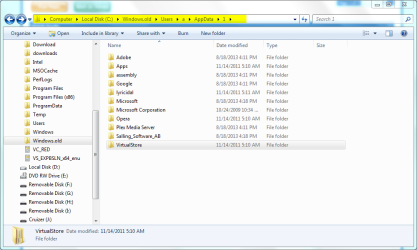
OK, I have two problems that maybe someone can help me with. First I created my Backup image and was wondering why I needed 131 GB to do it. I got to looking through some folders and found the Windows.old which basically had everything from before in it, about 98 GB. I tried to delete it; it is mostly gone, except for see screen shot. Not sure if it was Local, Roaming or the other one, but I changed it to 1 thinking I could then delete it.


I am in this circle where I "select all", right click and choose Delete, get a message that says I need administrative permission. I click the pop up that says I am the administrator go ahead and dump the files. Then it comes back and says I am do not have permission.

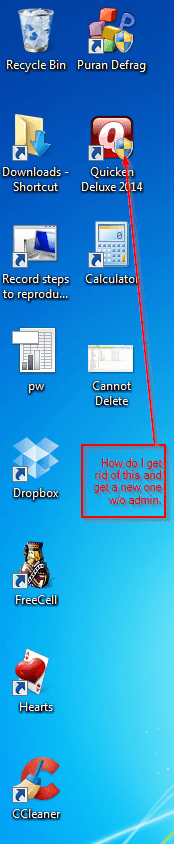
The other problem is with my Quicken shortcut. It has the Admin Seal in the Icon and Quicken will not run in Admin mode. It does but you get these annoying popups saying it has no effect on Quicken, at start up and Exit.
See cons attachment.

Other than that is I deleted the 131 GB image from external drive and made a new one with the files I can not delete and then started over on Clean Install on about step 3 or 4 so I could defrag the mess I made.

Everything does work ten times faster tough, start up is, Bang! It is done. Keyboard died this morning, had to go to town and buy a new one.

Thanks
 

Attachments

  • Cannot Delete.png
    Cannot Delete.png
    34.4 KB · Views: 1
  • Icons.png
    Icons.png
    50.6 KB · Views: 2

My Computer My Computer

At a glance

Microsoft Windows 7 Professional 64-bit 7601 ...Intel(R) Core(TM)2 Quad CPU Q8200 @ 2.33GHz6.00 GB(1) Intel(R) G45/G43 Express Chipset (Microso...
Computer type
PC/Desktop
Computer Manufacturer/Model Number
Dell Studio
OS
Microsoft Windows 7 Professional 64-bit 7601 Multiprocessor Free Service Pack 1
CPU
Intel(R) Core(TM)2 Quad CPU Q8200 @ 2.33GHz
Motherboard
Dell Inc. 0M017G
Memory
6.00 GB
Graphics Card(s)
(1) Intel(R) G45/G43 Express Chipset (Microsoft Corporation
Sound Card
(1) High Definition Audio Device (2) High Definition Audio
Monitor(s) Displays
HP2009m
Screen Resolution
1600 x 900 x 32 bits (4294967296 colors) @ 60 Hz
Hard Drives
(1) SAMSUNG HD642JJ ATA Device (2) Generic- Compact Flash USB Device (3) Generic- MS/MS-Pro USB Device (4) Generic- SD/MMC USB Device (5) Generic- SM/xD Picture USB Device
So you didn't follow or likely even look at Clean Reinstall - Factory OEM Windows 7 or you would have correctly booted the installer and not run it from Win7, which causes it to stuff everything from the old install into windows.old folder.

Why would you come here for help and ignore the best help we can give? The tutorial compiles everything that works best based on having helped with tens of thousands of installs here.

If you have any questions, you only need to ask - not just merrily go on your way randomly stabbing at it.

I would start over and this time do it according to the tutorial so you have a perfect install instead of what you did. Otherwise you can delete windows.old using Disk Cleanup. Then I'd CClean the HD and Registry and run Puran Boot Time Defrag. But those are in the tutorial so you don't know about them. :rolleyes:
 
Back
Top