iball 150m wireless-n home router

AtulKarche

New member
Local time
10:15 PM
Messages
6
Hi My name is Atul i have problem with my new Router
iball 150m wireless-n home router
i connect it with my BSNL Broadband And i want create Wi-fi Area at my home
But It give me error"No Internet Access ,Check your Online settings"
Plzzzzzz
Help me
 

My Computer My Computer

At a glance

windows 8 x32biti56GBReminder
Computer type
Laptop
Computer Manufacturer/Model Number
HP Envy m6 1103tx
OS
windows 8 x32bit
CPU
i5
Motherboard
hp
Memory
6GB
Graphics Card(s)
Reminder
Hard Drives
750HDD
Plzzzzzz Help Me
 

My Computer My Computer

At a glance

windows 8 x32biti56GBReminder
Computer type
Laptop
Computer Manufacturer/Model Number
HP Envy m6 1103tx
OS
windows 8 x32bit
CPU
i5
Motherboard
hp
Memory
6GB
Graphics Card(s)
Reminder
Hard Drives
750HDD
I-Ball 150M wireless-n home router

i am perches the IBall 150m wireless-n home router
but i cant understand the configuration
i want to connect it with my Bsnl Broadband DSL
but It Give's me Message"No Internet Access, Please check your Online Settings"
I Fully Helpless
i submit my ipconfig to you
plzzzzzzz
Help me!!!!
 

Attachments

My Computer My Computer

At a glance

windows 8 x32biti56GBReminder
Computer type
Laptop
Computer Manufacturer/Model Number
HP Envy m6 1103tx
OS
windows 8 x32bit
CPU
i5
Motherboard
hp
Memory
6GB
Graphics Card(s)
Reminder
Hard Drives
750HDD
Your machine doesn't appear to have an enabled or configured wireless adapter so that will not work. Your ipconfig looks fine for the ethernet adapter however I have noticed that you are not set to automatically retrieve one. Are you setting a static IP address?

I have a feeling that your DNS servers may be of a possible cause....

http://www.sevenforums.com/tutorials/15037-dns-addressing-how-change-windows-7-a.html

Follow the above tutorial til step 7 and then change the primary and secondary DNS servers as the following for testing purposes:

Primary: 8.8.8.8

Secondary/Alternate: 8.8.4.4

Test connectivity...

If that fails then it may be worth trying to retrieve one automatically.

Please follow this tutorial up to step 7 - http://www.sevenforums.com/tutorials/15037-dns-addressing-how-change-windows-7-a.html

Rather than changing the DNS related information can you check 'Obtain an IP address automatically' and the 'Obtain DNS server address automatically' radio buttons.

After that click 'OK' twice to apply the configuration. Please then test connectivity and post back your results with a new IPconfig - http://www.sevenforums.com/network-sharing/300288-basic-requirements-before-posting-your-networking-thread.html

Many Thanks,
Josh
 
Last edited:

My Computer My Computer

At a glance

Windows 7 Professional x64 SP1 ; Windows Serv...Intel Core i5 2400 @ 3.10GHz8.0GB DDR3 @ 665MHz (2GBx4)AMD Radeon HD 6870
Computer type
PC/Desktop
Computer Manufacturer/Model Number
Custom Built
OS
Windows 7 Professional x64 SP1 ; Windows Server 2012 R2 Standard
CPU
Intel Core i5 2400 @ 3.10GHz
Motherboard
Foxconn H67MP-S/-V/H67MP
Memory
8.0GB DDR3 @ 665MHz (2GBx4)
Graphics Card(s)
AMD Radeon HD 6870
Sound Card
Realtek High Definition Audio
Monitor(s) Displays
AOC 2243W & SMB1930NW
Screen Resolution
1440x900 & 1920x1080
Hard Drives
977GB Seagate ST31000524AS ATA Drive (SATA)
250GB WD iSCSI attached Drive
PSU
750W Gaming PSU
Case
Novatech Night
Cooling
Fan
Keyboard
Dell Standard PS/2 Keyboard
Mouse
R.A.T 07 Gaming Mouse
Internet Speed
Download: 10 Mbps Ping: 30ms Upload: 0.81 Mbps
Browser
Google Chrome
Other Info
Optiarc DVD RW AD-5260S ATA Device
That notebook has a wired adapter (RJ-45 plug) and Bluetooth. It doesn't have a wireless adapter unless you added one. If you have a USB port, there's small adapters you can purchase for under $10. I just bought two from Newegg on sale for $7.99.

After you install the adapter in your notebook, power up your wireless router but DO NOT connect it to your Broadband router yet. Enter the IP address for the wireless router in your browser (may be similar to 192.168.0.1). The actual address should be in the documentation for the router. Once in the menu, Disable DHCP. You don't want this router to request an IP address from the host. It will get one assigned by your Broadband router after you plug it in. Then go through the menu and enable security and change the password. After the changes are made, then plug the wireless router into your Broadband router. After a few seconds, make sure the connection light is on. After this, you should have wireless access on your PC.
 

My Computer My Computer

At a glance

Windows 7 Pro-x64i7-2600 3.4GHz - 3.8GHz Turbo8Gb - 2x4GB, Muskin 991770 PC3-1333Integrated Intel HD 2000
Computer type
PC/Desktop
Computer Manufacturer/Model Number
Built 2/11/2011
OS
Windows 7 Pro-x64
CPU
i7-2600 3.4GHz - 3.8GHz Turbo
Motherboard
Intel DH67BL-B3
Memory
8Gb - 2x4GB, Muskin 991770 PC3-1333
Graphics Card(s)
Integrated Intel HD 2000
Sound Card
Integrated Intel 10.1 HD, RealTek ALC892
Monitor(s) Displays
Asus LCD VH222H, Haier HL24XSL2a
Screen Resolution
1920x1080, 1920x1080
Hard Drives
Crucial SSD C300-128Gb,
Western Digital WD5002AALX - 500Gb,
Western Digital WD7501AALS - 750Gb
PSU
Seasonic 650W 80+ Gold Modular
Case
Rosewill Defender
Cooling
Stock CPU, Four 120mm case fans, PCH fan added
Keyboard
Logitech EX100 Y-RBH94 Wireless
Mouse
Logitech EX100 M-RCE95 Wireless
Internet Speed
3.0/1.5 Mbs
Antivirus
Microsoft Security Essentials
Browser
Microsoft Internet Explorer 11
Other Info
Antec Veris Premier-Multimedia IR Station,
Cyber Accoustics-3602 Speakers,
AFT XM-5U Card Reader,
Hauppauge TV-HVR-2250,
Sony LX300 USB Turntable
In addition....

Were you trying to connect your computer without the Wi-Fi adapter or perhaps another wireless device, like Smart phones?
But It give me error"No Internet Access ,Check your Online settings"
If the ipconfig/all output that you posted came from your computer that you wish to have a wireless connection it won't work. As carwiz suggested you will need a Wi-Fi adapter and I'm pretty sure they are reasonable as well in your country. This tutorial will give you an idea on how you may configure your wireless network.

We'll appreciate an update.
 
Last edited:

My Computer My Computer

At a glance

Win7 & Win8 64bitIntel i5
Computer Manufacturer/Model Number
Lenovo Desktop/Samsung Laptop
OS
Win7 & Win8 64bit
CPU
Intel i5
Internet Speed
Charter-20 Mbps
Antivirus
Avast
Browser
FF, IE9 and Chrome
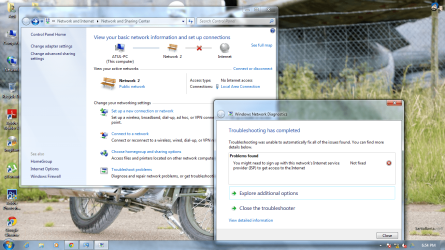
i tried this process but it gives me An ISP Errror
Problem.png
plzzz
help me
 

My Computer My Computer

At a glance

windows 8 x32biti56GBReminder
Computer type
Laptop
Computer Manufacturer/Model Number
HP Envy m6 1103tx
OS
windows 8 x32bit
CPU
i5
Motherboard
hp
Memory
6GB
Graphics Card(s)
Reminder
Hard Drives
750HDD
May we ask how are you able to post? From the image that you've provided your LAN or Local Area Network has no internet access. Is your issue both wired and wireless connectivity?

In our opinion your main issue is this:
i connect it with my BSNL Broadband And i want create Wi-fi Area at my home
Has this changed now?

What process have you tried? The Tutorial link that I gave you? Did you ever get a Wi-Fi adapter?
i tried this process but it gives me An ISP Errror
We'll be able to assist you and expedite the troubleshooting process if you can provide us a lot more information.
 

My Computer My Computer

At a glance

Win7 & Win8 64bitIntel i5
Computer Manufacturer/Model Number
Lenovo Desktop/Samsung Laptop
OS
Win7 & Win8 64bit
CPU
Intel i5
Internet Speed
Charter-20 Mbps
Antivirus
Avast
Browser
FF, IE9 and Chrome
We also need to know the exact model number of you router and your wireless adapter.
 

My Computer My Computer

At a glance

Windows 7 Pro-x64i7-2600 3.4GHz - 3.8GHz Turbo8Gb - 2x4GB, Muskin 991770 PC3-1333Integrated Intel HD 2000
Computer type
PC/Desktop
Computer Manufacturer/Model Number
Built 2/11/2011
OS
Windows 7 Pro-x64
CPU
i7-2600 3.4GHz - 3.8GHz Turbo
Motherboard
Intel DH67BL-B3
Memory
8Gb - 2x4GB, Muskin 991770 PC3-1333
Graphics Card(s)
Integrated Intel HD 2000
Sound Card
Integrated Intel 10.1 HD, RealTek ALC892
Monitor(s) Displays
Asus LCD VH222H, Haier HL24XSL2a
Screen Resolution
1920x1080, 1920x1080
Hard Drives
Crucial SSD C300-128Gb,
Western Digital WD5002AALX - 500Gb,
Western Digital WD7501AALS - 750Gb
PSU
Seasonic 650W 80+ Gold Modular
Case
Rosewill Defender
Cooling
Stock CPU, Four 120mm case fans, PCH fan added
Keyboard
Logitech EX100 Y-RBH94 Wireless
Mouse
Logitech EX100 M-RCE95 Wireless
Internet Speed
3.0/1.5 Mbs
Antivirus
Microsoft Security Essentials
Browser
Microsoft Internet Explorer 11
Other Info
Antec Veris Premier-Multimedia IR Station,
Cyber Accoustics-3602 Speakers,
AFT XM-5U Card Reader,
Hauppauge TV-HVR-2250,
Sony LX300 USB Turntable
Back
Top