
Icon Cache - Rebuild

How to Rebuild the Icon Cache in Windows

   Information
If one or more of your icons are not displaying correctly, or that your icon cache is corrupted, then you might consider rebuilding the icon cache to reset and reload the icon images into the icon cache in Vista, Windows 7, and Windows 8.

   Note
This will not help with any of the following icon issues:
  • A shortcut's icon that is not displayed properly due to the source of the shortcut being moved or deleted. You may need to recreate a new shortcut directly from the source (ex: program's exe) file to replace it instead.
  • All icons for a specific file extension display the wrong icon. This may be due to setting the wrong association for what program to open the file extension instead. You can restore the default file extension's associations to fix this icon instead.


OPTION ONE

Automatically Rebuild the Icon Cache


1. Click/tap on the download button below to download the file below.
Rebuild_Icon_Cache.bat

Download


2. Save the file to your desktop, and run it.

3. Click/tap on Run when prompted.

4. Follow the instructions in the command prompt to rebuild the Icon Cache. (see screenshot below)
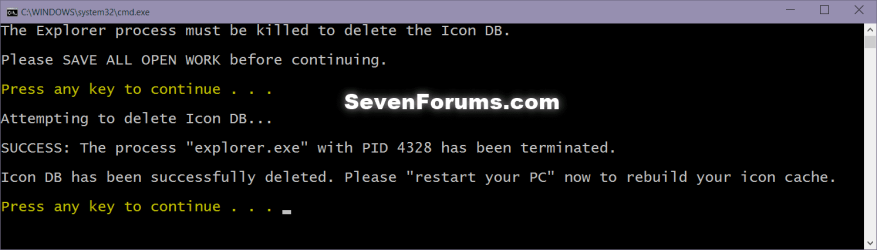
Icon_cache_command.png
5. Restart your computer to generate a new IconCache.db file.

6. If the icons are still not displaying properly, then download and merge the ICO option in this tutorial for Windows 7 or Windows 8 to restore the default associations of .ico (icon) files.


OPTION TWO

To Manually Rebuild the Icon Cache using the Command Prompt


1. Close and save anything that you are working on. This command will kill explorer and restart the computer when completed.

2. Open a command prompt in Windows 7 or Windows 8.

3. In the command prompt, Copy and paste each command line below exactly as is one at a time and press enter after each command.
:warn:WARNING: The last command will restart the computer, so be sure to close and save anything that you are working on first.
  • ie4uinit.exe -ClearIconCache
  • taskkill /IM explorer.exe /F
  • DEL "%localappdata%\IconCache.db" /A
  • DEL "%localappdata%\Microsoft\Windows\Explorer\iconcache*" /A
  • shutdown /r /f /t 00
4. The IconCache.db file has now been rebuilt.

5. If the icons are still not displaying properly, then download and merge the ICO option in this tutorial for Windows 7 or Windows 8 to restore the default associations of .ico (icon) files.

That's it,
Shawn


Attachments

Last edited:
You're most welcome Dgonline, and welcome to Seven Forums. :)
thanks for the bat , it really very useful

but does the sp1 fix this issue?
 

My Computer

Computer type
PC/Desktop
OS
windows 7 ultimate 64bit
Hello Drugo, and you're welcome.

Usually you would have to rebuild the icon cache due to it getting corrupted by one thing or another, and it's really not something that SP1, a Windows Update, or hotfix will be able to fix. :(
 

My Computer

Computer type
PC/Desktop
Computer Manufacturer/Model Number
Self built custom
OS
64-bit Windows 11 Pro for Workstations
CPU
Intel i7-8700K OC'd to 5 GHz
Motherboard
ASUS ROG Maximus XI Formula Z390
Memory
64 GB (4x16GB) G.SKILL TridentZ RGB DDR4 3600 MHz
Graphics Card(s)
ASUS ROG-STRIX-GTX1080TI-O11G-GAMING
Sound Card
Integrated
Monitor(s) Displays
2 x Samsung Odyssey G7 27"
Screen Resolution
2560x1440
Hard Drives
1TB Samsung 990 PRO M.2,
4TB Samsung 990 PRO PRO M.2,
TerraMaster F8 SSD Plus NAS
PSU
Seasonic Prime Titanium 850W
Case
Thermaltake Core P3
Cooling
Corsair Hydro H115i
Keyboard
Logitech wireless K800
Mouse
Logitech MX Master 4
Internet Speed
2 Gb/s Download and 100 Mb/s Upload
Antivirus
Malwarebyte Anti-Malware Premium
Browser
Google Chrome
Other Info
Logitech Z625 speaker system,
Logitech BRIO 4K Pro webcam,
HP Color LaserJet Pro MFP M477fdn,
APC SMART-UPS RT 1000 XL - SURT1000XLI,
Galaxy S23 Plus phone
Hello Drugo, and you're welcome.

Usually you would have to rebuild the icon cache due to it getting corrupted by one thing or another, and it's really not something that SP1, a Windows Update, or hotfix will be able to fix. :(
yes i got it
but microsoft did not release a hotfix to fix it
 

My Computer

Computer type
PC/Desktop
OS
windows 7 ultimate 64bit
I'm not aware of one. Unless the icon cache was found to be corrupted by something specific all the time, there will usually not be a hotfix for it. :(
 

My Computer

Computer type
PC/Desktop
Computer Manufacturer/Model Number
Self built custom
OS
64-bit Windows 11 Pro for Workstations
CPU
Intel i7-8700K OC'd to 5 GHz
Motherboard
ASUS ROG Maximus XI Formula Z390
Memory
64 GB (4x16GB) G.SKILL TridentZ RGB DDR4 3600 MHz
Graphics Card(s)
ASUS ROG-STRIX-GTX1080TI-O11G-GAMING
Sound Card
Integrated
Monitor(s) Displays
2 x Samsung Odyssey G7 27"
Screen Resolution
2560x1440
Hard Drives
1TB Samsung 990 PRO M.2,
4TB Samsung 990 PRO PRO M.2,
TerraMaster F8 SSD Plus NAS
PSU
Seasonic Prime Titanium 850W
Case
Thermaltake Core P3
Cooling
Corsair Hydro H115i
Keyboard
Logitech wireless K800
Mouse
Logitech MX Master 4
Internet Speed
2 Gb/s Download and 100 Mb/s Upload
Antivirus
Malwarebyte Anti-Malware Premium
Browser
Google Chrome
Other Info
Logitech Z625 speaker system,
Logitech BRIO 4K Pro webcam,
HP Color LaserJet Pro MFP M477fdn,
APC SMART-UPS RT 1000 XL - SURT1000XLI,
Galaxy S23 Plus phone
As far as I've experienced you don't have to force the manual delete of iconcache.db...
You can simply run the system Disk Cleanup utility and choose to delete thumbnail icon preview. Windows will reset all caches exactly as the "brutal" method! ;)

diskclean-245x300.png


Please, can you help me with this issue: missing XML icon?
 
Last edited:

My Computer

Computer type
Laptop
Computer Manufacturer/Model Number
MSI GX660-262it
OS
Windows 7 Home Premium x64 SP1
CPU
Intel Core i7 840QM
Memory
8GB DDR3 1333MHz
Graphics Card(s)
ATI Mobility HD 7970M 2GB DDR5
Screen Resolution
1920x1080
Hard Drives
Intel SSDSA2CT040G3
Hybrid ST750LX0ST750LX003
Antivirus
360 Internet Security
Browser
IE10

My Computer

Computer type
PC/Desktop
Computer Manufacturer/Model Number
Self built custom
OS
64-bit Windows 11 Pro for Workstations
CPU
Intel i7-8700K OC'd to 5 GHz
Motherboard
ASUS ROG Maximus XI Formula Z390
Memory
64 GB (4x16GB) G.SKILL TridentZ RGB DDR4 3600 MHz
Graphics Card(s)
ASUS ROG-STRIX-GTX1080TI-O11G-GAMING
Sound Card
Integrated
Monitor(s) Displays
2 x Samsung Odyssey G7 27"
Screen Resolution
2560x1440
Hard Drives
1TB Samsung 990 PRO M.2,
4TB Samsung 990 PRO PRO M.2,
TerraMaster F8 SSD Plus NAS
PSU
Seasonic Prime Titanium 850W
Case
Thermaltake Core P3
Cooling
Corsair Hydro H115i
Keyboard
Logitech wireless K800
Mouse
Logitech MX Master 4
Internet Speed
2 Gb/s Download and 100 Mb/s Upload
Antivirus
Malwarebyte Anti-Malware Premium
Browser
Google Chrome
Other Info
Logitech Z625 speaker system,
Logitech BRIO 4K Pro webcam,
HP Color LaserJet Pro MFP M477fdn,
APC SMART-UPS RT 1000 XL - SURT1000XLI,
Galaxy S23 Plus phone
Hello Hexaae,

Thank you, but unfortunately the "icon cache" is different than the "thumbnail cache".

http://www.sevenforums.com/tutorials/10797-thumbnail-cache-clear-reset.html

I know it may sound strange and Thumbnail != program icons, but as a personal experience I've solved the same problems forcing a refresh of program/menu/startbar corrupt icons too (not just the explorer thumbs) clicking below "Cleanup System files" with admin rights. Then I've realized it's the same as the brutal manual method reported everywhere on the web, except you use a system program. I'm 99% sure ;)
 
Last edited:

My Computer

Computer type
Laptop
Computer Manufacturer/Model Number
MSI GX660-262it
OS
Windows 7 Home Premium x64 SP1
CPU
Intel Core i7 840QM
Memory
8GB DDR3 1333MHz
Graphics Card(s)
ATI Mobility HD 7970M 2GB DDR5
Screen Resolution
1920x1080
Hard Drives
Intel SSDSA2CT040G3
Hybrid ST750LX0ST750LX003
Antivirus
360 Internet Security
Browser
IE10
Still problems

Hi, I have the generic Icon issue as well. So far I have tried the following (in no particular order):

1) deleting the iconcache.db file (manually)
2) increasing the icon cache to 4 MB through the registry editor
3) restarting in safe mode
4) system restore (a whole other issue--this fails to perform now)
5) installing a 3rd party icon packager program (hey, worth a shot)

Should also note that right-clicking on icons is a dead-end because the change icon button is grayed out.

Have run chckdsk, rebooted countless times in every mode under the sun...what gives?

Angela
 

My Computer

Computer Manufacturer/Model Number
Dell Latitude E6510
OS
Windows 7 Ultimate x64
Graphics Card(s)
nVIDIA
Hello Angela, and welcome to Seven Forums.

Do you have the generic icon issue for any specific file extension type, shortcut, or is this for all files?
 

My Computer

Computer type
PC/Desktop
Computer Manufacturer/Model Number
Self built custom
OS
64-bit Windows 11 Pro for Workstations
CPU
Intel i7-8700K OC'd to 5 GHz
Motherboard
ASUS ROG Maximus XI Formula Z390
Memory
64 GB (4x16GB) G.SKILL TridentZ RGB DDR4 3600 MHz
Graphics Card(s)
ASUS ROG-STRIX-GTX1080TI-O11G-GAMING
Sound Card
Integrated
Monitor(s) Displays
2 x Samsung Odyssey G7 27"
Screen Resolution
2560x1440
Hard Drives
1TB Samsung 990 PRO M.2,
4TB Samsung 990 PRO PRO M.2,
TerraMaster F8 SSD Plus NAS
PSU
Seasonic Prime Titanium 850W
Case
Thermaltake Core P3
Cooling
Corsair Hydro H115i
Keyboard
Logitech wireless K800
Mouse
Logitech MX Master 4
Internet Speed
2 Gb/s Download and 100 Mb/s Upload
Antivirus
Malwarebyte Anti-Malware Premium
Browser
Google Chrome
Other Info
Logitech Z625 speaker system,
Logitech BRIO 4K Pro webcam,
HP Color LaserJet Pro MFP M477fdn,
APC SMART-UPS RT 1000 XL - SURT1000XLI,
Galaxy S23 Plus phone
It's a smattering: MS Office shortcuts (they are still usable) and files, Skype, Itunes, some Dell bloatware that I don't use or care about. Also, Adobe PS but NOT AI (??).
 

My Computer

Computer Manufacturer/Model Number
Dell Latitude E6510
OS
Windows 7 Ultimate x64
Graphics Card(s)
nVIDIA
It's a smattering: MS Office shortcuts (they are still usable) and files, Skype, Itunes, some Dell bloatware that I don't use or care about. Also, Adobe PS but NOT AI (??).


See if the correct icon will display if you create new shortcuts directly from the EXE files of the programs.
 
Last edited:

My Computer

Computer type
PC/Desktop
Computer Manufacturer/Model Number
Self built custom
OS
64-bit Windows 11 Pro for Workstations
CPU
Intel i7-8700K OC'd to 5 GHz
Motherboard
ASUS ROG Maximus XI Formula Z390
Memory
64 GB (4x16GB) G.SKILL TridentZ RGB DDR4 3600 MHz
Graphics Card(s)
ASUS ROG-STRIX-GTX1080TI-O11G-GAMING
Sound Card
Integrated
Monitor(s) Displays
2 x Samsung Odyssey G7 27"
Screen Resolution
2560x1440
Hard Drives
1TB Samsung 990 PRO M.2,
4TB Samsung 990 PRO PRO M.2,
TerraMaster F8 SSD Plus NAS
PSU
Seasonic Prime Titanium 850W
Case
Thermaltake Core P3
Cooling
Corsair Hydro H115i
Keyboard
Logitech wireless K800
Mouse
Logitech MX Master 4
Internet Speed
2 Gb/s Download and 100 Mb/s Upload
Antivirus
Malwarebyte Anti-Malware Premium
Browser
Google Chrome
Other Info
Logitech Z625 speaker system,
Logitech BRIO 4K Pro webcam,
HP Color LaserJet Pro MFP M477fdn,
APC SMART-UPS RT 1000 XL - SURT1000XLI,
Galaxy S23 Plus phone
If it's of interest, I'm on a Dell Latitude e6510 with a clean install. This machine has been buggy and crashy from the start, but was diagnosed by my Univ's tech guys as having bad video drivers, so they reinstalled (nVIDIA).

Yes, I mean it works in that I can get shortcuts that look like the programs again. That wasn't so much my concern as much as the root cause of the problem? On some other sites folks have reported the program files disappearing after awhile.

Also, thanks for your help! :)
 
Last edited by a moderator:

My Computer

Computer Manufacturer/Model Number
Dell Latitude E6510
OS
Windows 7 Ultimate x64
Graphics Card(s)
nVIDIA
That's great news Angela.

It could have been caused from a number of things, but I would guess that some sort of issue with the shortcut's target location, or association may have been it.
 

My Computer

Computer type
PC/Desktop
Computer Manufacturer/Model Number
Self built custom
OS
64-bit Windows 11 Pro for Workstations
CPU
Intel i7-8700K OC'd to 5 GHz
Motherboard
ASUS ROG Maximus XI Formula Z390
Memory
64 GB (4x16GB) G.SKILL TridentZ RGB DDR4 3600 MHz
Graphics Card(s)
ASUS ROG-STRIX-GTX1080TI-O11G-GAMING
Sound Card
Integrated
Monitor(s) Displays
2 x Samsung Odyssey G7 27"
Screen Resolution
2560x1440
Hard Drives
1TB Samsung 990 PRO M.2,
4TB Samsung 990 PRO PRO M.2,
TerraMaster F8 SSD Plus NAS
PSU
Seasonic Prime Titanium 850W
Case
Thermaltake Core P3
Cooling
Corsair Hydro H115i
Keyboard
Logitech wireless K800
Mouse
Logitech MX Master 4
Internet Speed
2 Gb/s Download and 100 Mb/s Upload
Antivirus
Malwarebyte Anti-Malware Premium
Browser
Google Chrome
Other Info
Logitech Z625 speaker system,
Logitech BRIO 4K Pro webcam,
HP Color LaserJet Pro MFP M477fdn,
APC SMART-UPS RT 1000 XL - SURT1000XLI,
Galaxy S23 Plus phone
Wow ... amazing what mess can one .db file make. Thx man ... worked like charm!
 

My Computer

Computer Manufacturer/Model Number
HomeMade
OS
Windows 7 Ultimate x64 SP1 + OS X 10.7.4
CPU
Intel Core i7-860 @ 2,8GHz
Motherboard
GigaByte P55A-UD3R
Memory
4×2GB DDR3 Kingston 1333MHz
Graphics Card(s)
Gigabyte GeForce GTX 460 1GB OC
Sound Card
Realtek HD Audio ALC889 Integrated Chip
Monitor(s) Displays
iiyama ProLite E2475HDS + LG Flatron L1953TR
Screen Resolution
1920×1080 + 1280×1024
Hard Drives
80GB Intel SSD 320 Series (Win7 System Disk)
250GB Maxtor Sata (OS X System Disk)
500GB Western Digital Sata2 (Green)
2TB Western Digital Sata2 (Green)
PSU
Fortron Saga II 500W
Case
Zeon (unknown type :D)
Cooling
BOX CPU Cooler / AC 12cm near HDDs
Keyboard
Logitech Media Keyboard 600
Mouse
Logitech M500 Performance Laser
Internet Speed
40Mbit DL/40Mbit UP -- 9,16€ per Month
Other Info
Drives: Samsung DVD-RW SH-S223C + LiteOn DVD-RW SOHW-1653S (External),
UPS: Fortron/FPS EP 1000W, 1000 VA, line interactive,
TV Tuner: Leadtek WinFast DTV2000H Plus,
Speakers: Creative Inspire T6100,
Printer: HP Color LaserJet CP1215,
Scanner: Canon LiDE 100
Great news. You're most welcome Ethan. :)
 

My Computer

Computer type
PC/Desktop
Computer Manufacturer/Model Number
Self built custom
OS
64-bit Windows 11 Pro for Workstations
CPU
Intel i7-8700K OC'd to 5 GHz
Motherboard
ASUS ROG Maximus XI Formula Z390
Memory
64 GB (4x16GB) G.SKILL TridentZ RGB DDR4 3600 MHz
Graphics Card(s)
ASUS ROG-STRIX-GTX1080TI-O11G-GAMING
Sound Card
Integrated
Monitor(s) Displays
2 x Samsung Odyssey G7 27"
Screen Resolution
2560x1440
Hard Drives
1TB Samsung 990 PRO M.2,
4TB Samsung 990 PRO PRO M.2,
TerraMaster F8 SSD Plus NAS
PSU
Seasonic Prime Titanium 850W
Case
Thermaltake Core P3
Cooling
Corsair Hydro H115i
Keyboard
Logitech wireless K800
Mouse
Logitech MX Master 4
Internet Speed
2 Gb/s Download and 100 Mb/s Upload
Antivirus
Malwarebyte Anti-Malware Premium
Browser
Google Chrome
Other Info
Logitech Z625 speaker system,
Logitech BRIO 4K Pro webcam,
HP Color LaserJet Pro MFP M477fdn,
APC SMART-UPS RT 1000 XL - SURT1000XLI,
Galaxy S23 Plus phone
The icon cache file can be deleted manually, it is never locked. With earlier versions of windows, to rebuild the file, one has to change colour depth twice, logout and login again. I still do this on win 7 as it takes less time than to restart and find the file has not been recreated.

Dil
 

My Computer

OS
Win 7 32 & 64bit
This worked for me as well, I had to use the manual solution, because the .bat didn't work. For some reason, I had an error with:
cd /d %userprofile%\AppData\Local

So, I followed the instructions and instead of that line, I typed:
cd AppData (enter)
cd Local (enter)

And then I followed the rest. My user profile name has two spaces and a & sign in it, so I figured it was just a little too much for cmd to understand. :) Thanks for the tutorial!
 

My Computer

OS
Windows 7
CPU
i7 920
Motherboard
Asus P6T
Thanks

Worked first go for me. Thanks very much for this info. :D
 

My Computer

Computer Manufacturer/Model Number
Samsung
OS
Windows 7 Ultimate x64
CPU
Intel Core i5 M480 @ 2.67 GHz
Motherboard
ACPI x64 based pc
Memory
QUAD Intel i5 M480 2.67GHz
Graphics Card(s)
Nvidia Geforce 315M
Sound Card
Intel
Monitor(s) Displays
Samsung HD
Hard Drives
Samsung HM500JI
PSU
Microsoft Composite Battery
Case
Laptop
Cooling
ACPI Thermal fan
You're most welcome Boomerang1 and WildHare, and welcome to Seven Forums. :)
 

My Computer

Computer type
PC/Desktop
Computer Manufacturer/Model Number
Self built custom
OS
64-bit Windows 11 Pro for Workstations
CPU
Intel i7-8700K OC'd to 5 GHz
Motherboard
ASUS ROG Maximus XI Formula Z390
Memory
64 GB (4x16GB) G.SKILL TridentZ RGB DDR4 3600 MHz
Graphics Card(s)
ASUS ROG-STRIX-GTX1080TI-O11G-GAMING
Sound Card
Integrated
Monitor(s) Displays
2 x Samsung Odyssey G7 27"
Screen Resolution
2560x1440
Hard Drives
1TB Samsung 990 PRO M.2,
4TB Samsung 990 PRO PRO M.2,
TerraMaster F8 SSD Plus NAS
PSU
Seasonic Prime Titanium 850W
Case
Thermaltake Core P3
Cooling
Corsair Hydro H115i
Keyboard
Logitech wireless K800
Mouse
Logitech MX Master 4
Internet Speed
2 Gb/s Download and 100 Mb/s Upload
Antivirus
Malwarebyte Anti-Malware Premium
Browser
Google Chrome
Other Info
Logitech Z625 speaker system,
Logitech BRIO 4K Pro webcam,
HP Color LaserJet Pro MFP M477fdn,
APC SMART-UPS RT 1000 XL - SURT1000XLI,
Galaxy S23 Plus phone
Add me to the list. I knew it was something simple but utterly too complex for me lol. Thanks.
 

My Computer

OS
64 Win7
Back
Top