
Hi everybody
I was successful to change the icon of Control Panel. However, when I display the content of CP(StartMenu-Control Panel) on the desktop, the icon of CP is the old format. the issue is shown below :
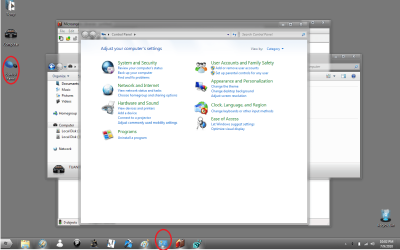
Can somebody to give me a hand to fix it please.Thanks
Tuan Tran
I was successful to change the icon of Control Panel. However, when I display the content of CP(StartMenu-Control Panel) on the desktop, the icon of CP is the old format. the issue is shown below :
Can somebody to give me a hand to fix it please.Thanks
Tuan Tran
My Computer
At a glance
win 7 pro
- OS
- win 7 pro


 .
.


