Solved Icon Customize for the Users folder

JerryFerreira

New member
Local time
3:53 PM
Messages
25
To start: Desktop is XP Pro SP3, notebook is Windows 7 Pro SP1.

I've set up shared folders on both computers without using Homegroup because the desktop is XP Pro and doesn't recognize Homegroup with Win 7. The accessing of shared files is no problem and desktop XP shows the "shared" hand under its shared folders as usual.


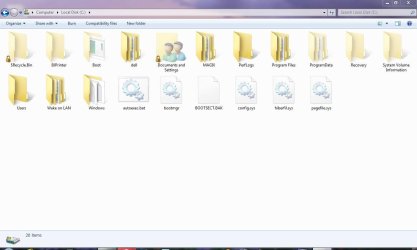
Here's an interesting problem. I'm trying to customize Windows 7 Pro so that the "Users" folder shows it's been shared when explorer is in "icon view". As of now, shared folders in Windows 7 show up the same as unshared folders (see attachment User Folder 01.jpg).

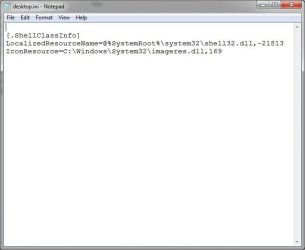
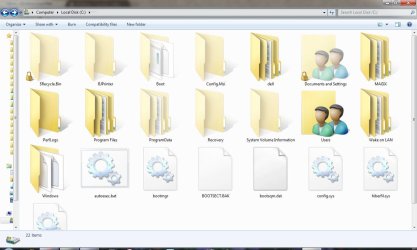
When I try to customize the "Users" folder using Properties, Customize, Change Icon..., using the imageres.dll as the icon resource (great icons in this folder) the folder doesn't change. So I worked around this by editing the desktop.ini file (see attachment User Folder 02.jpg) to force it to use the icon I want. Well, now the junction folder "Documents and Settings" has the new icon, but not the "User" folder (see attachment User Folder 03.jpg) .

Has anyone tried this and/or have any suggestions?
 

Attachments

  • User Folder 01.JPG
    User Folder 01.JPG
    76.4 KB · Views: 36
  • User Folder 02.JPG
    User Folder 02.JPG
    39.2 KB · Views: 41
  • User Folder 03.JPG
    User Folder 03.JPG
    76.5 KB · Views: 34

My Computer

Computer Manufacturer/Model Number
Dell Inspiron 1521
OS
Windows 7 Professional
CPU
AMD Turion 64 X2
Motherboard
Model: Dell 0GU163 Chipset: ATI M690G (RS690M) + SB600
Memory
2 GB PC2-5300 (667Mhz)
Graphics Card(s)
ATI Mobility Radeon Xpress 1270
Sound Card
ATI SB600 High Definition Adio Controller; SigmaTel STAC9205
Screen Resolution
1280 x 800
Hard Drives
Hitachi HTS541680J9SA00; 80 Gb

My Computer

Computer Manufacturer/Model Number
Insane hobo technologies. ;-)
OS
Windows 7 x64
CPU
Intel i7 2600k
Motherboard
Asrock z68 extreme 4 gen 3
Memory
G.skill Ripjaw 16gigs @ 1866
Graphics Card(s)
Nvidia gtx580 (evga)
Sound Card
Integrated HD audio + hdmi
Monitor(s) Displays
24" ASUS widescreen + 42" insignia
Screen Resolution
1080p (1920x1080)
Hard Drives
128 Samsung 830
256 Samsung 840
3 x 1tb storage drive (various)
1 western digital 1tb (eSATA)
1 Seagate 1tb (eSATA)
PSU
1 kilowatt SLI/Crossfire rated Silverstone modular
Case
NZXT Phantom + additional 220 fan
Cooling
Zalmann
Keyboard
Microsoft wireless 3000 (v2)
Mouse
MS - wireless 5000 (bluetrack)
Internet Speed
depends on if you ask me or my provider.
Other Info
The above information is provided as is, and the author assumes no responsibility for issues it may cause with your sanity or fanboyism.
No, unfortunately that doesn't help. Thanks for your reply. :D
 

My Computer

Computer Manufacturer/Model Number
Dell Inspiron 1521
OS
Windows 7 Professional
CPU
AMD Turion 64 X2
Motherboard
Model: Dell 0GU163 Chipset: ATI M690G (RS690M) + SB600
Memory
2 GB PC2-5300 (667Mhz)
Graphics Card(s)
ATI Mobility Radeon Xpress 1270
Sound Card
ATI SB600 High Definition Adio Controller; SigmaTel STAC9205
Screen Resolution
1280 x 800
Hard Drives
Hitachi HTS541680J9SA00; 80 Gb
Yeah sorry that was the wrong link, and now I can't find the one I meant to point you too.
Sorry about that.
 

My Computer

Computer Manufacturer/Model Number
Insane hobo technologies. ;-)
OS
Windows 7 x64
CPU
Intel i7 2600k
Motherboard
Asrock z68 extreme 4 gen 3
Memory
G.skill Ripjaw 16gigs @ 1866
Graphics Card(s)
Nvidia gtx580 (evga)
Sound Card
Integrated HD audio + hdmi
Monitor(s) Displays
24" ASUS widescreen + 42" insignia
Screen Resolution
1080p (1920x1080)
Hard Drives
128 Samsung 830
256 Samsung 840
3 x 1tb storage drive (various)
1 western digital 1tb (eSATA)
1 Seagate 1tb (eSATA)
PSU
1 kilowatt SLI/Crossfire rated Silverstone modular
Case
NZXT Phantom + additional 220 fan
Cooling
Zalmann
Keyboard
Microsoft wireless 3000 (v2)
Mouse
MS - wireless 5000 (bluetrack)
Internet Speed
depends on if you ask me or my provider.
Other Info
The above information is provided as is, and the author assumes no responsibility for issues it may cause with your sanity or fanboyism.
@JerryFerreira

Rebuild your icon cache should be able to get the custom icon in place if not boot into safe mode
and reboot.

I have manager to unlock "Documents and Settings" folder and take a peek inside.
what really curious me is the "Documents and Settings" and "User" folder are the same. It is a mirror image
If you edit the desktop.ini in "user" folder to change icon, it will change the "Documents and Settings" folder as well
Strange.........but its true


Attached image for your reference.... using the same desktop.ini as your "User Folder 02.jpg" posted.
 

Attachments

  • User Folder.jpg
    User Folder.jpg
    209.3 KB · Views: 13

My Computer

OS
ultimate x64
That's just for backwards compatiblity. So you can install older apps.
 

My Computer

Computer Manufacturer/Model Number
Insane hobo technologies. ;-)
OS
Windows 7 x64
CPU
Intel i7 2600k
Motherboard
Asrock z68 extreme 4 gen 3
Memory
G.skill Ripjaw 16gigs @ 1866
Graphics Card(s)
Nvidia gtx580 (evga)
Sound Card
Integrated HD audio + hdmi
Monitor(s) Displays
24" ASUS widescreen + 42" insignia
Screen Resolution
1080p (1920x1080)
Hard Drives
128 Samsung 830
256 Samsung 840
3 x 1tb storage drive (various)
1 western digital 1tb (eSATA)
1 Seagate 1tb (eSATA)
PSU
1 kilowatt SLI/Crossfire rated Silverstone modular
Case
NZXT Phantom + additional 220 fan
Cooling
Zalmann
Keyboard
Microsoft wireless 3000 (v2)
Mouse
MS - wireless 5000 (bluetrack)
Internet Speed
depends on if you ask me or my provider.
Other Info
The above information is provided as is, and the author assumes no responsibility for issues it may cause with your sanity or fanboyism.
Thanks Bulldog7 for your reply. I tried rebuilding my icon cache file (iconcache.db) which I've done several times and tried using safe mode.

Still the same as before :(

And Maguscreed---you're correct. Windows 7 set up the "Documents and Settings" as a junction folder for backward compatability with older programs. When older programs look for the "Documents and Settings" folder, it gets redirected to the "Users" folder.

P.S. The DESKTOP.INI file I edited is in the "Users" folder.
 
Last edited:

My Computer

Computer Manufacturer/Model Number
Dell Inspiron 1521
OS
Windows 7 Professional
CPU
AMD Turion 64 X2
Motherboard
Model: Dell 0GU163 Chipset: ATI M690G (RS690M) + SB600
Memory
2 GB PC2-5300 (667Mhz)
Graphics Card(s)
ATI Mobility Radeon Xpress 1270
Sound Card
ATI SB600 High Definition Adio Controller; SigmaTel STAC9205
Screen Resolution
1280 x 800
Hard Drives
Hitachi HTS541680J9SA00; 80 Gb
I think the reason why the Users folder can't accept the custom icon because of the desktop.ini attributes.
Guess you have created the desktop.ini with notepad and save it. Right click properties desktop.ini go to detail tab
the attributes should be HSA.

H = hide
S = system
A = File ready for archiving.


You need to run command prompt to get "S" attribute into the desktop.ini.
Run command prompt as adminsitrator... cd change dir to the folder you save the desktop.ini and type "attrib +S +H +A desktop.ini" without the quote
Check the properties again if the attribute has change to HSA. Copy and paste it into the User folder.

If you have problem with command prompt, a easier way to get the HSA attribute is to copy out the default desktop.ini created by MS.
change it and paste it back to the User folder.

Hope it work for u now....:)
 

My Computer

OS
ultimate x64
Thanks Bulldog7. I checked the attributes and the file is already HSA. I even used the attrib command to make sure that it was set.

Still showing a regular folder for "Users" and a customized folder for the junction folder "Documents and Settings".

:huh:
 

My Computer

Computer Manufacturer/Model Number
Dell Inspiron 1521
OS
Windows 7 Professional
CPU
AMD Turion 64 X2
Motherboard
Model: Dell 0GU163 Chipset: ATI M690G (RS690M) + SB600
Memory
2 GB PC2-5300 (667Mhz)
Graphics Card(s)
ATI Mobility Radeon Xpress 1270
Sound Card
ATI SB600 High Definition Adio Controller; SigmaTel STAC9205
Screen Resolution
1280 x 800
Hard Drives
Hitachi HTS541680J9SA00; 80 Gb
Still no joy..... :( I have tried it on 2 computer x64 and x86 ( HA & HSA attribute ) both working without a glitch.
If you still have the patience to give it a go.... here is the last resource i have

Browse to a difference icon instead of "169" see whether it works.

if not

Download the attached file.... a desktop.ini with a difference configuration and a icon. Copy the 2 files and paste it
into the Users folder.

Ok that it.....

desktop.ini.rar
 

My Computer

OS
ultimate x64
Hi Bulldog7,

Tried the different icon, get the different one in the "Documents and Settings" folder, "Users" folder stays the same.

Also tried your file attachment, didn't work.

Thanks so much for your time! :)
 

My Computer

Computer Manufacturer/Model Number
Dell Inspiron 1521
OS
Windows 7 Professional
CPU
AMD Turion 64 X2
Motherboard
Model: Dell 0GU163 Chipset: ATI M690G (RS690M) + SB600
Memory
2 GB PC2-5300 (667Mhz)
Graphics Card(s)
ATI Mobility Radeon Xpress 1270
Sound Card
ATI SB600 High Definition Adio Controller; SigmaTel STAC9205
Screen Resolution
1280 x 800
Hard Drives
Hitachi HTS541680J9SA00; 80 Gb
Going to leave it as is

I'm not going to worry about this anymore, so I'm marking this as solved.

Thanks for both your help.
 

My Computer

Computer Manufacturer/Model Number
Dell Inspiron 1521
OS
Windows 7 Professional
CPU
AMD Turion 64 X2
Motherboard
Model: Dell 0GU163 Chipset: ATI M690G (RS690M) + SB600
Memory
2 GB PC2-5300 (667Mhz)
Graphics Card(s)
ATI Mobility Radeon Xpress 1270
Sound Card
ATI SB600 High Definition Adio Controller; SigmaTel STAC9205
Screen Resolution
1280 x 800
Hard Drives
Hitachi HTS541680J9SA00; 80 Gb
Actually, the attributes fix was right, but only part of the solution. The desktop.ini file needs to have the H and S attributes (the A attribute is not needed, but won't hurt), but also, the folder in which the desktop.ini file is needs to have the R attribute (not the read only attribute that can be set through Windows Explorer, but the one you set in a Command Prompt window using the attrib +r command on the folder.
 

My Computer

Computer Manufacturer/Model Number
(Custom built by myself)
OS
Windows 7 Ultimate x86
CPU
AMD Athlon X2 5200+
Motherboard
Abit KN9 SLI
Memory
2 GB DDR 800
Graphics Card(s)
ATI Radeon HD4850
Sound Card
Realtek HD (integrated in motherboard)
Monitor(s) Displays
ASUS MW221
Screen Resolution
1680 x 1050
Hard Drives
WD Velociraptor 300 GB
PSU
OCZ 500W
Case
Soprano
Cooling
Yes
Keyboard
Saitek Eclipse II
Mouse
Logitech Wireless Laser
Internet Speed
Cable
YES

coch,

YOU ARE A GENIUS! It worked! Attached is the new result
 

Attachments

  • Users Folder.JPG
    Users Folder.JPG
    107.1 KB · Views: 13

My Computer

Computer Manufacturer/Model Number
Dell Inspiron 1521
OS
Windows 7 Professional
CPU
AMD Turion 64 X2
Motherboard
Model: Dell 0GU163 Chipset: ATI M690G (RS690M) + SB600
Memory
2 GB PC2-5300 (667Mhz)
Graphics Card(s)
ATI Mobility Radeon Xpress 1270
Sound Card
ATI SB600 High Definition Adio Controller; SigmaTel STAC9205
Screen Resolution
1280 x 800
Hard Drives
Hitachi HTS541680J9SA00; 80 Gb
Back
Top