JerryFerreira
New member
- Local time
- 4:48 AM
- Messages
- 25
To start: Desktop is XP Pro SP3, notebook is Windows 7 Pro SP1.
I've set up shared folders on both computers without using Homegroup because the desktop is XP Pro and doesn't recognize Homegroup with Win 7. The accessing of shared files is no problem and desktop XP shows the "shared" hand under its shared folders as usual.
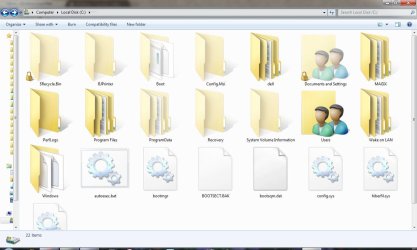
Here's an interesting problem. I'm trying to customize Windows 7 Pro so that the "Users" folder shows it's been shared when explorer is in "icon view". As of now, shared folders in Windows 7 show up the same as unshared folders (see attachment User Folder 01.jpg).
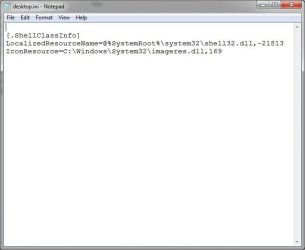
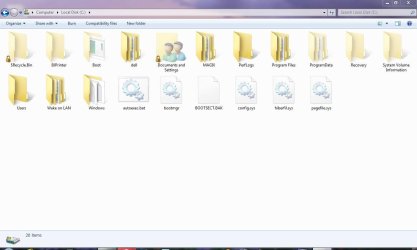
When I try to customize the "Users" folder using Properties, Customize, Change Icon..., using the imageres.dll as the icon resource (great icons in this folder) the folder doesn't change. So I worked around this by editing the desktop.ini file (see attachment User Folder 02.jpg) to force it to use the icon I want. Well, now the junction folder "Documents and Settings" has the new icon, but not the "User" folder (see attachment User Folder 03.jpg) .
Has anyone tried this and/or have any suggestions?
I've set up shared folders on both computers without using Homegroup because the desktop is XP Pro and doesn't recognize Homegroup with Win 7. The accessing of shared files is no problem and desktop XP shows the "shared" hand under its shared folders as usual.
Here's an interesting problem. I'm trying to customize Windows 7 Pro so that the "Users" folder shows it's been shared when explorer is in "icon view". As of now, shared folders in Windows 7 show up the same as unshared folders (see attachment User Folder 01.jpg).
When I try to customize the "Users" folder using Properties, Customize, Change Icon..., using the imageres.dll as the icon resource (great icons in this folder) the folder doesn't change. So I worked around this by editing the desktop.ini file (see attachment User Folder 02.jpg) to force it to use the icon I want. Well, now the junction folder "Documents and Settings" has the new icon, but not the "User" folder (see attachment User Folder 03.jpg) .
Has anyone tried this and/or have any suggestions?
Attachments

My Computer
At a glance
Windows 7 ProfessionalAMD Turion 64 X22 GB PC2-5300 (667Mhz)ATI Mobility Radeon Xpress 1270
- Computer Manufacturer/Model Number
- Dell Inspiron 1521
- OS
- Windows 7 Professional
- CPU
- AMD Turion 64 X2
- Motherboard
- Model: Dell 0GU163 Chipset: ATI M690G (RS690M) + SB600
- Memory
- 2 GB PC2-5300 (667Mhz)
- Graphics Card(s)
- ATI Mobility Radeon Xpress 1270
- Sound Card
- ATI SB600 High Definition Adio Controller; SigmaTel STAC9205
- Screen Resolution
- 1280 x 800
- Hard Drives
- Hitachi HTS541680J9SA00; 80 Gb