Icon (.ico) sizes in Win7 when changing folder icons

sickanpickan

New member
Local time
3:27 AM
Messages
2
Hi,

I've googled my behind off trying to find a solution or answer to a fairly simple question, which I don't understand it seems, (even though I'm fairly smart otherwise :p). Hopefully someone here can explain it to me. ;)

Here goes:

I know how to make icon files, and change them on my desktop folders or shortcuts. My problem is that when I try to make an .ico file it always present itself very very tiny.

I can't seem to get (or make) a nice big icon to replace another.
It drives me crazy. I mean it! :cry:

Can anyone help?

I've attached a link to a picture that shows my problem here.


Thank You!
:o:(
 

My Computer My Computer

At a glance

Windows 7 Ultimate 32-bit
OS
Windows 7 Ultimate 32-bit
Hello sickanpickan, I understand what you mean but i can not give you an answer why it happens but this little program may be what you are after (worked for me). When you create an ico or convert a png to ico it will give you the option to make 4 copies all in different sizes, if i recall up to 256x256

IcoFX - The Free Icon Editor
 

My Computer My Computer

At a glance

Windows Seven Home Premium 32bit SP1AMD Athlon QI46 2.1Ghz2048 Mb DDR2 SD RAMNVidea GE GoForce 8200M G/256mb dedicated gra...
Computer Manufacturer/Model Number
Hewlett Packard Compaq Presario CQ60-305au
OS
Windows Seven Home Premium 32bit SP1
CPU
AMD Athlon QI46 2.1Ghz
Motherboard
Wistron 303c
Memory
2048 Mb DDR2 SD RAM
Graphics Card(s)
NVidea GE GoForce 8200M G/256mb dedicated graphics memory
Sound Card
MCP78S NVidea high definition
Monitor(s) Displays
15.6" High definition Brightview Widescreen
Screen Resolution
1336x768
Hard Drives
Toshiba MK2555GSX ATA
  • Like
Reactions: JMH
Hi,
thanks for answering me.

I have used IcoFX, to no avail. As well as PS, and other programs. The same thing happens. Saved it in 256x256 but still with that outcome, i.e too small.

I don't understand this at all. Bah! :confused:

Thanks though, hoping that someone can give me an AHA-moment :geek:

Cheers!
 

My Computer My Computer

At a glance

Windows 7 Ultimate 32-bit
OS
Windows 7 Ultimate 32-bit
Hi !

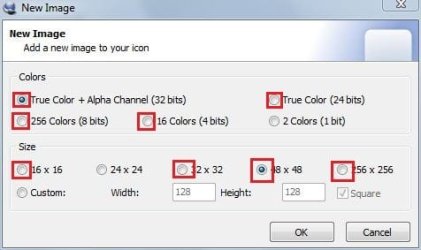
A perfect Icon should have at least 13 layers viz

1. True colors + Alpha 32 bit ---> 256x256 ; 48x48 ; 32x32 ; 16x16
2. True colors 24 bits --> 48x48 ; 32x32 ; 16x16
3. 256 colors 8 bits --> 48x48 ; 32x32 ; 16x16
4. 16 colors 4 bits --> 48x48 ; 32x32 ; 16x16

If so , they are fit for all locations throughout the windows with appropriate size . It may look very tiny when opened with photo viewer, but it will go to extra large view in explorer easily .
 

Attachments

  • Capture.JPG
    Capture.JPG
    26.8 KB · Views: 24

My Computer My Computer

At a glance

Microsoft Windows 10 Pro Insider Preview 64-bitIntel(R) Core(TM) i3-4130 CPU @ 3.40GHzCorsair Vengence 4GB x2 (8.00GB Dual-Channel ...2047MB GeForce GTS 450 (ZOTAC International)
Computer type
PC/Desktop
Computer Manufacturer/Model Number
Self Assembled
OS
Microsoft Windows 10 Pro Insider Preview 64-bit
CPU
Intel(R) Core(TM) i3-4130 CPU @ 3.40GHz
Motherboard
Gigabyte Technology Co., Ltd. B85M-D3H
Memory
Corsair Vengence 4GB x2 (8.00GB Dual-Channel DDR3 @ 798MHz)
Graphics Card(s)
2047MB GeForce GTS 450 (ZOTAC International)
Sound Card
Onboard (Realtek High Definition Audio)
Monitor(s) Displays
LG Flatron E2040T
Screen Resolution
1600x900
Hard Drives
Western Digital 1 TB
Seagate 500 GB
PSU
Corsair VS550
Case
Cooler Master K380
Cooling
Cooler Master Seidon 120V Plus
Keyboard
Logitech MK260r
Mouse
Logitech MK260r
Internet Speed
PMPL Broadband
Antivirus
Windows Defender + MBAM
Browser
Firefox
Other Info
Dell Studio 15" Laptop
Back
Top