JavaScript is disabled. For a better experience, please enable JavaScript in your browser before proceeding.
You are using an out of date browser. It may not display this or other websites correctly.
You should upgrade or use an
alternative browser .
Icon image becomes small after program association ?
Hi,
I've had a visual gripe with Windows for many years but never bothered to ask around for a solution. But enough is enough! Here goes:
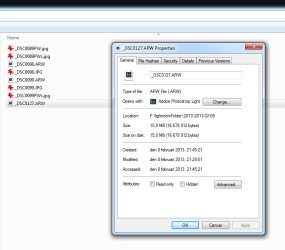
When I change program associations for file extensions, the icon for the new program association always appear inside "an empty icon" that icon that stands for no program associated. See enclosed image.
How can I get the icon to display in all it's beauty and glory as other icons in my system (such as the irfanview icon in the image)?
Thanks!
Untitled-1.png
18.5 KB
· Views: 5
Computer Manufacturer/Model Number built it myself OS Windows 7 Pro 64-bit CPU Intel i7 950 Motherboard Asus Sabertooth X58 Memory 18GB Graphics Card(s) Gigabyte Radeon HD7700 Sound Card onboard Realtek HD audio chip Monitor(s) Displays 2 x Dell U2412M Screen Resolution 1920x1200 Hard Drives 3 SSD PSU SeaSonic x650 Case Fractal Design R3 case Cooling Magehalems rev. B CPU cooler
Hi gridsystems.
Never worked with raw image file, but probably those are taken by a sony camera ? If so, you may try
Sony RAW Driver Download .
It will convert the .are as good as .jpg in windows explorer.
Computer type PC/Desktop Computer Manufacturer/Model Number Self Assembled OS Microsoft Windows 10 Pro Insider Preview 64-bit CPU Intel(R) Core(TM) i3-4130 CPU @ 3.40GHz Motherboard Gigabyte Technology Co., Ltd. B85M-D3H Memory Corsair Vengence 4GB x2 (8.00GB Dual-Channel DDR3 @ 798MHz) Graphics Card(s) 2047MB GeForce GTS 450 (ZOTAC International) Sound Card Onboard (Realtek High Definition Audio) Monitor(s) Displays LG Flatron E2040T Screen Resolution 1600x900 Hard Drives Western Digital 1 TB PSU Corsair VS550 Case Cooler Master K380 Cooling Cooler Master Seidon 120V Plus Keyboard Logitech MK260r Mouse Logitech MK260r Internet Speed PMPL Broadband Antivirus Windows Defender + MBAM Browser Firefox Other Info Dell Studio 15" Laptop
Well-known member
Guru
Gold Member
It's a known bug with the built-in file association manager from Windows 7, all the relevant features to fix that have been removed since XP.
You may want to use File Types Manager (
FileTypesMan - Alternative to 'File Types' manager of Windows ) which can edit the icon of any file association and replace with the real one, or any other you like.
Computer type Laptop Computer Manufacturer/Model Number Toshiba Sattelite A665-S6092 OS Windows 7 Ultimate x64 CPU Intel Core i7-740QM Memory 8 GB DDR3 Graphics Card(s) NVIDIA GeForce 330GT Screen Resolution 1366x768 Hard Drives Samsung 840 SSD 500GB Cooling Coolermaster Notepal U3 notebook cooling pad Internet Speed 3mbps ASDL Antivirus ClamWin 0.98.7 Browser Opera 12.17 x86 (main), Firefox 38 (sec), IE11 (last resort)