JavaScript is disabled. For a better experience, please enable JavaScript in your browser before proceeding.
You are using an out of date browser. It may not display this or other websites correctly.
You should upgrade or use an
alternative browser .
Icon issue! A little help please.
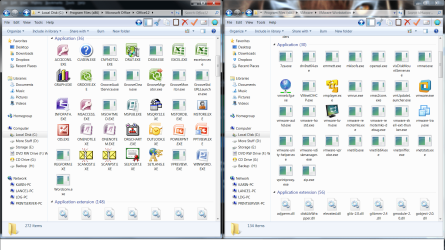
This has been bugging me for awhile. A number of application icons are not displaying. ["Not Shortcut Icons"] I tried
Brink's Icon Cache - Rebuild Suggestions with no success. I tried setting file association, also a no go. Here's a screenshot of two applications with this issue but its all over. Any suggestions?
Icons.png
564.7 KB
· Views: 7
1.png
177.7 KB
· Views: 1
Computer type PC/Desktop Computer Manufacturer/Model Number Custom Built By Me. OS Windows 10 Pro 64 bit CPU AMD FX 9590 8 Core Black Edition Motherboard MSI 990FXA GAMING (MS-7893) Memory Corsair Vengeance 16GB DDR3 Graphics Card(s) AMD Radeon (TM) R9 380 Gaming Series Sound Card AMD High Definition Monitor(s) Displays Samsung 32" 60Hz 4ms Curved PLS LED Screen Resolution 1920 X 1080 Hard Drives C: 223 GB SSD = E: 465 GB HDD = F: 931 GB HDD = G: 149 GB HDD = H: 931 GB HDD PSU EVGA Supernova NEX750B 750W ATX EPS12V 80PLUS Bronze Case Cool Master Cooling Noctua NH-D15 Premium Cooler with 2x NF-A15 PWM 140mm Fan Internet Speed Fiber Optic: Download 332.7 Mbps / Upload 331.5 Mbps Antivirus Windows Defender Browser Slimjet (64bit)
Well-known member
Guru
Gold Member
VIP
Its because there not shortcuts.
There is no easy or Microsoft supported way of changing the icon associated with an exe file because the icon is embedded into the executable.
Roy
Computer type PC/Desktop Computer Manufacturer/Model Number medionl/Aspire 6930G/acer x55a OS W7 home premium 32bit/W7HP 64bit/w10 tp insider ring CPU E5300 dual core Motherboard medion MS7366 Memory 3gb Graphics Card(s) Nvidia Geforce 7100 Nforce 630i Monitor(s) Displays avixc Internet Speed n (isp resticted to 72) Antivirus mse/pands Browser palemoon Other Info Belkin Fd7050 n USB using Railink RT2870 drivers, more upto date
New member
Pro User
VIP
Thread Starter
What about a repair install Roy? Overkill!
Computer type PC/Desktop Computer Manufacturer/Model Number Custom Built By Me. OS Windows 10 Pro 64 bit CPU AMD FX 9590 8 Core Black Edition Motherboard MSI 990FXA GAMING (MS-7893) Memory Corsair Vengeance 16GB DDR3 Graphics Card(s) AMD Radeon (TM) R9 380 Gaming Series Sound Card AMD High Definition Monitor(s) Displays Samsung 32" 60Hz 4ms Curved PLS LED Screen Resolution 1920 X 1080 Hard Drives C: 223 GB SSD = E: 465 GB HDD = F: 931 GB HDD = G: 149 GB HDD = H: 931 GB HDD PSU EVGA Supernova NEX750B 750W ATX EPS12V 80PLUS Bronze Case Cool Master Cooling Noctua NH-D15 Premium Cooler with 2x NF-A15 PWM 140mm Fan Internet Speed Fiber Optic: Download 332.7 Mbps / Upload 331.5 Mbps Antivirus Windows Defender Browser Slimjet (64bit)
Very Senior Member
Guru
Gold Member
VIP
You can give a Repair Install a try. If there is nothing to repair, it won't hurt anything.
Computer type PC/Desktop Computer Manufacturer/Model Number Custom Build OS Windows 7 Home Premium 32-Bit - Build 7600 SP1 CPU Intel Core i3-2120 3.30Ghz Motherboard Asus P8Z68-V LX Intel Z68 Socket H2 ATX Memory Kingston 4 GB DDR3 1333 mhz Graphics Card(s) AMD Radeon HD6670 Sound Card Sound Blaster Audigy SE 24-Bit Monitor(s) Displays Asus VE228 Screen Resolution 1440 X 900 Hard Drives OCZ Vertex 3 120 GB Sata 3 SSD ==
Kingston SH103/S3 120 G Hyper X 120 GB SSD ==
Western Digital 500 GB Caviar Green 7200 RPM == PSU Corsair CX600M == 600 Watt Case NZXT Apollo - Silver with Clear Side Panel Cooling Three 120 mm Fans Keyboard Microsoft Natural 4000 Mouse Microsoft Custom Optical 3000 Internet Speed AT&T Fiber Optic Wireless Network Antivirus Microsoft Security Essentials Browser Chrome Other Info 120 mm Blue LED Fan -- Three Blue LED Lazer Light Sticks
New member
Pro User
VIP
Thread Starter
Thanks bigmck I've tries everything ells so your right. What can it hurt.
Computer type PC/Desktop Computer Manufacturer/Model Number Custom Built By Me. OS Windows 10 Pro 64 bit CPU AMD FX 9590 8 Core Black Edition Motherboard MSI 990FXA GAMING (MS-7893) Memory Corsair Vengeance 16GB DDR3 Graphics Card(s) AMD Radeon (TM) R9 380 Gaming Series Sound Card AMD High Definition Monitor(s) Displays Samsung 32" 60Hz 4ms Curved PLS LED Screen Resolution 1920 X 1080 Hard Drives C: 223 GB SSD = E: 465 GB HDD = F: 931 GB HDD = G: 149 GB HDD = H: 931 GB HDD PSU EVGA Supernova NEX750B 750W ATX EPS12V 80PLUS Bronze Case Cool Master Cooling Noctua NH-D15 Premium Cooler with 2x NF-A15 PWM 140mm Fan Internet Speed Fiber Optic: Download 332.7 Mbps / Upload 331.5 Mbps Antivirus Windows Defender Browser Slimjet (64bit)
New member
Guru
Gold Member
VIP
Hold off on the reinstall. Unfortunately I don't use MS Office Suite. Anyway try this:
Get:
FileTypesMan - Alternative to 'File Types' manager of Windows
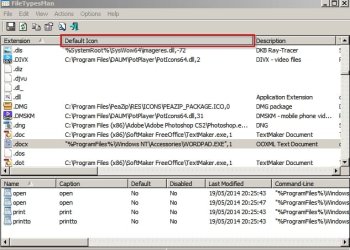
Run it and check out those problematic file extensions. One of the columns shows the path to the icon.
IconViewer mentioned in this thread:
Icon Viewer
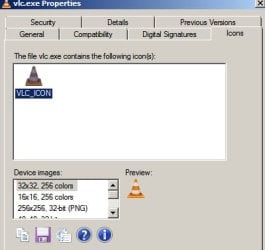
shows the icons packed inside executables so check the executable that launches - say WORD - and see if the icon appears in the list. If it does then modify the icon path in FileTypesMan.
Computer type Laptop Computer Manufacturer/Model Number ASUS OS Microsoft Windows 7 Home Premium 64-bit 7601 Multiprocessor Free Service Pack 1 CPU AMD C-60 APU with Radeon(tm) HD Graphics Motherboard ASUSTeK COMPUTER INC. X501U Memory 4.00 GB Graphics Card(s) AMD Radeon HD 6290 Graphics Sound Card (1) AMD High Definition Audio Device (2) Realtek High Defi Screen Resolution 1366 x 768 x 32 bits (4294967296 colors) @ 60 Hz Hard Drives Hitachi HTS545050A7E380 SATA Disk Device Antivirus Comodo CIS & FW, SecureAplus App Whitelisting, Threatfire Browser Cyberfox 64bit, Opera 64bit, Airfox Other Info Spy-The-Spy, HitmanPro.Alert, Norton Connect Safe, MJRegWatcher, BitDefender TrafficLight, Voodoo Shield, Zemana AntiMalware
New member
Pro User
VIP
Thread Starter
Thanks Callender! I'll check that out right now.
Computer type PC/Desktop Computer Manufacturer/Model Number Custom Built By Me. OS Windows 10 Pro 64 bit CPU AMD FX 9590 8 Core Black Edition Motherboard MSI 990FXA GAMING (MS-7893) Memory Corsair Vengeance 16GB DDR3 Graphics Card(s) AMD Radeon (TM) R9 380 Gaming Series Sound Card AMD High Definition Monitor(s) Displays Samsung 32" 60Hz 4ms Curved PLS LED Screen Resolution 1920 X 1080 Hard Drives C: 223 GB SSD = E: 465 GB HDD = F: 931 GB HDD = G: 149 GB HDD = H: 931 GB HDD PSU EVGA Supernova NEX750B 750W ATX EPS12V 80PLUS Bronze Case Cool Master Cooling Noctua NH-D15 Premium Cooler with 2x NF-A15 PWM 140mm Fan Internet Speed Fiber Optic: Download 332.7 Mbps / Upload 331.5 Mbps Antivirus Windows Defender Browser Slimjet (64bit)
New member
Guru
Gold Member
VIP
If the icon(s) shows up okay in the executable(s) try correcting paths.
Sorry but I don't have a better MS Office Suite related example.
Also it's possible to check icon paths in the registry.
Computer type Laptop Computer Manufacturer/Model Number ASUS OS Microsoft Windows 7 Home Premium 64-bit 7601 Multiprocessor Free Service Pack 1 CPU AMD C-60 APU with Radeon(tm) HD Graphics Motherboard ASUSTeK COMPUTER INC. X501U Memory 4.00 GB Graphics Card(s) AMD Radeon HD 6290 Graphics Sound Card (1) AMD High Definition Audio Device (2) Realtek High Defi Screen Resolution 1366 x 768 x 32 bits (4294967296 colors) @ 60 Hz Hard Drives Hitachi HTS545050A7E380 SATA Disk Device Antivirus Comodo CIS & FW, SecureAplus App Whitelisting, Threatfire Browser Cyberfox 64bit, Opera 64bit, Airfox Other Info Spy-The-Spy, HitmanPro.Alert, Norton Connect Safe, MJRegWatcher, BitDefender TrafficLight, Voodoo Shield, Zemana AntiMalware
Very Senior Member
Guru
Gold Member
VIP
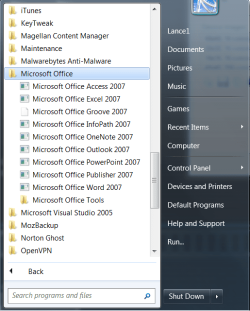
Give this a try. == Click on the Start Button and click on All Programs. Find the MS Office folder and click on it. Do you have icons in it?
Computer type PC/Desktop Computer Manufacturer/Model Number Custom Build OS Windows 7 Home Premium 32-Bit - Build 7600 SP1 CPU Intel Core i3-2120 3.30Ghz Motherboard Asus P8Z68-V LX Intel Z68 Socket H2 ATX Memory Kingston 4 GB DDR3 1333 mhz Graphics Card(s) AMD Radeon HD6670 Sound Card Sound Blaster Audigy SE 24-Bit Monitor(s) Displays Asus VE228 Screen Resolution 1440 X 900 Hard Drives OCZ Vertex 3 120 GB Sata 3 SSD ==
Kingston SH103/S3 120 G Hyper X 120 GB SSD ==
Western Digital 500 GB Caviar Green 7200 RPM == PSU Corsair CX600M == 600 Watt Case NZXT Apollo - Silver with Clear Side Panel Cooling Three 120 mm Fans Keyboard Microsoft Natural 4000 Mouse Microsoft Custom Optical 3000 Internet Speed AT&T Fiber Optic Wireless Network Antivirus Microsoft Security Essentials Browser Chrome Other Info 120 mm Blue LED Fan -- Three Blue LED Lazer Light Sticks
New member
Pro User
VIP
Thread Starter
Give this a try. == Click on the Start Button and click on All Programs. Find the MS Office folder and click on it. Do you have icons in it?
No I don't.
office.png
111.2 KB
· Views: 20
Computer type PC/Desktop Computer Manufacturer/Model Number Custom Built By Me. OS Windows 10 Pro 64 bit CPU AMD FX 9590 8 Core Black Edition Motherboard MSI 990FXA GAMING (MS-7893) Memory Corsair Vengeance 16GB DDR3 Graphics Card(s) AMD Radeon (TM) R9 380 Gaming Series Sound Card AMD High Definition Monitor(s) Displays Samsung 32" 60Hz 4ms Curved PLS LED Screen Resolution 1920 X 1080 Hard Drives C: 223 GB SSD = E: 465 GB HDD = F: 931 GB HDD = G: 149 GB HDD = H: 931 GB HDD PSU EVGA Supernova NEX750B 750W ATX EPS12V 80PLUS Bronze Case Cool Master Cooling Noctua NH-D15 Premium Cooler with 2x NF-A15 PWM 140mm Fan Internet Speed Fiber Optic: Download 332.7 Mbps / Upload 331.5 Mbps Antivirus Windows Defender Browser Slimjet (64bit)
New member
Pro User
VIP
Thread Starter
If the icon(s) shows up okay in the executable(s) try correcting paths.
Sorry but I don't have a better MS Office Suite related example.
Also it's possible to check icon paths in the registry.
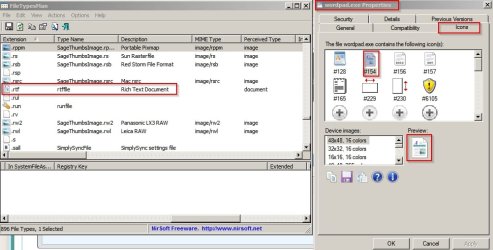
Still nothing Callender.
File Type.png
118.6 KB
· Views: 0
Computer type PC/Desktop Computer Manufacturer/Model Number Custom Built By Me. OS Windows 10 Pro 64 bit CPU AMD FX 9590 8 Core Black Edition Motherboard MSI 990FXA GAMING (MS-7893) Memory Corsair Vengeance 16GB DDR3 Graphics Card(s) AMD Radeon (TM) R9 380 Gaming Series Sound Card AMD High Definition Monitor(s) Displays Samsung 32" 60Hz 4ms Curved PLS LED Screen Resolution 1920 X 1080 Hard Drives C: 223 GB SSD = E: 465 GB HDD = F: 931 GB HDD = G: 149 GB HDD = H: 931 GB HDD PSU EVGA Supernova NEX750B 750W ATX EPS12V 80PLUS Bronze Case Cool Master Cooling Noctua NH-D15 Premium Cooler with 2x NF-A15 PWM 140mm Fan Internet Speed Fiber Optic: Download 332.7 Mbps / Upload 331.5 Mbps Antivirus Windows Defender Browser Slimjet (64bit)
New member
Guru
Gold Member
VIP
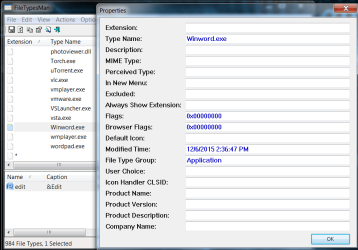
You don't need to click an entry to display properties.
Scroll across to the icon path column and post what it shows.
Computer type Laptop Computer Manufacturer/Model Number ASUS OS Microsoft Windows 7 Home Premium 64-bit 7601 Multiprocessor Free Service Pack 1 CPU AMD C-60 APU with Radeon(tm) HD Graphics Motherboard ASUSTeK COMPUTER INC. X501U Memory 4.00 GB Graphics Card(s) AMD Radeon HD 6290 Graphics Sound Card (1) AMD High Definition Audio Device (2) Realtek High Defi Screen Resolution 1366 x 768 x 32 bits (4294967296 colors) @ 60 Hz Hard Drives Hitachi HTS545050A7E380 SATA Disk Device Antivirus Comodo CIS & FW, SecureAplus App Whitelisting, Threatfire Browser Cyberfox 64bit, Opera 64bit, Airfox Other Info Spy-The-Spy, HitmanPro.Alert, Norton Connect Safe, MJRegWatcher, BitDefender TrafficLight, Voodoo Shield, Zemana AntiMalware
New member
Guru
Gold Member
VIP
From your screenshot it looks like all icons are blank!
Computer type Laptop Computer Manufacturer/Model Number ASUS OS Microsoft Windows 7 Home Premium 64-bit 7601 Multiprocessor Free Service Pack 1 CPU AMD C-60 APU with Radeon(tm) HD Graphics Motherboard ASUSTeK COMPUTER INC. X501U Memory 4.00 GB Graphics Card(s) AMD Radeon HD 6290 Graphics Sound Card (1) AMD High Definition Audio Device (2) Realtek High Defi Screen Resolution 1366 x 768 x 32 bits (4294967296 colors) @ 60 Hz Hard Drives Hitachi HTS545050A7E380 SATA Disk Device Antivirus Comodo CIS & FW, SecureAplus App Whitelisting, Threatfire Browser Cyberfox 64bit, Opera 64bit, Airfox Other Info Spy-The-Spy, HitmanPro.Alert, Norton Connect Safe, MJRegWatcher, BitDefender TrafficLight, Voodoo Shield, Zemana AntiMalware
New member
Guru
Gold Member
VIP
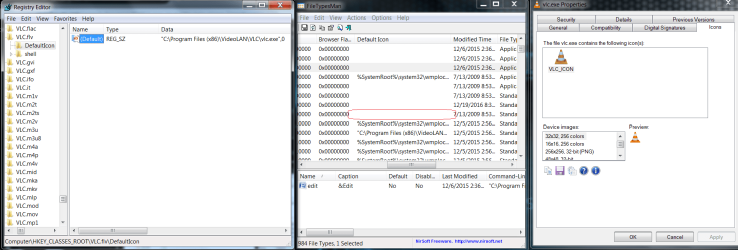
Let's start with a file that we have in common - vlc.exe
Open registry here:
HKEY_CLASSES_ROOT\VLC.flv\DefaultIcon
What does it show?
It should show the path to the icon embedded in the executable:
Computer type Laptop Computer Manufacturer/Model Number ASUS OS Microsoft Windows 7 Home Premium 64-bit 7601 Multiprocessor Free Service Pack 1 CPU AMD C-60 APU with Radeon(tm) HD Graphics Motherboard ASUSTeK COMPUTER INC. X501U Memory 4.00 GB Graphics Card(s) AMD Radeon HD 6290 Graphics Sound Card (1) AMD High Definition Audio Device (2) Realtek High Defi Screen Resolution 1366 x 768 x 32 bits (4294967296 colors) @ 60 Hz Hard Drives Hitachi HTS545050A7E380 SATA Disk Device Antivirus Comodo CIS & FW, SecureAplus App Whitelisting, Threatfire Browser Cyberfox 64bit, Opera 64bit, Airfox Other Info Spy-The-Spy, HitmanPro.Alert, Norton Connect Safe, MJRegWatcher, BitDefender TrafficLight, Voodoo Shield, Zemana AntiMalware
New member
Pro User
VIP
Thread Starter
Let's start with a file that we have in common - vlc.exe
Open registry here:
HKEY_CLASSES_ROOT\VLC.flv\DefaultIcon
What does it show?
It should show the path to the icon embedded in the executable:
Here you go Callender. It appears that there is no default icon.
VLC.png
289.4 KB
· Views: 2
Computer type PC/Desktop Computer Manufacturer/Model Number Custom Built By Me. OS Windows 10 Pro 64 bit CPU AMD FX 9590 8 Core Black Edition Motherboard MSI 990FXA GAMING (MS-7893) Memory Corsair Vengeance 16GB DDR3 Graphics Card(s) AMD Radeon (TM) R9 380 Gaming Series Sound Card AMD High Definition Monitor(s) Displays Samsung 32" 60Hz 4ms Curved PLS LED Screen Resolution 1920 X 1080 Hard Drives C: 223 GB SSD = E: 465 GB HDD = F: 931 GB HDD = G: 149 GB HDD = H: 931 GB HDD PSU EVGA Supernova NEX750B 750W ATX EPS12V 80PLUS Bronze Case Cool Master Cooling Noctua NH-D15 Premium Cooler with 2x NF-A15 PWM 140mm Fan Internet Speed Fiber Optic: Download 332.7 Mbps / Upload 331.5 Mbps Antivirus Windows Defender Browser Slimjet (64bit)
New member
Guru
Gold Member
VIP
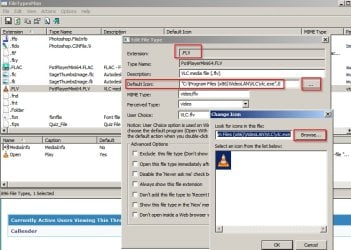
Okay so in FileTypesMan try changing deafault icon path for .flv to:
"C:\Program Files (x86)\VideoLAN\VLC\vlc.exe",0
Or just use the "browse" button and choose the executable. See if it works. You might need to refresh desktop.
Computer type Laptop Computer Manufacturer/Model Number ASUS OS Microsoft Windows 7 Home Premium 64-bit 7601 Multiprocessor Free Service Pack 1 CPU AMD C-60 APU with Radeon(tm) HD Graphics Motherboard ASUSTeK COMPUTER INC. X501U Memory 4.00 GB Graphics Card(s) AMD Radeon HD 6290 Graphics Sound Card (1) AMD High Definition Audio Device (2) Realtek High Defi Screen Resolution 1366 x 768 x 32 bits (4294967296 colors) @ 60 Hz Hard Drives Hitachi HTS545050A7E380 SATA Disk Device Antivirus Comodo CIS & FW, SecureAplus App Whitelisting, Threatfire Browser Cyberfox 64bit, Opera 64bit, Airfox Other Info Spy-The-Spy, HitmanPro.Alert, Norton Connect Safe, MJRegWatcher, BitDefender TrafficLight, Voodoo Shield, Zemana AntiMalware
New member
Guru
Gold Member
VIP
More to try:
Control Panel\All Control Panel Items\Default Programs\Set Associations
Set .doc to open with some other application and apply. Then re-associate it with word and apply.
Regarding rebuild icon cache script. Did you wait for the message prompting you to reboot when you ran the script? It can take a while to appear so it's easy to close the command window before you see the prompt.
Also do you have any registry backups that were created by any third party software recently. Search your HD for .reg files.
In SwiftSearch
*backup*?.reg returns results for file names containing the word backup with the .reg extension. I'm not sure if the same works in Windows Search as I don't use it and it's disabled.
If you have such a backup try imaging your current drive then restore the backup.
Computer type Laptop Computer Manufacturer/Model Number ASUS OS Microsoft Windows 7 Home Premium 64-bit 7601 Multiprocessor Free Service Pack 1 CPU AMD C-60 APU with Radeon(tm) HD Graphics Motherboard ASUSTeK COMPUTER INC. X501U Memory 4.00 GB Graphics Card(s) AMD Radeon HD 6290 Graphics Sound Card (1) AMD High Definition Audio Device (2) Realtek High Defi Screen Resolution 1366 x 768 x 32 bits (4294967296 colors) @ 60 Hz Hard Drives Hitachi HTS545050A7E380 SATA Disk Device Antivirus Comodo CIS & FW, SecureAplus App Whitelisting, Threatfire Browser Cyberfox 64bit, Opera 64bit, Airfox Other Info Spy-The-Spy, HitmanPro.Alert, Norton Connect Safe, MJRegWatcher, BitDefender TrafficLight, Voodoo Shield, Zemana AntiMalware
New member
Guru
Gold Member
VIP
I think that tutorial is just for default icons rather then program icons.
Computer type Laptop Computer Manufacturer/Model Number ASUS OS Microsoft Windows 7 Home Premium 64-bit 7601 Multiprocessor Free Service Pack 1 CPU AMD C-60 APU with Radeon(tm) HD Graphics Motherboard ASUSTeK COMPUTER INC. X501U Memory 4.00 GB Graphics Card(s) AMD Radeon HD 6290 Graphics Sound Card (1) AMD High Definition Audio Device (2) Realtek High Defi Screen Resolution 1366 x 768 x 32 bits (4294967296 colors) @ 60 Hz Hard Drives Hitachi HTS545050A7E380 SATA Disk Device Antivirus Comodo CIS & FW, SecureAplus App Whitelisting, Threatfire Browser Cyberfox 64bit, Opera 64bit, Airfox Other Info Spy-The-Spy, HitmanPro.Alert, Norton Connect Safe, MJRegWatcher, BitDefender TrafficLight, Voodoo Shield, Zemana AntiMalware
New member
Pro User
VIP
Thread Starter
Thank you for all the suggestions but me being me I got frustrated, backed up what I needed and stuck in a ghost image from a few months back. All is back and good. Sorry for wasting your time.
Computer type PC/Desktop Computer Manufacturer/Model Number Custom Built By Me. OS Windows 10 Pro 64 bit CPU AMD FX 9590 8 Core Black Edition Motherboard MSI 990FXA GAMING (MS-7893) Memory Corsair Vengeance 16GB DDR3 Graphics Card(s) AMD Radeon (TM) R9 380 Gaming Series Sound Card AMD High Definition Monitor(s) Displays Samsung 32" 60Hz 4ms Curved PLS LED Screen Resolution 1920 X 1080 Hard Drives C: 223 GB SSD = E: 465 GB HDD = F: 931 GB HDD = G: 149 GB HDD = H: 931 GB HDD PSU EVGA Supernova NEX750B 750W ATX EPS12V 80PLUS Bronze Case Cool Master Cooling Noctua NH-D15 Premium Cooler with 2x NF-A15 PWM 140mm Fan Internet Speed Fiber Optic: Download 332.7 Mbps / Upload 331.5 Mbps Antivirus Windows Defender Browser Slimjet (64bit)
Very Senior Member
Guru
Gold Member
VIP
No, You did not waste our time. Glad you got things going.
Computer type PC/Desktop Computer Manufacturer/Model Number Custom Build OS Windows 7 Home Premium 32-Bit - Build 7600 SP1 CPU Intel Core i3-2120 3.30Ghz Motherboard Asus P8Z68-V LX Intel Z68 Socket H2 ATX Memory Kingston 4 GB DDR3 1333 mhz Graphics Card(s) AMD Radeon HD6670 Sound Card Sound Blaster Audigy SE 24-Bit Monitor(s) Displays Asus VE228 Screen Resolution 1440 X 900 Hard Drives OCZ Vertex 3 120 GB Sata 3 SSD ==
Kingston SH103/S3 120 G Hyper X 120 GB SSD ==
Western Digital 500 GB Caviar Green 7200 RPM == PSU Corsair CX600M == 600 Watt Case NZXT Apollo - Silver with Clear Side Panel Cooling Three 120 mm Fans Keyboard Microsoft Natural 4000 Mouse Microsoft Custom Optical 3000 Internet Speed AT&T Fiber Optic Wireless Network Antivirus Microsoft Security Essentials Browser Chrome Other Info 120 mm Blue LED Fan -- Three Blue LED Lazer Light Sticks