Icon Issues

adamdavidson

New member
Local time
7:33 AM
Messages
7
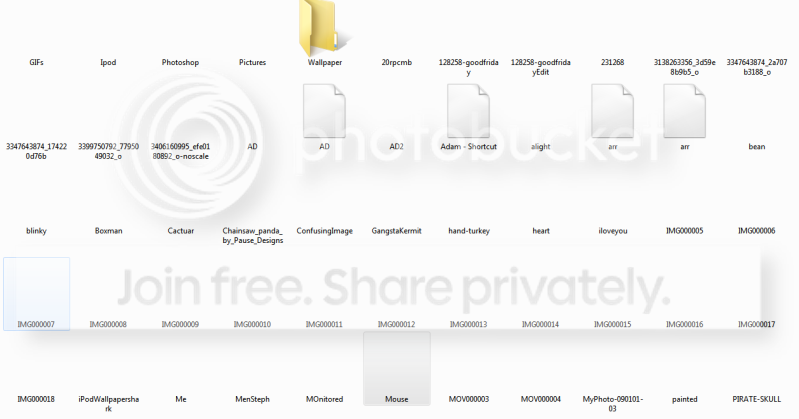
I am having issues with my icons in windows. all of windows. All of the thumbnail icons for my pictures are blank. By blank I mean no icons at all, no placeholders, no generic icons, just blank. Folders with pictures are the same way, only some of the folders show up, but no pictures on it. If anyone has any suggestions, that would be great. Preferrably if it's an easy fix :P
Capture.png
 

My Computer

OS
Windows 7 RC1
CPU
AMD 64 X2 6000+ @ 3.2GHz
Motherboard
Asus Crosshair II
Memory
4GB Corsair XMS2
Graphics Card(s)
2x nVidia GeForce 8800gt in SLI
Monitor(s) Displays
19" Widescreen Acer, 37" Vision Quest Rembrandt 1080p LCD
Screen Resolution
1440x900
Hard Drives
Western Digital 250GB
Seagate 250GB
Seagate 500GB
Hitachi 500GB
PSU
Corsair HX1000 1KW Modular PSU
Case
Antec 900
Keyboard
Logitech G15 Generation 1
Mouse
Logitech G9
Update: Okay, so the pictures show up sometimes but only temporarily, and they usually go away if I refresh the folder.
 

My Computer

OS
Windows 7 RC1
CPU
AMD 64 X2 6000+ @ 3.2GHz
Motherboard
Asus Crosshair II
Memory
4GB Corsair XMS2
Graphics Card(s)
2x nVidia GeForce 8800gt in SLI
Monitor(s) Displays
19" Widescreen Acer, 37" Vision Quest Rembrandt 1080p LCD
Screen Resolution
1440x900
Hard Drives
Western Digital 250GB
Seagate 250GB
Seagate 500GB
Hitachi 500GB
PSU
Corsair HX1000 1KW Modular PSU
Case
Antec 900
Keyboard
Logitech G15 Generation 1
Mouse
Logitech G9
I am having a similar kind of issue with my icons. My Icons either appear Black Boxes or they appear in 8 bit mode
here is how they look like


My Computer

OS
Windows 7 - RC Build 7100
Try rebuilding your icon cache and thumbnails database.

To clean the thumbnails database run Disk Cleanup utility

Then do the following
1: Next open a command prompt with admin privileges, to do this type in cmd into the search box on the start menu, right click over cmd.exe and run as admin.
2: after cmd is open, run task manager and end all explorer.exe processes. (this bit is imperative)
3: Now back to the cmd shell type in the following exactly but without the quotes "del /AH %USERPROFILE%\AppData\Local\Iconcache.db"

then ctrl alt del to restart the computer, your Icon caches will rebuild and hopefully all will be fixed.
 

My Computer

Computer Manufacturer/Model Number
Asus Component Home Brew
OS
Windows 7 x86
CPU
Intel E8400
Motherboard
ASUS P5E Deluxe
Memory
2x Corsair 2gig
Graphics Card(s)
Asus Geforce 9800 GTX+
Sound Card
Auzentech X-Fi Prelude 7.1
Monitor(s) Displays
3x Samsung SyncMaster 245B
Screen Resolution
3x 1920 x 1200
PSU
Corsair 550vx
Case
Old black one
Cooling
Dusty fans
Keyboard
Razer Tarantula
Mouse
Logitec G5
Internet Speed
Some times fast - Other times insanely fast
Other Info
Logitech Z-5500 speakers - Outpost OSS 6.7 - MediaMonkey it rocks - TrackIR Pro 4 - Hotas Cougar - Saitek Pro Yoke - Matrox TripleHeader
It seems as though Legand's Instructions worked, if not, I will let you know. Thanks Legand.
 

My Computer

OS
Windows 7 RC1
CPU
AMD 64 X2 6000+ @ 3.2GHz
Motherboard
Asus Crosshair II
Memory
4GB Corsair XMS2
Graphics Card(s)
2x nVidia GeForce 8800gt in SLI
Monitor(s) Displays
19" Widescreen Acer, 37" Vision Quest Rembrandt 1080p LCD
Screen Resolution
1440x900
Hard Drives
Western Digital 250GB
Seagate 250GB
Seagate 500GB
Hitachi 500GB
PSU
Corsair HX1000 1KW Modular PSU
Case
Antec 900
Keyboard
Logitech G15 Generation 1
Mouse
Logitech G9
The above instructions didn't work for me but i tried a new way and it worked that way. I opened up "Folder and Search Options" and in the second tab titled "View" and i checked the first option which was "Always show icons, never thumbnails". The result was that i couldn't see the thumbnails of the image files but the icons were all appearing Fine.
 

My Computer

OS
Windows 7 - RC Build 7100
I tried that too, but it didn't work, but I'm glad that the other way did.
 

My Computer

OS
Windows 7 RC1
CPU
AMD 64 X2 6000+ @ 3.2GHz
Motherboard
Asus Crosshair II
Memory
4GB Corsair XMS2
Graphics Card(s)
2x nVidia GeForce 8800gt in SLI
Monitor(s) Displays
19" Widescreen Acer, 37" Vision Quest Rembrandt 1080p LCD
Screen Resolution
1440x900
Hard Drives
Western Digital 250GB
Seagate 250GB
Seagate 500GB
Hitachi 500GB
PSU
Corsair HX1000 1KW Modular PSU
Case
Antec 900
Keyboard
Logitech G15 Generation 1
Mouse
Logitech G9

My Computer

Computer Manufacturer/Model Number
Asus Component Home Brew
OS
Windows 7 x86
CPU
Intel E8400
Motherboard
ASUS P5E Deluxe
Memory
2x Corsair 2gig
Graphics Card(s)
Asus Geforce 9800 GTX+
Sound Card
Auzentech X-Fi Prelude 7.1
Monitor(s) Displays
3x Samsung SyncMaster 245B
Screen Resolution
3x 1920 x 1200
PSU
Corsair 550vx
Case
Old black one
Cooling
Dusty fans
Keyboard
Razer Tarantula
Mouse
Logitec G5
Internet Speed
Some times fast - Other times insanely fast
Other Info
Logitech Z-5500 speakers - Outpost OSS 6.7 - MediaMonkey it rocks - TrackIR Pro 4 - Hotas Cougar - Saitek Pro Yoke - Matrox TripleHeader
Okay so, Legand's Solution worked for me perfectly, but it happened again, can anyone tell me why?
 

My Computer

OS
Windows 7 RC1
CPU
AMD 64 X2 6000+ @ 3.2GHz
Motherboard
Asus Crosshair II
Memory
4GB Corsair XMS2
Graphics Card(s)
2x nVidia GeForce 8800gt in SLI
Monitor(s) Displays
19" Widescreen Acer, 37" Vision Quest Rembrandt 1080p LCD
Screen Resolution
1440x900
Hard Drives
Western Digital 250GB
Seagate 250GB
Seagate 500GB
Hitachi 500GB
PSU
Corsair HX1000 1KW Modular PSU
Case
Antec 900
Keyboard
Logitech G15 Generation 1
Mouse
Logitech G9
Are you using any third party addon that may be corrupting the cache. TweakUI for example is notorious for doing it and so are a few other programs. Have a good look at what you are running as windows very really trashs the cache on its own.
 

My Computer

Computer Manufacturer/Model Number
Asus Component Home Brew
OS
Windows 7 x86
CPU
Intel E8400
Motherboard
ASUS P5E Deluxe
Memory
2x Corsair 2gig
Graphics Card(s)
Asus Geforce 9800 GTX+
Sound Card
Auzentech X-Fi Prelude 7.1
Monitor(s) Displays
3x Samsung SyncMaster 245B
Screen Resolution
3x 1920 x 1200
PSU
Corsair 550vx
Case
Old black one
Cooling
Dusty fans
Keyboard
Razer Tarantula
Mouse
Logitec G5
Internet Speed
Some times fast - Other times insanely fast
Other Info
Logitech Z-5500 speakers - Outpost OSS 6.7 - MediaMonkey it rocks - TrackIR Pro 4 - Hotas Cougar - Saitek Pro Yoke - Matrox TripleHeader
Cleaning the Icon Cache worked for me without the command line part. Great thing to add to my knowledge, and thanks!
Fallsoff
 

My Computer

Computer Manufacturer/Model Number
gateway d410
OS
w7 enterprise_32 bit
CPU
2.17 intel 1-core
Motherboard
dell
Memory
2 G DDR2
Graphics Card(s)
Intel shared 945
Sound Card
na_no w7 drivers
Monitor(s) Displays
12" LED
Hard Drives
100 G IDE
PSU
dell
Case
dell
Cooling
dell
Hello,
I posted a 'fix' report earlier and that was premature. Sorry.
I tried the different solutions above, the first (disk cleanup+ C_A_D) both 'with' and 'without' the command line part. 'Without' seemed to work until I rebooted and then the 'fix' was lost.

'With', (Command line+icon folder cleanup+C_A_D), just left the black squares as they were.
I also changed the folder options and that didn't work at all. I then used <Everything> to find and delete the icon database files thinking they might rebuild correctly__didn't work either. None of the above have worked for longer than a reboot--actually tons of reboots. I did refresh the desktop each time and that did not help either. TweakUI does not work in W7, so that is not the issue. I never had the problem in XP with TweakUI running, so maybe I was just 'lucky', (not my usual M.O.). I did learn a bit about the W7 system in the process and that is always good.

by the way this is the Enterprise (Tech Net) version__not that it would matter.

Thanks, (no hard feelings), and I will continue to search for a fix that works on this system,
fallsoff
 

My Computer

Computer Manufacturer/Model Number
gateway d410
OS
w7 enterprise_32 bit
CPU
2.17 intel 1-core
Motherboard
dell
Memory
2 G DDR2
Graphics Card(s)
Intel shared 945
Sound Card
na_no w7 drivers
Monitor(s) Displays
12" LED
Hard Drives
100 G IDE
PSU
dell
Case
dell
Cooling
dell
back again. I found a (temporary) 'fix' here:
http://www.sevenforums.com/tutorials/49819-icon-cache-rebuild.html.
I downloaded the 'fix' and ran it. The icons appeared. I rebooted and of course the black squares were back!
SO, I keep the 'fix' on the desktop and re-run it at each reboot, (it is NOT necessary to reboot after applying the 'fix', it works OK temporarily with OR without rebooting.), the icons return and remain until a reboot and then I run the 'fix' again.
better than what I had before....
Thanks again,
fallsoff
 

My Computer

Computer Manufacturer/Model Number
gateway d410
OS
w7 enterprise_32 bit
CPU
2.17 intel 1-core
Motherboard
dell
Memory
2 G DDR2
Graphics Card(s)
Intel shared 945
Sound Card
na_no w7 drivers
Monitor(s) Displays
12" LED
Hard Drives
100 G IDE
PSU
dell
Case
dell
Cooling
dell
Back
Top