IconPackager issue

frytur

New member
I have Win7 Sp1 x32
I downloaded JONGHYUNPARK7 2 [only to change icons]
Here is a link to this pack: jpyss on deviantART


I downloaded IconPackager 5.1 trial [or 5.0, l don't remember, anyway it was the last available version 1 month ago].

I applied pack for IconPackager.

Everything was fine but.... trial period of IconPackager was coming over and I deceided to restore all default icons and uninstall IconPackager trial.....

So I activated "Win default icon pack" option in IconPackager and uninstalled it....

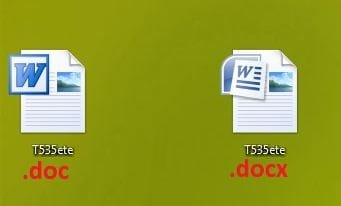
All is okey except all *.doc files: I have blank icons in Windows Explorer for all the *.doc files!
20110816220426.png


I launched sfc / scannow from command line in Win and restored imageres.dll file [it was corrupted] .... No result.....

I can't make Win Restore Point command cause I didn't save any Restore point before IconPackager installation....

So please, any help!
 

My Computer

Computer Manufacturer/Model Number
Windows
OS
Win7 SP1 x32
CPU
2.2
Motherboard
Asus
Memory
4
Graphics Card(s)
ATI
Sound Card
S
Monitor(s) Displays
Nec
Hard Drives
2
PSU
/
Case
/
Cooling
/

My Computer

Computer Manufacturer/Model Number
Windows
OS
Win7 SP1 x32
CPU
2.2
Motherboard
Asus
Memory
4
Graphics Card(s)
ATI
Sound Card
S
Monitor(s) Displays
Nec
Hard Drives
2
PSU
/
Case
/
Cooling
/
restore imageres.dll didn't help to solve an issue

H1, guys!

Here is my problem: http://www.sevenforums.com/customization/181374-iconpackager-issue.html

IconPackager made some mess... Have blank icons for *.doc files in Explorer....

Making a long story short: I ran sfc / scannow and restored my imageres.dll with no success....

So now I want to verify out if the icon index for *.doc -files in the original imageres.dll is the same as in my backup.ini so that [if yes] I will make a *.reg file from this backup.ini to restore the system to its previous state...

So:
Is there a way to find out the indexes for all the icons which locate in original imageres.dll - file of Win7?


Thanks!
 

My Computer

Computer Manufacturer/Model Number
Windows
OS
Win7 SP1 x32
CPU
2.2
Motherboard
Asus
Memory
4
Graphics Card(s)
ATI
Sound Card
S
Monitor(s) Displays
Nec
Hard Drives
2
PSU
/
Case
/
Cooling
/
couple of suggestions, run sfc/scannow from command as admin. or try rebuilding the icons cache, i would try the icons cache first as sfc/scannow will reset any third party themes you may have installed.

http://www.sevenforums.com/tutorials/49819-icon-cache-rebuild.html

http://www.sevenforums.com/tutorials/1538-sfc-scannow-command-system-file-checker.html
edit ,sorry just noticed you tried sfc/scannow.
also just to be sure check this tutorial
http://www.sevenforums.com/tutorials/700-system-restore.html
 

My Computer

Computer Manufacturer/Model Number
Hewlett packard/p6512uk
OS
Microsoft Windows 7 Home Premium 64-bit 7600
CPU
IIx4 amd athelon 635 processor
Motherboard
FOXCONN 2AA9
Memory
2x2gb
Graphics Card(s)
ati radeon HD 5450
Sound Card
(1) Realtek High Definition Audio (2) AMD High Definition
Monitor(s) Displays
samsung lcd tv 32"
Screen Resolution
1360x 768
Hard Drives
(1) WDC WD10 01FAES-60Z2A0 SATA Disk Device (2) Maxtor OneTouch USB Device (3) ST310003 33AS USB Device (4) WD My Book 1111 USB Device
PSU
?
Cooling
air!
Keyboard
wireless hp
Mouse
wireless Hp,optical
Internet Speed
1.10mb/s
Antivirus
MSE
Browser
Firefox
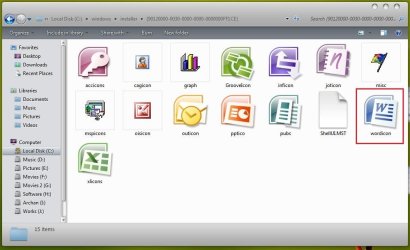
If you have MS Word, it IS NOT part of Windows.

For MS Office Word 2010 fix reg file should be
Code:
Windows Registry Editor Version 5.00

[HKEY_CLASSES_ROOT\Word.Document.8\DefaultIcon]
@="C:\\Windows\\Installer\\{[COLOR=Red]90140000-0011-0000-0000-[/COLOR]0000000FF1CE}\\wordicon.exe,1"
Red part might be different for your system (just search for wordicon.exe in Installer folder).

Also, you can try reselect Word for doc files in Control Panel - Default programs - Associate a file or protocol with a program
 

My Computer

Computer type
PC/Desktop
OS
Windows 8.1 ; Windows 7 x86 (Dec2008-Jan2013)
Other Info
"The scale icon at the top right of a post or tutorial is how you can give rep to the member."
couple of suggestions, run sfc/scannow from command as admin. or try rebuilding the icons cache, i would try the icons cache first as sfc/scannow will reset any third party themes you may have installed.

http://www.sevenforums.com/tutorials/49819-icon-cache-rebuild.html

http://www.sevenforums.com/tutorials/1538-sfc-scannow-command-system-file-checker.html
edit ,sorry just noticed you tried sfc/scannow.
also just to be sure check this tutorial
http://www.sevenforums.com/tutorials/700-system-restore.html


I launched option Windows Deafult Icons in IconPackager.


After this I run "Icon Cash Restore" Commands in CMD:

  • taskkill /IM explorer.exe /F
  • CD /d %userprofile%\AppData\Local
  • DEL IconCache.db /a
  • shutdown /r
No success...


I also pointed manually *.doc files to W1nWord.exe


I also run sfc / scannow command.

No result!


F$#^%K!


P.S. Don't have restore point before IconPackager installation...


P.P.S. Guess I have to play with registry. Who knows how?
 

My Computer

Computer Manufacturer/Model Number
Windows
OS
Win7 SP1 x32
CPU
2.2
Motherboard
Asus
Memory
4
Graphics Card(s)
ATI
Sound Card
S
Monitor(s) Displays
Nec
Hard Drives
2
PSU
/
Case
/
Cooling
/
Hi frytur !

I guess you are talking about this one .... (if no, pl overlook this post)
Capture1.JPG

It is the icon group 90 in imageres.dll .
Capture.JPG

So, IMO, you should try to change the icon group 90 in imageres.dll . IMO, moreover, wordicon.exe is the icon for ms word program that appears in taskbar and start menu , and doc and docx files icons are not in there .
Capture3.JPGCapture2.JPG

A fix may be with http://www.sevenforums.com/tutorials/73191-icons-change-using-resource-hacker.html , applying View attachment imageres-90.zip (unzip to get the icon) in the proper place .

It might help .
 

My Computer

Computer type
PC/Desktop
Computer Manufacturer/Model Number
Self Assembled
OS
Microsoft Windows 10 Pro Insider Preview 64-bit
CPU
Intel(R) Core(TM) i3-4130 CPU @ 3.40GHz
Motherboard
Gigabyte Technology Co., Ltd. B85M-D3H
Memory
Corsair Vengence 4GB x2 (8.00GB Dual-Channel DDR3 @ 798MHz)
Graphics Card(s)
2047MB GeForce GTS 450 (ZOTAC International)
Sound Card
Onboard (Realtek High Definition Audio)
Monitor(s) Displays
LG Flatron E2040T
Screen Resolution
1600x900
Hard Drives
Western Digital 1 TB
Seagate 500 GB
PSU
Corsair VS550
Case
Cooler Master K380
Cooling
Cooler Master Seidon 120V Plus
Keyboard
Logitech MK260r
Mouse
Logitech MK260r
Internet Speed
PMPL Broadband
Antivirus
Windows Defender + MBAM
Browser
Firefox
Other Info
Dell Studio 15" Laptop
Back
Top