JG Seven
New member
Hello all,
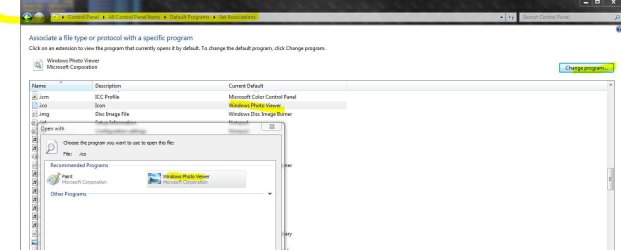
After messing with my default programs and setting Paint as the default for everything it's able to open, I noticed that the icons for some of my programs are now the generic paint icon. I tried removing .ico as a Paint default, but I can't seem to deselect it. Ideas? Any help will be greatly appreciated (slightly OCD about this sort of thing ).
).
Here's a screen capture of my issue (TinyPic). Edit: Thanks for embedding my image. I'll do that next time.
After messing with my default programs and setting Paint as the default for everything it's able to open, I noticed that the icons for some of my programs are now the generic paint icon. I tried removing .ico as a Paint default, but I can't seem to deselect it. Ideas? Any help will be greatly appreciated (slightly OCD about this sort of thing
).Here's a screen capture of my issue (TinyPic). Edit: Thanks for embedding my image. I'll do that next time.
Last edited by a moderator:
My Computer
- Computer Manufacturer/Model Number
- Self-built
- OS
- Windows 7 Home Premium x64
- CPU
- AMD Phenom II X4 965 Black Edition @ 3.4GHz (1.375V)
- Motherboard
- ASUS M4A79XTD EVO
- Memory
- 4GB G.SKILL DDR3 PC3-10666 1333MHz
- Graphics Card(s)
- Sapphire Radeon HD 5850 1GB (775/1125MHz)
- Sound Card
- VIA VT1708S Integrated Chip
- Monitor(s) Displays
- Acer X223W 22-inch LCD Monitor
- Screen Resolution
- 1680x1050
- Hard Drives
- 1TB Western Digital Caviar Black
- PSU
- Silverstone ST75F-P 750W
- Case
- Cooler Master Storm Sniper Black Edition
- Cooling
- Arctic Cooling Freezer 64 Pro
- Keyboard
- Logitech G11
- Mouse
- Microsoft Wheel Mouse Optical
- Internet Speed
- 15 Mbps Download/2 Mbps Upload
- Other Info
- LITE-ON Blu-Ray Burner -
LITE-ON DVD Burner