
Some of my icons appear too small

klear6

New member
Local time
6:16 PM
Messages
36
Let me preface this by saying I just did a fresh install of windows 7 x32 after noticing this problem, and it was recreated immediately before installing any software other than AVG and Xnview and GIMP. I'm not a big fan of AVG but I needed it for the styler to apply icon changes. Pretty big dent in my wallet just to be able to do that. (Side note: if anyone knows a FREE way to make all the changes AVG can I'd be more than happy to look into it). So it isn't malware, or viral. Now for the problem.

I have been customizing my icons, most of which I have made myself - which makes this all the more frustrating. When I apply the new icons to my libraries some of them come out perfectly and look great. Others are surrounded by a lot of space and a square and the icons are too small. Weird part is that they all started out the same size and format. Some of them DID need to be converted to ICOs but that variable doesn't seem to make a difference in this case. Let me attach a screenshot and please don't laugh too hard at my MLP obsession.

This is really irking me and I spent a TON of time trying to find a fix for this myself but at this point I need some help because I can't find any answers.

Remember that this is a clean install of windows, that should take out a LOT of variables.

Let me know what other info you guys need to be able to help me. Pretty please.
 

Attachments
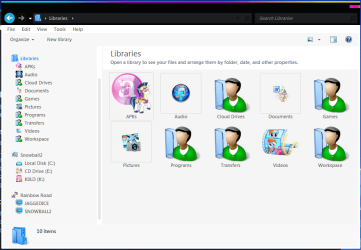
  • libraries example for forums.PNG
    libraries example for forums.PNG
    36.2 KB · Views: 3

My Computer My Computer

At a glance

Windows 7 Home Premium x32Intel Atom N2600 (1.6 GHz, 1 MB L2 cache)2 GB DDR3Intel Graphics Media Accelerator 3600 Series
Computer type
Laptop
Computer Manufacturer/Model Number
Acer Aspire One D270-1865
OS
Windows 7 Home Premium x32
CPU
Intel Atom N2600 (1.6 GHz, 1 MB L2 cache)
Motherboard
Acer JE01_CT
Memory
2 GB DDR3
Graphics Card(s)
Intel Graphics Media Accelerator 3600 Series
Hard Drives
320 GB HDD
(set up by Acer with seperate partition for Acer e Recovery with Windows Home Starter)
Antivirus
avast! Free Antivirus 2015
Browser
Maxthon v4.4.7.1000
The icons used by default are those held in the executable file or .ico files in the same folder as the program fie.

The standard for Icon sizes has changed several times over the years with the current maximum size being 256x256 pixels, the standard also includes smaller files, (for use in specialist usage), down to 16x16 pixels. Also included are 32x32 pixels, 64x64 pixels, and 128x128 pixels.

The individual .ico files can actually contain several of the standard sizes as can specially designed .DLL files

Some developers do not update the icons which were acceptable in previous Windows versions, (when the normal screen resolution was lower that today so displayed the icon satisfactorily), even those that update the actual software

It is possible to change the icon used for a shortcut, (this overrides the icon in the Executable file) by right clicking the shortcut and selecting properties

A seemingly unlimited collection of .Ico files are available online so I should be possible to find suitable icons for your programs that do not have the correct size built in

icons 256 pixel - Google Search

When creating your own icons ensure that you include the 256x256 pixel image - alternatively pre made icons are available

icons 256 pixel my little pony - Google Search
 

My Computers My Computers

  • At a glance

    Windows 11 Pro x64 [Latest Release and Releas...Ryzen 9 5950X, 3.8 - 5.2 MHz64GB [2 x 32GB] DDR4 3200MHz4GB NVIDIA GEFORCE GTX 1650 Ti
    Computer type
    PC/Desktop
    Computer Manufacturer/Model Number
    ChillBlast - Custom to my design
    OS
    Windows 11 Pro x64 [Latest Release and Release Preview]
    CPU
    Ryzen 9 5950X, 3.8 - 5.2 MHz
    Motherboard
    Asus Prime X570-Pro
    Memory
    64GB [2 x 32GB] DDR4 3200MHz
    Graphics Card(s)
    4GB NVIDIA GEFORCE GTX 1650 Ti
    Sound Card
    On-board SPDIF to 5.1 System + HDMI [5.1 system]
    Monitor(s) Displays
    32" UHD 32 Bit HDR Monitor + 43" UHD 4K 32Bit HDR TV
    Screen Resolution
    2 x 3840 x 2160 @60Hz
    Hard Drives
    1TB M2 SSD OS, 500GB Fast Access SSD, 2 x 8TB Data + Various Externals from 1TB to 4TB, 10TB NAS
    PSU
    NZXT C750 80 PLUS Gold 750W Modular PSU
    Case
    Workstation Case [Matt Black]
    Cooling
    NZXT Kraken X63 280mm CPU Cooler +2x Quiet Case fans
    Keyboard
    Logitech Wireless MX Keys & K400 + others
    Mouse
    Logitech Wireless MX Master 3S
    Internet Speed
    920 MB Down 50 MB Up
    Antivirus
    BitDefender Total Security Pro
    Browser
    Chrome (always run latest Non-Beta)
    Other Info
    Also run ...
    Laptop - Quad 8GB - Windows 10 Pro x64
    Nexus 7 Android tablet x2
    Samsung 10.2" tablet
    Blackview TAB 8 4G Android Tablet c/w Keyboard
    Wacom Intuos Pro Medium Pen Pad
    Wacom Intuos Pro Small Pen Pad
    Wacom Expresskeys Remote
    Loopdeck+ Graphics Controller
    Shuttle Pro v2 Control
  • At a glance

    Windows 11 Pro x64 Latest RPIntel I7 10750H 5.0GHz32GB [2x16GB] DDR4 2933 MHznVidia GTX1650Ti 4 GB GDDR6
    Computer type
    Laptop
    System Manufacturer/Model Number
    Dell XPS 17 10750H
    OS
    Windows 11 Pro x64 Latest RP
    CPU
    Intel I7 10750H 5.0GHz
    Motherboard
    Dell XPS
    Memory
    32GB [2x16GB] DDR4 2933 MHz
    Graphics Card(s)
    nVidia GTX1650Ti 4 GB GDDR6
    Sound Card
    Stock [Realtek] 4 Speaker
    Monitor(s) Displays
    17" IPS UHD+ Infinity Edge Touchscreen
    Screen Resolution
    3840 x 2400
    Hard Drives
    2TB M2 NVMe, 4TB External + various 500GB & 1TB External NVMe (also have access to spinner HDD from
    PSU
    Stock
    Case
    Stock XPS Aluminium & Carbon Fibre
    Cooling
    Stock - Active Fan Control
    Keyboard
    Backlit + Various Logitech
    Mouse
    Stock Track Pad + Logitech MX Trackball
    Internet Speed
    72 MB Down 18MB Up
    Browser
    Chrome
    Other Info
    Also run ...
    Laptop - Quad 8GB - Windows 10 Pro x64
    Nexus 7 Android tablet x2
    10.2" tablet
    Sony Z3 Android Smartphone
    Wacom Intuos Pro Medium Pen Pad
    Wacom Intuos Pro Small Pen Pad
    Wacom Expresskeys Remote
    Loopdeck+ Graphics Controller
    Shuttle Pro v2 Control Pad
    10TB NAS
Back
Top