Solved Icons in Control Panel\Programs\Default Programs\Set Default Programs

Edward 066

New member
Power User
Local time
12:30 AM
Messages
52
Location
malta
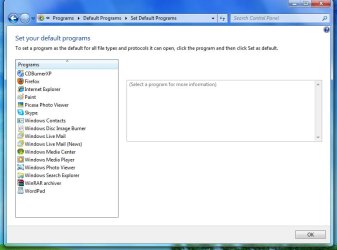
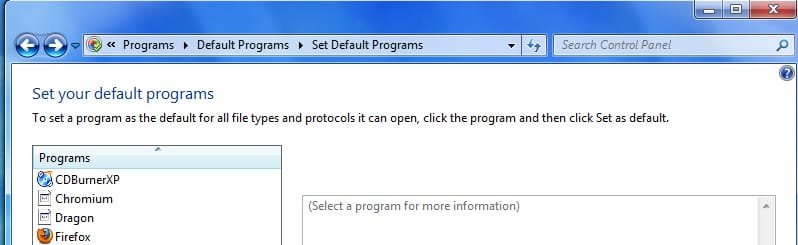
Hi, I went to set a program as a default and I saw these 2 browsers icons I had but I uninstalled them and the shortcuts are still there so how can I remove them? Thanks in advanced :)
 

Attachments

  • Untitled-1.jpg
    Untitled-1.jpg
    38.4 KB · Views: 66

My Computer

Computer Manufacturer/Model Number
Glite Cooler Master
OS
Windows 7 Ultimate SP1 64-bit / Ubuntu 11.10 x64
CPU
AMD Athlon 64x2 Dual Core processor 5000+ 2.60 GHz
Motherboard
ASUSTeK Computer INC.
Memory
4.00GB
Graphics Card(s)
NVIDIA GeForce 7050 PV / NVIDIA nForce 630a
Sound Card
NVIDIA HDMI Audio Device
Monitor(s) Displays
ViewSonic VA926 Series
Screen Resolution
1280 x 1024
Hard Drives
SAMSUNG HD502HJ ATA Device (500GB)
Keyboard
Standard PS/2 Keyboard
Mouse
Microsoft PS/2 Mouse
Uninstall your browsers using Revo Uninstaller. Use advanced mode.
 

My Computer

Computer Manufacturer/Model Number
Custom Build
OS
Windows 7 Pro/32 Academic. Build 7600
CPU
Intel 2.3 Duo core
Motherboard
EliteGroup G31T-M
Memory
4 GB DDR
Graphics Card(s)
Nvidia GeForce 9500 GT
Sound Card
Built in
Monitor(s) Displays
Viewsonic 15" 4:3
Screen Resolution
1280 x 1024
Hard Drives
WD Caviar Black 750 GB
WD 250 GB External
PSU
Antec 450w
Keyboard
Standard windows
Mouse
Logitech USB
Internet Speed
Bellsouth DSL 6.0
Uninstall your browsers using Revo Uninstaller. Use advanced mode.

I use revo to uninstall so maybe I forgot to select the advanced scan. Thank you for the help
 

My Computer

Computer Manufacturer/Model Number
Glite Cooler Master
OS
Windows 7 Ultimate SP1 64-bit / Ubuntu 11.10 x64
CPU
AMD Athlon 64x2 Dual Core processor 5000+ 2.60 GHz
Motherboard
ASUSTeK Computer INC.
Memory
4.00GB
Graphics Card(s)
NVIDIA GeForce 7050 PV / NVIDIA nForce 630a
Sound Card
NVIDIA HDMI Audio Device
Monitor(s) Displays
ViewSonic VA926 Series
Screen Resolution
1280 x 1024
Hard Drives
SAMSUNG HD502HJ ATA Device (500GB)
Keyboard
Standard PS/2 Keyboard
Mouse
Microsoft PS/2 Mouse
Have a look under this registry key for "rogue" entries

HKEY_LOCAL_MACHINE\SOFTWARE\RegisteredApplications

Of course, you will back up the registry key before deleting/changing anything.

I found both there and removed them. Thanks for the help :thumbsup:
 

Attachments

  • Untitled-1.jpg
    Untitled-1.jpg
    64.2 KB · Views: 39

My Computer

Computer Manufacturer/Model Number
Glite Cooler Master
OS
Windows 7 Ultimate SP1 64-bit / Ubuntu 11.10 x64
CPU
AMD Athlon 64x2 Dual Core processor 5000+ 2.60 GHz
Motherboard
ASUSTeK Computer INC.
Memory
4.00GB
Graphics Card(s)
NVIDIA GeForce 7050 PV / NVIDIA nForce 630a
Sound Card
NVIDIA HDMI Audio Device
Monitor(s) Displays
ViewSonic VA926 Series
Screen Resolution
1280 x 1024
Hard Drives
SAMSUNG HD502HJ ATA Device (500GB)
Keyboard
Standard PS/2 Keyboard
Mouse
Microsoft PS/2 Mouse
Back
Top