icons moving on desktop

guybc

New member
Member
Local time
4:03 AM
Messages
54
windows 7 frequently moves my icons around in a haphazard fashion so that I never know where anythinig is.
Is there a way to stop this?
 

My Computer My Computer

Computer Manufacturer/Model Number
Custom
OS
windows 7 Pro 64
CPU
intel core 2 duo E7400
Motherboard
Asus P5KPL
Memory
4 G
Graphics Card(s)
Geforce 9500GT
Hard Drives
500G
Internet Speed
cable
Welcome!

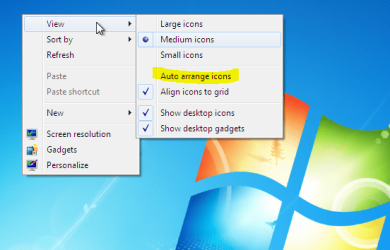
Make sure it is not set to auto arrange.

Capture.PNG
 

My Computer My Computer

Computer Manufacturer/Model Number
Custom
OS
Windows 7 Professional x64
CPU
Intel i7 2600K OC'd @ 4620 MHz
Motherboard
Asus P8Z68-V Pro
Memory
16GB GSkill Sniper 2133 Mhz (4x4GB)
Graphics Card(s)
EVGA GeForce GTX 480 SuperClocked+
Sound Card
Realtek High Definition Audio
Monitor(s) Displays
2x Acer S273HLbmii 27"
Screen Resolution
2 x 1920x1080
Hard Drives
64GB Crucial M4 SSD

Storage: Hitachi 1TB 5400RPM, Samsung 1.5TB 5400RPM
PSU
Corsair HW Series 750w (modular)
Case
Cooler Master HAF 932 Advanced Blue Edition
Cooling
CM Hyper 212+ CPU cooler, 3x 230mm + 1x 140mm case fans
Keyboard
Logitech MK320 (wireless)
Mouse
Logitech MK320 (wireless)
Internet Speed
30 Mb/s : 2 Mb/s
Yep, as Mr. King says - you may have your desktop icons set to automatically arrange. If they are automatically arranged, they have been stacked in the upper-left corner and locked in placed.
To unlock the icons so that you can move them again, clear the check mark next to Auto arrange icons (as King has showed you) and you should have full management of your icons.

Let us know what happens. :)

Cheers,
Cassandra
Microsoft Windows Outreach
 

My Computer My Computer

Computer Manufacturer/Model Number
HP/p6207c
OS
Windows 7 Professional 64-bit
CPU
Pentium(R) Dual-Core CPU E5300 @260GHz
Sound Card
RealTek High Def Audio
Monitor(s) Displays
HP 2159m
Screen Resolution
1920 x 1080 x 60
Mouse
HP M/N: M-U0009-HP1
Internet Speed
Broadband
Thanks for the replies.
I should have mentioned that autoarrange is not checked.
A thought! Possibly this was not happening before I installed the windows security program.
 

My Computer My Computer

Computer Manufacturer/Model Number
Custom
OS
windows 7 Pro 64
CPU
intel core 2 duo E7400
Motherboard
Asus P5KPL
Memory
4 G
Graphics Card(s)
Geforce 9500GT
Hard Drives
500G
Internet Speed
cable
Hello guybc, welcome to Seven Forums!


If you're referring to "MS Security Essentials" at the link below, I don't believe it could have anything to do with moving icons around on the desktop.

http://www.microsoft.com/security_essentials/
 

My Computer My Computer

Computer Manufacturer/Model Number
* BFK Customs *
OS
W 7 64-bit Ultimate
CPU
Intel Q9550 Yorkfield
Motherboard
ASUS P5Q Pro
Memory
8GB Dominator 8500C5D
Graphics Card(s)
ATI : XFX 5870
Sound Card
Realtek HD Audio 7-1
Monitor(s) Displays
1x 47" LCD HDMI & 3x 26" LCD HDMI
Screen Resolution
1920x1080P & 1920x1200
Hard Drives
1x 80GB Intel X25-M G2 SSD : 1x 500GB & 1x 640GB WD Caviar Black(s)
PSU
Corsair 620HX
Case
Cooler Master RC-690
Cooling
Tuniq Tower 120, 2x 140mm and 3x 120mm case fans
Keyboard
Microsoft 500
Mouse
Razer Diamondback 3G
Internet Speed
14 Mb/s
Other Info
1x Koutech 3Gb/s SATA HDD Hot Swap Rack

My Computer My Computer

Computer Manufacturer/Model Number
HP Pavilion dv7
OS
Windows 7
CPU
Core i7
Memory
8 GB
Graphics Card(s)
ATI FireGL
Monitor(s) Displays
Secondary is an HP L1940T
Screen Resolution
1680x1050
Hard Drives
160 GB SSD and 500 GB SATA
Keyboard
G11 Logitech
Mouse
G7 Logitech
Internet Speed
Fiber
Other Info
My rig smegging rules!
Many thanks!
Midiox has fixed the problem.
This is a very valuable site.
 

My Computer My Computer

Computer Manufacturer/Model Number
Custom
OS
windows 7 Pro 64
CPU
intel core 2 duo E7400
Motherboard
Asus P5KPL
Memory
4 G
Graphics Card(s)
Geforce 9500GT
Hard Drives
500G
Internet Speed
cable
Hello guybc.


We're glad you found a solution that worked for you; thanks for the update!
 

My Computer My Computer

Computer Manufacturer/Model Number
* BFK Customs *
OS
W 7 64-bit Ultimate
CPU
Intel Q9550 Yorkfield
Motherboard
ASUS P5Q Pro
Memory
8GB Dominator 8500C5D
Graphics Card(s)
ATI : XFX 5870
Sound Card
Realtek HD Audio 7-1
Monitor(s) Displays
1x 47" LCD HDMI & 3x 26" LCD HDMI
Screen Resolution
1920x1080P & 1920x1200
Hard Drives
1x 80GB Intel X25-M G2 SSD : 1x 500GB & 1x 640GB WD Caviar Black(s)
PSU
Corsair 620HX
Case
Cooler Master RC-690
Cooling
Tuniq Tower 120, 2x 140mm and 3x 120mm case fans
Keyboard
Microsoft 500
Mouse
Razer Diamondback 3G
Internet Speed
14 Mb/s
Other Info
1x Koutech 3Gb/s SATA HDD Hot Swap Rack
Many thanks!
Midiox has fixed the problem.
This is a very valuable site.

Totally awesome! Kudos to this site for posting it.
 

My Computer My Computer

Computer Manufacturer/Model Number
HP Pavilion dv7
OS
Windows 7
CPU
Core i7
Memory
8 GB
Graphics Card(s)
ATI FireGL
Monitor(s) Displays
Secondary is an HP L1940T
Screen Resolution
1680x1050
Hard Drives
160 GB SSD and 500 GB SATA
Keyboard
G11 Logitech
Mouse
G7 Logitech
Internet Speed
Fiber
Other Info
My rig smegging rules!
Back
Top