
Icons only work during regular "Windows Browsing".

Advanced

New member
Local time
5:45 PM
Messages
3
Location
New York City
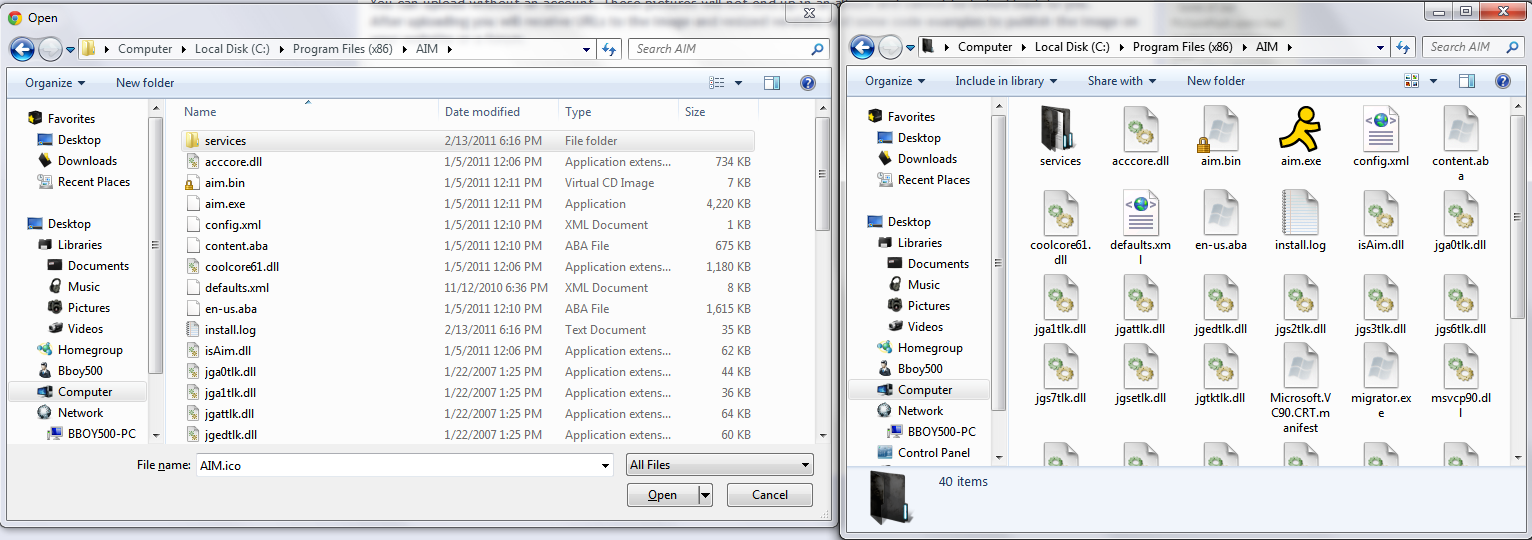
What I mean by this is if I use lets say Google chrome to upload a program.. it wont show the icons. Or If I try to use a program and point it at a another program, it also wont show up any icons. Here are 2 examples:
7627258.png


In here I am just showing you what Google shows me (The Left), and what the actual folder looks like for me if I just browse to it (The Right).

7627352.png


In this second one.. you can see Steam shows all Icons as broken... but if I was to go to there folders myself they would all be just fine.

Any way to fix this? I am using Icon Packager by the way. But other people I know who use it do not have this problem.
 

My Computer

OS
Windows 7 64 Bit Pro

My Computer

Computer type
Laptop
Computer Manufacturer/Model Number
Sager NP9170
OS
Win 7 Pro x64 / Win 10 Pro
CPU
Intel(R) Core(TM) i7-3630QM CPU @ 2.40GHz
Motherboard
CLEVO P170EM
Memory
12 GB
Graphics Card(s)
(1) Intel(R) HD Graphics 4000 (2) NVIDIA GeForce GTX 675M
Sound Card
(1) Realtek High Definition Audio (2) Intel(R) Display Aud
Monitor(s) Displays
17.3
Screen Resolution
1920x1080
Hard Drives
(1) Samsung 860 EVO 500GB(OS) (1) Samsung 860 EVO 500GB(Data)
Keyboard
Backlite
Antivirus
MSE, Malwarebytes Pro
Browser
Firefox
Other Info
DESKTOP: Custom-built.
OS: Win 10 Pro x64.
CASE: Rosewill R5.
CPU: Intel I5 4670K CPU @ 3.40GHz.
CPU COOLER: Cool Master Hyper 212 EVO.
MOTHERBOARD: Asus Z87-A.
MEMORY: Kingston HyperX 2x4 GB.
GPU: Nvidia Geforce 650 TI.
PSU: Corsair TX750.
DRIVES: (1) Samsung 840 120 GB SSD (2) Western Digital blue 500 GB 7200 RPM.
I am not surprised it didn't work like I said icon packers can cause a lot of problems, I would suggest you do Options 2 of this tutorial http://www.sevenforums.com/tutorials/1538-sfc-scannow-command-system-file-checker.html it will not harm any data or programs you have installed but it will try to repair any system files that have been modified or corrupted which will mean your icons will most likely go back to the default.
Then you may need to do this again http://www.sevenforums.com/tutorials/49819-icon-cache-rebuild.html
Jerry
 

My Computer

Computer type
Laptop
Computer Manufacturer/Model Number
Sager NP9170
OS
Win 7 Pro x64 / Win 10 Pro
CPU
Intel(R) Core(TM) i7-3630QM CPU @ 2.40GHz
Motherboard
CLEVO P170EM
Memory
12 GB
Graphics Card(s)
(1) Intel(R) HD Graphics 4000 (2) NVIDIA GeForce GTX 675M
Sound Card
(1) Realtek High Definition Audio (2) Intel(R) Display Aud
Monitor(s) Displays
17.3
Screen Resolution
1920x1080
Hard Drives
(1) Samsung 860 EVO 500GB(OS) (1) Samsung 860 EVO 500GB(Data)
Keyboard
Backlite
Antivirus
MSE, Malwarebytes Pro
Browser
Firefox
Other Info
DESKTOP: Custom-built.
OS: Win 10 Pro x64.
CASE: Rosewill R5.
CPU: Intel I5 4670K CPU @ 3.40GHz.
CPU COOLER: Cool Master Hyper 212 EVO.
MOTHERBOARD: Asus Z87-A.
MEMORY: Kingston HyperX 2x4 GB.
GPU: Nvidia Geforce 650 TI.
PSU: Corsair TX750.
DRIVES: (1) Samsung 840 120 GB SSD (2) Western Digital blue 500 GB 7200 RPM.
Well if its any help, I'm using the most famous/trusted one. Not something totally random.

Stardock Corporation - Software - IconPackager

And as I have said my other friends also use this, and are problem free.

Just ran the test, It claimed it repaired some files so I'm gonna go ahead and restart.

Edit: Did not work =/ Maybe I should post on Rocket dock's website?
 
Last edited:

My Computer

OS
Windows 7 64 Bit Pro
I'd completely uninstall the icon packager, reboot, run the SFC scan again, then the icon cache rebuild again, reboot and see if that fixes anything.
 

My Computer

OS
XP / Win7 x64 Pro
CPU
Intel Quad-Core Q9450 @ 3.2GHz
Motherboard
Asus P5-E
Memory
2x2GB GSkill DDR2
Graphics Card(s)
NVIDIA GeForce 8600 GTS (EVGA)
Monitor(s) Displays
Dell 2408WFP
Screen Resolution
1920x1200
Back
Top