ICS - No longer functioning.

dcrockett

New member
Local time
7:10 PM
Messages
8
My setup:
Windows 7 Home 64bit - quad CPU - 8GB ram - Available Virtual memory 14GB
NIC 1 Internet - trying to re-setup ICS
NIC 2 XBOX360

What happened recently:
Everything worked fine with ICS, however I wanted a router with wire + wireless connections so I could use the wii and DS wirelessly.
I installed a cysco linksys router (wrt300n) last week.
During the setup it said it needed to disable ICS so it could manage the connections.
Everything worked fine for the week I had this setup.
Due to lack of funds and an emergency hospital visit, I had to return the router to pay the bills.
So now I'm trying to reset up my network with ICS but I'm getting errors.

Problem:
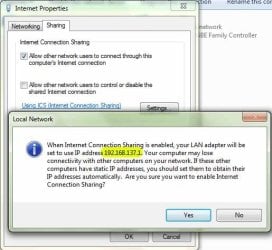
when trying to share it says:
"When Internet connection sharing is enabled, your LAN adapter will set to use IP address 192.168.137.1"
In the past I've noticed that it sets to "192.168.0.1" so I thought this was odd, maybe not relevant but still seemed odd.

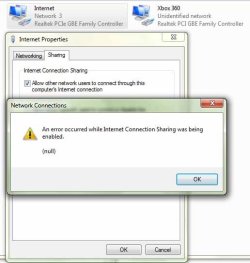
When I click "YES" to proceed with enabling ICS I get this error for Network Connections: "An error occurred while Internet Connection Sharing was being enabled. (null)"

Possible pertaining problems: windows logs, i get these two logs showing up.
Source: Microsoft-Windows-SharedAccess_NAT
Event ID: 34001
Level: Error
Description:
The ICS_IPV6 failed to configure IPv6 stack.

and

Source: Microsoft-Windows-SharedAccess_NAT
Event ID: 34005
Level: Warning
Description:
The ICS_IPV6 was unable to allocate bytes of memory. This may indicate that the system is low on virtual memory, or that the memory manager has encountered an internal error.

Things I've tryed:


  1. Uninstalling cysco network magic
  2. Uninstalling and reinstalling NIC's from device manager.
  3. Manual IP address assigment (192.168.0.2) for NIC 2 XBOX360.
  4. Automatic IP address assignment for NIC 2 XBOX 360.
  5. Check that the following services were enabled and running.

  • Application Layer Gateway Service
  • Network Connections
  • Network Location Awareness (NLA)
  • Plug And Play
  • Remote Access Auto Connection Manager
  • Remote Access Connection Manager
  • Remote Procedure Call (RPC)
  • Telephony
I tried to keep this short and simple. sorry if its long.
I attached two images showing the ICS response and error.
 

Attachments
  • ICS-01.jpg
    ICS-01.jpg
    55.2 KB · Views: 64
  • ICS-02.jpg
    ICS-02.jpg
    43.8 KB · Views: 61
Last edited:

My Computer

Computer Manufacturer/Model Number
ASUSTeK Computer INC. / ASUS CG5270
OS
Microsoft Windows 7 ultimate 64bit
CPU
Intel core 2 Quad CPU Q8300 @2.50GHz
Motherboard
Ausu
Memory
8GB
Graphics Card(s)
Nvidia GeForce 9800 GT
Sound Card
Rocketfish 5.1
Monitor(s) Displays
LG Flatron wide
Screen Resolution
1440x900
Hard Drives
1 TB - 160 GB - 1 TB
Cooling
Standard/Fan
Keyboard
Logitech MX 3200
Mouse
Logitech MX 3200
Internet Speed
21Mb/DL - 3.5Mb/UL
What address is being assigned to the network card that is running to your router?
Also if you have a router, why not just plug your xbox into it directly?

I have a linksys router and I have 1 pc, 1 server, PS3, and a printer. Plus my wireless stuff like laptop, phone, HTPC, etc... all connected and working fine.
 

My Computer

Computer Manufacturer/Model Number
Home Built
OS
Windows 7; Server 08; Window Home Server; Vista; XP
CPU
Intel E8400 @ 3.4Ghz
Motherboard
Gigabyte P35 DS3L
Memory
8 Gb Patriot DDr2 800
Graphics Card(s)
NVidia GTX460 OC
Sound Card
Onboard
Monitor(s) Displays
Samsung 21"
Screen Resolution
1920x1080
Hard Drives
Seagate 160Gb x2
Samsung 250Gb
PSU
Cooler Master 650w 52a on 12v
Case
Antec 300
Cooling
Stock
Keyboard
HP Standard USB
Mouse
Logitech 518
Internet Speed
25Mbit Down 1.5Mbit up
Other Info
http://www.speedtest.net/result/723924362.png
What address is being assigned to the network card that is running to your router?
Also if you have a router, why not just plug your xbox into it directly?

I have a linksys router and I have 1 pc, 1 server, PS3, and a printer. Plus my wireless stuff like laptop, phone, HTPC, etc... all connected and working fine.

Thanks for replying but I had to return the router due to lack of funds. That's why I'm trying to re-setup ICS like I used to have it. (without a router, only 2 NIC's)
 

My Computer

Computer Manufacturer/Model Number
ASUSTeK Computer INC. / ASUS CG5270
OS
Microsoft Windows 7 ultimate 64bit
CPU
Intel core 2 Quad CPU Q8300 @2.50GHz
Motherboard
Ausu
Memory
8GB
Graphics Card(s)
Nvidia GeForce 9800 GT
Sound Card
Rocketfish 5.1
Monitor(s) Displays
LG Flatron wide
Screen Resolution
1440x900
Hard Drives
1 TB - 160 GB - 1 TB
Cooling
Standard/Fan
Keyboard
Logitech MX 3200
Mouse
Logitech MX 3200
Internet Speed
21Mb/DL - 3.5Mb/UL
have you tried just selecting both network adapters and selecting bridge them?

1. Plug in your console (WII, Xbox 360, PS3) and allow it to acquiring ip address.
2. click on the Windows button and type "network and sharing center" and enter
3. on the left you will see "change adapter settings" click that
4. right click local area connection and disable it. The one connected to your modem
5. right click local area connection and click properties.
6. there should be a tab that says sharing go to that tab.
7. there is a box that says allow other network users to connect through this computers internet connection. uncheck it if it is checked.
8.hit ok then right click local area connection and enable it.
9 now select both your wired network connection and right click and it should have the option to bridge connections. when you click bridge it will do its thing and should work when its done.

A network bridge is just letting one device pass through another's network connection. No routing or NAT is needed. Super simple and works. Give it a try and let me know.
 

My Computer

Computer Manufacturer/Model Number
Home Built
OS
Windows 7; Server 08; Window Home Server; Vista; XP
CPU
Intel E8400 @ 3.4Ghz
Motherboard
Gigabyte P35 DS3L
Memory
8 Gb Patriot DDr2 800
Graphics Card(s)
NVidia GTX460 OC
Sound Card
Onboard
Monitor(s) Displays
Samsung 21"
Screen Resolution
1920x1080
Hard Drives
Seagate 160Gb x2
Samsung 250Gb
PSU
Cooler Master 650w 52a on 12v
Case
Antec 300
Cooling
Stock
Keyboard
HP Standard USB
Mouse
Logitech 518
Internet Speed
25Mbit Down 1.5Mbit up
Other Info
http://www.speedtest.net/result/723924362.png

My Computer

Computer type
PC/Desktop
Computer Manufacturer/Model Number
Home built
OS
Windows 7 Ult, Windows 8.1 Pro,
CPU
Q9650-4.275GHz, E8600 4.5GHz, E6750-3.8GHz
Motherboard
Evga 780i FTW
Memory
G.Skill PC2 9600 1200Mhz 5 5 5 15 2T
Graphics Card(s)
GTX480
Sound Card
Asus Xonar D2
Monitor(s) Displays
HannsG
Screen Resolution
1680X1050
Hard Drives
GSkill Phoenix Pro 120GB SSD
PSU
ThermalTake Toughpower 1000Watt modular
Case
ThermalTake XaserV
Cooling
Xigmatek S1283
Keyboard
Logitech G15
Mouse
Logitech G9
Internet Speed
T1
Well after fumbling with this for about a week and trying dozens of suggestions from several sources.
I read a few articles stating that during the setup of the cicso router. If you let it disable ICS instead of manually disabling it yourself. It does something unorthodox due to poor programing that makes several over complicated changes to the adapters and windows settings. I tried to resolve them manually but to no avail.

after trying rollbacks, un/reinstalls, system restore, system repair....I gave in and sadly, Out of utter frustration and against my normal judgment I decided to just do a complete reinstall of Windows 7 and be done with it.

Thanks for all the replies.
 

My Computer

Computer Manufacturer/Model Number
ASUSTeK Computer INC. / ASUS CG5270
OS
Microsoft Windows 7 ultimate 64bit
CPU
Intel core 2 Quad CPU Q8300 @2.50GHz
Motherboard
Ausu
Memory
8GB
Graphics Card(s)
Nvidia GeForce 9800 GT
Sound Card
Rocketfish 5.1
Monitor(s) Displays
LG Flatron wide
Screen Resolution
1440x900
Hard Drives
1 TB - 160 GB - 1 TB
Cooling
Standard/Fan
Keyboard
Logitech MX 3200
Mouse
Logitech MX 3200
Internet Speed
21Mb/DL - 3.5Mb/UL
Hi dcrockett,

I have exactly the same issue minus the installation of a Cisco router. Let me know if the reinstall works - this is causing me huge problems
 

My Computer

OS
Windows 7 Ultimate
CPU
AMD Quad
Motherboard
Gigabyte
Memory
4Gb DDR3
Graphics Card(s)
3 cheap ones
Sound Card
integrated
Monitor(s) Displays
many
PSU
Fanless
Case
Battered
Cooling
Standard
Hi Batman101,
Yes, reinstalling windows 7 completely did put everything back to default.
Although I usually don't recommend a complete start over like that. I just wasn't finding any answers and was hitting a dead end with everything I tried.

I hope you can resolve it without starting over like I did. good luck.
 

My Computer

Computer Manufacturer/Model Number
ASUSTeK Computer INC. / ASUS CG5270
OS
Microsoft Windows 7 ultimate 64bit
CPU
Intel core 2 Quad CPU Q8300 @2.50GHz
Motherboard
Ausu
Memory
8GB
Graphics Card(s)
Nvidia GeForce 9800 GT
Sound Card
Rocketfish 5.1
Monitor(s) Displays
LG Flatron wide
Screen Resolution
1440x900
Hard Drives
1 TB - 160 GB - 1 TB
Cooling
Standard/Fan
Keyboard
Logitech MX 3200
Mouse
Logitech MX 3200
Internet Speed
21Mb/DL - 3.5Mb/UL

My Computer

OS
Windows 7 Ultimate
CPU
AMD Quad
Motherboard
Gigabyte
Memory
4Gb DDR3
Graphics Card(s)
3 cheap ones
Sound Card
integrated
Monitor(s) Displays
many
PSU
Fanless
Case
Battered
Cooling
Standard
Glad you got a result in the end,

I did get this from severedsolo:

http://www.sevenforums.com/tutorials/76617-internet-connection-sharing-enable.html

Allowed me to enable ICS, although there's no internet access on my other machines yet.

If it comes to a full reinstall I think I'll be joining the Linux community - finding Windows 7 a bit frustrating after all these years of XP.:sarc:

If you find Windows 7 frustrating... Then you do not want to venture into the linux community. I run all versions of windows, and Ubuntu 7.x and later and spend far more time and effort figuring out why this or that does not work in Linux.
 

My Computer

Computer Manufacturer/Model Number
Home Built
OS
Windows 7; Server 08; Window Home Server; Vista; XP
CPU
Intel E8400 @ 3.4Ghz
Motherboard
Gigabyte P35 DS3L
Memory
8 Gb Patriot DDr2 800
Graphics Card(s)
NVidia GTX460 OC
Sound Card
Onboard
Monitor(s) Displays
Samsung 21"
Screen Resolution
1920x1080
Hard Drives
Seagate 160Gb x2
Samsung 250Gb
PSU
Cooler Master 650w 52a on 12v
Case
Antec 300
Cooling
Stock
Keyboard
HP Standard USB
Mouse
Logitech 518
Internet Speed
25Mbit Down 1.5Mbit up
Other Info
http://www.speedtest.net/result/723924362.png
The ICS_IPV6 failed to configure IPv6 stack.

I had the same issue and apparently was because i had Windows Firewall service stopped. After starting it, without reboot it allowed me to activate sharing.
 

My Computer

OS
Windows 7 Pro x64
cr1cr1, thanks 'Windows Firewall' was my problem, I had read other post listing the ICS dependencies and this service was not listed, but I guess it actually is necessary.
 

My Computer

Computer type
PC/Desktop
OS
Windows 7 Professional
Back
Top