Identifying 32-bit and 64-bit programs in Windows Explorer?

flycaster

New member
Member
VIP
Local time
8:52 PM
Messages
472
Location
Boynton Beach, FL
Most of the programs that I have dl'd, have been placed into Program Files (x86), even if the installer was recommending Program Files. Not really sure why I was doing this. I have now found out that the difference between these two folders is one is for 32-bit and the other for 64-bit programs. So, now I have many programs that are in the wrong folder, but don't know how to identify with is 64-bit and which is 32-bit. I'd like to be able to identify which is which and then move the programs into their correct folders. However, I must also say, that as far as I can tell, all my programs are working fine and I really wonder if I have to do this house-keeping???
 

My Computer

Computer Manufacturer/Model Number
Gateway DX4720-03/HP Pavilion dv6
OS
Windows 7 HP 64-bit
Memory
4GB/4GB
Antivirus
Avast Pro
Browser
Firefox, the latest
I'd like to be able to identify which is which and then move the programs into their correct folders. However, I must also say, that as far as I can tell, all my programs are working fine and I really wonder if I have to do this house-keeping???

I wouldn't move them.

I'd do one of two things:

Uninstall the programs and reinstall them to the proper folder.

Do nothing until and unless problems develop. I don't know how likely that is.
 

My Computer

Computer type
PC/Desktop
Computer Manufacturer/Model Number
Ignatz Special; 4 speed manual gearbox; factory air conditioning; one of one
OS
Windows 7 Home Premium SP1, 64-bit
CPU
Intel Skylake i5-6600K, not overclocked
Motherboard
AsRock Z170M Extreme 4, micro ATX
Memory
8 GB HyperX DDR4-2666 (2 x 4 GB)
Graphics Card(s)
none; graphics are integrated on CPU
Sound Card
onboard: Realtek ALC1150; external: USB Behringer UF0-202
Monitor(s) Displays
Dell S2340M 23 inch IPS
Screen Resolution
1600 x 900
Hard Drives
System: Crucial MX100 series SSD, 128 GB;
Data: Samsung Spinpoint 103SJ, 1 TB;
Backup: WD Caviar Green WD30EZRX-00D8PB0, 3 TB
PSU
Rosewill SilentNight 500 watt fanless, semi-modular
Case
Antec Solo II
Cooling
Noctua NH-U12S; Noctua F12 intake, Noctua S12A exhaust
Keyboard
Microsoft 200 6JH-00001 USB
Mouse
Dell or Microsoft optical wired; USB
Antivirus
Microsoft Security Essentials and Malwarebytes Premium
Browser
Pale Moon
Other Info
All fans PWM; speeds at idle: CPU circa 500 rpm; intake circa 600 rpm; exhaust circa 600 rpm; CPU temps 27 idle and 47 C load in a warm room (27 C/81 F) when running Intel Extreme Tuning Utility stress test.
I'd like to be able to identify which is which and then move the programs into their correct folders. However, I must also say, that as far as I can tell, all my programs are working fine and I really wonder if I have to do this house-keeping???

I wouldn't move them.

I'd do one of two things:

Uninstall the programs and reinstall them to the proper folder.

Do nothing until and unless problems develop. I don't know how likely that is.

OK, as they don't seem to be causing any known problems, I'll leave them as is. However, I am still interested in knowing how to identify the 32-bit from the 64-bit programs.

Also, let's say that although I have no problems with programs in the wrong folders, what is wrong with moving them to their correct folder?
 

My Computer

Computer Manufacturer/Model Number
Gateway DX4720-03/HP Pavilion dv6
OS
Windows 7 HP 64-bit
Memory
4GB/4GB
Antivirus
Avast Pro
Browser
Firefox, the latest
They really shouldn't be placed in any other than their default directory.

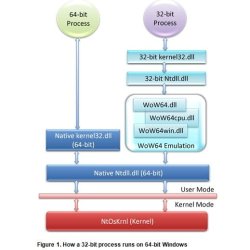
64-bit.JPG

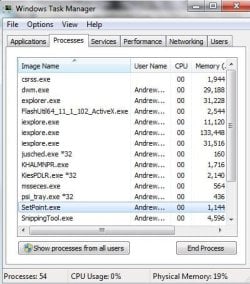
You can look in Task Manager under the Processes tab and it should notify you whether it is a 32-bit or 64-bit application.

task.JPG
 

My Computer

Computer Manufacturer/Model Number
HP Pavilion Elite 495UK
OS
Windows 7 Ultimate SP1 64-Bit
CPU
Intel Core i7 870 @ 2.93GHz
Motherboard
MSI 2A9C (CPU1)
Memory
8Gb Dual-Channel DDR3 @ 664MHz
Graphics Card(s)
nVidia GeForce GTX 460 1024MB dedicated RAM
Sound Card
Realtek HD Audio
Monitor(s) Displays
HP2310i
Screen Resolution
1920 x 1080
Hard Drives
1x1954GB Hitachi HDS22020ALA 330 (RAID), 1x1954GB Hitachi External for backup and storage
PSU
460W
Case
HP Elite
Cooling
Air cooled
Keyboard
Logitech K750 solar-powered keyboard
Mouse
Logitech Wireless M180 mouse
Internet Speed
2Mb
Other Info
Pure Avanti Flow Internet Radio with iPod Dock, 64Gb iPod, HP USB Speakers, Sony MDR-V500 Headphones, Sony Vaio F-Series Laptop
However, I am still interested in knowing how to identify the 32-bit from the 64-bit programs.

Also, let's say that although I have no problems with programs in the wrong folders, what is wrong with moving them to their correct folder?

I'm not sure there an easy way to identify 32-bit versus 64-bit from looking at file properties of any type. Normally, you would just look to see if the app was in Program Files or Program Files (x86) and draw a conclusion---which method you have foiled.

Moving non-personal files around within C is begging for problems. Try it and see how you make out. The registry would point to location A and you would have moved a file to location B.
 

My Computer

Computer type
PC/Desktop
Computer Manufacturer/Model Number
Ignatz Special; 4 speed manual gearbox; factory air conditioning; one of one
OS
Windows 7 Home Premium SP1, 64-bit
CPU
Intel Skylake i5-6600K, not overclocked
Motherboard
AsRock Z170M Extreme 4, micro ATX
Memory
8 GB HyperX DDR4-2666 (2 x 4 GB)
Graphics Card(s)
none; graphics are integrated on CPU
Sound Card
onboard: Realtek ALC1150; external: USB Behringer UF0-202
Monitor(s) Displays
Dell S2340M 23 inch IPS
Screen Resolution
1600 x 900
Hard Drives
System: Crucial MX100 series SSD, 128 GB;
Data: Samsung Spinpoint 103SJ, 1 TB;
Backup: WD Caviar Green WD30EZRX-00D8PB0, 3 TB
PSU
Rosewill SilentNight 500 watt fanless, semi-modular
Case
Antec Solo II
Cooling
Noctua NH-U12S; Noctua F12 intake, Noctua S12A exhaust
Keyboard
Microsoft 200 6JH-00001 USB
Mouse
Dell or Microsoft optical wired; USB
Antivirus
Microsoft Security Essentials and Malwarebytes Premium
Browser
Pale Moon
Other Info
All fans PWM; speeds at idle: CPU circa 500 rpm; intake circa 600 rpm; exhaust circa 600 rpm; CPU temps 27 idle and 47 C load in a warm room (27 C/81 F) when running Intel Extreme Tuning Utility stress test.
Thanks all. I can now identify 32-bit from 64-bit. However, for the time being, I think I'll just leave things as they are. And, maybe later, if I feel adventurous, I'll change some programs to their proper folders. My main concern is ignaatzatsonic's counseling on that "...Moving non-personal files around within C is begging for problems. Try it and see how you make out. The registry would point to location A and you would have moved a file to location B."
 

My Computer

Computer Manufacturer/Model Number
Gateway DX4720-03/HP Pavilion dv6
OS
Windows 7 HP 64-bit
Memory
4GB/4GB
Antivirus
Avast Pro
Browser
Firefox, the latest
Back
Top