IDT HD sound only sound on left!!

mikkeXD

New member
Local time
9:11 AM
Messages
4
I am using HP Pavilion dv6 Notebook PC and when i am using headset. It only comes out in the left (using IDT HD sound driver) i dont know what to do it`s kinda annoying plzz help!!??:sarc:
 

My Computer My Computer

At a glance

Windows 7 Home Premium 64bit
Computer Manufacturer/Model Number
HP Pavilion dv6 Notebook PC
OS
Windows 7 Home Premium 64bit
I mean when i play ect: music, games and movies
 

My Computer My Computer

At a glance

Windows 7 Home Premium 64bit
Computer Manufacturer/Model Number
HP Pavilion dv6 Notebook PC
OS
Windows 7 Home Premium 64bit
Welcome to the forum mikkeXD
Open the “Show hidden icons” in the taskbar and locate the IDT icon then click on Open Audio Control Panel and a windows pop-up like mine

Then you can adjust all the settings to your choice.
Good luck
 

Attachments

  • IDT.jpg
    IDT.jpg
    40.1 KB · Views: 95

My Computer My Computer

At a glance

win7 home premium-64bit-SP1-IE9RTMIntel core2 duo - T6600 2.2GHZ4.00GbATI Mobility Radeon HD 4530
Computer Manufacturer/Model Number
HP pavilion DV6-Laptop
OS
win7 home premium-64bit-SP1-IE9RTM
CPU
Intel core2 duo - T6600 2.2GHZ
Memory
4.00Gb
Graphics Card(s)
ATI Mobility Radeon HD 4530
Sound Card
IDT audio Monitor
Screen Resolution
32Bpp,1366x768
Hard Drives
Western Digital 500Gb
Internet Speed
Fast DSL
I tried that first and it didnt work :cry:
 

My Computer My Computer

At a glance

Windows 7 Home Premium 64bit
Computer Manufacturer/Model Number
HP Pavilion dv6 Notebook PC
OS
Windows 7 Home Premium 64bit
Maybe there is something with your headset.
Did you try it on a radio or other devices?
 

My Computer My Computer

At a glance

win7 home premium-64bit-SP1-IE9RTMIntel core2 duo - T6600 2.2GHZ4.00GbATI Mobility Radeon HD 4530
Computer Manufacturer/Model Number
HP pavilion DV6-Laptop
OS
win7 home premium-64bit-SP1-IE9RTM
CPU
Intel core2 duo - T6600 2.2GHZ
Memory
4.00Gb
Graphics Card(s)
ATI Mobility Radeon HD 4530
Sound Card
IDT audio Monitor
Screen Resolution
32Bpp,1366x768
Hard Drives
Western Digital 500Gb
Internet Speed
Fast DSL
It's not that either i checked it
 

My Computer My Computer

At a glance

Windows 7 Home Premium 64bit
Computer Manufacturer/Model Number
HP Pavilion dv6 Notebook PC
OS
Windows 7 Home Premium 64bit
mikkeXD
Try this one
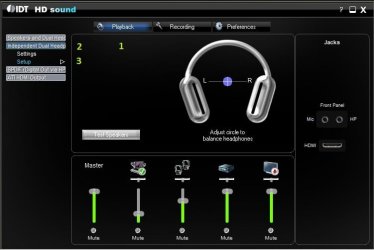
Open the IDT HD Interface then select PLAYBACK then INDEPENDENT DUAL HEADPHONES and finally select SETUP after that try to adjust the speakers balance like in this screenshot.
Headphones.jpg

maybe that will solve your problem.
 

My Computer My Computer

At a glance

win7 home premium-64bit-SP1-IE9RTMIntel core2 duo - T6600 2.2GHZ4.00GbATI Mobility Radeon HD 4530
Computer Manufacturer/Model Number
HP pavilion DV6-Laptop
OS
win7 home premium-64bit-SP1-IE9RTM
CPU
Intel core2 duo - T6600 2.2GHZ
Memory
4.00Gb
Graphics Card(s)
ATI Mobility Radeon HD 4530
Sound Card
IDT audio Monitor
Screen Resolution
32Bpp,1366x768
Hard Drives
Western Digital 500Gb
Internet Speed
Fast DSL
Back
Top