IE 11 64 Bit does not appear to install.

davpet

New member
Local time
5:36 AM
Messages
39
Hi All.

I would appreciate some help on this one and clarification where need be.

I am running Windows 7-64 Bit Pro with SP 1 installed. "Clean install."

I would like to install IE 11 64Bit but have been having some issues.

I first installed IE 11 after the clean install from MS Website. I believe though by default MS installs IE 11 32bit.

I then downloaded IE 11 64 bit as far I understand from the following link "Download Internet Explorer 11 for Windows 7 64-bit Edition and Windows Server 2008 R2 64-bit Edition from Official Microsoft Download Center" with file name IE11-Windows6.1-x64-en-us.exe. and size 53MB

I then uninstalled IE 11 and ran the file that I had downloaded to reinstall hoping that I would then see IE 11 64Bit in the About Internet Explorer Window according to what I have been reading, but alas 64Bit is not mentioned which I understand then would be 32Bit.

IE 11 Version: 11.0.9600.16428
RTM (KB2841134)

Any help or understanding that could be offered would be most appreciated.

With many thanks
Dave.
 

My Computer My Computer

Computer type
Laptop
Computer Manufacturer/Model Number
Toshiba
OS
Windows 7 SP1
CPU
Intel R Core
Memory
2 GB
Graphics Card(s)
ATI Mobility Radeon HD 5470
Monitor(s) Displays
Generic PNP Monitor
Screen Resolution
1366 * 786
Hard Drives
Toshiba MK5065GSXN ATA Device
PSU
Intel Core Duo 5 Processor
Other Info
Laptop Machine
Firstly,
Please confirm your system type,
Click Start and type in the search box,
system
Click on system information,
System type/ does it say x64 based PC ?
A 64 based system would not download the 32 bit version only a 32 bit system would be compatible with that specific download,
There is no choice but to download the 64 bit version on a 64 bit system,
Cheers.
 

My Computer My Computer

Computer type
PC/Desktop
Computer Manufacturer/Model Number
Custom assembled by me :}
OS
Win-7-Pro64bit 7-H-Prem-64bit
CPU
i7-5930K 2nd i9-9940x both water blocked VRM's too
Motherboard
ASUS SABERTOOTH X99 2nd ASUS x299 Apex
Memory
Trident-z 3200C14 2nd Trident-z 3600C16
Graphics Card(s)
EVGA 1080ti ftw3 2nd Titan Xp both water blocked
Sound Card
Built-in Realtek
Monitor(s) Displays
1-AOC G2460PG 24"G-Sync 144Hz/ 2nd 1-ASUS VG248QE 24" 144Hz
Screen Resolution
1920 x 1080 144Hz
Hard Drives
2-Samsung M.2 Evo & Evo Plus
2-Samsung 850 EVO 500GB SSD's/ 3-2.5 W.D. Black 1tb-&3-1tb/3-3.5 WD Black 1tb hdd's
PSU
EVGA SuperNOVA 1000-P2 2nd 1200-P2
Case
2-Corsair Obsidian Series 450D Black ATX Mid Tower
Cooling
Custom water loops
Keyboard
Logitech G710+/ 2nd Logitech G910
Mouse
2-RedDragon M901 Perdition 16400 dpi Gaming mouse = wired
Internet Speed
Comcast Ping 19ms 89.31mbps download speed 6.12mbps upload
Antivirus
Malwarebytes Pro/ Superantispyware Pro
Browser
FireFox & Pale moon
Other Info
2nd ASUS X299 Apex/Intel i9-9940x with Custom water loop/7H-Prem-x64/Corsair 450D case/Ram Trident-z 3600C16 4x8gb / Samsung970Evo plus 500gb SSD/Dual ssd EZ swap evo/PSU EVGA SuperNova 1200w-P2 80+Platinum/GPU Titan Xp /8-ML-140 on push-pull on 2-280GTX rads
Hi.

Thank you for your help. System Type confirms for me that it is an X64 Based PC. I hear what you are saying about downloading only 64 Bit.

I am a little confused though as many websites suggest including MS website I stand to be corrected here that IE 11 32 bit would be installed by default as many Active X controls on websites and many addons are still only 32 bit.

I also read that one can enable IE 11 then to run in 64 Bit but this is not the default setting however I cannot seem to find where that setting may be.

I do appreciate your help that I can obtain in this forum to help me further understand these matters.

Many thanks
 

My Computer My Computer

Computer type
Laptop
Computer Manufacturer/Model Number
Toshiba
OS
Windows 7 SP1
CPU
Intel R Core
Memory
2 GB
Graphics Card(s)
ATI Mobility Radeon HD 5470
Monitor(s) Displays
Generic PNP Monitor
Screen Resolution
1366 * 786
Hard Drives
Toshiba MK5065GSXN ATA Device
PSU
Intel Core Duo 5 Processor
Other Info
Laptop Machine
64 bit download contains both versions so there's nothing else to download,
32 bit systems are not that lucky,

Activate Enhanced Protection Mode to use all 64 bit Processes,
http://www.sevenforums.com/tutorials/280434-internet-explorer-10-enable-32-bit-64-bit-ie10-windows-7-a.html#post2312336
Verify with Task Manager,
task%20manager-right%20ckick-tb.jpg

With EPM not activated you'll see only one 64 bit process usually Managing the open *32 bit processes,
epm%20not%20activated.PNG

With EPM Activated you'll see One still Managing but All open Tabs are now using 64 bit Processes,
epm%20activated.PNG
 

My Computer My Computer

Computer type
PC/Desktop
Computer Manufacturer/Model Number
Custom assembled by me :}
OS
Win-7-Pro64bit 7-H-Prem-64bit
CPU
i7-5930K 2nd i9-9940x both water blocked VRM's too
Motherboard
ASUS SABERTOOTH X99 2nd ASUS x299 Apex
Memory
Trident-z 3200C14 2nd Trident-z 3600C16
Graphics Card(s)
EVGA 1080ti ftw3 2nd Titan Xp both water blocked
Sound Card
Built-in Realtek
Monitor(s) Displays
1-AOC G2460PG 24"G-Sync 144Hz/ 2nd 1-ASUS VG248QE 24" 144Hz
Screen Resolution
1920 x 1080 144Hz
Hard Drives
2-Samsung M.2 Evo & Evo Plus
2-Samsung 850 EVO 500GB SSD's/ 3-2.5 W.D. Black 1tb-&3-1tb/3-3.5 WD Black 1tb hdd's
PSU
EVGA SuperNOVA 1000-P2 2nd 1200-P2
Case
2-Corsair Obsidian Series 450D Black ATX Mid Tower
Cooling
Custom water loops
Keyboard
Logitech G710+/ 2nd Logitech G910
Mouse
2-RedDragon M901 Perdition 16400 dpi Gaming mouse = wired
Internet Speed
Comcast Ping 19ms 89.31mbps download speed 6.12mbps upload
Antivirus
Malwarebytes Pro/ Superantispyware Pro
Browser
FireFox & Pale moon
Other Info
2nd ASUS X299 Apex/Intel i9-9940x with Custom water loop/7H-Prem-x64/Corsair 450D case/Ram Trident-z 3600C16 4x8gb / Samsung970Evo plus 500gb SSD/Dual ssd EZ swap evo/PSU EVGA SuperNova 1200w-P2 80+Platinum/GPU Titan Xp /8-ML-140 on push-pull on 2-280GTX rads
Hi.

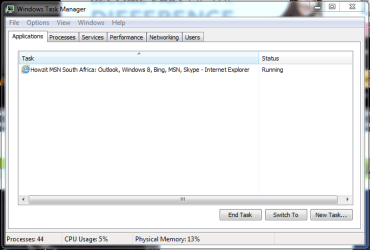
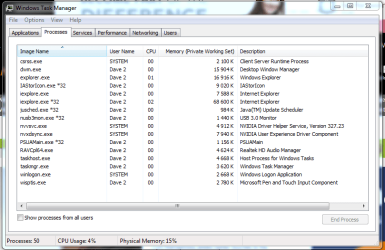
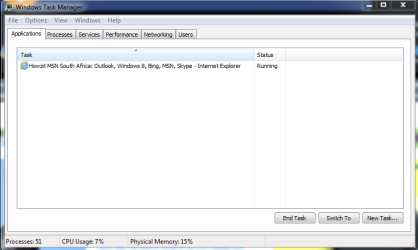
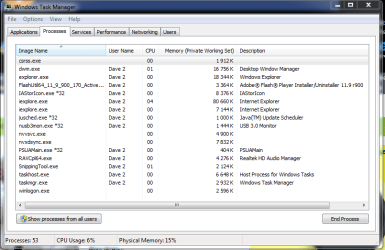
Thank you for the explanation I am gaining more insight as I go along. I have followed as suggested however I get slightly different results in my processes list.

The first two images is when I have both Enable Protected Mode and Enable Enhance Protected Mode unticked.

Image1.PNG

Image2.PNG

The next two images are when I have both Enable Protected Mode and Enable Enhanced Protected Mode ticked.

Image3.PNG

Image4.PNG

I take it that the absence of iexplore32 means that it is running in 64bit, would my conclusion be correct.

With many thanks
 

My Computer My Computer

Computer type
Laptop
Computer Manufacturer/Model Number
Toshiba
OS
Windows 7 SP1
CPU
Intel R Core
Memory
2 GB
Graphics Card(s)
ATI Mobility Radeon HD 5470
Monitor(s) Displays
Generic PNP Monitor
Screen Resolution
1366 * 786
Hard Drives
Toshiba MK5065GSXN ATA Device
PSU
Intel Core Duo 5 Processor
Other Info
Laptop Machine

My Computer My Computer

Computer type
PC/Desktop
Computer Manufacturer/Model Number
Custom assembled by me :}
OS
Win-7-Pro64bit 7-H-Prem-64bit
CPU
i7-5930K 2nd i9-9940x both water blocked VRM's too
Motherboard
ASUS SABERTOOTH X99 2nd ASUS x299 Apex
Memory
Trident-z 3200C14 2nd Trident-z 3600C16
Graphics Card(s)
EVGA 1080ti ftw3 2nd Titan Xp both water blocked
Sound Card
Built-in Realtek
Monitor(s) Displays
1-AOC G2460PG 24"G-Sync 144Hz/ 2nd 1-ASUS VG248QE 24" 144Hz
Screen Resolution
1920 x 1080 144Hz
Hard Drives
2-Samsung M.2 Evo & Evo Plus
2-Samsung 850 EVO 500GB SSD's/ 3-2.5 W.D. Black 1tb-&3-1tb/3-3.5 WD Black 1tb hdd's
PSU
EVGA SuperNOVA 1000-P2 2nd 1200-P2
Case
2-Corsair Obsidian Series 450D Black ATX Mid Tower
Cooling
Custom water loops
Keyboard
Logitech G710+/ 2nd Logitech G910
Mouse
2-RedDragon M901 Perdition 16400 dpi Gaming mouse = wired
Internet Speed
Comcast Ping 19ms 89.31mbps download speed 6.12mbps upload
Antivirus
Malwarebytes Pro/ Superantispyware Pro
Browser
FireFox & Pale moon
Other Info
2nd ASUS X299 Apex/Intel i9-9940x with Custom water loop/7H-Prem-x64/Corsair 450D case/Ram Trident-z 3600C16 4x8gb / Samsung970Evo plus 500gb SSD/Dual ssd EZ swap evo/PSU EVGA SuperNova 1200w-P2 80+Platinum/GPU Titan Xp /8-ML-140 on push-pull on 2-280GTX rads
Great stuff that certainly helps me a whole lot and clarifies many of the questions that I have had in this regard. Much appreciated.

Many thanks.
 

My Computer My Computer

Computer type
Laptop
Computer Manufacturer/Model Number
Toshiba
OS
Windows 7 SP1
CPU
Intel R Core
Memory
2 GB
Graphics Card(s)
ATI Mobility Radeon HD 5470
Monitor(s) Displays
Generic PNP Monitor
Screen Resolution
1366 * 786
Hard Drives
Toshiba MK5065GSXN ATA Device
PSU
Intel Core Duo 5 Processor
Other Info
Laptop Machine
~~~
...I have followed as suggested however I get slightly different results in my processes list.
~~~
You must restart the computer one time after enabling the Enhance Protected Mode (EPM) on the Internet Options or Internet Properties advanced tab.

After that one restart, you can toggle EPM off and on with that setting and then just restart IE.

Think of the main 64bit process as the parent process. Think of the processes that actually do the surfing and display the websites as children of that parent process. If you always get a 32bit children while EPM is enabled, then something is not quite right. Perhaps a plug-in is causing the parent process to launch 32bit plug-ins.
 

My Computer My Computer

Computer type
Laptop
Computer Manufacturer/Model Number
Employer provided Dell Latitude
OS
W7 Pro SP1 64bit
CPU
i7
Memory
8GB
Graphics Card(s)
Intel HD Graphics
Hard Drives
crappy SSD
Antivirus
Employer mandated Symantec Endpoint Protection
Browser
Pale Moon 64bit, IE11 64bit & Chrome 64bit
Back
Top