Solved IE 11 64 bit ?

JoeN

New member
Member
Local time
3:28 PM
Messages
68
Hope this is posted in the right place - how do I know if I have IE 11, 64 bit enabled or not - I have read all the info in these forums but I am soooo confused :-(

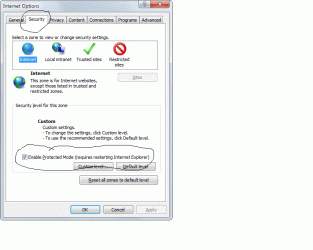
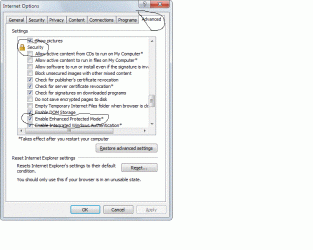
Here are some screenshots - maybe somebody can let me know what I have and if necessary what I have to do to enable 64 bit -


Thanks


Joe
 

Attachments

  • Untitled.gif
    Untitled.gif
    19.8 KB · Views: 2
  • Untitled 2.gif
    Untitled 2.gif
    44.5 KB · Views: 1
  • Untitled 3.gif
    Untitled 3.gif
    51.2 KB · Views: 1

My Computer

Computer type
PC/Desktop
Computer Manufacturer/Model Number
custom build
OS
win. 7 64 bit Home Premium
CPU
Intel i7 920 overclocked
Motherboard
Asus P6T
Memory
Corsair 6GB overclocked
Graphics Card(s)
Nivida GTX 960
Monitor(s) Displays
ViewSonic 2365 @ 1920 x 1080 DVI
Hard Drives
80 GB Segate
Antivirus
Avast
Browser
IE & Firefox
Hello Joe,

It looks like you have IE11 set properly to use 64-bit tab processes. Did you restart the PC afterwards to apply?

Internet Explorer 11 - Enable 64-bit Tab Processes for EPM

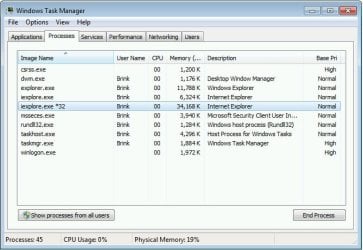
You can check in Task Manager (CTRL+SHIFT+ESC) in the Processes tab to see if all but one iexplore.exe names do not have *32 in the name.

processes.jpg
 

My Computer

Computer type
PC/Desktop
Computer Manufacturer/Model Number
Self built custom
OS
64-bit Windows 11 Pro for Workstations
CPU
Intel i7-8700K OC'd to 5 GHz
Motherboard
ASUS ROG Maximus XI Formula Z390
Memory
64 GB (4x16GB) G.SKILL TridentZ RGB DDR4 3600 MHz
Graphics Card(s)
ASUS ROG-STRIX-GTX1080TI-O11G-GAMING
Sound Card
Integrated
Monitor(s) Displays
2 x Samsung Odyssey G7 27"
Screen Resolution
2560x1440
Hard Drives
1TB Samsung 990 PRO M.2,
4TB Samsung 990 PRO PRO M.2,
TerraMaster F8 SSD Plus NAS
PSU
Seasonic Prime Titanium 850W
Case
Thermaltake Core P3
Cooling
Corsair Hydro H115i
Keyboard
Logitech wireless K800
Mouse
Logitech MX Master 4
Internet Speed
2 Gb/s Download and 100 Mb/s Upload
Antivirus
Malwarebyte Anti-Malware Premium
Browser
Google Chrome
Other Info
Logitech Z625 speaker system,
Logitech BRIO 4K Pro webcam,
HP Color LaserJet Pro MFP M477fdn,
APC SMART-UPS RT 1000 XL - SURT1000XLI,
Galaxy S23 Plus phone
Activate Enhanced Protection Mode to use all 64 bit Processes,
http://www.sevenforums.com/tutorials/280434-internet-explorer-10-enable-32-bit-64-bit-ie10-windows-7-a.html#post2312336
Verify with Task Manager,
task%20manager-right%20ckick-tb.jpg

With EPM not activated you'll see only one 64 bit process usually Managing the open *32 bit processes,
epm%20not%20activated.PNG

With EPM Activated you'll see One still Managing but All open Tabs are now using 64 bit Processes,
epm%20activated.PNG
 

My Computer

Computer type
PC/Desktop
Computer Manufacturer/Model Number
Custom assembled by me :}
OS
Win-7-Pro64bit 7-H-Prem-64bit
CPU
i7-5930K 2nd i9-9940x both water blocked VRM's too
Motherboard
ASUS SABERTOOTH X99 2nd ASUS x299 Apex
Memory
Trident-z 3200C14 2nd Trident-z 3600C16
Graphics Card(s)
EVGA 1080ti ftw3 2nd Titan Xp both water blocked
Sound Card
Built-in Realtek
Monitor(s) Displays
1-AOC G2460PG 24"G-Sync 144Hz/ 2nd 1-ASUS VG248QE 24" 144Hz
Screen Resolution
1920 x 1080 144Hz
Hard Drives
2-Samsung M.2 Evo & Evo Plus
2-Samsung 850 EVO 500GB SSD's/ 3-2.5 W.D. Black 1tb-&3-1tb/3-3.5 WD Black 1tb hdd's
PSU
EVGA SuperNOVA 1000-P2 2nd 1200-P2
Case
2-Corsair Obsidian Series 450D Black ATX Mid Tower
Cooling
Custom water loops
Keyboard
Logitech G710+/ 2nd Logitech G910
Mouse
2-RedDragon M901 Perdition 16400 dpi Gaming mouse = wired
Internet Speed
Comcast Ping 19ms 89.31mbps download speed 6.12mbps upload
Antivirus
Malwarebytes Pro/ Superantispyware Pro
Browser
FireFox & Pale moon
Other Info
2nd ASUS X299 Apex/Intel i9-9940x with Custom water loop/7H-Prem-x64/Corsair 450D case/Ram Trident-z 3600C16 4x8gb / Samsung970Evo plus 500gb SSD/Dual ssd EZ swap evo/PSU EVGA SuperNova 1200w-P2 80+Platinum/GPU Titan Xp /8-ML-140 on push-pull on 2-280GTX rads
I thought when I opened the "help or about" tab in IE 11 it would show I was using 64 bit ?

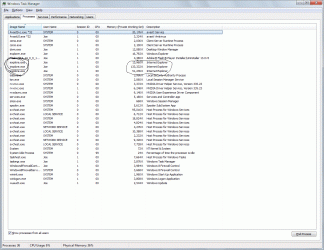
Here is a current screenshot from "task mgr." with 2 tabs open in IE 11 - looks like 64 bit processing is working -

Am I correct ?
 

Attachments

  • Untitled.gif
    Untitled.gif
    125 KB · Views: 9

My Computer

Computer type
PC/Desktop
Computer Manufacturer/Model Number
custom build
OS
win. 7 64 bit Home Premium
CPU
Intel i7 920 overclocked
Motherboard
Asus P6T
Memory
Corsair 6GB overclocked
Graphics Card(s)
Nivida GTX 960
Monitor(s) Displays
ViewSonic 2365 @ 1920 x 1080 DVI
Hard Drives
80 GB Segate
Antivirus
Avast
Browser
IE & Firefox
i always thought there was no 64-bit IE10 or 111, whenever i downgraded from IE9 to 8 it opened up the 64bit version when i clicked on it and i never use the 64bit version
 

My Computer

Computer type
Laptop
Computer Manufacturer/Model Number
Toshiba Satellite C655-S5547
OS
Windows 7 Pro 64bit
CPU
Intel(R) Core(TM) i3-2350M CPU @ 2.30 GHZ
Memory
4.00 GB
Graphics Card(s)
Intel HD Graphiics
Sound Card
Conexant HD Audio
Monitor(s) Displays
Generic PnP Monitor
Screen Resolution
1366 x 768 x 32 bits (4294967296 colors) @ 60 Hz
Hard Drives
TI106321W0B(C:) 450GB
Keyboard
Standard PS/2 Keyboard
Mouse
Synaptics Pointing Device
Internet Speed
51.68 mb/s download and 12.08 mb/s upload as of 6/24/15
Antivirus
Webroot Secure Anywhere
Browser
IE11, Mozilla Firefox 41.1.01, and Google Chrome if I must
I thought when I opened the "help or about" tab in IE 11 it would show I was using 64 bit ?

Here is a current screenshot from "task mgr." with 2 tabs open in IE 11 - looks like 64 bit processing is working -

Am I correct ?

That looks correct to me for 64-bit IE11. :)
 

My Computer

Computer type
PC/Desktop
Computer Manufacturer/Model Number
Self built custom
OS
64-bit Windows 11 Pro for Workstations
CPU
Intel i7-8700K OC'd to 5 GHz
Motherboard
ASUS ROG Maximus XI Formula Z390
Memory
64 GB (4x16GB) G.SKILL TridentZ RGB DDR4 3600 MHz
Graphics Card(s)
ASUS ROG-STRIX-GTX1080TI-O11G-GAMING
Sound Card
Integrated
Monitor(s) Displays
2 x Samsung Odyssey G7 27"
Screen Resolution
2560x1440
Hard Drives
1TB Samsung 990 PRO M.2,
4TB Samsung 990 PRO PRO M.2,
TerraMaster F8 SSD Plus NAS
PSU
Seasonic Prime Titanium 850W
Case
Thermaltake Core P3
Cooling
Corsair Hydro H115i
Keyboard
Logitech wireless K800
Mouse
Logitech MX Master 4
Internet Speed
2 Gb/s Download and 100 Mb/s Upload
Antivirus
Malwarebyte Anti-Malware Premium
Browser
Google Chrome
Other Info
Logitech Z625 speaker system,
Logitech BRIO 4K Pro webcam,
HP Color LaserJet Pro MFP M477fdn,
APC SMART-UPS RT 1000 XL - SURT1000XLI,
Galaxy S23 Plus phone
Thanks Brink
 

My Computer

Computer type
PC/Desktop
Computer Manufacturer/Model Number
custom build
OS
win. 7 64 bit Home Premium
CPU
Intel i7 920 overclocked
Motherboard
Asus P6T
Memory
Corsair 6GB overclocked
Graphics Card(s)
Nivida GTX 960
Monitor(s) Displays
ViewSonic 2365 @ 1920 x 1080 DVI
Hard Drives
80 GB Segate
Antivirus
Avast
Browser
IE & Firefox
You're welcome. Glad we could help. :)
 

My Computer

Computer type
PC/Desktop
Computer Manufacturer/Model Number
Self built custom
OS
64-bit Windows 11 Pro for Workstations
CPU
Intel i7-8700K OC'd to 5 GHz
Motherboard
ASUS ROG Maximus XI Formula Z390
Memory
64 GB (4x16GB) G.SKILL TridentZ RGB DDR4 3600 MHz
Graphics Card(s)
ASUS ROG-STRIX-GTX1080TI-O11G-GAMING
Sound Card
Integrated
Monitor(s) Displays
2 x Samsung Odyssey G7 27"
Screen Resolution
2560x1440
Hard Drives
1TB Samsung 990 PRO M.2,
4TB Samsung 990 PRO PRO M.2,
TerraMaster F8 SSD Plus NAS
PSU
Seasonic Prime Titanium 850W
Case
Thermaltake Core P3
Cooling
Corsair Hydro H115i
Keyboard
Logitech wireless K800
Mouse
Logitech MX Master 4
Internet Speed
2 Gb/s Download and 100 Mb/s Upload
Antivirus
Malwarebyte Anti-Malware Premium
Browser
Google Chrome
Other Info
Logitech Z625 speaker system,
Logitech BRIO 4K Pro webcam,
HP Color LaserJet Pro MFP M477fdn,
APC SMART-UPS RT 1000 XL - SURT1000XLI,
Galaxy S23 Plus phone
I have a similar problem.

I am running Windows 7 64 bit Pro and I am trying to get IE11 to run in 64 bit mode with no success.

I have enabled protected mode and restarted the computer, and I even disabled all addons because I read somewhere if there was a 32 bit one enabled, then IE 11 would not use 64 bit mode. Yet, I still get the 32 bit iexplorer processes in the task bar.

Could I be missing another setting or checkbox?
 

My Computer

Computer type
PC/Desktop
OS
Windows 7 64 bit Professional
Hi and welcome to SevenForums,
Use the link above my signature to Fill in your system spec's page,
Add which security suite/ 's you have installed as well as any third party utilities like ccleaner.......
Also see post #4 and issue a screen shot of your Processes page in Task Manager, The entire page would be best ;)
Also for a better idea of what's going on,
Click Start and type in the search box,
msconfig
Click on the suggestion on top or hit the Enter key,
Go to the Startup section and take some screen shots for a complete list,
Go to the Services section and on the bottom left Check the box to Hide All Microsoft services,
Repeat the screen shots,
See the links above my signature on how to take and upload screen shots here,
Cheers.
 

My Computer

Computer type
PC/Desktop
Computer Manufacturer/Model Number
Custom assembled by me :}
OS
Win-7-Pro64bit 7-H-Prem-64bit
CPU
i7-5930K 2nd i9-9940x both water blocked VRM's too
Motherboard
ASUS SABERTOOTH X99 2nd ASUS x299 Apex
Memory
Trident-z 3200C14 2nd Trident-z 3600C16
Graphics Card(s)
EVGA 1080ti ftw3 2nd Titan Xp both water blocked
Sound Card
Built-in Realtek
Monitor(s) Displays
1-AOC G2460PG 24"G-Sync 144Hz/ 2nd 1-ASUS VG248QE 24" 144Hz
Screen Resolution
1920 x 1080 144Hz
Hard Drives
2-Samsung M.2 Evo & Evo Plus
2-Samsung 850 EVO 500GB SSD's/ 3-2.5 W.D. Black 1tb-&3-1tb/3-3.5 WD Black 1tb hdd's
PSU
EVGA SuperNOVA 1000-P2 2nd 1200-P2
Case
2-Corsair Obsidian Series 450D Black ATX Mid Tower
Cooling
Custom water loops
Keyboard
Logitech G710+/ 2nd Logitech G910
Mouse
2-RedDragon M901 Perdition 16400 dpi Gaming mouse = wired
Internet Speed
Comcast Ping 19ms 89.31mbps download speed 6.12mbps upload
Antivirus
Malwarebytes Pro/ Superantispyware Pro
Browser
FireFox & Pale moon
Other Info
2nd ASUS X299 Apex/Intel i9-9940x with Custom water loop/7H-Prem-x64/Corsair 450D case/Ram Trident-z 3600C16 4x8gb / Samsung970Evo plus 500gb SSD/Dual ssd EZ swap evo/PSU EVGA SuperNova 1200w-P2 80+Platinum/GPU Titan Xp /8-ML-140 on push-pull on 2-280GTX rads
java 64 bit applet in IE 11 on Win 7 64 bit does not start

I try to use java 64 bit application in IE11 on Win 7 Pro 64 bit. I did the two steps above, restarted the computer and when I check the presence of Java, it shows in 64 bit tab and process. When I use some webpage that requires 64 bit java, it openes in 32 IE and I got the message that Java is not installed (I did not install 32 bit Java) and a square instead of application. Moreover, Java Helpers (add-ons) are recognized as incompatible.
When I install the 32 bit java, the web page (www.pmod.com -> support, you need to have login there) loads the applet for 32 bit, but then the applet does not work, as it requires several GB of RAM.
On a forum of Win 8, I found on the web to fix that the tabs of IE11 come in 32 bit mode, as you told. The page http://www.eightforums.com/tutorials/32024-internet-explorer-11-enable-64-bit-tab-processes-epm.html explains how to enable 64 bit tabs in IE11 in Win 8 64 bit (they claim that it works also in Win 7 64 bit), yet the security option “Enable 64-bit processes for Enhanced Protected Mode” is simply not there, even if I restart the computer.
IE 11 is update 8.
The frustration I have, is that I have two systems running Win 7 Pro 64 bit both with IE11 update 8, and on one of them the 64 bit tabs do work and on the other not. I have no idea why.
Kind regards
Marcin
 

My Computer

Computer type
PC/Desktop
Computer Manufacturer/Model Number
HP
OS
Windows 7 Pro 64 bit, Windows Vista Pro 32 bit
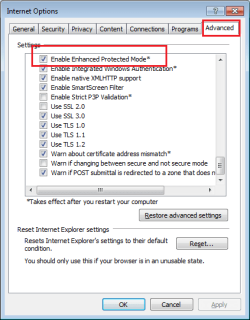
For IE11 on 64bit W7 OS, it should look like this:

IE11-EPM.png

edit: the link that you provided only applies to W8.
 

My Computer

Computer type
Laptop
Computer Manufacturer/Model Number
Employer provided Dell Latitude
OS
W7 Pro SP1 64bit
CPU
i7
Memory
8GB
Graphics Card(s)
Intel HD Graphics
Hard Drives
crappy SSD
Antivirus
Employer mandated Symantec Endpoint Protection
Browser
Pale Moon 64bit, IE11 64bit & Chrome 64bit
Thank you. Could you describe it? The PNG file you posted shows as an emty square.
Kind regards
Marcin Balcerzyk
 

My Computer

Computer type
PC/Desktop
Computer Manufacturer/Model Number
HP
OS
Windows 7 Pro 64 bit, Windows Vista Pro 32 bit

My Computer

Computer type
Laptop
Computer Manufacturer/Model Number
Employer provided Dell Latitude
OS
W7 Pro SP1 64bit
CPU
i7
Memory
8GB
Graphics Card(s)
Intel HD Graphics
Hard Drives
crappy SSD
Antivirus
Employer mandated Symantec Endpoint Protection
Browser
Pale Moon 64bit, IE11 64bit & Chrome 64bit
Thank you. Could you describe it? The PNG file you posted shows as an emty square.
Kind regards
Marcin Balcerzyk

Hi and welcome to SevenForums,
Take a screen shot of what your saying is an "Empty box" ?
The only reason I can think of,
Is you have a group policy preventing EPM from being activated = a company provided machine.

EPM is available to 64 bit systems only,
If not a company machine then make a new Administrator user account and test the issue,
Your showing on your system spec's page 2 os's,
Vista 32 bit this will not be compatible with ie11 or ie10 so I hope your not referring to this machine as having the issue,
ie10-11 are the only ie versions with EPM,
ie9 does not have it,
Cheers.
 

My Computer

Computer type
PC/Desktop
Computer Manufacturer/Model Number
Custom assembled by me :}
OS
Win-7-Pro64bit 7-H-Prem-64bit
CPU
i7-5930K 2nd i9-9940x both water blocked VRM's too
Motherboard
ASUS SABERTOOTH X99 2nd ASUS x299 Apex
Memory
Trident-z 3200C14 2nd Trident-z 3600C16
Graphics Card(s)
EVGA 1080ti ftw3 2nd Titan Xp both water blocked
Sound Card
Built-in Realtek
Monitor(s) Displays
1-AOC G2460PG 24"G-Sync 144Hz/ 2nd 1-ASUS VG248QE 24" 144Hz
Screen Resolution
1920 x 1080 144Hz
Hard Drives
2-Samsung M.2 Evo & Evo Plus
2-Samsung 850 EVO 500GB SSD's/ 3-2.5 W.D. Black 1tb-&3-1tb/3-3.5 WD Black 1tb hdd's
PSU
EVGA SuperNOVA 1000-P2 2nd 1200-P2
Case
2-Corsair Obsidian Series 450D Black ATX Mid Tower
Cooling
Custom water loops
Keyboard
Logitech G710+/ 2nd Logitech G910
Mouse
2-RedDragon M901 Perdition 16400 dpi Gaming mouse = wired
Internet Speed
Comcast Ping 19ms 89.31mbps download speed 6.12mbps upload
Antivirus
Malwarebytes Pro/ Superantispyware Pro
Browser
FireFox & Pale moon
Other Info
2nd ASUS X299 Apex/Intel i9-9940x with Custom water loop/7H-Prem-x64/Corsair 450D case/Ram Trident-z 3600C16 4x8gb / Samsung970Evo plus 500gb SSD/Dual ssd EZ swap evo/PSU EVGA SuperNova 1200w-P2 80+Platinum/GPU Titan Xp /8-ML-140 on push-pull on 2-280GTX rads
Back
Top