
Solved IE 11 and ability to get at sky router stats

Edit: upon re-reading this thread - I see where I failed to remember what I highlighted on the previous page: that the problematic computer uses a 32bit OS and therefore will not have the EPM option.


Just out of curiosity...

On the 64bit W7 computer: check the state of the EPM setting.

You should be able to get to the router with EPM on or off on that 64bit OS/browser.

You might have already tried this...
...compare the IE settings on the IE11 setup that works
...with the IE settings on the setup that fails.
In particular:
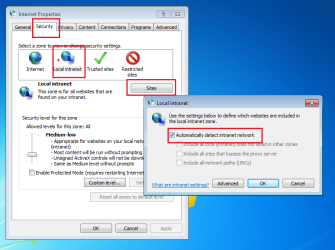
IE11.png
 
Last edited:

My Computer My Computer

At a glance

W7 Pro SP1 64biti78GBIntel HD Graphics
Computer type
Laptop
Computer Manufacturer/Model Number
Employer provided Dell Latitude
OS
W7 Pro SP1 64bit
CPU
i7
Memory
8GB
Graphics Card(s)
Intel HD Graphics
Hard Drives
crappy SSD
Antivirus
Employer mandated Symantec Endpoint Protection
Browser
Pale Moon 64bit, IE11 64bit & Chrome 64bit
I've tried switching everything off in tools; advanced ;security... no joy

the box for intranet is ticked....

great fun this:)

Thanks Al

not checked against other 64bit PC yet...
 

My Computer My Computer

At a glance

windows 7 32 bit
Computer type
PC/Desktop
Computer Manufacturer/Model Number
dell
OS
windows 7 32 bit
well I'm back on IE11...(I need it for a website I manage) pings work fine.

I'm no nearer solving the 192.168.0.1 issue though... I can get to the router just fine on IE9.. but can't on IE 10 or 11.

not a major problem because my laptop (also win7 pro (32) and IE11) and my wife's PC (win 7 pro (64) and IE11) can get to it no problem.

I suppose what I'm saying is it is a local setting which is causing this as it works on the laptop (same system) and the 64 bit PC with no issues.

Al
 

My Computer My Computer

At a glance

windows 7 32 bit
Computer type
PC/Desktop
Computer Manufacturer/Model Number
dell
OS
windows 7 32 bit
All that I can suggest is to start comparing settings between a working computer and the problematic computer.
 

My Computer My Computer

At a glance

W7 Pro SP1 64biti78GBIntel HD Graphics
Computer type
Laptop
Computer Manufacturer/Model Number
Employer provided Dell Latitude
OS
W7 Pro SP1 64bit
CPU
i7
Memory
8GB
Graphics Card(s)
Intel HD Graphics
Hard Drives
crappy SSD
Antivirus
Employer mandated Symantec Endpoint Protection
Browser
Pale Moon 64bit, IE11 64bit & Chrome 64bit
Thanks.

I've been through as many settings as I can find and they all look identical. I'm obviously missing the vital one...but do not know where to look anymore.

Al
 

My Computer My Computer

At a glance

windows 7 32 bit
Computer type
PC/Desktop
Computer Manufacturer/Model Number
dell
OS
windows 7 32 bit
Last edited:

My Computer My Computer

At a glance

W7 Pro SP1 64biti78GBIntel HD Graphics
Computer type
Laptop
Computer Manufacturer/Model Number
Employer provided Dell Latitude
OS
W7 Pro SP1 64bit
CPU
i7
Memory
8GB
Graphics Card(s)
Intel HD Graphics
Hard Drives
crappy SSD
Antivirus
Employer mandated Symantec Endpoint Protection
Browser
Pale Moon 64bit, IE11 64bit & Chrome 64bit
Yes, sorry I should be more specific. Yes I've tried all of the suggestions so far without any success.
Thanks Al
 

My Computer My Computer

At a glance

windows 7 32 bit
Computer type
PC/Desktop
Computer Manufacturer/Model Number
dell
OS
windows 7 32 bit
Forgive me if this has been suggested before - I did not feel like reading each post yet again:
As silly as it sounds, you might try uninstalling any antivirus app and/or firewall tool.
And/or briefly turning the firewall off.


Also, I'm going to guess that both the working 64bit IE11 and the broken 32bit IE11 are on computers that list the current network as "Home network" in the Network and Sharing Center.


Did we try this: Fix Internet Explorer issues to make IE fast, safe and stable
 

My Computer My Computer

At a glance

W7 Pro SP1 64biti78GBIntel HD Graphics
Computer type
Laptop
Computer Manufacturer/Model Number
Employer provided Dell Latitude
OS
W7 Pro SP1 64bit
CPU
i7
Memory
8GB
Graphics Card(s)
Intel HD Graphics
Hard Drives
crappy SSD
Antivirus
Employer mandated Symantec Endpoint Protection
Browser
Pale Moon 64bit, IE11 64bit & Chrome 64bit
Thanks, I think your suggestions would be valid if I had the problem on all versions of IE. As it is only on ie 10 and above I think it has to be a local settings issue.. but I'm open to any suggestions.
I have tried that link you provided and run the suggestions to no avail... Its going to be something very simple in the end.. I think.

Thanks again
 

My Computer My Computer

At a glance

windows 7 32 bit
Computer type
PC/Desktop
Computer Manufacturer/Model Number
dell
OS
windows 7 32 bit
Something is different about IE10 and IE11. It is just a guess that the antivirus app might be blocking some aspect of IE10 or IE11 that it is not blocking in IE9. It is a long short, but we are running out of ideas :-)
 

My Computer My Computer

At a glance

W7 Pro SP1 64biti78GBIntel HD Graphics
Computer type
Laptop
Computer Manufacturer/Model Number
Employer provided Dell Latitude
OS
W7 Pro SP1 64bit
CPU
i7
Memory
8GB
Graphics Card(s)
Intel HD Graphics
Hard Drives
crappy SSD
Antivirus
Employer mandated Symantec Endpoint Protection
Browser
Pale Moon 64bit, IE11 64bit & Chrome 64bit
I'll give turning off the anti-virus another shot.. Thanks -Al
 

My Computer My Computer

At a glance

windows 7 32 bit
Computer type
PC/Desktop
Computer Manufacturer/Model Number
dell
OS
windows 7 32 bit
OK, everything I can think of:

Tools> Internet Options> Connections tab> LAN Settings> make sure Use a proxy server for your LAN...is unchecked

Start> In search box type Network and Sharing Center> Enter> Change Adapter Settings upper left> Right click Local Area Connection> Properties> Uncheck Internet Protocol Version 6(TCP/IP V6)> OK> See if any help, if not recheck and OK

Also, see if your router shows in the Network page on your desktop> If so, right click it and see if there is a choice of View device webpage> See if that gives you the same issue

A Guy
 

My Computer My Computer

At a glance

Windows 10 Home x64INTEL Core i5-750 Quad-Core 3.37GHzHyperX Fury Black Series 8GB (2 x 4GB) 1866MhzEVGA GeForce GTX 750 Superclocked 1GB 128-Bit...
Computer type
PC/Desktop
OS
Windows 10 Home x64
CPU
INTEL Core i5-750 Quad-Core 3.37GHz
Motherboard
ASUS P7P55D
Memory
HyperX Fury Black Series 8GB (2 x 4GB) 1866Mhz
Graphics Card(s)
EVGA GeForce GTX 750 Superclocked 1GB 128-Bit GDDR5
Monitor(s) Displays
LG 32MA68HY 32" IPS
Screen Resolution
1920 x 1080
Hard Drives
Samsung 840 Evo 120GB, SEAGATE 500GB Barracuda® 7200.12, SATA 3 Gb/s, 7200 RPM, 16MB cache
PSU
ANTEC TruePower New TP-550, 80 PLUS, 550W
Case
ANTEC Three Hundred Illusion
Cooling
COOLER MASTER Hyper 212 Plus, 4 x 120mm 1 x 140mm Noctua's
Internet Speed
85 + Mbps
Antivirus
Avast
Browser
Vivaldi
Thanks for these, none I'm afraid made any difference.. proxy is unchecked, removing ipv6 no change and the router is not specifically shown in network connection.

Al
 

My Computer My Computer

At a glance

windows 7 32 bit
Computer type
PC/Desktop
Computer Manufacturer/Model Number
dell
OS
windows 7 32 bit
I turned off MS essentials but still no joy I'm afraid.

Al
 

My Computer My Computer

At a glance

windows 7 32 bit
Computer type
PC/Desktop
Computer Manufacturer/Model Number
dell
OS
windows 7 32 bit
I recall a thread where the AV was uninstalled...
...then IE was reverted all the way back to IE8
...then IE11 was installed while there was no AV installed.

It might not be worth attempting, but again - running short of ideas.
 

My Computer My Computer

At a glance

W7 Pro SP1 64biti78GBIntel HD Graphics
Computer type
Laptop
Computer Manufacturer/Model Number
Employer provided Dell Latitude
OS
W7 Pro SP1 64bit
CPU
i7
Memory
8GB
Graphics Card(s)
Intel HD Graphics
Hard Drives
crappy SSD
Antivirus
Employer mandated Symantec Endpoint Protection
Browser
Pale Moon 64bit, IE11 64bit & Chrome 64bit
This is getting to be fun! I decided to do a clean install of W7, I wanted to update to 64bit anyway.
Guess what...no change...aghhhhhhhhhh.

Now completlel out of ideas. I felt sure a clean install would fix it.....

Happy new year ..Al
 

My Computer My Computer

At a glance

windows 7 32 bit
Computer type
PC/Desktop
Computer Manufacturer/Model Number
dell
OS
windows 7 32 bit
I feel for you mate. Reinstalling the OS is a drastic and long winded undertaking. To be met with the same issue is dis-heartening. Clearly internet explorer 11 does not like something in one of your essential hardware drivers or setup on this specific computer. But trying to problem solve is like looking for a needle in a haystack. As much as I love computers I hate these sorts of issues. Especially when so called 'upgrades' create them and break functionality. A lot of people swear blind by IE10 and IE11 but I have my own frustrations with them and wish IE9 was the latest browser. This functioned fine. The pace of change is too much, too many changes/updates breaking stuff which wasn't broken and it is pretty sad. Unfortunately IE9 will soon fall off the pace as sites begin to optimise and only support latest versions despite the bugs. You are compelled to move to IE11. I have even lost faith with adobe and flash with their constant updates and performance issues!

Sadly I expect updates to work better and receive more thorough QA testing but they don't. I wish I had more time to wrestle with the issues but my wife says she is gonna divorce me if I spend much more time with the computer. A computer I seem to spend more time sweating on and looking into bugs than I do actually enjoying the thing!

I hope you do eventually get to the bottom of this. Blame IE11 and Microsoft for tinkering with sonething that once worked so well!
 

My Computer My Computer

At a glance

Windows 7 Ultimate 64 bitSandybridge 2820 QM 2.3 ghz8 gbAMD Radeon 6970m
Computer type
Laptop
Computer Manufacturer/Model Number
Alienware M17RX3
OS
Windows 7 Ultimate 64 bit
CPU
Sandybridge 2820 QM 2.3 ghz
Memory
8 gb
Graphics Card(s)
AMD Radeon 6970m
Sound Card
Integrated
Monitor(s) Displays
Laptop 17"
Screen Resolution
1980x1080
Hard Drives
750 gb mechanical (7,200RPM) Seagate Momentous paired with OCZ Synapse 128 gb SSD cache drive
Internet Speed
55 mbits download, 12 mbits download
Antivirus
Microsoft Security Essentials
Browser
IE11, Mozilla
Thanks for this. It is quite a pain, although not a massive one, as I can view the router through my other PC and via my ipad or iphone... I just would like to understand it.

If I ping the router from the affected PC it comes back with no issues. Typing 192.168.0.1 on my browser just gets a spinning wheel and eventual timeout.. no error codes are given...

I log it here if I find a solution.

Thanks again.
 

My Computer My Computer

At a glance

windows 7 32 bit
Computer type
PC/Desktop
Computer Manufacturer/Model Number
dell
OS
windows 7 32 bit
or even " I'll log it here "
 

My Computer My Computer

At a glance

windows 7 32 bit
Computer type
PC/Desktop
Computer Manufacturer/Model Number
dell
OS
windows 7 32 bit
The answer appears.... I just hope no one suggested this and I missed it!
I knew it would be something silly..!
I went to internet options, connections, Lan settings and unchecked the 'automatically detect settings' and that was it..arghhhh!
not sure if it will affect anything else... trial and error I suppose.
Thanks to everyone who offered suggestions and has followed this thread.. it seems to have been going on forever.
Al
 

My Computer My Computer

At a glance

windows 7 32 bit
Computer type
PC/Desktop
Computer Manufacturer/Model Number
dell
OS
windows 7 32 bit
Back
Top