
- Local time
- 3:16 PM
- Messages
- 8,138
Edit: upon re-reading this thread - I see where I failed to remember what I highlighted on the previous page: that the problematic computer uses a 32bit OS and therefore will not have the EPM option.
Just out of curiosity...
On the 64bit W7 computer: check the state of the EPM setting.
You should be able to get to the router with EPM on or off on that 64bit OS/browser.
You might have already tried this...
...compare the IE settings on the IE11 setup that works
...with the IE settings on the setup that fails.
In particular:
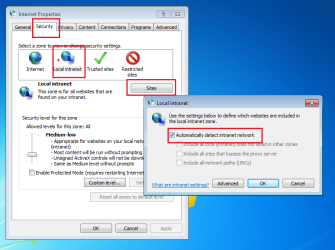
Just out of curiosity...
On the 64bit W7 computer: check the state of the EPM setting.
You should be able to get to the router with EPM on or off on that 64bit OS/browser.
You might have already tried this...
...compare the IE settings on the IE11 setup that works
...with the IE settings on the setup that fails.
In particular:
Last edited:
My Computer
At a glance
W7 Pro SP1 64biti78GBIntel HD Graphics
- Computer type
- Laptop
- Computer Manufacturer/Model Number
- Employer provided Dell Latitude
- OS
- W7 Pro SP1 64bit
- CPU
- i7
- Memory
- 8GB
- Graphics Card(s)
- Intel HD Graphics
- Hard Drives
- crappy SSD
- Antivirus
- Employer mandated Symantec Endpoint Protection
- Browser
- Pale Moon 64bit, IE11 64bit & Chrome 64bit


