Solved IE 11 Tracking

bej

New member
Power User
Local time
5:31 PM
Messages
325
Location
NV, Amerika
Is there anyway to stop IE 11 from tracking my online activity ?
IE 11 is unchecked in Windows features and I've never used it, anyway
CCleaner seems to get rid of most IE 11 junk but, I have to use "Internet Options"
to get rid of it all (maybe).
Using Win 7/64.
 

My Computer

Computer type
PC/Desktop
Computer Manufacturer/Model Number
Home Built
OS
Windows 7 Home Pro SP1 64bit
CPU
Intel Xeon E-3 1240v2
Motherboard
HP
Memory
8GB
Graphics Card(s)
NVIDIA 300
Sound Card
Onboard
Monitor(s) Displays
Hanns G 25"
Screen Resolution
1920x1080
Hard Drives
Hitachi 2GB
PSU
Seasonic 430W
Case
Antec
Cooling
Stock
Keyboard
Logitech
Mouse
Logitech
Internet Speed
5MB
If you've never used it why would you think it's tracking you?
 

My Computer

Computer type
PC/Desktop
OS
Windows 11
Because every website I visit has full knowledge of where I've been and what I looked at.
This after closing Pale Moon and running CCleaner (all boxes checked, 7 passes).
I go to a website and it's obvious IE 11 has stored my data. Only other choice !!!
 

My Computer

Computer type
PC/Desktop
Computer Manufacturer/Model Number
Home Built
OS
Windows 7 Home Pro SP1 64bit
CPU
Intel Xeon E-3 1240v2
Motherboard
HP
Memory
8GB
Graphics Card(s)
NVIDIA 300
Sound Card
Onboard
Monitor(s) Displays
Hanns G 25"
Screen Resolution
1920x1080
Hard Drives
Hitachi 2GB
PSU
Seasonic 430W
Case
Antec
Cooling
Stock
Keyboard
Logitech
Mouse
Logitech
Internet Speed
5MB
I use Pale Moon as well. You should do the following at least, but there are many, many other things and with security comes cumbersomeness.

Go into Preferences | Privacy and chose use custom settings for history. Select the following:

All sites to store cookies and data.


Accept third-party cookies Never.

Keep until I close Pale Moon.

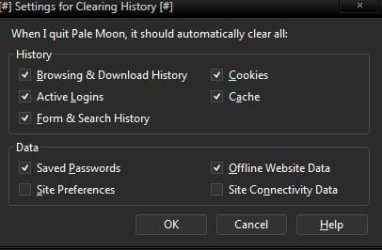
Clear history when Pale Moon closes. Use the options I have in this screenshot.

Now type in about:config in your address bar. Accept there are dragons in here crap. In about:config search for the word poison. For the pref canvas.poisondata set it to True.

You may also want to read about and fully understand how Sandboxie works and use it for the browser.


The reason why IE is storing cookies and what have you that shows up in Ccleaner is because other Apps use IE like the Windows Media Player. So cookies and what not will show up. IE is an integral part of the OS.
 

Attachments

  • 1.jpg
    1.jpg
    14.5 KB · Views: 5

My Computer

Computer type
PC/Desktop
OS
Windows 7 Ultimate x64
Of course if you use the password feature in Pale Moon don't clear passwords.
 

My Computer

Computer type
PC/Desktop
OS
Windows 7 Ultimate x64
Very informative...Thank you...I'm going to mark this solved.
 

My Computer

Computer type
PC/Desktop
Computer Manufacturer/Model Number
Home Built
OS
Windows 7 Home Pro SP1 64bit
CPU
Intel Xeon E-3 1240v2
Motherboard
HP
Memory
8GB
Graphics Card(s)
NVIDIA 300
Sound Card
Onboard
Monitor(s) Displays
Hanns G 25"
Screen Resolution
1920x1080
Hard Drives
Hitachi 2GB
PSU
Seasonic 430W
Case
Antec
Cooling
Stock
Keyboard
Logitech
Mouse
Logitech
Internet Speed
5MB
Back
Top