Solved IE disabled but still generating temp files?

scoobz

New member
Local time
10:26 AM
Messages
18
I've just done a clean install of home premium 64 and I'm going through the process of optimization. One of those optimizations is disabling IE however it still appears to be generating temporary internet files and other data even though I have 'removed' it (disabled in windows programs)

Seems a bit odd to me, any ideas?

Thanks in advance!
 

My Computer My Computer

OS
Win 7 Home Premium 64

My Computer My Computer

Computer type
PC/Desktop
Computer Manufacturer/Model Number
Custom assembled by me :}
OS
Win-7-Pro64bit 7-H-Prem-64bit
CPU
i7-5930K 2nd i9-9940x both water blocked VRM's too
Motherboard
ASUS SABERTOOTH X99 2nd ASUS x299 Apex
Memory
Trident-z 3200C14 2nd Trident-z 3600C16
Graphics Card(s)
EVGA 1080ti ftw3 2nd Titan Xp both water blocked
Sound Card
Built-in Realtek
Monitor(s) Displays
1-AOC G2460PG 24"G-Sync 144Hz/ 2nd 1-ASUS VG248QE 24" 144Hz
Screen Resolution
1920 x 1080 144Hz
Hard Drives
2-Samsung M.2 Evo & Evo Plus
2-Samsung 850 EVO 500GB SSD's/ 3-2.5 W.D. Black 1tb-&3-1tb/3-3.5 WD Black 1tb hdd's
PSU
EVGA SuperNOVA 1000-P2 2nd 1200-P2
Case
2-Corsair Obsidian Series 450D Black ATX Mid Tower
Cooling
Custom water loops
Keyboard
Logitech G710+/ 2nd Logitech G910
Mouse
2-RedDragon M901 Perdition 16400 dpi Gaming mouse = wired
Internet Speed
Comcast Ping 19ms 89.31mbps download speed 6.12mbps upload
Antivirus
Malwarebytes Pro/ Superantispyware Pro
Browser
FireFox & Pale moon
Other Info
2nd ASUS X299 Apex/Intel i9-9940x with Custom water loop/7H-Prem-x64/Corsair 450D case/Ram Trident-z 3600C16 4x8gb / Samsung970Evo plus 500gb SSD/Dual ssd EZ swap evo/PSU EVGA SuperNova 1200w-P2 80+Platinum/GPU Titan Xp /8-ML-140 on push-pull on 2-280GTX rads
Thanks for the quick reply, this is something I was looking at only yesterday coincidentally ;)

zjgpa9.jpg


Thanks for the link, I got the one I missed.

I'll see if ccleaner finds any more files.
 

My Computer My Computer

OS
Win 7 Home Premium 64
Yup it's still generating an index.dat almost immediately after cleaning.

This seems odd from a program that is disabled...
16knh36.jpg
 

My Computer My Computer

OS
Win 7 Home Premium 64
Use of Temporary Internet Files isn't exclusive to Internet Explorer. There are a number of other Windows components that do so as well, such as Windows Explorer and Windows Search. There is nothing unusual about this.
 

My Computer My Computer

Computer type
PC/Desktop
Computer Manufacturer/Model Number
HP
OS
Windows 7 Pro 64 bit
CPU
Xeon W3520
Memory
8 GB
Graphics Card(s)
Nvidia Geforce 210
Use of Temporary Internet Files isn't exclusive to Internet Explorer. There are a number of other Windows components that do so as well, such as Windows Explorer and Windows Search. There is nothing unusual about this.

:ditto:

Scoobz, here's what Microsoft says about Internet Explorer. I've highlighted what I think are the important points:

Remove all visible entry points to Internet Explorer and set another browser as default
(Applies to Windows XP, Windows Vista, Windows 7, Windows 8, and Windows 8.1)

Windows allows you to remove all the visible entry points to Internet Explorer and to set another browser as the default. Once access is removed and another browser is chosen as the default, all Internet Explorer icons and menu entries will be removed and Windows will no longer automatically launch Internet Explorer. However, it remains possible for apps and users to directly launch Internet Explorer.

------------------------------------

Turn off Internet Explorer
(Applies to Windows XP, Windows 7, Windows 8, and Windows 8.1)

Windows XP, Windows 7, Windows 8, and Windows 8.1 allow you to turn off Internet Explorer. If Internet Explorer is turned off, it's not available for use by any users on the PC and can't be launched for any reason, even if no other browser is available on the system. The program files to launch and use Internet Explorer are removed to a separate storage location as a backup copy so that a user can turn Internet Explorer back on.

When Internet Explorer is turned off using this feature there is minimal impact on third-party programs (and other parts of Windows itself) that call upon Internet Explorer app services, because the Internet Explorer files that provide functionality to third parties and other parts of Windows are left intact.

Source: How to turn Internet Explorer off - Windows Help

This might help explain why temp files are still being generated.
 

My Computer My Computer

Computer type
Laptop
Computer Manufacturer/Model Number
Sony Vaio VPCEB47GM Laptop
OS
Win 7 Pro 64-bit
CPU
Intel i5 2.4 Ghz
Memory
8GB DDR3
Graphics Card(s)
Intel HD 3000
Sound Card
IDT High Definition
Monitor(s) Displays
15.6 WGXA Anti-Glare LED
Screen Resolution
1280x800
Hard Drives
640Gb 7200rpm
Antivirus
MSE
Browser
Opera (primary) with IE9 backup
Yup it's still generating an index.dat almost immediately after cleaning.

This seems odd from a program that is disabled...
16knh36.jpg

Are you using the built in Administrator account for day to day use?

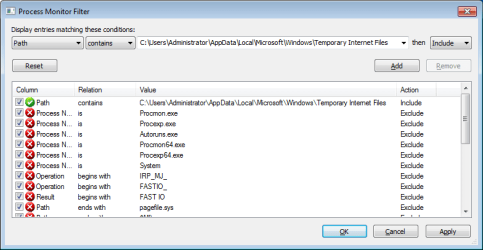
Process Monitor should show you what app or apps are accessing things in that folder.

Set the filter something like this:

filter.png
 

My Computer My Computer

Computer type
Laptop
Computer Manufacturer/Model Number
Employer provided Dell Latitude
OS
W7 Pro SP1 64bit
CPU
i7
Memory
8GB
Graphics Card(s)
Intel HD Graphics
Hard Drives
crappy SSD
Antivirus
Employer mandated Symantec Endpoint Protection
Browser
Pale Moon 64bit, IE11 64bit & Chrome 64bit
Hi,
No problem they may return so keep a watch out not sure what those listing are about hopefully the other posts will help figure it out :)
Cheers.
 

My Computer My Computer

Computer type
PC/Desktop
Computer Manufacturer/Model Number
Custom assembled by me :}
OS
Win-7-Pro64bit 7-H-Prem-64bit
CPU
i7-5930K 2nd i9-9940x both water blocked VRM's too
Motherboard
ASUS SABERTOOTH X99 2nd ASUS x299 Apex
Memory
Trident-z 3200C14 2nd Trident-z 3600C16
Graphics Card(s)
EVGA 1080ti ftw3 2nd Titan Xp both water blocked
Sound Card
Built-in Realtek
Monitor(s) Displays
1-AOC G2460PG 24"G-Sync 144Hz/ 2nd 1-ASUS VG248QE 24" 144Hz
Screen Resolution
1920 x 1080 144Hz
Hard Drives
2-Samsung M.2 Evo & Evo Plus
2-Samsung 850 EVO 500GB SSD's/ 3-2.5 W.D. Black 1tb-&3-1tb/3-3.5 WD Black 1tb hdd's
PSU
EVGA SuperNOVA 1000-P2 2nd 1200-P2
Case
2-Corsair Obsidian Series 450D Black ATX Mid Tower
Cooling
Custom water loops
Keyboard
Logitech G710+/ 2nd Logitech G910
Mouse
2-RedDragon M901 Perdition 16400 dpi Gaming mouse = wired
Internet Speed
Comcast Ping 19ms 89.31mbps download speed 6.12mbps upload
Antivirus
Malwarebytes Pro/ Superantispyware Pro
Browser
FireFox & Pale moon
Other Info
2nd ASUS X299 Apex/Intel i9-9940x with Custom water loop/7H-Prem-x64/Corsair 450D case/Ram Trident-z 3600C16 4x8gb / Samsung970Evo plus 500gb SSD/Dual ssd EZ swap evo/PSU EVGA SuperNova 1200w-P2 80+Platinum/GPU Titan Xp /8-ML-140 on push-pull on 2-280GTX rads
Thanks for the input everyone, it does help to know that it's standard behaviour and MS' official line on it.

UNI, I did get as far as the screen shot you posted but not really sure what to do beyond that. I clicked on apply and many, many entries remained.

I was using my last setup for 5 years and don't remember seeing the IE entries in Ccleaner although it could be something I became blind to over time ;)
 

My Computer My Computer

OS
Win 7 Home Premium 64
Hi,
You might post a screen shot of what was found possibly UNI can get an idea from it to go forward ?

Could be windows updates checking ?
 

My Computer My Computer

Computer type
PC/Desktop
Computer Manufacturer/Model Number
Custom assembled by me :}
OS
Win-7-Pro64bit 7-H-Prem-64bit
CPU
i7-5930K 2nd i9-9940x both water blocked VRM's too
Motherboard
ASUS SABERTOOTH X99 2nd ASUS x299 Apex
Memory
Trident-z 3200C14 2nd Trident-z 3600C16
Graphics Card(s)
EVGA 1080ti ftw3 2nd Titan Xp both water blocked
Sound Card
Built-in Realtek
Monitor(s) Displays
1-AOC G2460PG 24"G-Sync 144Hz/ 2nd 1-ASUS VG248QE 24" 144Hz
Screen Resolution
1920 x 1080 144Hz
Hard Drives
2-Samsung M.2 Evo & Evo Plus
2-Samsung 850 EVO 500GB SSD's/ 3-2.5 W.D. Black 1tb-&3-1tb/3-3.5 WD Black 1tb hdd's
PSU
EVGA SuperNOVA 1000-P2 2nd 1200-P2
Case
2-Corsair Obsidian Series 450D Black ATX Mid Tower
Cooling
Custom water loops
Keyboard
Logitech G710+/ 2nd Logitech G910
Mouse
2-RedDragon M901 Perdition 16400 dpi Gaming mouse = wired
Internet Speed
Comcast Ping 19ms 89.31mbps download speed 6.12mbps upload
Antivirus
Malwarebytes Pro/ Superantispyware Pro
Browser
FireFox & Pale moon
Other Info
2nd ASUS X299 Apex/Intel i9-9940x with Custom water loop/7H-Prem-x64/Corsair 450D case/Ram Trident-z 3600C16 4x8gb / Samsung970Evo plus 500gb SSD/Dual ssd EZ swap evo/PSU EVGA SuperNova 1200w-P2 80+Platinum/GPU Titan Xp /8-ML-140 on push-pull on 2-280GTX rads
Doesn't matter if you "dissabled" IE, as its a clean install ALL of the updates that relate to it will still download, ie the fix's etc hence the temp files.

Roy
 

My Computer My Computer

Computer type
PC/Desktop
Computer Manufacturer/Model Number
medionl/Aspire 6930G/acer x55a
OS
W7 home premium 32bit/W7HP 64bit/w10 tp insider ring
CPU
E5300 dual core
Motherboard
medion MS7366
Memory
3gb
Graphics Card(s)
Nvidia Geforce 7100 Nforce 630i
Monitor(s) Displays
avixc
Internet Speed
n (isp resticted to 72)
Antivirus
mse/pands
Browser
palemoon
Other Info
Belkin Fd7050 n USB using Railink RT2870 drivers, more upto date
Thanks Roy, we're a few days into this install so all major updates are done. It's more like new files being generated within a couple of minutes of a cleanup.

The only programs running are FF and WLM so it's got to be WLM I'm thinking.

I've just closed WLM a few minutes ago and no new temp internet files as of right now. I removed the RSS feeds but apparently they're still somewhere accessing the web.

(that's my best guess at the moment) :)
 

My Computer My Computer

OS
Win 7 Home Premium 64
UNI, I did get as far as the screen shot you posted but not really sure what to do beyond that. I clicked on apply and many, many entries remained.
After hitting apply, you close that window with OK. That should filter the results. Look in the column named Process Name. Those are the apps writing to that folder.

If I totally missed what you were asking, maybe watching me use Process Monitor might help you out. See this post.


Are you using the built in Administrator account for day to day use?

Btw, I am, I thought that was ok? I got tired of doing elevated command prompts ;)
Using the built in Administrator account for day to day use is not safe. If you do not understand why, then you should not be making the decision to change the way Micosoft set up the security model. The built in Administrator account to disabled by default. Some users (and companies) also rename the built in Administrator account for a bit more safety.

It would be best to...
...create a user:admin account
...create a user:standard account
...move you current profile files to the user:standard account
...disable the built in:Administrator account
...have a password on all accounts
...use the user:standard account for day to day use
...set the User Account Control slider to the top
That is the best.

Most people tend to use a user:admin account for day to day use.


If you don't mind me asking, what is it that you frequently do via elevated command prompts?
 

My Computer My Computer

Computer type
Laptop
Computer Manufacturer/Model Number
Employer provided Dell Latitude
OS
W7 Pro SP1 64bit
CPU
i7
Memory
8GB
Graphics Card(s)
Intel HD Graphics
Hard Drives
crappy SSD
Antivirus
Employer mandated Symantec Endpoint Protection
Browser
Pale Moon 64bit, IE11 64bit & Chrome 64bit
I closed and reopened procmon, entered the filter and the list was empty until I closed and opened WLM, I also got entries for HWMON when I opened that, ccleaner of course, cmdagent and WMIC.exe

I have 3 profiles on the machine admin, guest (disabled) and a user/admin account (which is still there but I disabled the logon screen)

I think I disabled UAC on the user account so to all intents and purposes it WAS a proper admin account. I don't do anything on a regular basis that demands elevated prompts, just in the overall setup of windows (there were loads of things to do, most requiring some sort of admin access).

I'll have to research how to copy the admin profile over to the user account. Edit: Not having a lot of luck, maybe I need to create a new account before I can copy the data over? "Delete" and "Copy to" are greyed out.

Thanks

Btw, this is a machine only I have access to so I'm not worried about local security.
 
Last edited:

My Computer My Computer

OS
Win 7 Home Premium 64
Now you see the apps using that folder :-)

The UAC setting is system wide. What it is set at in one account is what it is set at in all accounts. It should be set to the default or higher setting. Each time that you see the UAC prompt, you sould not think of it as an annoyance, you should think of it as proof that the OS security model is functioning. You should never run a browser from an admin account while the UAC is off.

Yes, create whatever user account you will be using, then copy Start menu items, documents, videos.... over to that account.
 

My Computer My Computer

Computer type
Laptop
Computer Manufacturer/Model Number
Employer provided Dell Latitude
OS
W7 Pro SP1 64bit
CPU
i7
Memory
8GB
Graphics Card(s)
Intel HD Graphics
Hard Drives
crappy SSD
Antivirus
Employer mandated Symantec Endpoint Protection
Browser
Pale Moon 64bit, IE11 64bit & Chrome 64bit
Now you see the apps using that folder :-)

The UAC setting is system wide. What it is set at in one account is what it is set at in all accounts. It should be set to the default or higher setting. Each time that you see the UAC prompt, you sould not think of it as an annoyance, you should think of it as proof that the OS security model is functioning. You should never run a browser from an admin account while the UAC is off.

Yes, create whatever user account you will be using, then copy Start menu items, documents, videos.... over to that account.

Thanks. Thing is I want an exact copy of what I'm using in the admin account. Is this the way to do it?
Fixing a corrupted user profile - Windows Help
 

My Computer My Computer

OS
Win 7 Home Premium 64
I don't know of a way to have everything copied. You might want to search this forum's tutorials.
 

My Computer My Computer

Computer type
Laptop
Computer Manufacturer/Model Number
Employer provided Dell Latitude
OS
W7 Pro SP1 64bit
CPU
i7
Memory
8GB
Graphics Card(s)
Intel HD Graphics
Hard Drives
crappy SSD
Antivirus
Employer mandated Symantec Endpoint Protection
Browser
Pale Moon 64bit, IE11 64bit & Chrome 64bit
I don't know of a way to have everything copied. You might want to search this forum's tutorials.

Turns out that was the right way to do it although I had some problems with permissions (solved by taking ownership of the appdata folder)

Thanks for the assistance :)
 

My Computer My Computer

OS
Win 7 Home Premium 64
Appdata - taking ownership

Turns out that was the right way to do it although I had some problems with permissions (solved by taking ownership of the appdata folder)

You'd better check that you haven't got a self-replicating application data folder.

C:\Users\Username\AppData\Local\Application Data\Application Data\Application Data\*

Endless replication usually happens if you take ownership of that folder.
 

My Computer My Computer

Computer type
Laptop
Computer Manufacturer/Model Number
ASUS
OS
Microsoft Windows 7 Home Premium 64-bit 7601 Multiprocessor Free Service Pack 1
CPU
AMD C-60 APU with Radeon(tm) HD Graphics
Motherboard
ASUSTeK COMPUTER INC. X501U
Memory
4.00 GB
Graphics Card(s)
AMD Radeon HD 6290 Graphics
Sound Card
(1) AMD High Definition Audio Device (2) Realtek High Defi
Screen Resolution
1366 x 768 x 32 bits (4294967296 colors) @ 60 Hz
Hard Drives
Hitachi HTS545050A7E380 SATA Disk Device
Antivirus
Comodo CIS & FW, SecureAplus App Whitelisting, Threatfire
Browser
Cyberfox 64bit, Opera 64bit, Airfox
Other Info
Spy-The-Spy, HitmanPro.Alert, Norton Connect Safe, MJRegWatcher, BitDefender TrafficLight, Voodoo Shield, Zemana AntiMalware
Back
Top