
IE disappears from taskbar on reboot

FYI IE and Windows Explorer are back on the taskbar as shortcuts.
UAC set to never notify
Windows 7 Pro 64 bit
Rootkit was enabled
 

Attachments

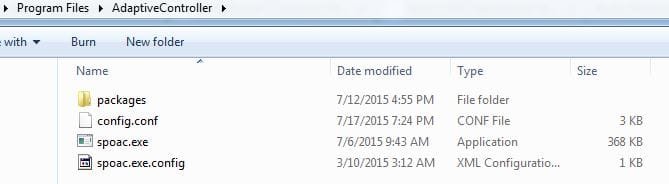
  • Adaptive.JPG
    Adaptive.JPG
    21.7 KB · Views: 8
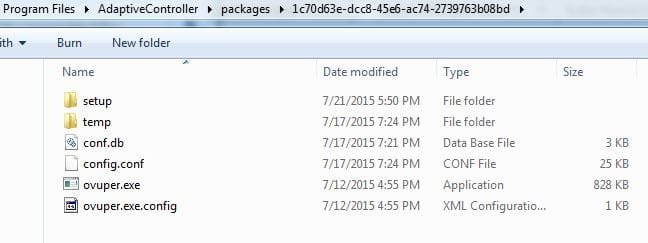
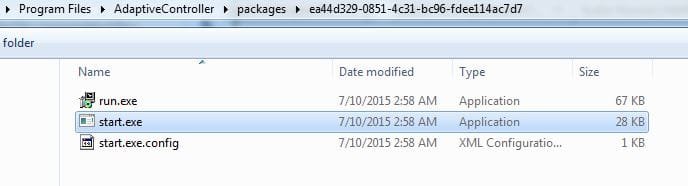
  • packages 1.JPG
    packages 1.JPG
    26.4 KB · Views: 8
  • packages 2.JPG
    packages 2.JPG
    22.8 KB · Views: 8
  • services.JPG
    services.JPG
    9.1 KB · Views: 0

My Computer My Computer

Computer type
PC/Desktop
Computer Manufacturer/Model Number
Custom Build
OS
Windows 7 Pro 64Bit
CPU
i7 5820K
Motherboard
MSI X99A SLI KRAIT EDITION LGA 2011-v3
Memory
CORSAIR Vengeance LPX 16GB 288-Pin DDR4 SDRAM
Graphics Card(s)
MSI GeForce GTX 970 100ME 4GB
PSU
Corsair RM850X 850W
Antivirus
Microsoft Security Essentials
~~~
UAC set to never notify
~~~
Windows 7 Pro 64 bit
~~~
If you have not already done so, please consider turning on the Enhanced Protected Mode within IE.

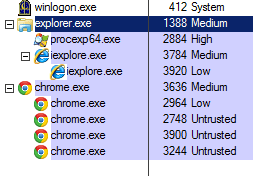
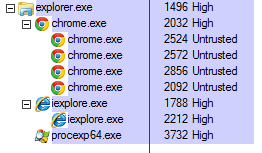
If you are not going to turn on the UAC, then do not use IE or Firefox. With the UAC turned off, IE and Firefox run at the High integrity level. If you do not know what that means, then you should not be making the decision to turn off the UAC.

UAC ON
UAC-ON.PNG

UAC OFF
UAC-OFF.PNG

Chrome is only a bit safer than IE or Firefox with the UAC turned off. Chrome still launches child processes at the Untrusted integrity level; however, the parent process is at the dangerous High integrity level.
 

My Computer My Computer

Computer type
Laptop
Computer Manufacturer/Model Number
Employer provided Dell Latitude
OS
W7 Pro SP1 64bit
CPU
i7
Memory
8GB
Graphics Card(s)
Intel HD Graphics
Hard Drives
crappy SSD
Antivirus
Employer mandated Symantec Endpoint Protection
Browser
Pale Moon 64bit, IE11 64bit & Chrome 64bit
I turned on UAC to the default setting and added Enable Enhanced Protected Mode and Enable 64 bit processes for enchanced protected mode. Now IE gives the error stopped working
 

My Computer My Computer

Computer type
PC/Desktop
Computer Manufacturer/Model Number
Custom Build
OS
Windows 7 Pro 64Bit
CPU
i7 5820K
Motherboard
MSI X99A SLI KRAIT EDITION LGA 2011-v3
Memory
CORSAIR Vengeance LPX 16GB 288-Pin DDR4 SDRAM
Graphics Card(s)
MSI GeForce GTX 970 100ME 4GB
PSU
Corsair RM850X 850W
Antivirus
Microsoft Security Essentials

My Computer My Computer

Computer type
Laptop
Computer Manufacturer/Model Number
Employer provided Dell Latitude
OS
W7 Pro SP1 64bit
CPU
i7
Memory
8GB
Graphics Card(s)
Intel HD Graphics
Hard Drives
crappy SSD
Antivirus
Employer mandated Symantec Endpoint Protection
Browser
Pale Moon 64bit, IE11 64bit & Chrome 64bit
I turned on UAC to the default setting and added Enable Enhanced Protected Mode and Enable 64 bit processes for enchanced protected mode. Now IE gives the error stopped working
 

My Computer My Computer

Computer type
PC/Desktop
Computer Manufacturer/Model Number
Custom Build
OS
Windows 7 Pro 64Bit
CPU
i7 5820K
Motherboard
MSI X99A SLI KRAIT EDITION LGA 2011-v3
Memory
CORSAIR Vengeance LPX 16GB 288-Pin DDR4 SDRAM
Graphics Card(s)
MSI GeForce GTX 970 100ME 4GB
PSU
Corsair RM850X 850W
Antivirus
Microsoft Security Essentials
Ran a utility from microsoft that resets IE and not it works fine. MicrosoftFixit50195.msi Yesterday I turned on my computer and no internet. Turns out the DNS server on TCP/IPv4 Preferred 198.18.0.1 and secondary 198.18.0.2 changed by itself. I changed it back to obtain DNS automatically. Is that a sign of persistant malware infection?
 

My Computer My Computer

Computer type
PC/Desktop
Computer Manufacturer/Model Number
Custom Build
OS
Windows 7 Pro 64Bit
CPU
i7 5820K
Motherboard
MSI X99A SLI KRAIT EDITION LGA 2011-v3
Memory
CORSAIR Vengeance LPX 16GB 288-Pin DDR4 SDRAM
Graphics Card(s)
MSI GeForce GTX 970 100ME 4GB
PSU
Corsair RM850X 850W
Antivirus
Microsoft Security Essentials
Back
Top