
You are using an out of date browser. It may not display this or other websites correctly.
You should upgrade or use an alternative browser.
You should upgrade or use an alternative browser.
Solved IE icon on desktop
- Thread starter Babis49
- Start date

- Local time
- 9:09 PM
- Messages
- 761
Err..
The Internet Explorer icon is missing from your desktop
Windows 7 no longer supports the ability to modify the registry to get the special Internet Explorer icon to appear on your desktop. This change was made to ensure Internet Explorer could be removed easily for compliance reasons. The only way to add the Internet Explorer icon to the desktop in Windows 7 is to create a shortcut as shown in Method 1
My Computer
- Computer Manufacturer/Model Number
- Asus G73SW-XN2
- OS
- Windows 2000 5.0 Build 2195
- CPU
- Intel Core i7-2630QM@2GHz(2.9GHz Turbo Boost) [Sandy Bridge]
- Motherboard
- Asus G73SW (Intel HM65 Chipset)
- Memory
- Kingston DDR3 1333 16GB (4GBx4)
- Graphics Card(s)
- nVidia GTX 460m 1.5GB
- Sound Card
- EAX Advanced HD 5.0, THX TruStudio
- Monitor(s) Displays
- 17.3 in. primary & 23 in. secondary
- Screen Resolution
- 1920x1080
- Hard Drives
- Seagate Momentus XT (SATA II) 500 GB @ 7200 RPM
Hitachi (SATA II) 500GB @ 7200 RPM
Non Raid because ASUS was crappy to choose an HM65 Chipset
- Keyboard
- Built-in 102-Key Backlit Keyboard
- Other Info
- It's a Laptop.
Start menu - All programs - IE - right mouse click - send to desktop
My Computer
- OS
- Win 7 Ult 64-bit
- CPU
- AMD Athlon 455 3core
- Memory
- 6 Gb 1333Mhz
- Graphics Card(s)
- GForce 545 1,5Gb 192-bit
- Monitor(s) Displays
- LG IPS234
- Hard Drives
- 1tb
- Case
- Acer Predator

Hello Babis,
Here you go.
http://www.sevenforums.com/tutorials/167811-internet-explorer-desktop-icon-create-windows-7-a.html
Hope this helps,
Shawn
Here you go.
http://www.sevenforums.com/tutorials/167811-internet-explorer-desktop-icon-create-windows-7-a.html
Hope this helps,
Shawn
Last edited:
My Computer
- Computer type
- PC/Desktop
- Computer Manufacturer/Model Number
- Self built custom
- OS
- 64-bit Windows 11 Pro for Workstations
- CPU
- Intel i7-8700K OC'd to 5 GHz
- Motherboard
- ASUS ROG Maximus XI Formula Z390
- Memory
- 64 GB (4x16GB) G.SKILL TridentZ RGB DDR4 3600 MHz
- Graphics Card(s)
- ASUS ROG-STRIX-GTX1080TI-O11G-GAMING
- Sound Card
- Integrated
- Monitor(s) Displays
- 2 x Samsung Odyssey G7 27"
- Screen Resolution
- 2560x1440
- Hard Drives
- 1TB Samsung 990 PRO M.2,
4TB Samsung 990 PRO PRO M.2,
TerraMaster F8 SSD Plus NAS
- PSU
- Seasonic Prime Titanium 850W
- Case
- Thermaltake Core P3
- Cooling
- Corsair Hydro H115i
- Keyboard
- Logitech wireless K800
- Mouse
- Logitech MX Master 4
- Internet Speed
- 2 Gb/s Download and 100 Mb/s Upload
- Antivirus
- Malwarebyte Anti-Malware Premium
- Browser
- Google Chrome
- Other Info
- Logitech Z625 speaker system,
Logitech BRIO 4K Pro webcam,
HP Color LaserJet Pro MFP M477fdn,
APC SMART-UPS RT 1000 XL - SURT1000XLI,
Galaxy S23 Plus phone
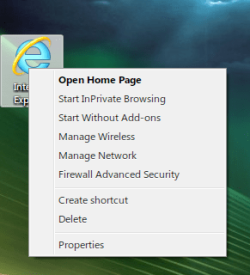
I made mine similar to the XP style but it took some serious reg hacking. I added a few extra menu items as well. The properties menu item opens up Internet Options dialog
My Computer
- Computer Manufacturer/Model Number
- Averatec 6130HS-20
- OS
- Windows 7 Professional 32-bit (6.1, Build 7600)
- CPU
- Intel(R) Pentium(R) 4 3.00 GHz HT
- Memory
- 2.0 GB
- Graphics Card(s)
- ATI Mobility Radeon 9600 64MB
- Sound Card
- Realtek AC'97 Audio
- Screen Resolution
- 1280 x 800
- Hard Drives
- Seagate 96023A 60GB 7200RPM -
Seagate FreeAgentDesktop 250GB
- Cooling
- 20 Inch Box Fan
- Mouse
- Targus PAWM10 Wireless Optical Laptop Mouse
IE icon on desktop
in case that something got wrong running the reg file AddIE7iconToDesktop.reg , would the RemoveIE7iconFromEsktop.reg repair it ? I ' m a bit anxious because a damage in Registry would be a problem .
Hello Babis,
Here you go. OPTION ONE would be the same as in Vista for Windows 7.
Internet Explorer Icon - Vista Forums
Hope this helps,
Shawn
in case that something got wrong running the reg file AddIE7iconToDesktop.reg , would the RemoveIE7iconFromEsktop.reg repair it ? I ' m a bit anxious because a damage in Registry would be a problem .
My Computer
- OS
- windows 7 Ultimate x32
Babis,
Scratch that. I just tested that tutorial in Windows 7, and it will not work. That tutorial will only work in Vista.
From MS KB...
The Internet Explorer icon is missing from your desktop
Scratch that. I just tested that tutorial in Windows 7, and it will not work. That tutorial will only work in Vista.
From MS KB...
Important: Windows 7 no longer supports the ability to modify the registry to get the special Internet Explorer icon to appear on your desktop. This change was made to ensure Internet Explorer could be removed easily for compliance reasons. The only way to add the Internet Explorer icon to the desktop in Windows 7 is to create a shortcut. To create a shortcut to Internet Explorer on your desktop, follow these steps:
The Internet Explorer icon is missing from your desktop
Last edited:
My Computer
- Computer type
- PC/Desktop
- Computer Manufacturer/Model Number
- Self built custom
- OS
- 64-bit Windows 11 Pro for Workstations
- CPU
- Intel i7-8700K OC'd to 5 GHz
- Motherboard
- ASUS ROG Maximus XI Formula Z390
- Memory
- 64 GB (4x16GB) G.SKILL TridentZ RGB DDR4 3600 MHz
- Graphics Card(s)
- ASUS ROG-STRIX-GTX1080TI-O11G-GAMING
- Sound Card
- Integrated
- Monitor(s) Displays
- 2 x Samsung Odyssey G7 27"
- Screen Resolution
- 2560x1440
- Hard Drives
- 1TB Samsung 990 PRO M.2,
4TB Samsung 990 PRO PRO M.2,
TerraMaster F8 SSD Plus NAS
- PSU
- Seasonic Prime Titanium 850W
- Case
- Thermaltake Core P3
- Cooling
- Corsair Hydro H115i
- Keyboard
- Logitech wireless K800
- Mouse
- Logitech MX Master 4
- Internet Speed
- 2 Gb/s Download and 100 Mb/s Upload
- Antivirus
- Malwarebyte Anti-Malware Premium
- Browser
- Google Chrome
- Other Info
- Logitech Z625 speaker system,
Logitech BRIO 4K Pro webcam,
HP Color LaserJet Pro MFP M477fdn,
APC SMART-UPS RT 1000 XL - SURT1000XLI,
Galaxy S23 Plus phone
Babis,
Here you go. This new tutorial will allow you to add a Internet Explorer desktop icon in Windows 7.
http://www.sevenforums.com/tutorials/167811-internet-explorer-desktop-icon-create-windows-7-a.html
Here you go. This new tutorial will allow you to add a Internet Explorer desktop icon in Windows 7.
http://www.sevenforums.com/tutorials/167811-internet-explorer-desktop-icon-create-windows-7-a.html
My Computer
- Computer type
- PC/Desktop
- Computer Manufacturer/Model Number
- Self built custom
- OS
- 64-bit Windows 11 Pro for Workstations
- CPU
- Intel i7-8700K OC'd to 5 GHz
- Motherboard
- ASUS ROG Maximus XI Formula Z390
- Memory
- 64 GB (4x16GB) G.SKILL TridentZ RGB DDR4 3600 MHz
- Graphics Card(s)
- ASUS ROG-STRIX-GTX1080TI-O11G-GAMING
- Sound Card
- Integrated
- Monitor(s) Displays
- 2 x Samsung Odyssey G7 27"
- Screen Resolution
- 2560x1440
- Hard Drives
- 1TB Samsung 990 PRO M.2,
4TB Samsung 990 PRO PRO M.2,
TerraMaster F8 SSD Plus NAS
- PSU
- Seasonic Prime Titanium 850W
- Case
- Thermaltake Core P3
- Cooling
- Corsair Hydro H115i
- Keyboard
- Logitech wireless K800
- Mouse
- Logitech MX Master 4
- Internet Speed
- 2 Gb/s Download and 100 Mb/s Upload
- Antivirus
- Malwarebyte Anti-Malware Premium
- Browser
- Google Chrome
- Other Info
- Logitech Z625 speaker system,
Logitech BRIO 4K Pro webcam,
HP Color LaserJet Pro MFP M477fdn,
APC SMART-UPS RT 1000 XL - SURT1000XLI,
Galaxy S23 Plus phone
IE icon on desktop
Brink ,
I followed your instructions and the IE9 icon appeared on my desktop . So , many thanks to you and Shawn as well .
Babis,
Here you go. This new tutorial will allow you to add a Internet Explorer desktop icon in Windows 7.
http://www.sevenforums.com/tutorials/167811-internet-explorer-desktop-icon-create-windows-7-a.html
Brink ,
I followed your instructions and the IE9 icon appeared on my desktop . So , many thanks to you and Shawn as well .
My Computer
- OS
- windows 7 Ultimate x32
You're most welcome Babis. Glad we could help.
My Computer
- Computer type
- PC/Desktop
- Computer Manufacturer/Model Number
- Self built custom
- OS
- 64-bit Windows 11 Pro for Workstations
- CPU
- Intel i7-8700K OC'd to 5 GHz
- Motherboard
- ASUS ROG Maximus XI Formula Z390
- Memory
- 64 GB (4x16GB) G.SKILL TridentZ RGB DDR4 3600 MHz
- Graphics Card(s)
- ASUS ROG-STRIX-GTX1080TI-O11G-GAMING
- Sound Card
- Integrated
- Monitor(s) Displays
- 2 x Samsung Odyssey G7 27"
- Screen Resolution
- 2560x1440
- Hard Drives
- 1TB Samsung 990 PRO M.2,
4TB Samsung 990 PRO PRO M.2,
TerraMaster F8 SSD Plus NAS
- PSU
- Seasonic Prime Titanium 850W
- Case
- Thermaltake Core P3
- Cooling
- Corsair Hydro H115i
- Keyboard
- Logitech wireless K800
- Mouse
- Logitech MX Master 4
- Internet Speed
- 2 Gb/s Download and 100 Mb/s Upload
- Antivirus
- Malwarebyte Anti-Malware Premium
- Browser
- Google Chrome
- Other Info
- Logitech Z625 speaker system,
Logitech BRIO 4K Pro webcam,
HP Color LaserJet Pro MFP M477fdn,
APC SMART-UPS RT 1000 XL - SURT1000XLI,
Galaxy S23 Plus phone
Similar threads
- Replies
- 4
- Views
- 4K
- Replies
- 2
- Views
- 3K


- Replies
- 0
- Views
- 703