Solved IE10 A Bit Of A No Go For Me

I've got IE10 installed on my main PC but I can't upload pics to this or other sites that I usually upload pictures to. I never see the dialog box that lets me browse for the pictures...
 

My Computer My Computer

At a glance

Microsoft Windows 8.1 Enterprise 64-bitIntel(R) Core(TM) i7-3770K CPU @ 4.7GHz (Over...32 GB 12800 DDR3 Crucial Ballistix SportNVIDIA GeForce GTX 660 SC x 2 (SLI) by EVGA
Computer type
PC/Desktop
Computer Manufacturer/Model Number
Intel DZ77GA-70K
OS
Microsoft Windows 8.1 Enterprise 64-bit
CPU
Intel(R) Core(TM) i7-3770K CPU @ 4.7GHz (Overclocked)
Motherboard
Intel Corporation DZ77GA-70K, 0066 BIOS version
Memory
32 GB 12800 DDR3 Crucial Ballistix Sport
Graphics Card(s)
NVIDIA GeForce GTX 660 SC x 2 (SLI) by EVGA
Sound Card
(1) Bluetooth Hands-free Audio (2) NVIDIA High Definition
Monitor(s) Displays
LG 27" HDMI
Screen Resolution
12920 x 1080 x 32 bits (4294967296 colors) @ 60Hz
Hard Drives
Intel 120GB SSD (ATA INTEL SSDSC2CT12 SCSI Disk Device)
Western Digital Caviar Black 64M cache 2TB 7200rpm (ATA WDC WD2002FAEX-0 SCSI Disk Device), 3 x WD 150Gb 10k Velociraptor hard drives in RAID 0 (testing)
PSU
Corsair 750w fully modular
Case
Corsair 650D with perforated side panel
Cooling
3 200mm case fans, Intel liquid cooling for CPU w 120mm fans
Keyboard
Logitech backlit
Mouse
Dell
Internet Speed
11Mbps DSL
Antivirus
Windows Defender, MalWareBytes Pro and CCleaner Pro
Browser
Chrome, IE and FireFox (latest versions)
Other Info
Windows Home Server 2011 with 10 clients at home
IE10error_zpsc43921ea.png


Above is the exact error that I am getting.

Perform the following steps to install Internet Explorer 10.


Step 1:

Place the computer in Clean boot state.


You can start Windows by using a minimal set of drivers and startup programs. This kind of startup is known as a "clean boot." A clean boot helps eliminate software conflicts.

To set the computer in clean boot, follow the steps from the link: How to perform a clean boot

Note: After checking in clean boot, follow step: 3 from the article to reset the computer to normal boot.


Step 2:


Install the prerequisites manually before installing Internet Explorer 10.

Refer to the link “How to obtain prerequisite updates for Internet Explorer 10 for Windows 7 that fail to install” to install prerequisite for Internet Explorer 10.


Step 3:

Download and install Internet Explorer 10 manually from Microsoft download centre and then check if you are able to install it.

You can download Internet Explorer 10 from this link “Download Internet Explorer 10”.


Step 4:


After installing Internet Explorer 10, reset the computer to Normal boot.


Follow step: 3 from the link “How to perform a clean boot” to reset the computer to normal boot.


I hope this helps you to fix the issue. If the issue persists or you have any other issues with Windows, please do post it in Microsoft Community. We would be happy to help you.
Someone at the MS site suggested I try this. It did nothing but remove my av and caused me more headaches. I am now done with trying to instal IE 10 and I have also removed IE 9.

LOL ...... They suggested to me that I do the very same thing, minus your headaches it did absolutely nothing for me ...... still the very same results, and I tried all four steps. :mad:
 

My Computer My Computer

At a glance

Windows 8 Pro / Windows 7 Home Premium x64 du...6 gigsNvidia GEForce 9400 GT
Computer type
PC/Desktop
Computer Manufacturer/Model Number
HP
OS
Windows 8 Pro / Windows 7 Home Premium x64 dual boot
Memory
6 gigs
Graphics Card(s)
Nvidia GEForce 9400 GT
Screen Resolution
1600 x 900
Hard Drives
Internal - Western Digital 600 gb HDD
Internal - Western Digital 250 gb HDD
External - Western Digital 1 TB HDD
Antivirus
Avast!
Browser
Pale Moon
They had better come up with a fix for this.
 

My Computer My Computer

At a glance

Win 10 Pro 64Intel Core i7 960 @3.20 GHz24.0 GB DDR3EVGA GTX 750Ti
Computer type
PC/Desktop
Computer Manufacturer/Model Number
Custom Build
OS
Win 10 Pro 64
CPU
Intel Core i7 960 @3.20 GHz
Motherboard
MSI MS7522
Memory
24.0 GB DDR3
Graphics Card(s)
EVGA GTX 750Ti
Monitor(s) Displays
LG E2341 23 Inch
Screen Resolution
1920x1080
Hard Drives
1TB Western Dgital 1002FAEX-00Y9A0
1TB Hitachi HDS721010CLA322
PSU
700 Watt
Case
Haf 912
Cooling
Fans
Keyboard
Logitech MK710
Mouse
Logitech M705
Internet Speed
Cable
Antivirus
AIS 2015 .10.0.2225
Browser
Firefox 49
Other Info
MalwareBytes Anti-Rootkit utility
(I know Jerry and Archie for 2 are big on customizing their icons, either of you managed to get it installed without the error)

Danny
I just tried it in VMware Win 7 64 bit with IE 10 installed then got the shell32.dll from C:\Windows\System32 and C:\Windows\SysWOW64 and used my bitmaps and #42 UIFILE, did the ownership, permission, rename, replaced them, did restart and IE 10 works.
I use Restorator 2007 not Resource hacker, I have had trouble sometimes with system files after using Resource hacker.

Jerry
About Internet Explorer.png

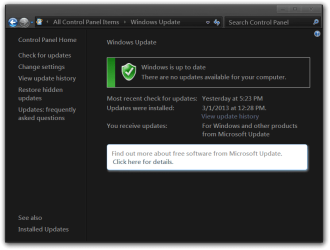
Windows Update.png

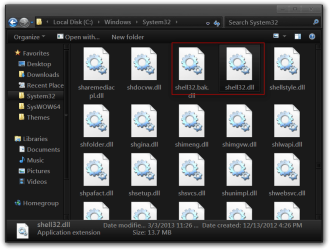
System32.png
 

My Computer My Computer

At a glance

Win 7 Pro x64 / Win 10 ProIntel(R) Core(TM) i7-3630QM CPU @ 2.40GHz12 GB(1) Intel(R) HD Graphics 4000 (2) NVIDIA GeFo...
Computer type
Laptop
Computer Manufacturer/Model Number
Sager NP9170
OS
Win 7 Pro x64 / Win 10 Pro
CPU
Intel(R) Core(TM) i7-3630QM CPU @ 2.40GHz
Motherboard
CLEVO P170EM
Memory
12 GB
Graphics Card(s)
(1) Intel(R) HD Graphics 4000 (2) NVIDIA GeForce GTX 675M
Sound Card
(1) Realtek High Definition Audio (2) Intel(R) Display Aud
Monitor(s) Displays
17.3
Screen Resolution
1920x1080
Hard Drives
(1) Samsung 860 EVO 500GB(OS) (1) Samsung 860 EVO 500GB(Data)
Keyboard
Backlite
Antivirus
MSE, Malwarebytes Pro
Browser
Firefox
Other Info
DESKTOP: Custom-built.
OS: Win 10 Pro x64.
CASE: Rosewill R5.
CPU: Intel I5 4670K CPU @ 3.40GHz.
CPU COOLER: Cool Master Hyper 212 EVO.
MOTHERBOARD: Asus Z87-A.
MEMORY: Kingston HyperX 2x4 GB.
GPU: Nvidia Geforce 650 TI.
PSU: Corsair TX750.
DRIVES: (1) Samsung 840 120 GB SSD (2) Western Digital blue 500 GB 7200 RPM.
(I know Jerry and Archie for 2 are big on customizing their icons, either of you managed to get it installed without the error)

Danny
I just tried it in VMware Win 7 64 bit with IE 10 installed then got the shell32.dll from C:\Windows\System32 and C:\Windows\SysWOW64 and used my bitmaps and #42 UIFILE, did the ownership, permission, rename, replaced them, did restart and IE 10 works.
I use Restorator 2007 not Resource hacker, I have had trouble sometimes with system files after using Resource hacker.

Jerry
View attachment 257802

View attachment 257803

View attachment 257804

That's interesting Jerry. On the back of what you said I just tried again, this was my process

Reset all system files and ran sfc /scannow until it reported no errors
Installed the platform update and IE10 both installed and IE10 opened fine
Changed 1 icon in the C:\Windows\System32 and C:\Windows\SysWOW64 No #4 using the same method you have except using resource hacker.
Rebooted and IE10 is broken just hangs. Very Odd

What does your details tab look like on the shell32.dll it looked to me as though it had been updated With IE10 and I wondered if that was the issue, this is pre IE10,

Capture.PNG

Danny
 

My Computer My Computer

At a glance

Windows 7 Home Premium x64 SP1intel(R)core(TM)2 duo CPU T6600 @ 2.20GHz3 gb ddr3ati radeon hd4570/512mb
Computer Manufacturer/Model Number
acer aspire 5935g
OS
Windows 7 Home Premium x64 SP1
CPU
intel(R)core(TM)2 duo CPU T6600 @ 2.20GHz
Motherboard
intel gm45/gm47 revision 07
Memory
3 gb ddr3
Graphics Card(s)
ati radeon hd4570/512mb
Monitor(s) Displays
lop156wh2-tle1 15.3 flat
Screen Resolution
1366x768
Hard Drives
OCZ-Agility3 60gig ssd
320gig external hdd
500gig external hdd
Mouse
Optical
Internet Speed
30Mbps Down/30Mbps Up
Well don't want to start another thread on this but I want to get back to IE9 and I cannot find IE10 in Programs and Features.

I am only doing this because of a work related site that I cannot access in IE10 with or without Java as the program the department uses is Oracle based:mad:

Plus I find the constant slow downloading of web pages and the flicking of the page up and down before it finally stops pretty annoying.
 

My Computer My Computer

At a glance

Desk1 7 Home Prem / Desk2 10 Pro / Main lap A...Desk1 i5 3750K / Laptop i7 GTX 860M / Desk2 i...Desk1 8GB (1866) / Desk2 16GB (1333) / Laptop...Desk 1& 2NVidia GTX 650 & Laptops on board Intel
Computer type
PC/Desktop
Computer Manufacturer/Model Number
Own build (new) Desk1 / Asus ROG Win 7 / Desk2 1st build
OS
Desk1 7 Home Prem / Desk2 10 Pro / Main lap Asus ROG 10 Pro 2 laptop Toshiba 7 Pro Asus P2520 7 & 10
CPU
Desk1 i5 3750K / Laptop i7 GTX 860M / Desk2 i5 2500
Motherboard
Desk1 Asus P877-V / Desk2 Gigabyte H67 UD3H / Laptop ?
Memory
Desk1 8GB (1866) / Desk2 16GB (1333) / Laptop 8Gb DDR3
Graphics Card(s)
Desk 1& 2NVidia GTX 650 & Laptops on board Intel
Sound Card
Desk 1 & 2 -XONAR DG Realtek High Def audio Laptop
Monitor(s) Displays
Desk 1 Benq HD 2450 / Desk2 Philips 24" / Laptop 17.5"
Screen Resolution
1920x1080 D1 & D2 & Laptop 1
Hard Drives
Desk1 Samsung 120GB 830 SSD
Asus ROG 256GB 850 Pro SSD
Desk2 Samsung 840 256 SSD
Toshiba 120GB EVO
PSU
Desk 1 Corsair HX 1050/ Laptop ? / Desk 2 Corsair HX 650
Case
Desk 1 Cooler HAF XM ? Toshiba laptop / Desk2 Coolermaster
Cooling
Fans on all Desk1 -2 Desk2 - all Coolermasters 5 Laptop ?
Keyboard
Desk 1 MS Sidewinder X6 Desk 2 MS Sidewinder X 4
Mouse
Desk 1&2 - Gigabyte MS 900 gamer - laptop - Logitec wireless
Internet Speed
ADSL2+
Other Info
One other Desktop (tester) and spare Toshba laptop both with SSD's
Running Kaspersky 2016 ISS on all machines config'd identically
Logitec audio stereo systems on each machine (x3)
Canon MG5250MFC
Router/modem TP-Link running WPA2SK
Well don't want to start another thread on this but I want to get back to IE9 and I cannot find IE10 in Programs and Features.

I am only doing this because of a work related site that I cannot access in IE10 with or without Java as the program the department uses is Oracle based:mad:

Plus I find the constant slow downloading of web pages and the flicking of the page up and down before it finally stops pretty annoying.

John, it should be under "Installed Updates".

http://www.sevenforums.com/browsers-mail/280253-trouble-ie10.html#post2308174
 

My Computer My Computer

At a glance

Win 7 Pro 64-bitIntel i5 2.4 Ghz8GB DDR3Intel HD 3000
Computer type
Laptop
Computer Manufacturer/Model Number
Sony Vaio VPCEB47GM Laptop
OS
Win 7 Pro 64-bit
CPU
Intel i5 2.4 Ghz
Memory
8GB DDR3
Graphics Card(s)
Intel HD 3000
Sound Card
IDT High Definition
Monitor(s) Displays
15.6 WGXA Anti-Glare LED
Screen Resolution
1280x800
Hard Drives
640Gb 7200rpm
Antivirus
MSE
Browser
Opera (primary) with IE9 backup
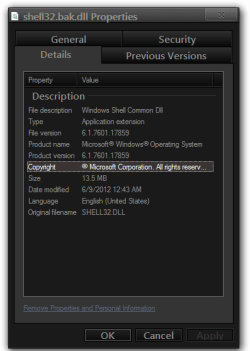
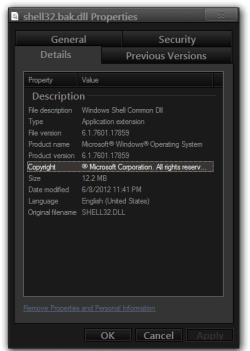
Here are the property Windows Danny

Modified
shell32.dll Properties.png

Original
shell32.bak.dll Properties.png


WOW64 folder

Modified
shell32.dll PropertiesWOW64.png

Original
shell32.bak.dll PropertiesWOW64.png
 

My Computer My Computer

At a glance

Win 7 Pro x64 / Win 10 ProIntel(R) Core(TM) i7-3630QM CPU @ 2.40GHz12 GB(1) Intel(R) HD Graphics 4000 (2) NVIDIA GeFo...
Computer type
Laptop
Computer Manufacturer/Model Number
Sager NP9170
OS
Win 7 Pro x64 / Win 10 Pro
CPU
Intel(R) Core(TM) i7-3630QM CPU @ 2.40GHz
Motherboard
CLEVO P170EM
Memory
12 GB
Graphics Card(s)
(1) Intel(R) HD Graphics 4000 (2) NVIDIA GeForce GTX 675M
Sound Card
(1) Realtek High Definition Audio (2) Intel(R) Display Aud
Monitor(s) Displays
17.3
Screen Resolution
1920x1080
Hard Drives
(1) Samsung 860 EVO 500GB(OS) (1) Samsung 860 EVO 500GB(Data)
Keyboard
Backlite
Antivirus
MSE, Malwarebytes Pro
Browser
Firefox
Other Info
DESKTOP: Custom-built.
OS: Win 10 Pro x64.
CASE: Rosewill R5.
CPU: Intel I5 4670K CPU @ 3.40GHz.
CPU COOLER: Cool Master Hyper 212 EVO.
MOTHERBOARD: Asus Z87-A.
MEMORY: Kingston HyperX 2x4 GB.
GPU: Nvidia Geforce 650 TI.
PSU: Corsair TX750.
DRIVES: (1) Samsung 840 120 GB SSD (2) Western Digital blue 500 GB 7200 RPM.
Here are the property Windows Danny

Modified
View attachment 257894

Original
View attachment 257895


WOW64 folder

Modified
View attachment 257896

Original
View attachment 257897

That doesn't show any change which is odd I'm sure when I updated the product version changed after IE10 was installed. The reason is Im thinking if they have updated the shell32.dll all my icon .dlls are all made from the original .dlls which I just swap over after an install, if the versions have changed I maybe need to remake them with the new shell32.dll. Although that doesn't explain why it didn't work before changing 1 icon in the new .dll. Im confused:confused:

EDIT - Has IE10 been removed from windows update I thought I would give it another go but im not been offered it through the update:o
Danny
 
Last edited:

My Computer My Computer

At a glance

Windows 7 Home Premium x64 SP1intel(R)core(TM)2 duo CPU T6600 @ 2.20GHz3 gb ddr3ati radeon hd4570/512mb
Computer Manufacturer/Model Number
acer aspire 5935g
OS
Windows 7 Home Premium x64 SP1
CPU
intel(R)core(TM)2 duo CPU T6600 @ 2.20GHz
Motherboard
intel gm45/gm47 revision 07
Memory
3 gb ddr3
Graphics Card(s)
ati radeon hd4570/512mb
Monitor(s) Displays
lop156wh2-tle1 15.3 flat
Screen Resolution
1366x768
Hard Drives
OCZ-Agility3 60gig ssd
320gig external hdd
500gig external hdd
Mouse
Optical
Internet Speed
30Mbps Down/30Mbps Up
This is my Copy of shell32.dll in Sysytem32

sysWOW64Shell32_zps45a2ecb3.png


This is the one in sysWOW64:

sys32shell_zps62f1321f.png


I still cannot install IE 10. I keep getting this error:


Any help would be appreciated.
 

My Computer My Computer

At a glance

Win 10 Pro 64Intel Core i7 960 @3.20 GHz24.0 GB DDR3EVGA GTX 750Ti
Computer type
PC/Desktop
Computer Manufacturer/Model Number
Custom Build
OS
Win 10 Pro 64
CPU
Intel Core i7 960 @3.20 GHz
Motherboard
MSI MS7522
Memory
24.0 GB DDR3
Graphics Card(s)
EVGA GTX 750Ti
Monitor(s) Displays
LG E2341 23 Inch
Screen Resolution
1920x1080
Hard Drives
1TB Western Dgital 1002FAEX-00Y9A0
1TB Hitachi HDS721010CLA322
PSU
700 Watt
Case
Haf 912
Cooling
Fans
Keyboard
Logitech MK710
Mouse
Logitech M705
Internet Speed
Cable
Antivirus
AIS 2015 .10.0.2225
Browser
Firefox 49
Other Info
MalwareBytes Anti-Rootkit utility
This is my Copy of shell32.dll in Sysytem32

sysWOW64Shell32_zps45a2ecb3.png


This is the one in sysWOW64:

sys32shell_zps62f1321f.png


I still cannot install IE 10. I keep getting this error:


Any help would be appreciated.

Still working on it lol
 

My Computer My Computer

At a glance

Windows 7 Home Premium x64 SP1intel(R)core(TM)2 duo CPU T6600 @ 2.20GHz3 gb ddr3ati radeon hd4570/512mb
Computer Manufacturer/Model Number
acer aspire 5935g
OS
Windows 7 Home Premium x64 SP1
CPU
intel(R)core(TM)2 duo CPU T6600 @ 2.20GHz
Motherboard
intel gm45/gm47 revision 07
Memory
3 gb ddr3
Graphics Card(s)
ati radeon hd4570/512mb
Monitor(s) Displays
lop156wh2-tle1 15.3 flat
Screen Resolution
1366x768
Hard Drives
OCZ-Agility3 60gig ssd
320gig external hdd
500gig external hdd
Mouse
Optical
Internet Speed
30Mbps Down/30Mbps Up
http://www.tweaking....all_in_one.html

I downloaded and ran the above. It does all kinds of testing and it removed my 7tsp hudevolution Icon. I then was able to install IE 10 with no problems. Then I used 7tsp and replaced those Icons and guess what? IE 10 would not start. I reverted back to Mr Grim's Blue Icons and IE 10 works just fine. I did not have to remove any themes. So If you have anything installed with 7tsp I would remove it if you want to have IE 10. I am a die hard Firefox user but IE 10 is twice as fast.
 

My Computer My Computer

At a glance

Win 10 Pro 64Intel Core i7 960 @3.20 GHz24.0 GB DDR3EVGA GTX 750Ti
Computer type
PC/Desktop
Computer Manufacturer/Model Number
Custom Build
OS
Win 10 Pro 64
CPU
Intel Core i7 960 @3.20 GHz
Motherboard
MSI MS7522
Memory
24.0 GB DDR3
Graphics Card(s)
EVGA GTX 750Ti
Monitor(s) Displays
LG E2341 23 Inch
Screen Resolution
1920x1080
Hard Drives
1TB Western Dgital 1002FAEX-00Y9A0
1TB Hitachi HDS721010CLA322
PSU
700 Watt
Case
Haf 912
Cooling
Fans
Keyboard
Logitech MK710
Mouse
Logitech M705
Internet Speed
Cable
Antivirus
AIS 2015 .10.0.2225
Browser
Firefox 49
Other Info
MalwareBytes Anti-Rootkit utility

My Computer My Computer

At a glance

Win 7 Pro x64 / Win 10 ProIntel(R) Core(TM) i7-3630QM CPU @ 2.40GHz12 GB(1) Intel(R) HD Graphics 4000 (2) NVIDIA GeFo...
Computer type
Laptop
Computer Manufacturer/Model Number
Sager NP9170
OS
Win 7 Pro x64 / Win 10 Pro
CPU
Intel(R) Core(TM) i7-3630QM CPU @ 2.40GHz
Motherboard
CLEVO P170EM
Memory
12 GB
Graphics Card(s)
(1) Intel(R) HD Graphics 4000 (2) NVIDIA GeForce GTX 675M
Sound Card
(1) Realtek High Definition Audio (2) Intel(R) Display Aud
Monitor(s) Displays
17.3
Screen Resolution
1920x1080
Hard Drives
(1) Samsung 860 EVO 500GB(OS) (1) Samsung 860 EVO 500GB(Data)
Keyboard
Backlite
Antivirus
MSE, Malwarebytes Pro
Browser
Firefox
Other Info
DESKTOP: Custom-built.
OS: Win 10 Pro x64.
CASE: Rosewill R5.
CPU: Intel I5 4670K CPU @ 3.40GHz.
CPU COOLER: Cool Master Hyper 212 EVO.
MOTHERBOARD: Asus Z87-A.
MEMORY: Kingston HyperX 2x4 GB.
GPU: Nvidia Geforce 650 TI.
PSU: Corsair TX750.
DRIVES: (1) Samsung 840 120 GB SSD (2) Western Digital blue 500 GB 7200 RPM.
If you want Danny you can try my modified shell32.dlls it modifies the left navigation pane in control panel and the top of the control panel itself and also the animation window color background of the copy window. For some reason this link will not work with Firefox at least for me I had to use IE.
https://skydrive.live.com/redir?resid=E0B41F06C2E47D63!6856&authkey=!AAX9B_hnfl-lM6M

Jerry

Thanks Jerry will give it a go.

Likewise these are my 2 shell32.dlls. http://sdrv.ms/XGKMhO They are only icon and folder changes, if you still have your VM running could you pop these in and see how you get on.
 

My Computer My Computer

At a glance

Windows 7 Home Premium x64 SP1intel(R)core(TM)2 duo CPU T6600 @ 2.20GHz3 gb ddr3ati radeon hd4570/512mb
Computer Manufacturer/Model Number
acer aspire 5935g
OS
Windows 7 Home Premium x64 SP1
CPU
intel(R)core(TM)2 duo CPU T6600 @ 2.20GHz
Motherboard
intel gm45/gm47 revision 07
Memory
3 gb ddr3
Graphics Card(s)
ati radeon hd4570/512mb
Monitor(s) Displays
lop156wh2-tle1 15.3 flat
Screen Resolution
1366x768
Hard Drives
OCZ-Agility3 60gig ssd
320gig external hdd
500gig external hdd
Mouse
Optical
Internet Speed
30Mbps Down/30Mbps Up
I will try them out a little later today or tomorrow morning and let you know.

Jerry
 

My Computer My Computer

At a glance

Win 7 Pro x64 / Win 10 ProIntel(R) Core(TM) i7-3630QM CPU @ 2.40GHz12 GB(1) Intel(R) HD Graphics 4000 (2) NVIDIA GeFo...
Computer type
Laptop
Computer Manufacturer/Model Number
Sager NP9170
OS
Win 7 Pro x64 / Win 10 Pro
CPU
Intel(R) Core(TM) i7-3630QM CPU @ 2.40GHz
Motherboard
CLEVO P170EM
Memory
12 GB
Graphics Card(s)
(1) Intel(R) HD Graphics 4000 (2) NVIDIA GeForce GTX 675M
Sound Card
(1) Realtek High Definition Audio (2) Intel(R) Display Aud
Monitor(s) Displays
17.3
Screen Resolution
1920x1080
Hard Drives
(1) Samsung 860 EVO 500GB(OS) (1) Samsung 860 EVO 500GB(Data)
Keyboard
Backlite
Antivirus
MSE, Malwarebytes Pro
Browser
Firefox
Other Info
DESKTOP: Custom-built.
OS: Win 10 Pro x64.
CASE: Rosewill R5.
CPU: Intel I5 4670K CPU @ 3.40GHz.
CPU COOLER: Cool Master Hyper 212 EVO.
MOTHERBOARD: Asus Z87-A.
MEMORY: Kingston HyperX 2x4 GB.
GPU: Nvidia Geforce 650 TI.
PSU: Corsair TX750.
DRIVES: (1) Samsung 840 120 GB SSD (2) Western Digital blue 500 GB 7200 RPM.
IE 10 started to work fine for about 45 minutes< then my screen went black< an i got a BSOD. I am done with IE 10.
 

My Computer My Computer

At a glance

Win 10 Pro 64Intel Core i7 960 @3.20 GHz24.0 GB DDR3EVGA GTX 750Ti
Computer type
PC/Desktop
Computer Manufacturer/Model Number
Custom Build
OS
Win 10 Pro 64
CPU
Intel Core i7 960 @3.20 GHz
Motherboard
MSI MS7522
Memory
24.0 GB DDR3
Graphics Card(s)
EVGA GTX 750Ti
Monitor(s) Displays
LG E2341 23 Inch
Screen Resolution
1920x1080
Hard Drives
1TB Western Dgital 1002FAEX-00Y9A0
1TB Hitachi HDS721010CLA322
PSU
700 Watt
Case
Haf 912
Cooling
Fans
Keyboard
Logitech MK710
Mouse
Logitech M705
Internet Speed
Cable
Antivirus
AIS 2015 .10.0.2225
Browser
Firefox 49
Other Info
MalwareBytes Anti-Rootkit utility
http://www.tweaking....all_in_one.html

I downloaded and ran the above. It does all kinds of testing and it removed my 7tsp hudevolution Icon. I then was able to install IE 10 with no problems. Then I used 7tsp and replaced those Icons and guess what? IE 10 would not start. I reverted back to Mr Grim's Blue Icons and IE 10 works just fine. I did not have to remove any themes. So If you have anything installed with 7tsp I would remove it if you want to have IE 10. I am a die hard Firefox user but IE 10 is twice as fast.

IE 10 started to work fine for about 45 minutes< then my screen went black< an i got a BSOD. I am done with IE 10.

I believe many Forum contributors will say that "tweaking" tools should not be used on Windows 7. They cause more problems than they solve. Having said that, make sure you have a current restore point available at a minimum. A system image is even better. Then let the experiments begin. ;)
 

My Computer My Computer

At a glance

Win 7 Pro 64-bitIntel i5 2.4 Ghz8GB DDR3Intel HD 3000
Computer type
Laptop
Computer Manufacturer/Model Number
Sony Vaio VPCEB47GM Laptop
OS
Win 7 Pro 64-bit
CPU
Intel i5 2.4 Ghz
Memory
8GB DDR3
Graphics Card(s)
Intel HD 3000
Sound Card
IDT High Definition
Monitor(s) Displays
15.6 WGXA Anti-Glare LED
Screen Resolution
1280x800
Hard Drives
640Gb 7200rpm
Antivirus
MSE
Browser
Opera (primary) with IE9 backup
Well don't want to start another thread on this but I want to get back to IE9 and I cannot find IE10 in Programs and Features.

I am only doing this because of a work related site that I cannot access in IE10 with or without Java as the program the department uses is Oracle based:mad:

Plus I find the constant slow downloading of web pages and the flicking of the page up and down before it finally stops pretty annoying.

John, it should be under "Installed Updates".

http://www.sevenforums.com/browsers-mail/280253-trouble-ie10.html#post2308174
Thanks Lee I will do that as it isn't working out well at all - not just on my worksite but alos loading pages with that constant flicking up and down before settling on a screen.

But the worksite is the most important issue ate the moment and I have got onto to the IT people from work and they had no idea this was happening. Just so lucky I had the old multi drive machine still with IE9:)
 

My Computer My Computer

At a glance

Desk1 7 Home Prem / Desk2 10 Pro / Main lap A...Desk1 i5 3750K / Laptop i7 GTX 860M / Desk2 i...Desk1 8GB (1866) / Desk2 16GB (1333) / Laptop...Desk 1& 2NVidia GTX 650 & Laptops on board Intel
Computer type
PC/Desktop
Computer Manufacturer/Model Number
Own build (new) Desk1 / Asus ROG Win 7 / Desk2 1st build
OS
Desk1 7 Home Prem / Desk2 10 Pro / Main lap Asus ROG 10 Pro 2 laptop Toshiba 7 Pro Asus P2520 7 & 10
CPU
Desk1 i5 3750K / Laptop i7 GTX 860M / Desk2 i5 2500
Motherboard
Desk1 Asus P877-V / Desk2 Gigabyte H67 UD3H / Laptop ?
Memory
Desk1 8GB (1866) / Desk2 16GB (1333) / Laptop 8Gb DDR3
Graphics Card(s)
Desk 1& 2NVidia GTX 650 & Laptops on board Intel
Sound Card
Desk 1 & 2 -XONAR DG Realtek High Def audio Laptop
Monitor(s) Displays
Desk 1 Benq HD 2450 / Desk2 Philips 24" / Laptop 17.5"
Screen Resolution
1920x1080 D1 & D2 & Laptop 1
Hard Drives
Desk1 Samsung 120GB 830 SSD
Asus ROG 256GB 850 Pro SSD
Desk2 Samsung 840 256 SSD
Toshiba 120GB EVO
PSU
Desk 1 Corsair HX 1050/ Laptop ? / Desk 2 Corsair HX 650
Case
Desk 1 Cooler HAF XM ? Toshiba laptop / Desk2 Coolermaster
Cooling
Fans on all Desk1 -2 Desk2 - all Coolermasters 5 Laptop ?
Keyboard
Desk 1 MS Sidewinder X6 Desk 2 MS Sidewinder X 4
Mouse
Desk 1&2 - Gigabyte MS 900 gamer - laptop - Logitec wireless
Internet Speed
ADSL2+
Other Info
One other Desktop (tester) and spare Toshba laptop both with SSD's
Running Kaspersky 2016 ISS on all machines config'd identically
Logitec audio stereo systems on each machine (x3)
Canon MG5250MFC
Router/modem TP-Link running WPA2SK
Likewise these are my 2 shell32.dlls. http://sdrv.ms/XGKMhO They are only icon and folder changes, if you still have your VM running could you pop these in and see how you get on.

Just try this out Danny and IE 10 would not even start. I noticed your .dlls were quite a bit bigger than the original yours are running about 20 to 21 mb and the originals are about 12 to 13 mb. If you like I could make some for you using Restorator and see if that makes a difference.

Jerry
 

My Computer My Computer

At a glance

Win 7 Pro x64 / Win 10 ProIntel(R) Core(TM) i7-3630QM CPU @ 2.40GHz12 GB(1) Intel(R) HD Graphics 4000 (2) NVIDIA GeFo...
Computer type
Laptop
Computer Manufacturer/Model Number
Sager NP9170
OS
Win 7 Pro x64 / Win 10 Pro
CPU
Intel(R) Core(TM) i7-3630QM CPU @ 2.40GHz
Motherboard
CLEVO P170EM
Memory
12 GB
Graphics Card(s)
(1) Intel(R) HD Graphics 4000 (2) NVIDIA GeForce GTX 675M
Sound Card
(1) Realtek High Definition Audio (2) Intel(R) Display Aud
Monitor(s) Displays
17.3
Screen Resolution
1920x1080
Hard Drives
(1) Samsung 860 EVO 500GB(OS) (1) Samsung 860 EVO 500GB(Data)
Keyboard
Backlite
Antivirus
MSE, Malwarebytes Pro
Browser
Firefox
Other Info
DESKTOP: Custom-built.
OS: Win 10 Pro x64.
CASE: Rosewill R5.
CPU: Intel I5 4670K CPU @ 3.40GHz.
CPU COOLER: Cool Master Hyper 212 EVO.
MOTHERBOARD: Asus Z87-A.
MEMORY: Kingston HyperX 2x4 GB.
GPU: Nvidia Geforce 650 TI.
PSU: Corsair TX750.
DRIVES: (1) Samsung 840 120 GB SSD (2) Western Digital blue 500 GB 7200 RPM.
http://www.tweaking....all_in_one.html

I downloaded and ran the above. It does all kinds of testing and it removed my 7tsp hudevolution Icon. I then was able to install IE 10 with no problems. Then I used 7tsp and replaced those Icons and guess what? IE 10 would not start. I reverted back to Mr Grim's Blue Icons and IE 10 works just fine. I did not have to remove any themes. So If you have anything installed with 7tsp I would remove it if you want to have IE 10. I am a die hard Firefox user but IE 10 is twice as fast.

IE 10 started to work fine for about 45 minutes< then my screen went black< an i got a BSOD. I am done with IE 10.

I believe many Forum contributors will say that "tweaking" tools should not be used on Windows 7. They cause more problems than they solve. Having said that, make sure you have a current restore point available at a minimum. A system image is even better. Then let the experiments begin. ;)

Thanks, yes I did a re image and am without IE10, which is fine with me. Maybe when it comes to Windows update, I will try it again. Thanks. This tool basically just does what you can do yourself in the cmd prompt.
 

My Computer My Computer

At a glance

Win 10 Pro 64Intel Core i7 960 @3.20 GHz24.0 GB DDR3EVGA GTX 750Ti
Computer type
PC/Desktop
Computer Manufacturer/Model Number
Custom Build
OS
Win 10 Pro 64
CPU
Intel Core i7 960 @3.20 GHz
Motherboard
MSI MS7522
Memory
24.0 GB DDR3
Graphics Card(s)
EVGA GTX 750Ti
Monitor(s) Displays
LG E2341 23 Inch
Screen Resolution
1920x1080
Hard Drives
1TB Western Dgital 1002FAEX-00Y9A0
1TB Hitachi HDS721010CLA322
PSU
700 Watt
Case
Haf 912
Cooling
Fans
Keyboard
Logitech MK710
Mouse
Logitech M705
Internet Speed
Cable
Antivirus
AIS 2015 .10.0.2225
Browser
Firefox 49
Other Info
MalwareBytes Anti-Rootkit utility
Back
Top