IE10 not Resetting

techtitan100

New member
Power User
VIP
Local time
3:54 PM
Messages
541
Location
Indianapolis
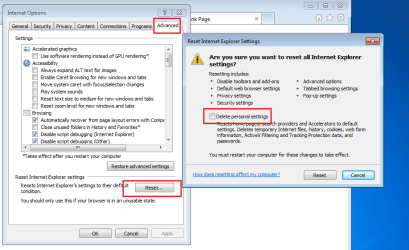
I can't get IE10 to reset at all, I have tried everything to get it to work, like uninstalling my Anti-Virus software, after the reset I restarted my computer it came back up and when I clicked on IE it came up to MSN, like a reset would normally do and when I go to yahoo I find out I am still signed in and then I go to facebook to find that I am still signed in on there to, is there any way for me to fix this to make sure I am signed out and yes I did make sure to check delete personal settings before the reset, any help would be appreciated thanks
 

My Computer

Computer type
Laptop
Computer Manufacturer/Model Number
Toshiba Satellite C655-S5547
OS
Windows 7 Pro 64bit
CPU
Intel(R) Core(TM) i3-2350M CPU @ 2.30 GHZ
Memory
4.00 GB
Graphics Card(s)
Intel HD Graphiics
Sound Card
Conexant HD Audio
Monitor(s) Displays
Generic PnP Monitor
Screen Resolution
1366 x 768 x 32 bits (4294967296 colors) @ 60 Hz
Hard Drives
TI106321W0B(C:) 450GB
Keyboard
Standard PS/2 Keyboard
Mouse
Synaptics Pointing Device
Internet Speed
51.68 mb/s download and 12.08 mb/s upload as of 6/24/15
Antivirus
Webroot Secure Anywhere
Browser
IE11, Mozilla Firefox 41.1.01, and Google Chrome if I must
If you remain signed in, have a look at your cookies.

Open IE> Tools> Internet Options> General tab> Under Browser History, Settings button> Temporary internet files> View files button

Make note of any cookies cookie:(User name)@yahoo.com for instance

Now reset (a reset is not necessary to just delete cookies normally. Open IE> Ctrl+Shift+Delete> Put a check next to cookies and website data> Delete button)

See if the cookies remain. It sounds like your IE is resetting, but not deleting cookies as it should.

Settings that are deleted (Delete personal settings is selected)

Browser history, temporary Internet files, cookies, form data, and stored passwords

Typed URL information, menu extensions

InPrivate Filtering data

Explorer most recently used list

A Guy
 

My Computer

Computer type
PC/Desktop
OS
Windows 10 Home x64
CPU
INTEL Core i5-750 Quad-Core 3.37GHz
Motherboard
ASUS P7P55D
Memory
HyperX Fury Black Series 8GB (2 x 4GB) 1866Mhz
Graphics Card(s)
EVGA GeForce GTX 750 Superclocked 1GB 128-Bit GDDR5
Monitor(s) Displays
LG 32MA68HY 32" IPS
Screen Resolution
1920 x 1080
Hard Drives
Samsung 840 Evo 120GB, SEAGATE 500GB Barracuda® 7200.12, SATA 3 Gb/s, 7200 RPM, 16MB cache
PSU
ANTEC TruePower New TP-550, 80 PLUS, 550W
Case
ANTEC Three Hundred Illusion
Cooling
COOLER MASTER Hyper 212 Plus, 4 x 120mm 1 x 140mm Noctua's
Internet Speed
85 + Mbps
Antivirus
Avast
Browser
Vivaldi
What A Guy said :-)

reset.png
 

My Computer

Computer type
Laptop
Computer Manufacturer/Model Number
Employer provided Dell Latitude
OS
W7 Pro SP1 64bit
CPU
i7
Memory
8GB
Graphics Card(s)
Intel HD Graphics
Hard Drives
crappy SSD
Antivirus
Employer mandated Symantec Endpoint Protection
Browser
Pale Moon 64bit, IE11 64bit & Chrome 64bit
this is fixed, now that my computer was shut off all night and now all of a sudden I am trying to go in and re-install yahoo toolbar and now it is trying to download as a .xpi file when I thought it was suppose to download an .exe
 

My Computer

Computer type
Laptop
Computer Manufacturer/Model Number
Toshiba Satellite C655-S5547
OS
Windows 7 Pro 64bit
CPU
Intel(R) Core(TM) i3-2350M CPU @ 2.30 GHZ
Memory
4.00 GB
Graphics Card(s)
Intel HD Graphiics
Sound Card
Conexant HD Audio
Monitor(s) Displays
Generic PnP Monitor
Screen Resolution
1366 x 768 x 32 bits (4294967296 colors) @ 60 Hz
Hard Drives
TI106321W0B(C:) 450GB
Keyboard
Standard PS/2 Keyboard
Mouse
Synaptics Pointing Device
Internet Speed
51.68 mb/s download and 12.08 mb/s upload as of 6/24/15
Antivirus
Webroot Secure Anywhere
Browser
IE11, Mozilla Firefox 41.1.01, and Google Chrome if I must
Back
Top