

Okay so that site uses Brightcove video platform too along with Quantcast for tracking and the page loads scripts from each.
If I unblock brightcove dot com and quantserve.com then videos play. Otherwise with those domains blocked - no videos play oon that website.
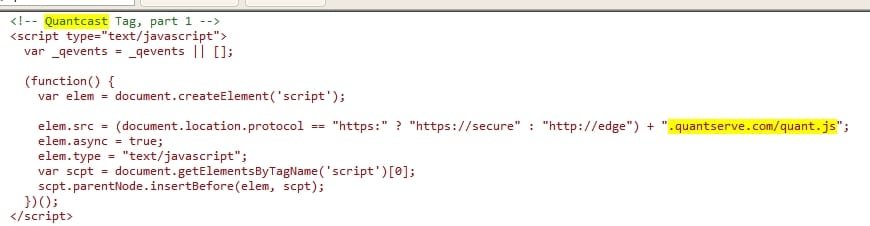
Personally I tend to avoid such sites!
If I unblock brightcove dot com and quantserve.com then videos play. Otherwise with those domains blocked - no videos play oon that website.
Code:
                <div id="pageEl_67881550" class="pageEl"  >

      <div class="pageElement codeElement">
  <!-- Start of Brightcove Player -->
<div style="display:none">

</div>

<!--
By use of this code snippet, I agree to the Brightcove Publisher T and C
found at https://accounts.brightcove.com/en/terms-and-conditions/.
-->

<script language="JavaScript" type="text/javascript" src="http://[B][color=red]admin.brightcove.com[/color]B]/js/BrightcoveExperiences.js"></script>

<object id="myExperience" class="BrightcoveExperience">
  <param name="bgcolor" value="#FFFFFF" />
<param name="wmode" value="transparent">
  <param name="width" value="660" />
  <param name="height" value="1000" />
  <param name="playerID" value="3546817435001" />
  <param name="playerKey" value="AQ~~,AAABCveqeEk~,BRLBX-1yBlnz9_8jB8OSwg9mVu2lS5rK" />
  <param name="isVid" value="true" />
  <param name="isUI" value="true" />
  <param name="dynamicStreaming" value="true" />

</object>

<!--
This script tag will cause the Brightcove Players defined above it to be created as soon
as the line is read by the browser. If you wish to have the player instantiated only after
the rest of the HTML is processed and the page load is complete, remove the line.
-->
<script type="text/javascript">brightcove.createExperiences();</script>

<!-- End of Brightcove Player -->
<span class="clearAll"></span>Personally I tend to avoid such sites!
Last edited:
My Computer
At a glance
Microsoft Windows 7 Home Premium 64-bit 7601 ...AMD C-60 APU with Radeon(tm) HD Graphics4.00 GBAMD Radeon HD 6290 Graphics
- Computer type
- Laptop
- Computer Manufacturer/Model Number
- ASUS
- OS
- Microsoft Windows 7 Home Premium 64-bit 7601 Multiprocessor Free Service Pack 1
- CPU
- AMD C-60 APU with Radeon(tm) HD Graphics
- Motherboard
- ASUSTeK COMPUTER INC. X501U
- Memory
- 4.00 GB
- Graphics Card(s)
- AMD Radeon HD 6290 Graphics
- Sound Card
- (1) AMD High Definition Audio Device (2) Realtek High Defi
- Screen Resolution
- 1366 x 768 x 32 bits (4294967296 colors) @ 60 Hz
- Hard Drives
- Hitachi HTS545050A7E380 SATA Disk Device
- Antivirus
- Comodo CIS & FW, SecureAplus App Whitelisting, Threatfire
- Browser
- Cyberfox 64bit, Opera 64bit, Airfox
- Other Info
- Spy-The-Spy, HitmanPro.Alert, Norton Connect Safe, MJRegWatcher, BitDefender TrafficLight, Voodoo Shield, Zemana AntiMalware


