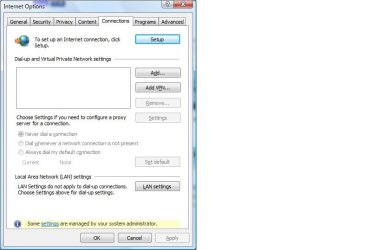
IE9 connection tab "some settings controled by admin" cannot change.

pmshopper

New member
Local time
5:29 AM
Messages
3
IE9 connection tab "some settings controled by admin" cannot change.

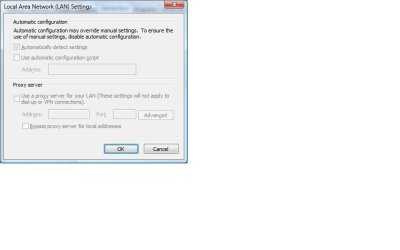
Windows 7 Home x32 - IE9 - The connection tab at the bottom of the dialogue box states "some settings are managed by your system administrator" and when I click on the LAN button, all options are grayed out.

1.) I have a administrator account.
2.) This version does not support GPEDIT.msc
3.) "control panel" registry key is empty under policies in both HKLM and HKCU
3.) Possible remnants from malware

So, here is what I want to accomplish:

1.) Remove the nag
2.) Restore the functionality of the LAN settings.

Thanks all !
 

My Computer My Computer

Computer type
PC/Desktop
OS
Windows 8.1 Pro
Hello and welcome pmshopper mate try running these first and this order as it could e a glitch in the OS and malware as you mentioned it

http://www.sevenforums.com/tutorials/1538-sfc-scannow-command-system-file-checker.html

http://www.sevenforums.com/tutorials/433-disk-check.html < use the /f option in Option 2 ifnecessary

http://www.superantispyware.com/

http://www.malwarebytes.org/products/malwarebytes_free/

http://www.bleepingcomputer.com/download/adwcleaner/

download from bleeping computer – delete any rubbishthese find.

If these come up nothing then maybe download a copy of IE9 to Downloads or Desktop doesn't matter where really and then uninstall the one you have and reinstall the download.
 

My Computer My Computer

Computer type
PC/Desktop
Computer Manufacturer/Model Number
Own build (new) Desk1 / Asus ROG Win 7 / Desk2 1st build
OS
Desk1 7 Home Prem / Desk2 10 Pro / Main lap Asus ROG 10 Pro 2 laptop Toshiba 7 Pro Asus P2520 7 & 10
CPU
Desk1 i5 3750K / Laptop i7 GTX 860M / Desk2 i5 2500
Motherboard
Desk1 Asus P877-V / Desk2 Gigabyte H67 UD3H / Laptop ?
Memory
Desk1 8GB (1866) / Desk2 16GB (1333) / Laptop 8Gb DDR3
Graphics Card(s)
Desk 1& 2NVidia GTX 650 & Laptops on board Intel
Sound Card
Desk 1 & 2 -XONAR DG Realtek High Def audio Laptop
Monitor(s) Displays
Desk 1 Benq HD 2450 / Desk2 Philips 24" / Laptop 17.5"
Screen Resolution
1920x1080 D1 & D2 & Laptop 1
Hard Drives
Desk1 Samsung 120GB 830 SSD
Asus ROG 256GB 850 Pro SSD
Desk2 Samsung 840 256 SSD
Toshiba 120GB EVO
PSU
Desk 1 Corsair HX 1050/ Laptop ? / Desk 2 Corsair HX 650
Case
Desk 1 Cooler HAF XM ? Toshiba laptop / Desk2 Coolermaster
Cooling
Fans on all Desk1 -2 Desk2 - all Coolermasters 5 Laptop ?
Keyboard
Desk 1 MS Sidewinder X6 Desk 2 MS Sidewinder X 4
Mouse
Desk 1&2 - Gigabyte MS 900 gamer - laptop - Logitec wireless
Internet Speed
ADSL2+
Other Info
One other Desktop (tester) and spare Toshba laptop both with SSD's
Running Kaspersky 2016 ISS on all machines config'd identically
Logitec audio stereo systems on each machine (x3)
Canon MG5250MFC
Router/modem TP-Link running WPA2SK
I have followed all of the suggestions but the Connections Tab still has the nag and the LAN is still grayed out. But I do appreciate the introduction to the Super Anti-Spyware and ADWCleaner scanners. Found a lot of stuff that Malwarebytes alone couldn't find.

In the LAN settings, I know the ckeckbox is selected for "auto detect" but that was done by gaining control in the same user account in Safe Mode.
 

Attachments

  • Connections.jpg
    Connections.jpg
    35.5 KB · Views: 0
  • LAN.jpg
    LAN.jpg
    23.4 KB · Views: 0
Last edited:

My Computer My Computer

Computer type
PC/Desktop
OS
Windows 8.1 Pro
PM mate are you running 7 or 8.1 as I see in your specs you are on 8.1. Now I am running 8.1 on this laptop and my readout for those settings is different to yours and the only reason I can think of is that you have IE9 whereas I have IE11.

I am now wondering if you would be better off with IE11 as it is supposed to be safer security wise, and I have it on all of my machines except one which I keep 9 on because my pay office cannot or will not use 11 for connecting to them.

I am also wondering what you see when you click on that blue link at the bottom of the Connections tab in options called Some "settings" are managed by......

Some system specs would be good too see this
http://www.sevenforums.com/tutorials/180324-system-info-see-your-system-specs.html
 

My Computer My Computer

Computer type
PC/Desktop
Computer Manufacturer/Model Number
Own build (new) Desk1 / Asus ROG Win 7 / Desk2 1st build
OS
Desk1 7 Home Prem / Desk2 10 Pro / Main lap Asus ROG 10 Pro 2 laptop Toshiba 7 Pro Asus P2520 7 & 10
CPU
Desk1 i5 3750K / Laptop i7 GTX 860M / Desk2 i5 2500
Motherboard
Desk1 Asus P877-V / Desk2 Gigabyte H67 UD3H / Laptop ?
Memory
Desk1 8GB (1866) / Desk2 16GB (1333) / Laptop 8Gb DDR3
Graphics Card(s)
Desk 1& 2NVidia GTX 650 & Laptops on board Intel
Sound Card
Desk 1 & 2 -XONAR DG Realtek High Def audio Laptop
Monitor(s) Displays
Desk 1 Benq HD 2450 / Desk2 Philips 24" / Laptop 17.5"
Screen Resolution
1920x1080 D1 & D2 & Laptop 1
Hard Drives
Desk1 Samsung 120GB 830 SSD
Asus ROG 256GB 850 Pro SSD
Desk2 Samsung 840 256 SSD
Toshiba 120GB EVO
PSU
Desk 1 Corsair HX 1050/ Laptop ? / Desk 2 Corsair HX 650
Case
Desk 1 Cooler HAF XM ? Toshiba laptop / Desk2 Coolermaster
Cooling
Fans on all Desk1 -2 Desk2 - all Coolermasters 5 Laptop ?
Keyboard
Desk 1 MS Sidewinder X6 Desk 2 MS Sidewinder X 4
Mouse
Desk 1&2 - Gigabyte MS 900 gamer - laptop - Logitec wireless
Internet Speed
ADSL2+
Other Info
One other Desktop (tester) and spare Toshba laptop both with SSD's
Running Kaspersky 2016 ISS on all machines config'd identically
Logitec audio stereo systems on each machine (x3)
Canon MG5250MFC
Router/modem TP-Link running WPA2SK
The specs listed on the profile is my main system. The specs I have listed in the original post is from the system I am having trouble with. We are in the same boat as for why I am not using IE11 on that system. Company websites comparability. So again, Win7 x86, IE9 is what I am dealing with.

I think the key is that I have full control, no nag or grayed out in Safe Mode with the same user account. I just don't know where to go from there.
 

My Computer My Computer

Computer type
PC/Desktop
OS
Windows 8.1 Pro
Back
Top