
IE9 from server doesn't work properly

jimbo45

New member
Guru
Gold Member
VIP
Local time
2:05 PM
Messages
5,941
Location
Hafnarfjörður IS
Hi there

When logging on to a service that needs extra logon Information such as supplying password etc IE9 fails.

I'm currently in France and have to use the ORANGE France wifi service.

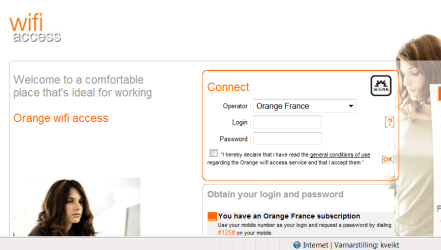
IE8 gives me an orange logon screen -- works fine

IE9 doesn't present the option -- I just get IE cannot connect etc.

Enc screenshot for IE8

cheers
jimbo
 

Attachments
  • orange.png
    orange.png
    48.3 KB · Views: 7

My Computer

Computer type
PC/Desktop
Computer Manufacturer/Model Number
Custom built, several laptops HP/ASUS
OS
Linux CENTOS 7 / various Windows OS'es and servers
CPU
Intel i7 Intel i5
Memory
8GB, 16GB
Graphics Card(s)
On Motherboard
Sound Card
Realtek HD audio
Monitor(s) Displays
Apple Cinema display, Samsung LCD
Screen Resolution
1920 X 1080
Hard Drives
4 X 1TB SATA
Mouse
Toshiba wireless laser
Internet Speed
> 20MB up
Did you turn off activex filtering for the website by clicking the littke bloe "no" icon?

How about trying opening it in compatibility mode (click the little "broken tag" icon to the right of the address bar.

A lot of sites are broken by default with IE9's standard setings... One of those two options almost always work for me.
 

My Computer

Computer Manufacturer/Model Number
Scratch built
OS
Windows 7 x64 Ultimate
CPU
i7 960
Motherboard
Asus P6X58D
Memory
12 Gig Corsair Dominator
Graphics Card(s)
Nvidia 480
Sound Card
Maudio Delta 44 + breakout box
Monitor(s) Displays
Dell UltraSharp U2410 24in and Samsung 21 dual monitors
Screen Resolution
1920x1200 and 1280x1024
Hard Drives
Primary: Intel X-25M G2 160G SSD
Secondary: Segate baracuda 1.0 TB
HDs in AHCI mode.
PSU
Corasair TX850
Case
Cooler Master HAF
Cooling
Corsair H50
Keyboard
Logitech G15 + N52 game pad
Mouse
Logitech MX518
Internet Speed
15kbs down 4.5kbps up
Other Info
WEI 7.6
CPU & RAM 7.6
Graphics 7.9
Hard disk 7.7
Did you turn off activex filtering for the website by clicking the littke bloe "no" icon?

How about trying opening it in compatibility mode (click the little "broken tag" icon to the right of the address bar.

A lot of sites are broken by default with IE9's standard setings... One of those two options almost always work for me.

Hi there
tried all that --doesn't work.

I'm happy with IE8 so far -- I don't tend to use torrents or download stuff from "dubious" sources so I'll stick with IE8 until more people have fixed the bugs in IE9.

Thanks

Cheers
jimbo
 

My Computer

Computer type
PC/Desktop
Computer Manufacturer/Model Number
Custom built, several laptops HP/ASUS
OS
Linux CENTOS 7 / various Windows OS'es and servers
CPU
Intel i7 Intel i5
Memory
8GB, 16GB
Graphics Card(s)
On Motherboard
Sound Card
Realtek HD audio
Monitor(s) Displays
Apple Cinema display, Samsung LCD
Screen Resolution
1920 X 1080
Hard Drives
4 X 1TB SATA
Mouse
Toshiba wireless laser
Internet Speed
> 20MB up
Back
Top