
IE9 - History tab no longer showing websites by "View by Date"

Vendetta

New member
Power User
Local time
5:11 AM
Messages
99
Location
Universe
IE9 - History tab no longer showing websites by "View by Date"

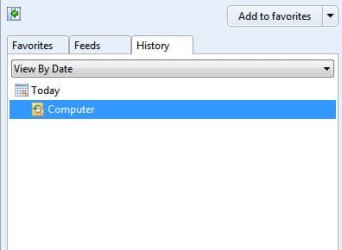
I'm using Windows 7 Ultimate x86 and recently, my browser is no longer showing the websites I've visited by date. It will only show Computer and the local files I've accessed. I've attached an image for you to better understand.

Anyone had this problem and was able to fix it? Thanks.
 

Attachments
  • HISTORY.jpg
    HISTORY.jpg
    9.3 KB · Views: 3

My Computer My Computer

At a glance

Microsoft Windows 7 Ultimate x64 7601 Multipr...AMD FX-6100 Six-Core Processor - Cooler Maste...16GB of RAM - Kingston 99U5471-020.A00LF 4GB ...EVGA NVIDIA GeForce GT 630 2GB
Computer type
PC/Desktop
Computer Manufacturer/Model Number
My First Custom Built And Very Quiet Computer
OS
Microsoft Windows 7 Ultimate x64 7601 Multiprocessor - SP1
CPU
AMD FX-6100 Six-Core Processor - Cooler Master Hyper 212 EVO
Motherboard
ASUSTeK COMPUTER INC. SABERTOOTH 990FX Rev. 1.01
Memory
16GB of RAM - Kingston 99U5471-020.A00LF 4GB Stick
Graphics Card(s)
EVGA NVIDIA GeForce GT 630 2GB
Sound Card
Creative SoundBlaster Audigy 5/Rx Audio Processor (WDM)
Monitor(s) Displays
Dual Dell 24" 2408WFP (Digital) Using DV-I
Screen Resolution
1920 X 1200
Hard Drives
Samsung 480GB Enterprise SSD (Main OS) -
Seagate 1TB OS Backup Drive -
Seagate 3TB Data Drive -
Seagate 3TB Data Backup Drive
PSU
SeaSonic SS-500ET - 500 Watt
Case
SilverStone Raven - SST-RV04B-W - I LOVE THIS CASE!
Cooling
2 x SilverStone AP181 180mm Intake Fan; 1 Antec TrueQuiet Ex
Keyboard
Memorex Multi-Function Keyboard
Mouse
Microsoft Wireless Laser Mouse 5000
Internet Speed
60+MBps Down & 15+MBps Up
Antivirus
AVG Internet Security 2015
Browser
IE 10 & FireFox
Other Info
BIOS Details:

American Megatrends Inc.
BIOS Date: 10/20/10 09:47:36 Ver: 08.00.10
Version: 1604
Release Date: 10/16/2012
Hi Vendetta

My name is Mohammed from DELL media outreach team

In response to you recent query, by any chance did you delete browsing history recently or reset IE or else please check whether you have made a check mark on the delete browsing history option. You can check that by going in to IE then select Tools->Internet option->in general tab window make sure delete browsing history radio button is unchecked, if not uncheck the option close the browser then try checking the history after visiting any website .Check whether this helps

Thanks & Regards
DELL_Mohammed_A
DELL social Media responder
 
Last edited by a moderator:

My Computer My Computer

At a glance

windows 7 home premium 32bit
OS
windows 7 home premium 32bit
I didn't change any settings and the checkbox is unchecked for deleting when closing the browser. I did reset the browser recently, but it's still not logging websites I've been to, only local files for "Computer."

Thanks.
 

My Computer My Computer

At a glance

Microsoft Windows 7 Ultimate x64 7601 Multipr...AMD FX-6100 Six-Core Processor - Cooler Maste...16GB of RAM - Kingston 99U5471-020.A00LF 4GB ...EVGA NVIDIA GeForce GT 630 2GB
Computer type
PC/Desktop
Computer Manufacturer/Model Number
My First Custom Built And Very Quiet Computer
OS
Microsoft Windows 7 Ultimate x64 7601 Multiprocessor - SP1
CPU
AMD FX-6100 Six-Core Processor - Cooler Master Hyper 212 EVO
Motherboard
ASUSTeK COMPUTER INC. SABERTOOTH 990FX Rev. 1.01
Memory
16GB of RAM - Kingston 99U5471-020.A00LF 4GB Stick
Graphics Card(s)
EVGA NVIDIA GeForce GT 630 2GB
Sound Card
Creative SoundBlaster Audigy 5/Rx Audio Processor (WDM)
Monitor(s) Displays
Dual Dell 24" 2408WFP (Digital) Using DV-I
Screen Resolution
1920 X 1200
Hard Drives
Samsung 480GB Enterprise SSD (Main OS) -
Seagate 1TB OS Backup Drive -
Seagate 3TB Data Drive -
Seagate 3TB Data Backup Drive
PSU
SeaSonic SS-500ET - 500 Watt
Case
SilverStone Raven - SST-RV04B-W - I LOVE THIS CASE!
Cooling
2 x SilverStone AP181 180mm Intake Fan; 1 Antec TrueQuiet Ex
Keyboard
Memorex Multi-Function Keyboard
Mouse
Microsoft Wireless Laser Mouse 5000
Internet Speed
60+MBps Down & 15+MBps Up
Antivirus
AVG Internet Security 2015
Browser
IE 10 & FireFox
Other Info
BIOS Details:

American Megatrends Inc.
BIOS Date: 10/20/10 09:47:36 Ver: 08.00.10
Version: 1604
Release Date: 10/16/2012
This must be an odd issue since no one is experiencing the same problem?
 

My Computer My Computer

At a glance

Microsoft Windows 7 Ultimate x64 7601 Multipr...AMD FX-6100 Six-Core Processor - Cooler Maste...16GB of RAM - Kingston 99U5471-020.A00LF 4GB ...EVGA NVIDIA GeForce GT 630 2GB
Computer type
PC/Desktop
Computer Manufacturer/Model Number
My First Custom Built And Very Quiet Computer
OS
Microsoft Windows 7 Ultimate x64 7601 Multiprocessor - SP1
CPU
AMD FX-6100 Six-Core Processor - Cooler Master Hyper 212 EVO
Motherboard
ASUSTeK COMPUTER INC. SABERTOOTH 990FX Rev. 1.01
Memory
16GB of RAM - Kingston 99U5471-020.A00LF 4GB Stick
Graphics Card(s)
EVGA NVIDIA GeForce GT 630 2GB
Sound Card
Creative SoundBlaster Audigy 5/Rx Audio Processor (WDM)
Monitor(s) Displays
Dual Dell 24" 2408WFP (Digital) Using DV-I
Screen Resolution
1920 X 1200
Hard Drives
Samsung 480GB Enterprise SSD (Main OS) -
Seagate 1TB OS Backup Drive -
Seagate 3TB Data Drive -
Seagate 3TB Data Backup Drive
PSU
SeaSonic SS-500ET - 500 Watt
Case
SilverStone Raven - SST-RV04B-W - I LOVE THIS CASE!
Cooling
2 x SilverStone AP181 180mm Intake Fan; 1 Antec TrueQuiet Ex
Keyboard
Memorex Multi-Function Keyboard
Mouse
Microsoft Wireless Laser Mouse 5000
Internet Speed
60+MBps Down & 15+MBps Up
Antivirus
AVG Internet Security 2015
Browser
IE 10 & FireFox
Other Info
BIOS Details:

American Megatrends Inc.
BIOS Date: 10/20/10 09:47:36 Ver: 08.00.10
Version: 1604
Release Date: 10/16/2012
Hi this is Mohammed from DELL social media outreach team again

The following factors could affect the history.

Internet Option, General Tab, click Settings button besides Delete button, if the Temporary Internet files folder's size is full, the history won't be recorded. Also, it only records the latest days' history.


1. Open Internet Explorer by clicking the Start button, and then clicking Internet Explorer.
2. In Content, there will be an option AutoComplete, and then clicking Settings.
3. In AutoComplete settings, Browsing history option should be checked.
If this does not work, reinstall IE 9


Thanks & Regards
DELL_Mohammed_A
DELL Social media Responder
 
Last edited by a moderator:

My Computer My Computer

At a glance

windows 7 home premium 32bit
OS
windows 7 home premium 32bit
Back
Top