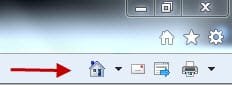
IE9 RC .commd-bar Question ..?

wds7

New member
Member
VIP
Local time
2:21 PM
Messages
329
Can i move the command bar around ...? Look ..:

2-13-2011 1-15-04 PM.jpg


Thanks .
 

My Computer

Computer type
Laptop
Computer Manufacturer/Model Number
Sony Vaio VPC-SE23FXS
OS
WDS 7 Home Pre.x64
CPU
Intel Core i5 2450M @ 2.50GHz
Memory
8GB Kingston[2x4] Dual-Channel DDR3 @ 1333MHz
Graphics Card(s)
AMD Radeon(TM) HD 6470M + Intel(R) HD Graph 3000
Hard Drives
TOSHIBA MK6459GSXP 600GB x 5400RPM (SATA)
No,I don't think so,even you press the "unlock the toolbars",
you still cannot move it.
I think the main reason is,the address bar would remain the same position because
it wants to match the buttons on the left and right.
 

My Computer

Computer Manufacturer/Model Number
Sony VGN-FW520D
OS
Windows 7 Ultimate SP1
CPU
Intel Core 2 Duo P7450 2.13GHz
Memory
4GB DDR2
Graphics Card(s)
ATI Mobility Radeon HD 4650 Graphics
Screen Resolution
1600x900
Hard Drives
500 GB SATA 5400 RPM
Bummer ...No can do ......?
Thanks .
 

My Computer

Computer type
Laptop
Computer Manufacturer/Model Number
Sony Vaio VPC-SE23FXS
OS
WDS 7 Home Pre.x64
CPU
Intel Core i5 2450M @ 2.50GHz
Memory
8GB Kingston[2x4] Dual-Channel DDR3 @ 1333MHz
Graphics Card(s)
AMD Radeon(TM) HD 6470M + Intel(R) HD Graph 3000
Hard Drives
TOSHIBA MK6459GSXP 600GB x 5400RPM (SATA)
Try this method for IE8 and see if it works in IE9:
  1. Open Internet Explorer. Right-click the Command Bar, and UNcheck: Lock the Toolbars.
  2. Move the Command Bar by clicking the Command Bar separator
    98d8b5da-336c-45b6-a2f5-353702fbfeb4.png
    and dragging it from the tab row to the Favorites Bar or its own row.
  3. When done, right-click the Command Bar, and then click: Lock the Toolbars.
 

My Computer

Computer Manufacturer/Model Number
HP Pavillion dv5t (generation 1)
OS
Vista 64 bit and 32 bit (SP2)
CPU
Intel(R) Core(TM)2 Duo Processor T9400 (2.53 GHz
Memory
4GB DDR2 System Memory (2 Dimm)
Graphics Card(s)
512 MB NVIDIA GeForce 9600M GT
Monitor(s) Displays
15.4" diagonal WSXGA+ High-Definition HP BrightView Widescre
Screen Resolution
1680 x 1050
Hard Drives
320GB 5400RPM SATA Hard Drive with HP ProtectSmart Hard Drive Protection
Keyboard
Built-in HP
Mouse
Built in - Synaptics TouchPad V6.5 on PS/2 Port
Internet Speed
Max
Other Info
~ Intel Next-Gen Wireless-N Mini-card w/Bluetooth ~ Blu-Ray ROM DVD+/-R/RW ~ Integ. HDTV Hybrid Tuner ~ 12 Cell Battery ~ MS Office (Home Premium) 2007 ~
Try this method for IE8 and see if it works in IE9:
  1. Open Internet Explorer. Right-click the Command Bar, and UNcheck: Lock the Toolbars.
  2. Move the Command Bar by clicking the Command Bar separator
    98d8b5da-336c-45b6-a2f5-353702fbfeb4.png
    and dragging it from the tab row to the Favorites Bar or its own row.
  3. When done, right-click the Command Bar, and then click: Lock the Toolbars.


Nop ...NO can do ....
It's OK .. I forgot about Favorite bar ..

2-14-2011 3-48-17 PM.jpg

Thanks .
 

My Computer

Computer type
Laptop
Computer Manufacturer/Model Number
Sony Vaio VPC-SE23FXS
OS
WDS 7 Home Pre.x64
CPU
Intel Core i5 2450M @ 2.50GHz
Memory
8GB Kingston[2x4] Dual-Channel DDR3 @ 1333MHz
Graphics Card(s)
AMD Radeon(TM) HD 6470M + Intel(R) HD Graph 3000
Hard Drives
TOSHIBA MK6459GSXP 600GB x 5400RPM (SATA)
Back
Top