Solved IE9/Win 7 Can't Display web pages within web pages

jimdot

New member
Power User
Local time
11:04 AM
Messages
35
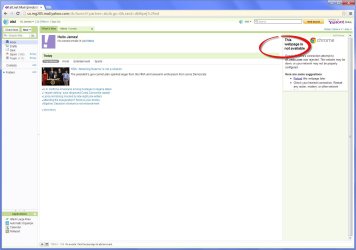
I seem to be getting allot of web pages within web pages that cannot be displayed(see Screen Shot). Can anyone tell me how to correct this or explain what is happening here? I tried making sure compatability was on but that didn't help.
 

Attachments

  • IE9 Screen Shot.jpg
    IE9 Screen Shot.jpg
    180.1 KB · Views: 9

My Computer My Computer

At a glance

Windows 7 Professional 64Bit
OS
Windows 7 Professional 64Bit
You may have an add-on that blocks tracking sites, or advertisers. Based on the picture, the chances are that it is an advertisement that is blocked by your settings.
 

My Computer My Computer

At a glance

Windows 7 64-bit, Windows 8.1 64-bit, OSX El ...Intel i5-3350P 3.1 GHz16 GBs GSkill SniperRadeon HD 7850
Computer type
PC/Desktop
Computer Manufacturer/Model Number
Custom built at Home
OS
Windows 7 64-bit, Windows 8.1 64-bit, OSX El Capitan, Windows 10 (VMware)
CPU
Intel i5-3350P 3.1 GHz
Motherboard
Gigabyte GA-Z77X-UP5 TH
Memory
16 GBs GSkill Sniper
Graphics Card(s)
Radeon HD 7850
Sound Card
VIA HD Audio
Monitor(s) Displays
Dell U2410 24"
Screen Resolution
1920x1200
Hard Drives
1 x Intel 520 240 GBs
1 x Seagate 1TBs SATA 2.0,
1 x Seagate 1TBs eSATA 2.0
PSU
Thermaltake 850W
Case
Antec P183
Cooling
Noctua NH-D14 Heatsink 2 x 120mm fans, 4 x 120mm case fans
Keyboard
Dell Multimedia keyboard
Mouse
Logitech Trackball
Internet Speed
28.5 Mb/s
Which settings? Security settings? What might I change?
 

My Computer My Computer

At a glance

Windows 7 Professional 64Bit
OS
Windows 7 Professional 64Bit
A bit more info in your system specs would help me know if this is on a desktop or a laptop. If laptop, does this happen when connected to another network?

It sure looks like something is blocking adverts - could be:
browser plug in
security software
HOST file
router settings
DNS provider settings (e.g. OpenDNS)
...other stuff...

If you are willing, install and test with Chrome.
(no need to make it your default browser)
(you can uninstall Chrome after we solve this)
 

My Computer My Computer

At a glance

W7 Pro SP1 64biti78GBIntel HD Graphics
Computer type
Laptop
Computer Manufacturer/Model Number
Employer provided Dell Latitude
OS
W7 Pro SP1 64bit
CPU
i7
Memory
8GB
Graphics Card(s)
Intel HD Graphics
Hard Drives
crappy SSD
Antivirus
Employer mandated Symantec Endpoint Protection
Browser
Pale Moon 64bit, IE11 64bit & Chrome 64bit
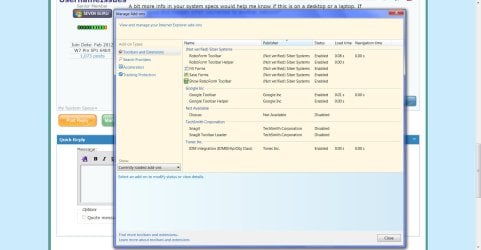
Thanks for the reply. Installed Chrome & got similar results(Google Chrome Screen Shot). I've also attached a screen shot here of my IE9 add-ons for you but I've been running these same things for many years now without issue. One of the things you listed as possibilities was router settings. Come to think of it I did get a new linksys wireless n router last October I think it was. I don't remember how long this problem has persisted but it has been awhile. I've just been living with it until I've finally decided to look into it. I'm no guru about routers. I just installed the software when I got it & have been merily going about my business ever since then.

I can't remember what the path is to that host file or I'd send you a screen shot of that also.

Other Info;
- Win 7 Pro/IE9 -- all updates applied.
- LINKSYS E4200 802.11a/b/g/n
- Microsoft Security Essentials.

Thanks again for your help with this. Any additional info or steps I can take just let me know. I am a retired I.T. software deleloper by the way so I'm not a complete idiot :D Yuk! Yuk!!
 

Attachments

  • Google Chrome Screen Shot.jpg
    Google Chrome Screen Shot.jpg
    123.3 KB · Views: 3
  • IE9 Add-ons.jpg
    IE9 Add-ons.jpg
    135.7 KB · Views: 4

My Computer My Computer

At a glance

Windows 7 Professional 64Bit
OS
Windows 7 Professional 64Bit
Thanks for the info and the screenshots.

MSE is not the problem - so one down :-)

The router is probably a non-issue. I do not know of any router that blocks specific advert sites by default. You would have to manually type in a list of the ones that you want blocked... so we can probably rule the router out.

Since Chrome does it too, then my guess is that it is not an IE plug-in causing this - the caveat to that statement is: I'm not too familiar with the IE Google toolbar. Maybe some settings in the IE Google toolbar are honored by Google's Chrome. A simple test would be to disable it within IE, restart IE and test again with IE.

Can you tell us what your DNS IP addresses are?

The HOST file is a bit trickier to check - I'm not sure what tutorial or external website I can link too and not run afoul of this forum's rules. Perhaps you can Google how to check to see if it has been changed.
 

My Computer My Computer

At a glance

W7 Pro SP1 64biti78GBIntel HD Graphics
Computer type
Laptop
Computer Manufacturer/Model Number
Employer provided Dell Latitude
OS
W7 Pro SP1 64bit
CPU
i7
Memory
8GB
Graphics Card(s)
Intel HD Graphics
Hard Drives
crappy SSD
Antivirus
Employer mandated Symantec Endpoint Protection
Browser
Pale Moon 64bit, IE11 64bit & Chrome 64bit
HOSTS in this folder - C:/Windows/System32/Drivers/etc . May have to use the view option to show hidden files. (That's for Win7 32-bit.)
 

My Computer My Computer

At a glance

Windows 8 Pro w/MC 32-bitIntel Atom 1.86 GHz2 GBIntel GMA 500
Computer type
PC/Desktop
Computer Manufacturer/Model Number
OQO 2+
OS
Windows 8 Pro w/MC 32-bit
CPU
Intel Atom 1.86 GHz
Motherboard
OQO 2+
Memory
2 GB
Graphics Card(s)
Intel GMA 500
Sound Card
IDT
Monitor(s) Displays
LCD
Screen Resolution
800 x 480 (portable) 1280 x 1024 (docked)
Hard Drives
64 GB SSD
PSU
9 Ah Battery (portable) or OQO Brick (docked)
Case
Shirt Pocket Sized
Cooling
Tiny Fan
Keyboard
Slide out (portable) DiNovo Edge (docked)
Mouse
Eraser head (portable) Logitech Bluetooth (docked)
Internet Speed
WWAN or 802.11G (portable) T1 (docked)
Browser
IE 10
Other Info
DVD-RW OQO Docking Station
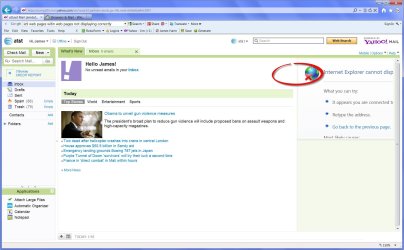
In IE, you have a tab for "Tracking protection", the link to it is in the image you posted. You may have some traking protection enabled there, or the site is blocked based on its reputation.

The site of d7.zedo.com is part of an ad-exchange network. Chrome, read Google, maybe blocking this ad network as well, due to its reputation. I wouldn't worry about not seeing ads...
 

My Computer My Computer

At a glance

Windows 7 64-bit, Windows 8.1 64-bit, OSX El ...Intel i5-3350P 3.1 GHz16 GBs GSkill SniperRadeon HD 7850
Computer type
PC/Desktop
Computer Manufacturer/Model Number
Custom built at Home
OS
Windows 7 64-bit, Windows 8.1 64-bit, OSX El Capitan, Windows 10 (VMware)
CPU
Intel i5-3350P 3.1 GHz
Motherboard
Gigabyte GA-Z77X-UP5 TH
Memory
16 GBs GSkill Sniper
Graphics Card(s)
Radeon HD 7850
Sound Card
VIA HD Audio
Monitor(s) Displays
Dell U2410 24"
Screen Resolution
1920x1200
Hard Drives
1 x Intel 520 240 GBs
1 x Seagate 1TBs SATA 2.0,
1 x Seagate 1TBs eSATA 2.0
PSU
Thermaltake 850W
Case
Antec P183
Cooling
Noctua NH-D14 Heatsink 2 x 120mm fans, 4 x 120mm case fans
Keyboard
Dell Multimedia keyboard
Mouse
Logitech Trackball
Internet Speed
28.5 Mb/s
I think I will take crOOzng advise "I wouldn't worry about not seeing ads... "

 

My Computer My Computer

At a glance

Windows 7 Professional 64Bit
OS
Windows 7 Professional 64Bit
Back
Top