IE9 won't complete downloads

Qibbler

New member
Local time
1:51 PM
Messages
12
Hi,

Just clean installed Windows 7 Professional. Updates all worked, including IE9 upgrading itself over IE8.

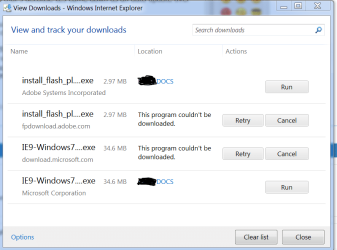
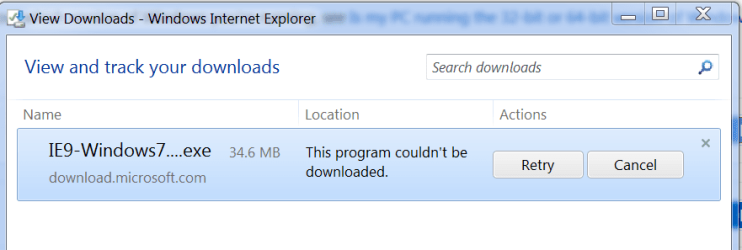
When i try downloading anything, the download manager gives an error part-way thru. See pics. I reset IE9 and tried running the no-add-ons version. Can't fresh reinstall IE9 as the download for IE9 also broke at about 90% :huh: It managed to download over 34 meg before it broke!

I thought might be a security policy setting. Disabled my SRP ... made no difference. Not sure if there is another secpol.msc setting that might be the culprit?

I've run all the usual scans and doesn't seem to be malware. I'm using Avast AV and Comodo firewall with HIPs. Brain's stopped working to figure out what might need changing in either of those.

Any help appreciated
 

Attachments
  • DLM.PNG
    DLM.PNG
    16.2 KB · Views: 21
  • DLM2.PNG
    DLM2.PNG
    8.3 KB · Views: 19

My Computer My Computer

At a glance

Windows 7 PRO x64
OS
Windows 7 PRO x64
Try with another browser, as a test. Firefox would be a good choice.
 

My Computer My Computer

At a glance

Windows 10, Home Clean InstallIntel Core2 processsor Q8200(2.33Ghz 1333FSB)...6 gbATI Radeon 256MB HD3650
Computer type
PC/Desktop
Computer Manufacturer/Model Number
Dell XPS 420
OS
Windows 10, Home Clean Install
CPU
Intel Core2 processsor Q8200(2.33Ghz 1333FSB) Quad Core Tech
Motherboard
Dell
Memory
6 gb
Graphics Card(s)
ATI Radeon 256MB HD3650
Sound Card
Intergrated 7.1 Channel Audio
Monitor(s) Displays
Dell SP2009W 20"
Hard Drives
640 GB Serial ATA Hard drive
Cooling
Fan
Keyboard
Dell USB Keyboard
Mouse
Dell Premium Optical USB
Internet Speed
DSL 2.85
Thanks for reply.

Thought I'd first revert to IE8 to see if that worked. Not sure if I've forgotten something I never knew (?) ... but I could remove IE9 as a windows feature and Windows only offered IE9 to replace it. Guess that's because IE9 came down as an auto update over IE8?

Vaguely recall reading IE9 should be installed with AV and HIPs turned off, but obviously automatic update gave me no chance to do that.

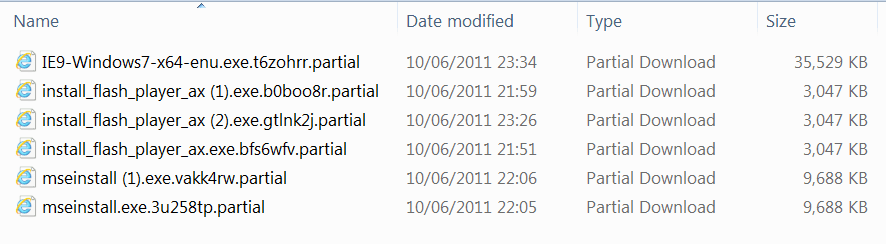
Thing is, I've just reinstated IE9 as a feature, and instead of using SAVE in its DLM I tried SAVE AS. The downloads work! :shock: Per the attached pic you can see the successful downloads are the same size as the so-called 'partial' ones that failed. Downloads still fail if I just use SAVE in the DLM.

Makes no sense? :mad:
 

Attachments

  • DLM3.PNG
    DLM3.PNG
    27.2 KB · Views: 29

My Computer My Computer

At a glance

Windows 7 PRO x64
OS
Windows 7 PRO x64
Mine doesn't save using "SAVE" OR "SAVE AS" (I am logging in to a Domain, not sure if it's a policy issue or not) but whenever I need to download I just use DAP (Download Accelerator Plus) since it also lets you download +2 gig files. Was this corrected in IE9 or is it still a 2gig cap on downloads?
 

My Computer My Computer

At a glance

Windows 7 x64
OS
Windows 7 x64
This issue was fixed in the June cumulative hotfix for IE9, so this should no longer be a problem. It appears that there was some sort of issue with downloads and tabs being closed or moved, it seems, after chatting with this with our support folks who had engaged Microsoft support initially for this very problem.
 

My Computer My Computer

At a glance

Windows 10 Pro x64Intel Core i7 4790K @ 4.5GHz32GB DDR3Nvidia GeForce GTX970
Computer type
PC/Desktop
Computer Manufacturer/Model Number
Custom
OS
Windows 10 Pro x64
CPU
Intel Core i7 4790K @ 4.5GHz
Motherboard
Asus Maximus Hero VII
Memory
32GB DDR3
Graphics Card(s)
Nvidia GeForce GTX970
Sound Card
Realtek HD Audio
Screen Resolution
1920x1200
Hard Drives
1x Samsung 250GB SSD
4x WD RE 2TB (RAIDZ)
PSU
Corsair AX760i
Case
Fractal Design Define R4
Cooling
Noctua NH-D15
Back
Top