Solved IEHelper.dll - What is it? Can I remove it?

TheTalker

New member
Member
VIP
Local time
9:30 AM
Messages
143
Hello everyone! I recently installed a download manager, JDownloader, and afterwards I had this bizarre toolbar, Delta Search, over-running my computer and browsers. (I was able to remove the Delta junk visually but if anyone has experience with this and knows if it's still on my PC, it'd be great if you could share how to remove completely.)
Edit:
I was NOT able to remove Delta. It's back. It takes over my default search engine in chrome even after I remove it. How do I remove this junk?
Edit 2: It seems I was able to remove the Delta trash by using this guide: Remove Delta Search (Uninstall Guide)
Edit 3: Delta is back after restart...
Edit 4: Okay, maybe it's not back. The homepage in Chrome was delta. Pretty sure I changed that but maybe not.
Edit 5: I installed their three recommended programs from the guide I linked above, they ran as intended, and even removed some delta items I missed....as well as some other unwanted items.

I still need help with the IEHelper.dll. It's not popping up but I'm not sure what it is or if I should be afraid of it.
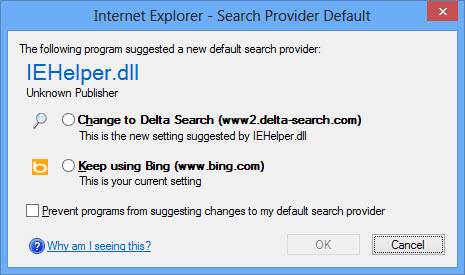
IEHelper-dll-warning.jpg


I've never seen this message and I'm guessing it's from installing JDownloader. Although, I've installed JDownloader before and this has never happened. It's all very odd.

I googled "IEHelper.dll" and everything is vague, some says it's a virus though. I'm not too keen on these kinds of things. Does anyone here know if this thing is dangerous and if/how I should remove it?

Thank you.

Edit 6: I was thinking. Delta changes the default search, maybe Microsoft added the Helper warning thing whenever something tries to change your search engine. Would make sense that it popped up at the same time Delta was installed. Maybe that's all it is. I just can't find any information on it, that's why it struck me as odd.

Last Edit 7: As "UsernameIssues" pointed out in their post, http://www.sevenforums.com/general-discussion/289613-iehelper-dll-what-can-i-remove.html#post2397683, when I installed JDownloader I went too fast and installed Delta which then installed other items such as this IEHelper. I was able to remove all items using the three programs listed in the guide linked above. Thank you.
 
Last edited:

My Computer My Computer

At a glance

Windows 7 Home Premium x64Intel Core i5-4690k8GBEVGA GeForce GTX 970
Computer type
PC/Desktop
Computer Manufacturer/Model Number
Custom build
OS
Windows 7 Home Premium x64
CPU
Intel Core i5-4690k
Motherboard
Gigabyte H97 SATA Express M.2 SSD UEFI DualBIOS DDR3 1600 LG
Memory
8GB
Graphics Card(s)
EVGA GeForce GTX 970
Monitor(s) Displays
2
Hard Drives
2:
- Samsung 850 EVO 250GB 2.5-Inch SATA III Internal SSD (MZ-75E250B/AM)
- Crucial MX300 275GB SATA 2.5 Inch Internal Solid State Drive - CT275MX300SSD1
PSU
Corsair 650x
Case
C70
Cooling
4 Fans
Internet Speed
Comcast Cable 22mbs
Antivirus
Microsoft Security Essentials
Browser
Chrome
Where is IEHelper.dll located?
 

My Computer My Computer

At a glance

Windows 10 Pro X64Intel Quad Core i7-4770 @ 3.4Ghz16.0GB PC3-12800 DDR3 SDRAM 1600 MHzIntel Integrated HD Graphics
Computer type
PC/Desktop
Computer Manufacturer/Model Number
Lenovo IdeaCenter 450
OS
Windows 10 Pro X64
CPU
Intel Quad Core i7-4770 @ 3.4Ghz
Memory
16.0GB PC3-12800 DDR3 SDRAM 1600 MHz
Graphics Card(s)
Intel Integrated HD Graphics
Sound Card
Realtek HD Audio
Monitor(s) Displays
HP 22" LCD
Screen Resolution
1680 x 1050
Hard Drives
250GB Samsung EVO SATA-3 SSD
2TB Seagate ST2000DM001 SATA-2
1.5TB Seagate ST3150041AS SATA
Keyboard
Dell USB
Mouse
Lenovo USB
Internet Speed
Cable via Road Runner 3MB Upload, 30MB Download
Antivirus
Windows Defender, MBAM Pro, MBAE
Browser
Seamonkey
Other Info
UEFI/GPT
PLDS DVD-RW DH16AERSH

My Computer My Computer

At a glance

Windows 7 Home Premium x64Intel Core i5-4690k8GBEVGA GeForce GTX 970
Computer type
PC/Desktop
Computer Manufacturer/Model Number
Custom build
OS
Windows 7 Home Premium x64
CPU
Intel Core i5-4690k
Motherboard
Gigabyte H97 SATA Express M.2 SSD UEFI DualBIOS DDR3 1600 LG
Memory
8GB
Graphics Card(s)
EVGA GeForce GTX 970
Monitor(s) Displays
2
Hard Drives
2:
- Samsung 850 EVO 250GB 2.5-Inch SATA III Internal SSD (MZ-75E250B/AM)
- Crucial MX300 275GB SATA 2.5 Inch Internal Solid State Drive - CT275MX300SSD1
PSU
Corsair 650x
Case
C70
Cooling
4 Fans
Internet Speed
Comcast Cable 22mbs
Antivirus
Microsoft Security Essentials
Browser
Chrome
When you downloaded the downloader, you didn`t uncheck a check box, now you have what looks like adware. Have you run Microsoft Security Essentials yet or Malwarebytes anti-malware ? Get rid of the program you downloaded, you don`t need a downloader. Look for it in add/remove programs.

Have you highlited the keep using Bing option, then checked the box so you stop getting that popup ?

You have got to go slower when you download garbage from the internet, and read everything.

http://www.file.net/process/iehelper.dll.html

http://www.iobit.com/exedll/iehelper-dll.html

http://www.spywareguide.com/product_show.php?id=770
 

My Computer My Computer

At a glance

Windows 10 Pro x64Intel Core i7 6700KGSkill TridentZ RGB 16GB 3600 16-16-16-36EVGA GTX 980 Ti SC x2
Computer type
PC/Desktop
Computer Manufacturer/Model Number
Skylake Special #666
OS
Windows 10 Pro x64
CPU
Intel Core i7 6700K
Motherboard
Asus Sabertooth Z170 Mark 1
Memory
GSkill TridentZ RGB 16GB 3600 16-16-16-36
Graphics Card(s)
EVGA GTX 980 Ti SC x2
Sound Card
Realtek High Definition
Monitor(s) Displays
AOC G2460PG
Screen Resolution
1920 x 1080 144Hz
Hard Drives
Samsung 860 Pro 256GB, Seagate Barracuda 4TB x2
PSU
EVGA 1000 P2, EVGA White Custom Braided Cables
Case
Corsair Vengeance C70 Gunmetal Black
Cooling
Corsair H100i v2, Corsair ML120 x2, Thermal Grizzly Kryonaut
Keyboard
Logitech G910 Orion Spectrum
Mouse
Logitech G700s
Internet Speed
Verizon Fios Quantum Gateway 75/75
Antivirus
Windows Defender, Malwarebytes Free 3.8.3
Browser
Chrome
Other Info
Corsair SP120 x4, LG Blu-ray Drive, Durabrand HT-395 100 Watt Dolby Digital Amp, Corsair H2100 Wireless 7.1 Headset
When you downloaded the downloader, you didn`t uncheck a check box, now you have what looks like adware. Have you run Microsoft Security Essentials yet or Malwarebytes anti-malware ? Get rid of the program you downloaded, you don`t need a downloader. Look for it in add/remove programs.

Have you highlited the keep using Bing option, then checked the box so you stop getting that popup ?

You have got to go slower when you download garbage from the internet, and read everything.

IEHelper.dll Windows process - What is it?

Remove iehelper.dll virus | iehelper error | iehelper.dll

IEHelper

I was able to rid myself of the Delta Search toolbar or as you called it adware. I have run both MSE and Malwarebytes along with two other programs listed in the removal guide I linked in my first post. All programs found no threats.

I read those guides you posted and IEHelper is not in C:Windows or C:Windows/System 32 like they say it is. I cannot find any IEHelper. I've just seen that popup, (picture in my first post), once and not since. I did highlight Bing when that window popped up. So maybe it's gone? Scary how it can monitor what I do and that some say it's a virus/trogan though....so I'd like to find out if it's truly gone.

I've always been very cautious and unfortunately this once I was in a hurry and did not read through the install wizard...causing me troubles. I checked my computer's task list because the guides said it can hide in certain tasks and there's nothing unusual running. I have 74 processes going and that majority of them is Google Chrome's tabs. The rest are normal tasks. Java, Malwarebytes, etc. No Internet Explorer either.

Since I cannot find IEHelper what could that mean? I've checked over and over in the areas those guides suggest.

Is this truly a virus? Watching my every move? Logging my passwords? Or is it just something that Microsoft implemented to happen when something tries to change your default search engine in Internet Explorer? Or did this Delta toolbar/search/crappy program add the IEHelper, thus removing it when I removed Delta?
 

My Computer My Computer

At a glance

Windows 7 Home Premium x64Intel Core i5-4690k8GBEVGA GeForce GTX 970
Computer type
PC/Desktop
Computer Manufacturer/Model Number
Custom build
OS
Windows 7 Home Premium x64
CPU
Intel Core i5-4690k
Motherboard
Gigabyte H97 SATA Express M.2 SSD UEFI DualBIOS DDR3 1600 LG
Memory
8GB
Graphics Card(s)
EVGA GeForce GTX 970
Monitor(s) Displays
2
Hard Drives
2:
- Samsung 850 EVO 250GB 2.5-Inch SATA III Internal SSD (MZ-75E250B/AM)
- Crucial MX300 275GB SATA 2.5 Inch Internal Solid State Drive - CT275MX300SSD1
PSU
Corsair 650x
Case
C70
Cooling
4 Fans
Internet Speed
Comcast Cable 22mbs
Antivirus
Microsoft Security Essentials
Browser
Chrome
Just like in this post - it matters where you download the app from. You can download JDownloader from filehippo. The filehippo version did not offer other programs to be installed. This could change at any time.

If you download JDownloader from here...
http://jdownloader.org/download/index
...you will be offered one or two other things to install.

If you download it from here...
http://jdownloader.com/
...you are offered a bunch of junk to install and then you will be offered the installer from the .org website.

I installed JDownloader several times inside a virtual machine. Most of the time the Programs and Features window showed that JDownloader 0.9 was installed. Once it showed JDownloader 1.01; or maybe I just imaged it.

It appears that you used the .com website (or one like it). You left the recommended option checked to install the Delta Search junk. That option also silently* installs other junk in the background while you are looking at additional install options in the main installer.

*no windows appear - except the one in the OP.

It does not matter if you select the option to stay with Bing or change to Delta Search, the DLL mentioned in the window will not to be registered. I did find the DLL in the user temp files. Here is a virustotal scan of that DLL. IEHELPER.DLL is only used to set the default search engine (be it Delta or Babylon or...). The DLL is only used during the installation process. According to Process Explorer, the DLL was not in RAM after the installation completed or after the computer restarted. The DLL is not a virus, it is just associated with software that is less than desirable.


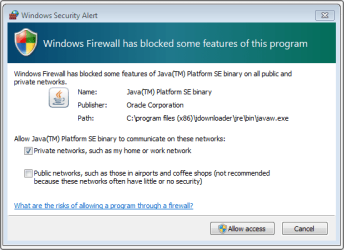
JDownloader uses Java and it asks you to allow Java to accept incoming connections from the internet. I don't know if that is a very safe thing to do. If you do not have the latest version of Java installed (1.7 update 21), the installer installs an old version (1.7 update 7) and it does not install the update tool for Java. If you opt to keep Java on your computer, please see the part of this post labeled generic advice.

javaw.png
 

My Computer My Computer

At a glance

W7 Pro SP1 64biti78GBIntel HD Graphics
Computer type
Laptop
Computer Manufacturer/Model Number
Employer provided Dell Latitude
OS
W7 Pro SP1 64bit
CPU
i7
Memory
8GB
Graphics Card(s)
Intel HD Graphics
Hard Drives
crappy SSD
Antivirus
Employer mandated Symantec Endpoint Protection
Browser
Pale Moon 64bit, IE11 64bit & Chrome 64bit
Just like in this post - it matters where you download the app from. You can download JDownloader from filehippo. The filehippo version did not offer other programs to be installed. This could change at any time.

If you download JDownloader from here...
http://jdownloader.org/download/index
...you will be offered one or two other things to install.

If you download it from here...
http://jdownloader.com/
...you are offered a bunch of junk to install and then you will be offered the installer from the .org website.

I installed JDownloader several times inside a virtual machine. Most of the time the Programs and Features window showed that JDownloader 0.9 was installed. Once it showed JDownloader 1.01; or maybe I just imaged it.

It appears that you used the .com website (or one like it). You left the recommended option checked to install the Delta Search junk. That option also silently* installs other junk in the background while you are looking at additional install options in the main installer.

*no windows appear - except the one in the OP.

It does not matter if you select the option to stay with Bing or change to Delta Search, the DLL mentioned in the window will not to be registered. I did find the DLL in the user temp files. Here is a virustotal scan of that DLL. IEHELPER.DLL is only used to set the default search engine (be it Delta or Babylon or...). The DLL is only used during the installation process. According to Process Explorer, the DLL was not in RAM after the installation completed or after the computer restarted. The DLL is not a virus, it is just associated with software that is less than desirable.


JDownloader uses Java and it asks you to allow Java to accept incoming connections from the internet. I don't know if that is a very safe thing to do. If you do not have the latest version of Java installed (1.7 update 21), the installer installs an old version (1.7 update 7) and it does not install the update tool for Java. If you opt to keep Java on your computer, please see the part of this post labeled generic advice.

View attachment 268004

Ah, thank you!! So in summary I installed Delta which installed other items such as IEHelper. I removed Delta using three programs---eventually I got to the point where nothing was found and all was okay again.

Thank you very much for your assistance. I'm glad it's not a virus. I have my peace of mind again!! I uninstalled JDownloader. If I ever get it again I will refer to your tips before doing anything. And go slower next time, haha.

PS: You guys always help me here at SevenForums. Repped! Thank you again!
 

My Computer My Computer

At a glance

Windows 7 Home Premium x64Intel Core i5-4690k8GBEVGA GeForce GTX 970
Computer type
PC/Desktop
Computer Manufacturer/Model Number
Custom build
OS
Windows 7 Home Premium x64
CPU
Intel Core i5-4690k
Motherboard
Gigabyte H97 SATA Express M.2 SSD UEFI DualBIOS DDR3 1600 LG
Memory
8GB
Graphics Card(s)
EVGA GeForce GTX 970
Monitor(s) Displays
2
Hard Drives
2:
- Samsung 850 EVO 250GB 2.5-Inch SATA III Internal SSD (MZ-75E250B/AM)
- Crucial MX300 275GB SATA 2.5 Inch Internal Solid State Drive - CT275MX300SSD1
PSU
Corsair 650x
Case
C70
Cooling
4 Fans
Internet Speed
Comcast Cable 22mbs
Antivirus
Microsoft Security Essentials
Browser
Chrome
You are welcome.

> So in summary I installed Delta which installed other items such as IEHelper.
It depends on what you mean by installed. IEHelper was written to a temp folder and was used from there. The installer for Delta, started RunDLL.exe (a native W7 app). RunDLL was told to use IEHelper.DLL to ask you to pick a search provider. Once you selected Bing, RunDLL and IEHelper exited RAM.

If you can live without it, just uninstall all versions of Java. You can use this tool - if need be:
JavaRa - SingularLabs
 

My Computer My Computer

At a glance

W7 Pro SP1 64biti78GBIntel HD Graphics
Computer type
Laptop
Computer Manufacturer/Model Number
Employer provided Dell Latitude
OS
W7 Pro SP1 64bit
CPU
i7
Memory
8GB
Graphics Card(s)
Intel HD Graphics
Hard Drives
crappy SSD
Antivirus
Employer mandated Symantec Endpoint Protection
Browser
Pale Moon 64bit, IE11 64bit & Chrome 64bit
Glad you got it sorted, and thanks for the rep :D
 

My Computer My Computer

At a glance

Windows 10 Pro x64Intel Core i7 6700KGSkill TridentZ RGB 16GB 3600 16-16-16-36EVGA GTX 980 Ti SC x2
Computer type
PC/Desktop
Computer Manufacturer/Model Number
Skylake Special #666
OS
Windows 10 Pro x64
CPU
Intel Core i7 6700K
Motherboard
Asus Sabertooth Z170 Mark 1
Memory
GSkill TridentZ RGB 16GB 3600 16-16-16-36
Graphics Card(s)
EVGA GTX 980 Ti SC x2
Sound Card
Realtek High Definition
Monitor(s) Displays
AOC G2460PG
Screen Resolution
1920 x 1080 144Hz
Hard Drives
Samsung 860 Pro 256GB, Seagate Barracuda 4TB x2
PSU
EVGA 1000 P2, EVGA White Custom Braided Cables
Case
Corsair Vengeance C70 Gunmetal Black
Cooling
Corsair H100i v2, Corsair ML120 x2, Thermal Grizzly Kryonaut
Keyboard
Logitech G910 Orion Spectrum
Mouse
Logitech G700s
Internet Speed
Verizon Fios Quantum Gateway 75/75
Antivirus
Windows Defender, Malwarebytes Free 3.8.3
Browser
Chrome
Other Info
Corsair SP120 x4, LG Blu-ray Drive, Durabrand HT-395 100 Watt Dolby Digital Amp, Corsair H2100 Wireless 7.1 Headset
Back
Top