Solved Illegal Instruction ?

Good2GO

New member
Member
Local time
5:16 PM
Messages
31
Location
Anthracite Region
Capture.PNG.Illeagle.Inst.PNG
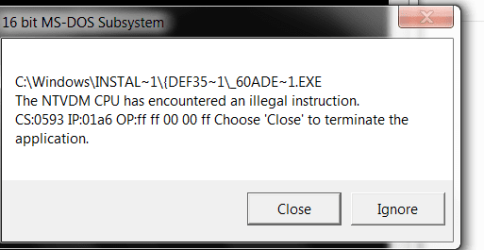
Hi ,Can anyone tell me what this attachment means & how can I put an end to it? It's always popping up every time I start any browser.
 

My Computer

Computer type
PC/Desktop
Computer Manufacturer/Model Number
Build 2010
OS
Windows 7 Home Premium 32bit
CPU
Intel Core 2 Quad Q8300 @ 2.50GHz 39 °C Yorkfield 45nm Techn
Motherboard
Gigabyte Technology Co., Ltd. G31M-ES2L (Socket 775
Memory
3.00 GB Dual-Channel DDR2 @ 400MHz (5-5-5-15)
Graphics Card(s)
Radeon HD 6870
Sound Card
Realtek High Definition Audio
Monitor(s) Displays
Hanns G-19.1 "
Hard Drives
Seagate & Western Digital
PSU
520w Seasonic
Case
Cooler Master
Keyboard
Logitech Deluxe 250
Mouse
Logitech M510
Internet Speed
10 GB
Antivirus
Symantec
Browser
Firefox & Google Chrome
You say this happens on every browser you try? What would they be?
 

My Computer

Computer type
Laptop
Computer Manufacturer/Model Number
MSI GE72VR Apache Pro-416
OS
Windows 10x64 Build 1709
CPU
Intel i7 7700HQ Kaby Lake
Motherboard
Micro-Star Intl. MS-179B (U3C1)
Memory
16 GB DDR4 @2400
Graphics Card(s)
Nvidia Geforce GTX 1060
Screen Resolution
1920x1080 120Hz
Hard Drives
256 GB Nvme M.2 SSD

1TB HDD@7200
Cooling
Cooler Blast 4
Keyboard
Steel Series
Antivirus
Bit Defender Free
Browser
Edge
Some corrupted (un)installer located inside the Installer folder seems to be causing the problem.

Go to C:\Windows\Installer\{DEF35...}\ and first make a backup of "_60ADE~1.EXE" file and then delete it and see if the problem persists. If this screws thing up, put that file back.
 
You say this happens on every browser you try? What would they be?


Actually I don't have to open any browser for it to show up. If I wait a few minuets after connecting to the Internet the message pops up
 

My Computer

Computer type
PC/Desktop
Computer Manufacturer/Model Number
Build 2010
OS
Windows 7 Home Premium 32bit
CPU
Intel Core 2 Quad Q8300 @ 2.50GHz 39 °C Yorkfield 45nm Techn
Motherboard
Gigabyte Technology Co., Ltd. G31M-ES2L (Socket 775
Memory
3.00 GB Dual-Channel DDR2 @ 400MHz (5-5-5-15)
Graphics Card(s)
Radeon HD 6870
Sound Card
Realtek High Definition Audio
Monitor(s) Displays
Hanns G-19.1 "
Hard Drives
Seagate & Western Digital
PSU
520w Seasonic
Case
Cooler Master
Keyboard
Logitech Deluxe 250
Mouse
Logitech M510
Internet Speed
10 GB
Antivirus
Symantec
Browser
Firefox & Google Chrome

My Computer

Computer type
PC/Desktop
Computer Manufacturer/Model Number
Home made Desktop
OS
Windows 10 Pro. 64/ version 1709 Windows 7 Pro/64
CPU
Intel i7-6800K @ 4.3
Motherboard
ASUS X-99 Deluxe II
Memory
Corsair Platinum 16 gig @2400
Graphics Card(s)
EVGA GTX 1070 OC
Monitor(s) Displays
Asus 27" LED LCD/VE278Q
Screen Resolution
1920-1080 or 1280-720 HDMI
Hard Drives
INTEL SSD 730-240 Gb Sata 3.0/
PSU
EVGA Platium 1200W
Case
Phanteks Luxe Tempered Glass 8 fans/ one radiator
Cooling
XSPC/ Water Cooled CPU
Keyboard
Das 4 Professional
Mouse
Logitech M705/MX Anywhere 2-S
Internet Speed
100 mbits
Antivirus
Microsoft Security Essentials/ Malwarebytes Premium 3.0/ SAS
Browser
I.E. 11 default/Firefox/ ISP Time Warner Cable/Spectrum
Other Info
LG BluRay Burner/
Sound system-KLipsch-THX/
Icy Dock ssd Hot Swap bays.
Some corrupted (un)installer located inside the Installer folder seems to be causing the problem.

Go to C:\Windows\Installer\{DEF35...}\ and first make a backup of "_60ADE~1.EXE" file and then delete it and see if the problem persists. If this screws thing up, put that file back.


I'm unable to find the folder you specified in the windows folder
 

My Computer

Computer type
PC/Desktop
Computer Manufacturer/Model Number
Build 2010
OS
Windows 7 Home Premium 32bit
CPU
Intel Core 2 Quad Q8300 @ 2.50GHz 39 °C Yorkfield 45nm Techn
Motherboard
Gigabyte Technology Co., Ltd. G31M-ES2L (Socket 775
Memory
3.00 GB Dual-Channel DDR2 @ 400MHz (5-5-5-15)
Graphics Card(s)
Radeon HD 6870
Sound Card
Realtek High Definition Audio
Monitor(s) Displays
Hanns G-19.1 "
Hard Drives
Seagate & Western Digital
PSU
520w Seasonic
Case
Cooler Master
Keyboard
Logitech Deluxe 250
Mouse
Logitech M510
Internet Speed
10 GB
Antivirus
Symantec
Browser
Firefox & Google Chrome
Some corrupted (un)installer located inside the Installer folder seems to be causing the problem.

Go to C:\Windows\Installer\{DEF35...}\ and first make a backup of "_60ADE~1.EXE" file and then delete it and see if the problem persists. If this screws thing up, put that file back.


I'm unable to find the folder you specified in the windows folder

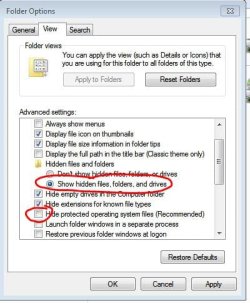
The "Installer" folder is hidden. Go to folder options, check to show hidden files and uncheck that check box that I have encircled in the following pic in order to show protected system hidden files:

Capture.JPG

That will give you access to the said folder.

Thanks. :)
 
Some corrupted (un)installer located inside the Installer folder seems to be causing the problem.

Go to C:\Windows\Installer\{DEF35...}\ and first make a backup of "_60ADE~1.EXE" file and then delete it and see if the problem persists. If this screws thing up, put that file back.


I'm unable to find the folder you specified in the windows folder

The "Installer" folder is hidden. Go to folder options, check to show hidden files and uncheck that check box that I have encircled in the following pic in order to show protected system hidden files:

View attachment 260519

That will give you access to the said folder.

Thanks. :)


I found the file backed it up & deleted it like you suggested. I'll get back to you with the results. Looks like it worked!
Thanks,
 
Last edited:

My Computer

Computer type
PC/Desktop
Computer Manufacturer/Model Number
Build 2010
OS
Windows 7 Home Premium 32bit
CPU
Intel Core 2 Quad Q8300 @ 2.50GHz 39 °C Yorkfield 45nm Techn
Motherboard
Gigabyte Technology Co., Ltd. G31M-ES2L (Socket 775
Memory
3.00 GB Dual-Channel DDR2 @ 400MHz (5-5-5-15)
Graphics Card(s)
Radeon HD 6870
Sound Card
Realtek High Definition Audio
Monitor(s) Displays
Hanns G-19.1 "
Hard Drives
Seagate & Western Digital
PSU
520w Seasonic
Case
Cooler Master
Keyboard
Logitech Deluxe 250
Mouse
Logitech M510
Internet Speed
10 GB
Antivirus
Symantec
Browser
Firefox & Google Chrome
Thanks to everyone that replied.
 

My Computer

Computer type
PC/Desktop
Computer Manufacturer/Model Number
Build 2010
OS
Windows 7 Home Premium 32bit
CPU
Intel Core 2 Quad Q8300 @ 2.50GHz 39 °C Yorkfield 45nm Techn
Motherboard
Gigabyte Technology Co., Ltd. G31M-ES2L (Socket 775
Memory
3.00 GB Dual-Channel DDR2 @ 400MHz (5-5-5-15)
Graphics Card(s)
Radeon HD 6870
Sound Card
Realtek High Definition Audio
Monitor(s) Displays
Hanns G-19.1 "
Hard Drives
Seagate & Western Digital
PSU
520w Seasonic
Case
Cooler Master
Keyboard
Logitech Deluxe 250
Mouse
Logitech M510
Internet Speed
10 GB
Antivirus
Symantec
Browser
Firefox & Google Chrome
Glad to know that helped! Though keep that backed up file with you incase you suddenly need it! :)


Will do. Thanks & Rock On !
 

My Computer

Computer type
PC/Desktop
Computer Manufacturer/Model Number
Build 2010
OS
Windows 7 Home Premium 32bit
CPU
Intel Core 2 Quad Q8300 @ 2.50GHz 39 °C Yorkfield 45nm Techn
Motherboard
Gigabyte Technology Co., Ltd. G31M-ES2L (Socket 775
Memory
3.00 GB Dual-Channel DDR2 @ 400MHz (5-5-5-15)
Graphics Card(s)
Radeon HD 6870
Sound Card
Realtek High Definition Audio
Monitor(s) Displays
Hanns G-19.1 "
Hard Drives
Seagate & Western Digital
PSU
520w Seasonic
Case
Cooler Master
Keyboard
Logitech Deluxe 250
Mouse
Logitech M510
Internet Speed
10 GB
Antivirus
Symantec
Browser
Firefox & Google Chrome
Back
Top