I'm trying to delete Win7 off of my old drive that is now a secondary

chuckiechan

New member
Local time
10:40 AM
Messages
23


I got an SSD "C" drive and am using the old drive "G" as a back up. "G" still has a copy of Windows on it that I don't need, plus the protected system reserved partition.

It won't let me delete any Windows files on "G" due to Trusted Installer.

I tried taking ownership but that didn't work. I'm admin by default, we have no icons to click on to open windows. I wanted to do that then just merge the partitions into one to create a basic back up internal Platter HDD.

When I installed the "C" SSD drive , I moved My docs, My Music, My Pictures, My Videos to the "G" drive as recommended by Properties/location/ change to "c". under "user" on "C".

Can I change those locations back to my SSD drive temporarily until I wipe the "G" drive, and if I do, will the files follow? If that works, then I can just reformat my drive into one logical internal back up drive. But I don't know if that will work.

Or as a plan "B", how do I delete the protected files, then take care of the partitions later.

So in review:
Issue #1 - somehow get authority to delete windows files, them clean up the hdd without wiping.
Issue #2 - move my docs, my photo, my video, my music, back to "C" (ssd) without creating a problem like lost files.

I need the space to do a Windows image because I'm having issues with my Seagate portable backup drive.
rolleyes.gif


SSD = 240G Crucial M500
Secondary in question = 140G or so Western Digital platter

I hope this is making sense.
 

My Computer My Computer

At a glance

Windows 7 64 bitAMD Phenom II x4 9558 gigECS (I think) Nvidea GTX 460
Computer Manufacturer/Model Number
Home build
OS
Windows 7 64 bit
CPU
AMD Phenom II x4 955
Motherboard
Biostar A770E3
Memory
8 gig
Graphics Card(s)
ECS (I think) Nvidea GTX 460
Sound Card
On board
Monitor(s) Displays
Samsung 1 SyncMaster 204B 20"
Screen Resolution
1600 x 1200 progressive
Hard Drives
1 WD1500 SATA partitioned to one "D" partition
1 Seagate ATA partitioned to "F" and "G" for backups, "F" being bootable at one time,
1 Maxtor ATA 6Y080PO backups
PSU
Antec 650 tri power
Case
Antec old timer
Cooling
Stock, + positive pressure w/filters for war on dustbunnies
Keyboard
Logitech
Mouse
Microsoft wireless
Internet Speed
DSL
Was the HDD disconnected when you installed Windows to the SSD?

Can you post a screen shot of Windows Disk Management?

I assume your personal data files are on the HDD and have never been on the SSD?

I assume that the current G drive used to be C?
 

My Computer My Computer

At a glance

Windows 7 Home Premium SP1, 64-bitIntel Skylake i5-6600K, not overclocked8 GB HyperX DDR4-2666 (2 x 4 GB)none; graphics are integrated on CPU
Computer type
PC/Desktop
Computer Manufacturer/Model Number
Ignatz Special; 4 speed manual gearbox; factory air conditioning; one of one
OS
Windows 7 Home Premium SP1, 64-bit
CPU
Intel Skylake i5-6600K, not overclocked
Motherboard
AsRock Z170M Extreme 4, micro ATX
Memory
8 GB HyperX DDR4-2666 (2 x 4 GB)
Graphics Card(s)
none; graphics are integrated on CPU
Sound Card
onboard: Realtek ALC1150; external: USB Behringer UF0-202
Monitor(s) Displays
Dell S2340M 23 inch IPS
Screen Resolution
1600 x 900
Hard Drives
System: Crucial MX100 series SSD, 128 GB;
Data: Samsung Spinpoint 103SJ, 1 TB;
Backup: WD Caviar Green WD30EZRX-00D8PB0, 3 TB
PSU
Rosewill SilentNight 500 watt fanless, semi-modular
Case
Antec Solo II
Cooling
Noctua NH-U12S; Noctua F12 intake, Noctua S12A exhaust
Keyboard
Microsoft 200 6JH-00001 USB
Mouse
Dell or Microsoft optical wired; USB
Antivirus
Microsoft Security Essentials and Malwarebytes Premium
Browser
Pale Moon
Other Info
All fans PWM; speeds at idle: CPU circa 500 rpm; intake circa 600 rpm; exhaust circa 600 rpm; CPU temps 27 idle and 47 C load in a warm room (27 C/81 F) when running Intel Extreme Tuning Utility stress test.
Partition Wizard will let you format it, but first you have to mark it inactive.

http://www.partitionwizard.com/free-partition-manager.html

Are you now booting from the ssd with the old hard drive unplugged ? ( This is important )

Get your personal data off the hard drive before you even think about formatting it.
 

My Computer My Computer

At a glance

Windows 10 Pro x64Intel Core i7 6700KGSkill TridentZ RGB 16GB 3600 16-16-16-36EVGA GTX 980 Ti SC x2
Computer type
PC/Desktop
Computer Manufacturer/Model Number
Skylake Special #666
OS
Windows 10 Pro x64
CPU
Intel Core i7 6700K
Motherboard
Asus Sabertooth Z170 Mark 1
Memory
GSkill TridentZ RGB 16GB 3600 16-16-16-36
Graphics Card(s)
EVGA GTX 980 Ti SC x2
Sound Card
Realtek High Definition
Monitor(s) Displays
AOC G2460PG
Screen Resolution
1920 x 1080 144Hz
Hard Drives
Samsung 860 Pro 256GB, Seagate Barracuda 4TB x2
PSU
EVGA 1000 P2, EVGA White Custom Braided Cables
Case
Corsair Vengeance C70 Gunmetal Black
Cooling
Corsair H100i v2, Corsair ML120 x2, Thermal Grizzly Kryonaut
Keyboard
Logitech G910 Orion Spectrum
Mouse
Logitech G700s
Internet Speed
Verizon Fios Quantum Gateway 75/75
Antivirus
Windows Defender, Malwarebytes Free 3.8.3
Browser
Chrome
Other Info
Corsair SP120 x4, LG Blu-ray Drive, Durabrand HT-395 100 Watt Dolby Digital Amp, Corsair H2100 Wireless 7.1 Headset
The correct way to delete an old OS is to delete its partition in Disk Mgmt. But you wont' be able to do this until you move the shell User folders back to C, and if necessary also move the System boot files to C if G wasn't properly unplugged when you installed Win7 to C.

To help determine this with certainty, please post back a screenshot of Disk Management - Post a Screen Capture Image .

Meanwhile you can return to C the User Folders - Restore Default Location - Windows 7 Forums. Note that you'll be asked if you want to also move your files back to C, but if you don't have the space you can select to not do this, then back up your files by dragging each User folder (once it's shell is moved back to C) from G to your external backup or another HD. This is always the easiest way to back up files.

Once we see the screenshot we can give you any other steps that will be necessary to clear G so it can be correctly deleted and then recreated as a data partition if that is what you want.
 
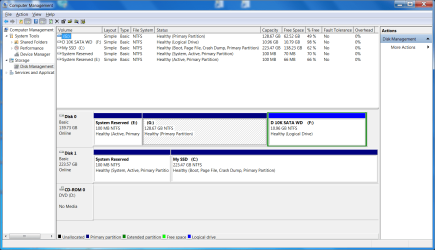
Attached is a screen shot. I'm running on the SSD.

1 - I installed Win7 on the SSD standing alone, with the Platter drive disconnected.
2 - "G" platter used to be my Windows 7 drive.
3 - Files were never on "C" ssd. I moved them after installation was done and all was well.
4 - I can boot from the SSD with the platter disconnected - and I have accidentally booted from the platter to my old O/S.
5 - I'm leaning toward the "Restore default location" solution. I have the space on "C" ssd. Then I can just use my bootable Minitool Partition Magic, and do partition deletes and re-formats. Or any other free one you can recommend...
5.5 - EDIT - I noticed I can go to the the My docs, etc. folder on "G", right click properties/location/ Restore default. I think that is the ticket, but I'll hold until for responses.
 

Attachments

  • Disk Mangement screen shot.png
    Disk Mangement screen shot.png
    55.2 KB · Views: 3

My Computer My Computer

At a glance

Windows 7 64 bitAMD Phenom II x4 9558 gigECS (I think) Nvidea GTX 460
Computer Manufacturer/Model Number
Home build
OS
Windows 7 64 bit
CPU
AMD Phenom II x4 955
Motherboard
Biostar A770E3
Memory
8 gig
Graphics Card(s)
ECS (I think) Nvidea GTX 460
Sound Card
On board
Monitor(s) Displays
Samsung 1 SyncMaster 204B 20"
Screen Resolution
1600 x 1200 progressive
Hard Drives
1 WD1500 SATA partitioned to one "D" partition
1 Seagate ATA partitioned to "F" and "G" for backups, "F" being bootable at one time,
1 Maxtor ATA 6Y080PO backups
PSU
Antec 650 tri power
Case
Antec old timer
Cooling
Stock, + positive pressure w/filters for war on dustbunnies
Keyboard
Logitech
Mouse
Microsoft wireless
Internet Speed
DSL
If possible I'd swap the cables between the two drives so that the SSD is in DISK0 position. This way if you do Startup Repairs or Reinstall the System boot files cannot be derailed to a preceding Primary partition as we see here fairly often.

The picture shows us that the SSD System Reserved partition is booting both OS's, as signified by the System label being only on it.

I would go ahead and restore default location of each User folder allowing it to copy files back to C. You must have not noticed that the blue links are illustrated tutorials showing how to do each step I gave you: User Folders - Restore Default Location - Windows 7 Forums

Then mark E Inactive so it will allow you to delete it, G and the empty D in Disk Mgmt which can perform these tasks. Note that to fully delete D you'll need to first Delete Volume and then Delete partition to get rid of the Logical container. You can then repartition the drive as you please using Disk Mgmt.
Partition or Volume - Delete
Partition or Volume - Create New

You can then either move the User folders to the new storage drive, or just copy each one there and then rightclick to add it to the related Library, setting that folder as the default Save location. This will allow you to use Windows imaging without being force to include the data drive as a System partition: Library - Include a Folder - Windows 7 Forums
Library - Set Save Folder - Windows 7 Help Forums
 
I'll be doing the file swap by changing location. After that, it won't matter what port the SSD is plugged into, will it?

Probably in a few days. I'll get back to you if I have problems.

BTW, my board appears to treat all the sata ports the same. There is nothing indicating the boot drive should be inserted into "plug x".
 

My Computer My Computer

At a glance

Windows 7 64 bitAMD Phenom II x4 9558 gigECS (I think) Nvidea GTX 460
Computer Manufacturer/Model Number
Home build
OS
Windows 7 64 bit
CPU
AMD Phenom II x4 955
Motherboard
Biostar A770E3
Memory
8 gig
Graphics Card(s)
ECS (I think) Nvidea GTX 460
Sound Card
On board
Monitor(s) Displays
Samsung 1 SyncMaster 204B 20"
Screen Resolution
1600 x 1200 progressive
Hard Drives
1 WD1500 SATA partitioned to one "D" partition
1 Seagate ATA partitioned to "F" and "G" for backups, "F" being bootable at one time,
1 Maxtor ATA 6Y080PO backups
PSU
Antec 650 tri power
Case
Antec old timer
Cooling
Stock, + positive pressure w/filters for war on dustbunnies
Keyboard
Logitech
Mouse
Microsoft wireless
Internet Speed
DSL
Not sure what you are trying to do.

If you want to delete the old os files from the partition, but leave everything else on there, the easiest way is to use winpe. I have a special file driver in winpe which ignores permissions, so anything can be deleted.
 

My Computers My Computers

  • At a glance

    7 X64i5 84002x8gb 3200mhz
    Computer type
    PC/Desktop
    OS
    7 X64
    CPU
    i5 8400
    Motherboard
    gigabyte b365m ds3h
    Memory
    2x8gb 3200mhz
    Hard Drives
    various
    PSU
    pure power 11 400w cm
    Case
    Coolermaster
    Cooling
    cryorig m9i
  • At a glance

    7x64g54008gb ddr4 2400
    Computer type
    PC/Desktop
    OS
    7x64
    CPU
    g5400
    Motherboard
    ga b365m ds3h
    Memory
    8gb ddr4 2400
    PSU
    xfx pro 450w
I plan to move the My Documents, My Photos, My Music, My Videos files back to the ssd, by changing the location in My Document / properties / location / back to "C" ssd.

Then I will wipe and un-partition my "G" platter drive, then move them back to the clean "G" drive.

I hope to accomplish this this weekend.

This is by far the best forum I've been on, BTW.
 

My Computer My Computer

At a glance

Windows 7 64 bitAMD Phenom II x4 9558 gigECS (I think) Nvidea GTX 460
Computer Manufacturer/Model Number
Home build
OS
Windows 7 64 bit
CPU
AMD Phenom II x4 955
Motherboard
Biostar A770E3
Memory
8 gig
Graphics Card(s)
ECS (I think) Nvidea GTX 460
Sound Card
On board
Monitor(s) Displays
Samsung 1 SyncMaster 204B 20"
Screen Resolution
1600 x 1200 progressive
Hard Drives
1 WD1500 SATA partitioned to one "D" partition
1 Seagate ATA partitioned to "F" and "G" for backups, "F" being bootable at one time,
1 Maxtor ATA 6Y080PO backups
PSU
Antec 650 tri power
Case
Antec old timer
Cooling
Stock, + positive pressure w/filters for war on dustbunnies
Keyboard
Logitech
Mouse
Microsoft wireless
Internet Speed
DSL
To wipe the HD of all code, run Diskpart Clean Command
on it from C or System Recovery Options Command Line.

Then you can create new partition(s) as desired in Disk Mgmt from the tutorials I provided earlier.

By swapping the drive cables you can move the SSD to DISK0 position which is safer, since you said that all ports provide the same performance.
 
I got the disk cleaned OK. And I know I moved My Document, My Photos, My Music, and My Video folders (empty) to "C" before I made changes... but now they are gone.

How can I make new folders that I can move back to my back up platter drive?
 

My Computer My Computer

At a glance

Windows 7 64 bitAMD Phenom II x4 9558 gigECS (I think) Nvidea GTX 460
Computer Manufacturer/Model Number
Home build
OS
Windows 7 64 bit
CPU
AMD Phenom II x4 955
Motherboard
Biostar A770E3
Memory
8 gig
Graphics Card(s)
ECS (I think) Nvidea GTX 460
Sound Card
On board
Monitor(s) Displays
Samsung 1 SyncMaster 204B 20"
Screen Resolution
1600 x 1200 progressive
Hard Drives
1 WD1500 SATA partitioned to one "D" partition
1 Seagate ATA partitioned to "F" and "G" for backups, "F" being bootable at one time,
1 Maxtor ATA 6Y080PO backups
PSU
Antec 650 tri power
Case
Antec old timer
Cooling
Stock, + positive pressure w/filters for war on dustbunnies
Keyboard
Logitech
Mouse
Microsoft wireless
Internet Speed
DSL
Yes, the data is safe.

I'm working through the tutorial.
 

My Computer My Computer

At a glance

Windows 7 64 bitAMD Phenom II x4 9558 gigECS (I think) Nvidea GTX 460
Computer Manufacturer/Model Number
Home build
OS
Windows 7 64 bit
CPU
AMD Phenom II x4 955
Motherboard
Biostar A770E3
Memory
8 gig
Graphics Card(s)
ECS (I think) Nvidea GTX 460
Sound Card
On board
Monitor(s) Displays
Samsung 1 SyncMaster 204B 20"
Screen Resolution
1600 x 1200 progressive
Hard Drives
1 WD1500 SATA partitioned to one "D" partition
1 Seagate ATA partitioned to "F" and "G" for backups, "F" being bootable at one time,
1 Maxtor ATA 6Y080PO backups
PSU
Antec 650 tri power
Case
Antec old timer
Cooling
Stock, + positive pressure w/filters for war on dustbunnies
Keyboard
Logitech
Mouse
Microsoft wireless
Internet Speed
DSL
It's a PITA but once you get them move, or back on C and then linked via Libraries, you can save a Win7 backup image to achieve it in the future.
 
My Music and My Pictures has not changed.

I'm going to take a break for awhile, since it said it may take a few restarts to come back.

I did the reg downloads for what I needed.

I did the elevated command prompt and it did not recognize the command, but I did it anyway.

So it will get there eventually.
 

My Computer My Computer

At a glance

Windows 7 64 bitAMD Phenom II x4 9558 gigECS (I think) Nvidea GTX 460
Computer Manufacturer/Model Number
Home build
OS
Windows 7 64 bit
CPU
AMD Phenom II x4 955
Motherboard
Biostar A770E3
Memory
8 gig
Graphics Card(s)
ECS (I think) Nvidea GTX 460
Sound Card
On board
Monitor(s) Displays
Samsung 1 SyncMaster 204B 20"
Screen Resolution
1600 x 1200 progressive
Hard Drives
1 WD1500 SATA partitioned to one "D" partition
1 Seagate ATA partitioned to "F" and "G" for backups, "F" being bootable at one time,
1 Maxtor ATA 6Y080PO backups
PSU
Antec 650 tri power
Case
Antec old timer
Cooling
Stock, + positive pressure w/filters for war on dustbunnies
Keyboard
Logitech
Mouse
Microsoft wireless
Internet Speed
DSL
Finally Got it. Thanks.

I've got:
Music
My Documents
Pictures
Videos

Will not having "My" in front of the cause any problems with Win 7?
 

My Computer My Computer

At a glance

Windows 7 64 bitAMD Phenom II x4 9558 gigECS (I think) Nvidea GTX 460
Computer Manufacturer/Model Number
Home build
OS
Windows 7 64 bit
CPU
AMD Phenom II x4 955
Motherboard
Biostar A770E3
Memory
8 gig
Graphics Card(s)
ECS (I think) Nvidea GTX 460
Sound Card
On board
Monitor(s) Displays
Samsung 1 SyncMaster 204B 20"
Screen Resolution
1600 x 1200 progressive
Hard Drives
1 WD1500 SATA partitioned to one "D" partition
1 Seagate ATA partitioned to "F" and "G" for backups, "F" being bootable at one time,
1 Maxtor ATA 6Y080PO backups
PSU
Antec 650 tri power
Case
Antec old timer
Cooling
Stock, + positive pressure w/filters for war on dustbunnies
Keyboard
Logitech
Mouse
Microsoft wireless
Internet Speed
DSL
Back
Top