chuckiechan
New member
- Local time
- 9:03 PM
- Messages
- 23
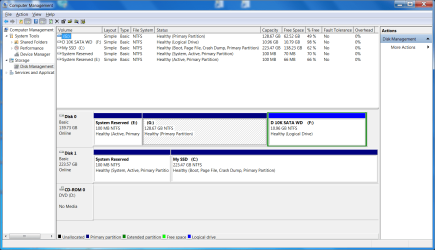
I got an SSD "C" drive and am using the old drive "G" as a back up. "G" still has a copy of Windows on it that I don't need, plus the protected system reserved partition.
It won't let me delete any Windows files on "G" due to Trusted Installer.
I tried taking ownership but that didn't work. I'm admin by default, we have no icons to click on to open windows. I wanted to do that then just merge the partitions into one to create a basic back up internal Platter HDD.
When I installed the "C" SSD drive , I moved My docs, My Music, My Pictures, My Videos to the "G" drive as recommended by Properties/location/ change to "c". under "user" on "C".
Can I change those locations back to my SSD drive temporarily until I wipe the "G" drive, and if I do, will the files follow? If that works, then I can just reformat my drive into one logical internal back up drive. But I don't know if that will work.
Or as a plan "B", how do I delete the protected files, then take care of the partitions later.
So in review:
Issue #1 - somehow get authority to delete windows files, them clean up the hdd without wiping.
Issue #2 - move my docs, my photo, my video, my music, back to "C" (ssd) without creating a problem like lost files.
I need the space to do a Windows image because I'm having issues with my Seagate portable backup drive.

SSD = 240G Crucial M500
Secondary in question = 140G or so Western Digital platter
I hope this is making sense.
It won't let me delete any Windows files on "G" due to Trusted Installer.
I tried taking ownership but that didn't work. I'm admin by default, we have no icons to click on to open windows. I wanted to do that then just merge the partitions into one to create a basic back up internal Platter HDD.
When I installed the "C" SSD drive , I moved My docs, My Music, My Pictures, My Videos to the "G" drive as recommended by Properties/location/ change to "c". under "user" on "C".
Can I change those locations back to my SSD drive temporarily until I wipe the "G" drive, and if I do, will the files follow? If that works, then I can just reformat my drive into one logical internal back up drive. But I don't know if that will work.
Or as a plan "B", how do I delete the protected files, then take care of the partitions later.
So in review:
Issue #1 - somehow get authority to delete windows files, them clean up the hdd without wiping.
Issue #2 - move my docs, my photo, my video, my music, back to "C" (ssd) without creating a problem like lost files.
I need the space to do a Windows image because I'm having issues with my Seagate portable backup drive.
SSD = 240G Crucial M500
Secondary in question = 140G or so Western Digital platter
I hope this is making sense.
My Computer
At a glance
Windows 7 64 bitAMD Phenom II x4 9558 gigECS (I think) Nvidea GTX 460
- Computer Manufacturer/Model Number
- Home build
- OS
- Windows 7 64 bit
- CPU
- AMD Phenom II x4 955
- Motherboard
- Biostar A770E3
- Memory
- 8 gig
- Graphics Card(s)
- ECS (I think) Nvidea GTX 460
- Sound Card
- On board
- Monitor(s) Displays
- Samsung 1 SyncMaster 204B 20"
- Screen Resolution
- 1600 x 1200 progressive
- Hard Drives
- 1 WD1500 SATA partitioned to one "D" partition
1 Seagate ATA partitioned to "F" and "G" for backups, "F" being bootable at one time,
1 Maxtor ATA 6Y080PO backups
- PSU
- Antec 650 tri power
- Case
- Antec old timer
- Cooling
- Stock, + positive pressure w/filters for war on dustbunnies
- Keyboard
- Logitech
- Mouse
- Microsoft wireless
- Internet Speed
- DSL