My image backups show the wrong datetime. I saw a thread where someone else had the same problem. That wasn't answered but that thread is old so I was hoping there was an answer now.
Recently I had to restore due to a bad driver update. The most recent image backups where close to each other as I sandwiched another change between them (i.e. image, system change, image).
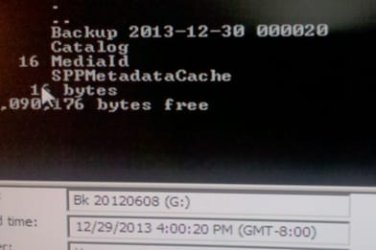
I have been renaming the WindowsImageBackup as suggested with a date time stamp of the backup. For example - WindowsImageBackup 2013-12-27 160024. When I went to restore the system I got confused. I found that the date / time of the doesn't match the folder date times. In fact, one backup did not even have the right date.
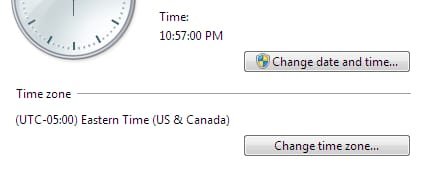
What I found was that the wrong timezone is being used. I am US east coast (UCT -5) and the backup is using the US west coast timezone (UCT - 8) so my backups are exactly 3 hours off.
My computer has the correct time and indicates the correct timezone (US east / UCT -5).
I guess I will normally be able to pick the right backup, but I'd really like to know the correct date and time to avoid any mistakes. Is there anyway to fix this?
Recently I had to restore due to a bad driver update. The most recent image backups where close to each other as I sandwiched another change between them (i.e. image, system change, image).
I have been renaming the WindowsImageBackup as suggested with a date time stamp of the backup. For example - WindowsImageBackup 2013-12-27 160024. When I went to restore the system I got confused. I found that the date / time of the doesn't match the folder date times. In fact, one backup did not even have the right date.
What I found was that the wrong timezone is being used. I am US east coast (UCT -5) and the backup is using the US west coast timezone (UCT - 8) so my backups are exactly 3 hours off.
My computer has the correct time and indicates the correct timezone (US east / UCT -5).
I guess I will normally be able to pick the right backup, but I'd really like to know the correct date and time to avoid any mistakes. Is there anyway to fix this?
My Computer
- Computer type
- Laptop
- Computer Manufacturer/Model Number
- Dell
- OS
- Windows 7 32-bit
- CPU
- Intel T2600 @ 2.16GHz, dual core
- Motherboard
- Latitude D820
- Memory
- 4G
- Graphics Card(s)
- NVIDIA Quadro NVS 120M
- Sound Card
- SigmaTel
- Monitor(s) Displays
- ASUS PA248Q
- Screen Resolution
- 1920 x 1200
- Internet Speed
- ~55M
- Antivirus
- AVG
- Browser
- Firefox / IE 8