Image # for Start Menu "All Programs" background

Attachments

  • Recent List.png
    Recent List.png
    27.4 KB · Views: 5

My Computer

Computer Manufacturer/Model Number
Dell 17-1750 Laptop
OS
Windows 7 Home Premium 64
CPU
Pentium Duo 2.54
Memory
4GB
Screen Resolution
1920 x 1080
Hard Drives
1 500GB
Mouse
Dell Optical
Internet Speed
768KB
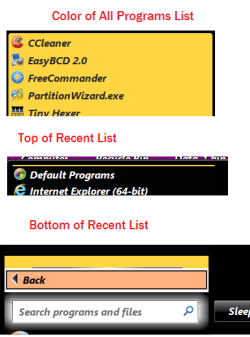
Here is the screen shot:
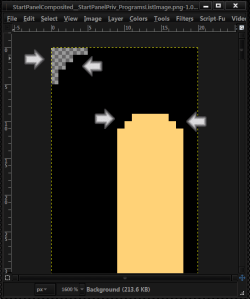
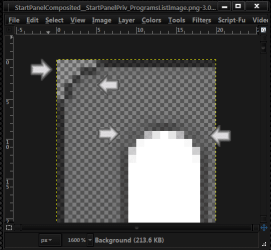
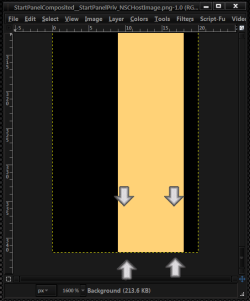
The top 1(image #872 now)is from the corners have no color & the where the black & yellow are not blended together look at the screenshot of yours and default aero.
Capture1.PNGCapture2.PNG
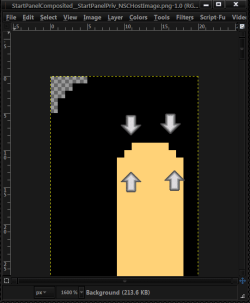
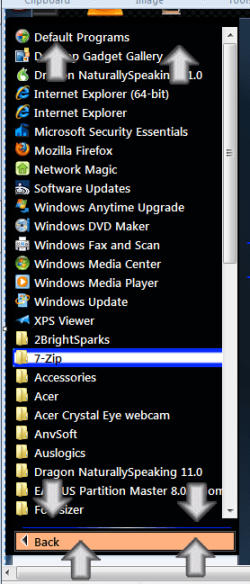
The top & bottom of the recent list (image #882 now) you will need to add your color (black)to the yellow that will hide it. Same with the corners here to as in the top image.
Jerry
 

My Computer

Computer type
Laptop
Computer Manufacturer/Model Number
Sager NP9170
OS
Win 7 Pro x64 / Win 10 Pro
CPU
Intel(R) Core(TM) i7-3630QM CPU @ 2.40GHz
Motherboard
CLEVO P170EM
Memory
12 GB
Graphics Card(s)
(1) Intel(R) HD Graphics 4000 (2) NVIDIA GeForce GTX 675M
Sound Card
(1) Realtek High Definition Audio (2) Intel(R) Display Aud
Monitor(s) Displays
17.3
Screen Resolution
1920x1080
Hard Drives
(1) Samsung 860 EVO 500GB(OS) (1) Samsung 860 EVO 500GB(Data)
Keyboard
Backlite
Antivirus
MSE, Malwarebytes Pro
Browser
Firefox
Other Info
DESKTOP: Custom-built.
OS: Win 10 Pro x64.
CASE: Rosewill R5.
CPU: Intel I5 4670K CPU @ 3.40GHz.
CPU COOLER: Cool Master Hyper 212 EVO.
MOTHERBOARD: Asus Z87-A.
MEMORY: Kingston HyperX 2x4 GB.
GPU: Nvidia Geforce 650 TI.
PSU: Corsair TX750.
DRIVES: (1) Samsung 840 120 GB SSD (2) Western Digital blue 500 GB 7200 RPM.
The top & bottom of the recent list (image #882 now) you will need to add your color (black)to the yellow that will hide it. Same with the corners here to as in the top image.
Jerry
I took a try and it didn't work. I will have to put some effort into this one. thanks
roger
 

My Computer

Computer Manufacturer/Model Number
Dell 17-1750 Laptop
OS
Windows 7 Home Premium 64
CPU
Pentium Duo 2.54
Memory
4GB
Screen Resolution
1920 x 1080
Hard Drives
1 500GB
Mouse
Dell Optical
Internet Speed
768KB
Try just a few 3 or 4 pixels high in a row at a time
Top
c.PNG
Bottom
v.PNG
Jerry
 

My Computer

Computer type
Laptop
Computer Manufacturer/Model Number
Sager NP9170
OS
Win 7 Pro x64 / Win 10 Pro
CPU
Intel(R) Core(TM) i7-3630QM CPU @ 2.40GHz
Motherboard
CLEVO P170EM
Memory
12 GB
Graphics Card(s)
(1) Intel(R) HD Graphics 4000 (2) NVIDIA GeForce GTX 675M
Sound Card
(1) Realtek High Definition Audio (2) Intel(R) Display Aud
Monitor(s) Displays
17.3
Screen Resolution
1920x1080
Hard Drives
(1) Samsung 860 EVO 500GB(OS) (1) Samsung 860 EVO 500GB(Data)
Keyboard
Backlite
Antivirus
MSE, Malwarebytes Pro
Browser
Firefox
Other Info
DESKTOP: Custom-built.
OS: Win 10 Pro x64.
CASE: Rosewill R5.
CPU: Intel I5 4670K CPU @ 3.40GHz.
CPU COOLER: Cool Master Hyper 212 EVO.
MOTHERBOARD: Asus Z87-A.
MEMORY: Kingston HyperX 2x4 GB.
GPU: Nvidia Geforce 650 TI.
PSU: Corsair TX750.
DRIVES: (1) Samsung 840 120 GB SSD (2) Western Digital blue 500 GB 7200 RPM.
Try just a few 3 or 4 pixels high in a row at a time
Jerry
That is what I tried and it didn't make any difference on the top or bottom.
roger
 

My Computer

Computer Manufacturer/Model Number
Dell 17-1750 Laptop
OS
Windows 7 Home Premium 64
CPU
Pentium Duo 2.54
Memory
4GB
Screen Resolution
1920 x 1080
Hard Drives
1 500GB
Mouse
Dell Optical
Internet Speed
768KB
Here is what I get
Before
a.PNG
After
b.PNG
What do you get? Try to use arrows if you can.
Jerry
 

My Computer

Computer type
Laptop
Computer Manufacturer/Model Number
Sager NP9170
OS
Win 7 Pro x64 / Win 10 Pro
CPU
Intel(R) Core(TM) i7-3630QM CPU @ 2.40GHz
Motherboard
CLEVO P170EM
Memory
12 GB
Graphics Card(s)
(1) Intel(R) HD Graphics 4000 (2) NVIDIA GeForce GTX 675M
Sound Card
(1) Realtek High Definition Audio (2) Intel(R) Display Aud
Monitor(s) Displays
17.3
Screen Resolution
1920x1080
Hard Drives
(1) Samsung 860 EVO 500GB(OS) (1) Samsung 860 EVO 500GB(Data)
Keyboard
Backlite
Antivirus
MSE, Malwarebytes Pro
Browser
Firefox
Other Info
DESKTOP: Custom-built.
OS: Win 10 Pro x64.
CASE: Rosewill R5.
CPU: Intel I5 4670K CPU @ 3.40GHz.
CPU COOLER: Cool Master Hyper 212 EVO.
MOTHERBOARD: Asus Z87-A.
MEMORY: Kingston HyperX 2x4 GB.
GPU: Nvidia Geforce 650 TI.
PSU: Corsair TX750.
DRIVES: (1) Samsung 840 120 GB SSD (2) Western Digital blue 500 GB 7200 RPM.
Here is what I get
What do you get? Try to use arrows if you can.
Jerry
I don't get any change. I need to look and see if I am in the right ball park.
roger
 

My Computer

Computer Manufacturer/Model Number
Dell 17-1750 Laptop
OS
Windows 7 Home Premium 64
CPU
Pentium Duo 2.54
Memory
4GB
Screen Resolution
1920 x 1080
Hard Drives
1 500GB
Mouse
Dell Optical
Internet Speed
768KB
Are you using the aero.msstyles that I posted?
Why I ask is #s 872 & 882 now where #811 in the default aero.msstyles it was a shared image.
Jerry
 

My Computer

Computer type
Laptop
Computer Manufacturer/Model Number
Sager NP9170
OS
Win 7 Pro x64 / Win 10 Pro
CPU
Intel(R) Core(TM) i7-3630QM CPU @ 2.40GHz
Motherboard
CLEVO P170EM
Memory
12 GB
Graphics Card(s)
(1) Intel(R) HD Graphics 4000 (2) NVIDIA GeForce GTX 675M
Sound Card
(1) Realtek High Definition Audio (2) Intel(R) Display Aud
Monitor(s) Displays
17.3
Screen Resolution
1920x1080
Hard Drives
(1) Samsung 860 EVO 500GB(OS) (1) Samsung 860 EVO 500GB(Data)
Keyboard
Backlite
Antivirus
MSE, Malwarebytes Pro
Browser
Firefox
Other Info
DESKTOP: Custom-built.
OS: Win 10 Pro x64.
CASE: Rosewill R5.
CPU: Intel I5 4670K CPU @ 3.40GHz.
CPU COOLER: Cool Master Hyper 212 EVO.
MOTHERBOARD: Asus Z87-A.
MEMORY: Kingston HyperX 2x4 GB.
GPU: Nvidia Geforce 650 TI.
PSU: Corsair TX750.
DRIVES: (1) Samsung 840 120 GB SSD (2) Western Digital blue 500 GB 7200 RPM.
Are you using the aero.msstyles that I posted?
Why I ask is #s 872 & 882 now where #811 in the default aero.msstyles it was a shared image.
Jerry
I am sure. I changed 872 which should have been Recent List background according to what you found and it did not work. Found 843 and it did the job by moving the pixels at the top and adding a black area to the bottom. I am using ResHack, but I have a hard time believing that it would affect the image #s.
 

My Computer

Computer Manufacturer/Model Number
Dell 17-1750 Laptop
OS
Windows 7 Home Premium 64
CPU
Pentium Duo 2.54
Memory
4GB
Screen Resolution
1920 x 1080
Hard Drives
1 500GB
Mouse
Dell Optical
Internet Speed
768KB

My Computer

Computer type
Laptop
Computer Manufacturer/Model Number
Sager NP9170
OS
Win 7 Pro x64 / Win 10 Pro
CPU
Intel(R) Core(TM) i7-3630QM CPU @ 2.40GHz
Motherboard
CLEVO P170EM
Memory
12 GB
Graphics Card(s)
(1) Intel(R) HD Graphics 4000 (2) NVIDIA GeForce GTX 675M
Sound Card
(1) Realtek High Definition Audio (2) Intel(R) Display Aud
Monitor(s) Displays
17.3
Screen Resolution
1920x1080
Hard Drives
(1) Samsung 860 EVO 500GB(OS) (1) Samsung 860 EVO 500GB(Data)
Keyboard
Backlite
Antivirus
MSE, Malwarebytes Pro
Browser
Firefox
Other Info
DESKTOP: Custom-built.
OS: Win 10 Pro x64.
CASE: Rosewill R5.
CPU: Intel I5 4670K CPU @ 3.40GHz.
CPU COOLER: Cool Master Hyper 212 EVO.
MOTHERBOARD: Asus Z87-A.
MEMORY: Kingston HyperX 2x4 GB.
GPU: Nvidia Geforce 650 TI.
PSU: Corsair TX750.
DRIVES: (1) Samsung 840 120 GB SSD (2) Western Digital blue 500 GB 7200 RPM.
I think I know whats going on you have been changing Or customizing both aero & basic images in the .msstyles 843 is in basic. I think when you try yours it disables aero
Did you do 1 of these 2 ways of Enabling custom themes it's needed for it to work.
http://www.sevenforums.com/tutorials/34579-enabling-custom-themes-windows-7-a.html
Or
http://www.sevenforums.com/tutorials/28377-theme-how-apply-custom-themes.html?filter
Jerry
You are correct and I did not say so, I have been working with Basic. I also can use Aero custom themes which, if you look, I have made some image changes to. I find that working with Basic is a little easier than Aero is when using ResHack. Sorry about the confusion; I will try to do be more explicit.
Roger
 

My Computer

Computer Manufacturer/Model Number
Dell 17-1750 Laptop
OS
Windows 7 Home Premium 64
CPU
Pentium Duo 2.54
Memory
4GB
Screen Resolution
1920 x 1080
Hard Drives
1 500GB
Mouse
Dell Optical
Internet Speed
768KB
I think I know whats going on you have been changing Or customizing both aero & basic images in the .msstyles 843 is in basic. I think when you try yours it disables aero
Did you do 1 of these 2 ways of Enabling custom themes it's needed for it to work.
http://www.sevenforums.com/tutorials/34579-enabling-custom-themes-windows-7-a.html
Or
http://www.sevenforums.com/tutorials/28377-theme-how-apply-custom-themes.html?filter
Jerry
You are correct and I did not say so, I have been working with Basic. I also can use Aero custom themes which, if you look, I have made some image changes to. I find that working with Basic is a little easier than Aero is when using ResHack. Sorry about the confusion; I will try to do be more explicit.
Roger
Ok if you needs some #s let me know.
I done for the night will check back in the AM
Jerry
 

My Computer

Computer type
Laptop
Computer Manufacturer/Model Number
Sager NP9170
OS
Win 7 Pro x64 / Win 10 Pro
CPU
Intel(R) Core(TM) i7-3630QM CPU @ 2.40GHz
Motherboard
CLEVO P170EM
Memory
12 GB
Graphics Card(s)
(1) Intel(R) HD Graphics 4000 (2) NVIDIA GeForce GTX 675M
Sound Card
(1) Realtek High Definition Audio (2) Intel(R) Display Aud
Monitor(s) Displays
17.3
Screen Resolution
1920x1080
Hard Drives
(1) Samsung 860 EVO 500GB(OS) (1) Samsung 860 EVO 500GB(Data)
Keyboard
Backlite
Antivirus
MSE, Malwarebytes Pro
Browser
Firefox
Other Info
DESKTOP: Custom-built.
OS: Win 10 Pro x64.
CASE: Rosewill R5.
CPU: Intel I5 4670K CPU @ 3.40GHz.
CPU COOLER: Cool Master Hyper 212 EVO.
MOTHERBOARD: Asus Z87-A.
MEMORY: Kingston HyperX 2x4 GB.
GPU: Nvidia Geforce 650 TI.
PSU: Corsair TX750.
DRIVES: (1) Samsung 840 120 GB SSD (2) Western Digital blue 500 GB 7200 RPM.

My Computer

Computer Manufacturer/Model Number
Dell 17-1750 Laptop
OS
Windows 7 Home Premium 64
CPU
Pentium Duo 2.54
Memory
4GB
Screen Resolution
1920 x 1080
Hard Drives
1 500GB
Mouse
Dell Optical
Internet Speed
768KB
Here it is.
On #3 from earlier if you replace image #825 with #870 will fix that.
Jerry
 

Attachments

My Computer

Computer type
Laptop
Computer Manufacturer/Model Number
Sager NP9170
OS
Win 7 Pro x64 / Win 10 Pro
CPU
Intel(R) Core(TM) i7-3630QM CPU @ 2.40GHz
Motherboard
CLEVO P170EM
Memory
12 GB
Graphics Card(s)
(1) Intel(R) HD Graphics 4000 (2) NVIDIA GeForce GTX 675M
Sound Card
(1) Realtek High Definition Audio (2) Intel(R) Display Aud
Monitor(s) Displays
17.3
Screen Resolution
1920x1080
Hard Drives
(1) Samsung 860 EVO 500GB(OS) (1) Samsung 860 EVO 500GB(Data)
Keyboard
Backlite
Antivirus
MSE, Malwarebytes Pro
Browser
Firefox
Other Info
DESKTOP: Custom-built.
OS: Win 10 Pro x64.
CASE: Rosewill R5.
CPU: Intel I5 4670K CPU @ 3.40GHz.
CPU COOLER: Cool Master Hyper 212 EVO.
MOTHERBOARD: Asus Z87-A.
MEMORY: Kingston HyperX 2x4 GB.
GPU: Nvidia Geforce 650 TI.
PSU: Corsair TX750.
DRIVES: (1) Samsung 840 120 GB SSD (2) Western Digital blue 500 GB 7200 RPM.
Here it is.
On #3 from earlier if you replace image #825 with #870 will fix that.
Jerry
Jerry I can't thank you enough.
Roger
 

My Computer

Computer Manufacturer/Model Number
Dell 17-1750 Laptop
OS
Windows 7 Home Premium 64
CPU
Pentium Duo 2.54
Memory
4GB
Screen Resolution
1920 x 1080
Hard Drives
1 500GB
Mouse
Dell Optical
Internet Speed
768KB
Your Welcome Roger
Jerry
 

My Computer

Computer type
Laptop
Computer Manufacturer/Model Number
Sager NP9170
OS
Win 7 Pro x64 / Win 10 Pro
CPU
Intel(R) Core(TM) i7-3630QM CPU @ 2.40GHz
Motherboard
CLEVO P170EM
Memory
12 GB
Graphics Card(s)
(1) Intel(R) HD Graphics 4000 (2) NVIDIA GeForce GTX 675M
Sound Card
(1) Realtek High Definition Audio (2) Intel(R) Display Aud
Monitor(s) Displays
17.3
Screen Resolution
1920x1080
Hard Drives
(1) Samsung 860 EVO 500GB(OS) (1) Samsung 860 EVO 500GB(Data)
Keyboard
Backlite
Antivirus
MSE, Malwarebytes Pro
Browser
Firefox
Other Info
DESKTOP: Custom-built.
OS: Win 10 Pro x64.
CASE: Rosewill R5.
CPU: Intel I5 4670K CPU @ 3.40GHz.
CPU COOLER: Cool Master Hyper 212 EVO.
MOTHERBOARD: Asus Z87-A.
MEMORY: Kingston HyperX 2x4 GB.
GPU: Nvidia Geforce 650 TI.
PSU: Corsair TX750.
DRIVES: (1) Samsung 840 120 GB SSD (2) Western Digital blue 500 GB 7200 RPM.
Deleted
 
Last edited:

My Computer

Computer Manufacturer/Model Number
Dell 17-1750 Laptop
OS
Windows 7 Home Premium 64
CPU
Pentium Duo 2.54
Memory
4GB
Screen Resolution
1920 x 1080
Hard Drives
1 500GB
Mouse
Dell Optical
Internet Speed
768KB
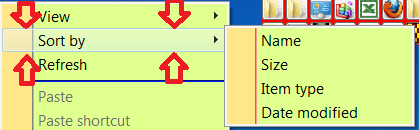
Jerry can you give me the Aero/Basic image #s for the menu selection bar - see image. thanks...
 

Attachments

  • popup.png
    popup.png
    13 KB · Views: 2

My Computer

Computer Manufacturer/Model Number
Dell 17-1750 Laptop
OS
Windows 7 Home Premium 64
CPU
Pentium Duo 2.54
Memory
4GB
Screen Resolution
1920 x 1080
Hard Drives
1 500GB
Mouse
Dell Optical
Internet Speed
768KB
Jerry can you give me the Aero/Basic image #s for the menu selection bar - see image. thanks...
Tell me where you are getting this menu at.
Jerry
 

My Computer

Computer type
Laptop
Computer Manufacturer/Model Number
Sager NP9170
OS
Win 7 Pro x64 / Win 10 Pro
CPU
Intel(R) Core(TM) i7-3630QM CPU @ 2.40GHz
Motherboard
CLEVO P170EM
Memory
12 GB
Graphics Card(s)
(1) Intel(R) HD Graphics 4000 (2) NVIDIA GeForce GTX 675M
Sound Card
(1) Realtek High Definition Audio (2) Intel(R) Display Aud
Monitor(s) Displays
17.3
Screen Resolution
1920x1080
Hard Drives
(1) Samsung 860 EVO 500GB(OS) (1) Samsung 860 EVO 500GB(Data)
Keyboard
Backlite
Antivirus
MSE, Malwarebytes Pro
Browser
Firefox
Other Info
DESKTOP: Custom-built.
OS: Win 10 Pro x64.
CASE: Rosewill R5.
CPU: Intel I5 4670K CPU @ 3.40GHz.
CPU COOLER: Cool Master Hyper 212 EVO.
MOTHERBOARD: Asus Z87-A.
MEMORY: Kingston HyperX 2x4 GB.
GPU: Nvidia Geforce 650 TI.
PSU: Corsair TX750.
DRIVES: (1) Samsung 840 120 GB SSD (2) Western Digital blue 500 GB 7200 RPM.

My Computer

Computer Manufacturer/Model Number
Dell 17-1750 Laptop
OS
Windows 7 Home Premium 64
CPU
Pentium Duo 2.54
Memory
4GB
Screen Resolution
1920 x 1080
Hard Drives
1 500GB
Mouse
Dell Optical
Internet Speed
768KB
Back
Top