Solved Image your system with free Macrium

whs, after getting my homeoffice-pc's system imaging needs squared-away with Macrium I moved on to my wife's Dell XPS M1330 laptop. It is now all set as well, and I have moved on again, this time to my daughters laptop (another Dell, XPS M1530).

During my first look at her computer I found nearly 160GB of stuff (systems and user data); I used your tips from previous posts and turned off hibernation, adjusted the pagefile down to 2GB, etc. etc. With these changes and the deletion of some user data, I initally was able to reduce the size down to about 145GB. I plan on partitioning the hard drive and moving 24GB of remaining user data there. If your counting, that will get us down to approximately 121GB. She does have a couple of games, notably one that takes up 19GB of space. Excluding the game, that's still around 102GB of used space on C:, which seems really high to me.

When I look at the ShadowStorage (see snip), I see approx 67GB used of 69GB allocated. Would this be considered high (HDD is 462GB total), and is this possibly why the total used hdd space is more than 100GB?

I'd really like to tweak the size of her hdd down to the 45-55GB range (including the game), if possible before I image and store her system files.

Any insight or tips?
 

Attachments

  • shadowstorage.jpg
    shadowstorage.jpg
    7.8 KB · Views: 12

My Computer My Computer

At a glance

Windows 8.1 Pro with Media CenterIntel Core i7-860 processor, (8MB Cache, 2.80...8GB DDR3 SDRAM at 1333MHz-4x2GBnVidia GeForce GTS240, 1024MB GDDR3
Computer type
PC/Desktop
Computer Manufacturer/Model Number
Dell Studio XPS 8100
OS
Windows 8.1 Pro with Media Center
CPU
Intel Core i7-860 processor, (8MB Cache, 2.80GHz)
Motherboard
Dell (Chicony - DH57M01)
Memory
8GB DDR3 SDRAM at 1333MHz-4x2GB
Graphics Card(s)
nVidia GeForce GTS240, 1024MB GDDR3
Sound Card
OEM Integrated
Monitor(s) Displays
Dell ST2410, 24" Flat Panel Monitor
Hard Drives
256GB Samsung SSD 840 Pro, MZ-7PD256BW
Western Digital 1TB Caviar Blue, WD10EALX
Seagate Baracuda 750GB, ST3750528AS (OEM)
Western Digital 2TB Black, WD2003FZEX
PSU
OEM - Max Output Power 350W
Case
OEM
Cooling
OEM
Yeah, the shadowstorage is very high. Nobody needs that much. I would reduce it to 10GB. Run this command:

vssadmin resize shadowstorage /For=C: /On=C: /MaxSize=10GB
 

My Computer My Computer

At a glance

Vista, Windows7, Mint Mate, Zorin, Windows 8from 1.6GHz Duo to i7
Computer Manufacturer/Model Number
HP, Dell, Gateway, Toshiba - 4 laptops and 2 desktops
OS
Vista, Windows7, Mint Mate, Zorin, Windows 8
CPU
from 1.6GHz Duo to i7
Monitor(s) Displays
2x HP w2207
Hard Drives
5x HDD, 7x SSD, 12x Externals
Keyboard
with trackball - no mices
Mouse
Trackball mice
Internet Speed
DSL 6000
what command is used to find the Shadow Storage size? I have been losing space on my C;\ drive. This is not needed unless one uses the w7 backup, correct? I'm a Macrium convert.
 

My Computer My Computer

At a glance

Windows 7 Ultimate X64 SP1Intel i5-2550K, Differing ~4.4-4.8GHz No buil...16GB G.Skill Sniper 1866MHz @ 2133MHz 2x8GBASUS GTX650TIB-DC2OC-2GD5, (650TI Boost)
Computer type
PC/Desktop
Computer Manufacturer/Model Number
Home Built Desktop By DataTech
OS
Windows 7 Ultimate X64 SP1
CPU
Intel i5-2550K, Differing ~4.4-4.8GHz No built in GPU
Motherboard
ASUS P8Z68-V PRO/GEN3
Memory
16GB G.Skill Sniper 1866MHz @ 2133MHz 2x8GB
Graphics Card(s)
ASUS GTX650TIB-DC2OC-2GD5, (650TI Boost)
Sound Card
Onboard Realtek 5-1
Monitor(s) Displays
Samsung P2570HD
Screen Resolution
1920x1080
Hard Drives
Samsung 840 Pro 256GB SSD for OS, 500GB Seagate Constellation (Enterprise drive) for Data
PSU
Corsair HX650W
Case
Inwin Dragon Rider
Cooling
Hyper 212 EVO w/two Noctua fans, push-pull, @1300 RPM
Keyboard
E-Z Eyes, bright yellow keys with large characters
Mouse
steelseries SENSEI Laser Pro Gaming
Internet Speed
48-51Mbs Mbs down, 11 Mbs up Xfinity Cable
Antivirus
Norton Internet Security 2013
Browser
IE 10, Opera, Pale Moon if needed
Other Info
4 case fans, LG BluRay-RE, ASUS DVD-RW, Mr. Fusion power supply, 1.21 gigawatts.
Gary, it's vssadmin list shadowstorage
 

My Computer My Computer

At a glance

Vista, Windows7, Mint Mate, Zorin, Windows 8from 1.6GHz Duo to i7
Computer Manufacturer/Model Number
HP, Dell, Gateway, Toshiba - 4 laptops and 2 desktops
OS
Vista, Windows7, Mint Mate, Zorin, Windows 8
CPU
from 1.6GHz Duo to i7
Monitor(s) Displays
2x HP w2207
Hard Drives
5x HDD, 7x SSD, 12x Externals
Keyboard
with trackball - no mices
Mouse
Trackball mice
Internet Speed
DSL 6000
Thanks Wolfgang. :)
 

My Computer My Computer

At a glance

Windows 7 Ultimate X64 SP1Intel i5-2550K, Differing ~4.4-4.8GHz No buil...16GB G.Skill Sniper 1866MHz @ 2133MHz 2x8GBASUS GTX650TIB-DC2OC-2GD5, (650TI Boost)
Computer type
PC/Desktop
Computer Manufacturer/Model Number
Home Built Desktop By DataTech
OS
Windows 7 Ultimate X64 SP1
CPU
Intel i5-2550K, Differing ~4.4-4.8GHz No built in GPU
Motherboard
ASUS P8Z68-V PRO/GEN3
Memory
16GB G.Skill Sniper 1866MHz @ 2133MHz 2x8GB
Graphics Card(s)
ASUS GTX650TIB-DC2OC-2GD5, (650TI Boost)
Sound Card
Onboard Realtek 5-1
Monitor(s) Displays
Samsung P2570HD
Screen Resolution
1920x1080
Hard Drives
Samsung 840 Pro 256GB SSD for OS, 500GB Seagate Constellation (Enterprise drive) for Data
PSU
Corsair HX650W
Case
Inwin Dragon Rider
Cooling
Hyper 212 EVO w/two Noctua fans, push-pull, @1300 RPM
Keyboard
E-Z Eyes, bright yellow keys with large characters
Mouse
steelseries SENSEI Laser Pro Gaming
Internet Speed
48-51Mbs Mbs down, 11 Mbs up Xfinity Cable
Antivirus
Norton Internet Security 2013
Browser
IE 10, Opera, Pale Moon if needed
Other Info
4 case fans, LG BluRay-RE, ASUS DVD-RW, Mr. Fusion power supply, 1.21 gigawatts.
Yeah, the shadowstorage is very high. Nobody needs that much. I would reduce it to 10GB. Run this command:

vssadmin resize shadowstorage /For=C: /On=C: /MaxSize=10GB


Done... THANK YOU!

This change should put me in the 55-60GB range of hdd used (including the games), once I repartition and move the user data.
 

My Computer My Computer

At a glance

Windows 8.1 Pro with Media CenterIntel Core i7-860 processor, (8MB Cache, 2.80...8GB DDR3 SDRAM at 1333MHz-4x2GBnVidia GeForce GTS240, 1024MB GDDR3
Computer type
PC/Desktop
Computer Manufacturer/Model Number
Dell Studio XPS 8100
OS
Windows 8.1 Pro with Media Center
CPU
Intel Core i7-860 processor, (8MB Cache, 2.80GHz)
Motherboard
Dell (Chicony - DH57M01)
Memory
8GB DDR3 SDRAM at 1333MHz-4x2GB
Graphics Card(s)
nVidia GeForce GTS240, 1024MB GDDR3
Sound Card
OEM Integrated
Monitor(s) Displays
Dell ST2410, 24" Flat Panel Monitor
Hard Drives
256GB Samsung SSD 840 Pro, MZ-7PD256BW
Western Digital 1TB Caviar Blue, WD10EALX
Seagate Baracuda 750GB, ST3750528AS (OEM)
Western Digital 2TB Black, WD2003FZEX
PSU
OEM - Max Output Power 350W
Case
OEM
Cooling
OEM
You guys are welcome. Any time.
 

My Computer My Computer

At a glance

Vista, Windows7, Mint Mate, Zorin, Windows 8from 1.6GHz Duo to i7
Computer Manufacturer/Model Number
HP, Dell, Gateway, Toshiba - 4 laptops and 2 desktops
OS
Vista, Windows7, Mint Mate, Zorin, Windows 8
CPU
from 1.6GHz Duo to i7
Monitor(s) Displays
2x HP w2207
Hard Drives
5x HDD, 7x SSD, 12x Externals
Keyboard
with trackball - no mices
Mouse
Trackball mice
Internet Speed
DSL 6000
I have just run vssadmin list shadowstorage and the results are
Code:
C:\Users\Alan>vssadmin list shadowstorage
vssadmin 1.1 - Volume Shadow Copy Service administrative command-line tool
(C) Copyright 2001-2005 Microsoft Corp.

Shadow Copy Storage association
   For volume: (\\?\Volume{87669c72-1fa2-11e2-ba5c-806e6f6e6963}\)\\?\Volume{87669c72-1fa2-11e2-ba5c-806e6f6e6963}\
   Shadow Copy Storage volume: (\\?\Volume{87669c72-1fa2-11e2-ba5c-806e6f6e6963}\)\\?\Volume{87669c72-1fa2-11e2-ba5c-806e6f6e6963}\
   Used Shadow Copy Storage space: 0 B (0%)
   Allocated Shadow Copy Storage space: 0 B (0%)
   Maximum Shadow Copy Storage space: 1.674 GB (6%)

Shadow Copy Storage association
   For volume: (C:)\\?\Volume{b8982f16-6a92-11e1-9d3e-806e6f6e6963}\
   Shadow Copy Storage volume: (C:)\\?\Volume{b8982f16-6a92-11e1-9d3e-806e6f6e6963}\
   Used Shadow Copy Storage space: 0 B (0%)
   Allocated Shadow Copy Storage space: 0 B (0%)
   Maximum Shadow Copy Storage space: 1.674 GB (3%)
Maximum Shadow Copy Storage space: 1.674 GB (6%)
This corresponds to an original installation of Windows Ultimate + SP1 in a 25 GB partition on my Samsung HDD
This remains available as a fall-back should my SSD die,
but at the moment it has no drive letter and is not set as Active.

Maximum Shadow Copy Storage space: 1.674 GB (3%)[/CODE]
This is a more recent original installation when an SSD was added to my system.
It is again Windows Ultimate + SP1.

I have only ever used Macrium - never risked messing with Windows built in image creation / restoration.

Is 1.684 GB a standard default allocation until such time as Windows image creation is used ,
or am I exceptionally lucky to be set at 1.674 GB max and zero Bytes actual use ?

Please - don't hate me for being so fortunate :)
 

My Computer My Computer

At a glance

Windows 7 Ultimate 64 bit SP1 x64AMD Phenom X4 95008 GBATI Radeon HD 4600 Series
Computer Manufacturer/Model Number
ASUSTeK Computer INC. M3A32-MVP DELUXE (CPU 1)
OS
Windows 7 Ultimate 64 bit SP1 x64
CPU
AMD Phenom X4 9500
Motherboard
ASUSTeK M3A32-MVP Deluxe (CPU 1)
Memory
8 GB
Graphics Card(s)
ATI Radeon HD 4600 Series
Sound Card
AMD High Definition Audio Device
Monitor(s) Displays
SyncMaster (1680x1050@60Hz)
Hard Drives
59GB OCZ-VERTEX2 ATA Device
+
977GB SAMSUNG HD103SJ ATA Device
+
625GB WDC WD6401AALS-00L3B2 ATA Device
The shadowstorage is for system restore points - has nothing to do with images and Macrium or windows 7 imaging.

A system restore point is written every time a program or update is installed or uninstalled and once per week. But your system restore seems to be deactivated - no restore point was ever written.

The allocation of 1.6GB is done automatically by the system. The percentage depends on the size of the disk.
 

My Computer My Computer

At a glance

Vista, Windows7, Mint Mate, Zorin, Windows 8from 1.6GHz Duo to i7
Computer Manufacturer/Model Number
HP, Dell, Gateway, Toshiba - 4 laptops and 2 desktops
OS
Vista, Windows7, Mint Mate, Zorin, Windows 8
CPU
from 1.6GHz Duo to i7
Monitor(s) Displays
2x HP w2207
Hard Drives
5x HDD, 7x SSD, 12x Externals
Keyboard
with trackball - no mices
Mouse
Trackball mice
Internet Speed
DSL 6000
Thanks for the explanation of what uses that space.

Restore Points were always an inconvenience with XP and when starting fresh with Windows 7 I decided that I would rather use an image to either restore the whole partition of to mount the image and browse with explorer to get the previous version of a file.

A decision that I have never regretted

Regards
Alan
 

My Computer My Computer

At a glance

Windows 7 Ultimate 64 bit SP1 x64AMD Phenom X4 95008 GBATI Radeon HD 4600 Series
Computer Manufacturer/Model Number
ASUSTeK Computer INC. M3A32-MVP DELUXE (CPU 1)
OS
Windows 7 Ultimate 64 bit SP1 x64
CPU
AMD Phenom X4 9500
Motherboard
ASUSTeK M3A32-MVP Deluxe (CPU 1)
Memory
8 GB
Graphics Card(s)
ATI Radeon HD 4600 Series
Sound Card
AMD High Definition Audio Device
Monitor(s) Displays
SyncMaster (1680x1050@60Hz)
Hard Drives
59GB OCZ-VERTEX2 ATA Device
+
977GB SAMSUNG HD103SJ ATA Device
+
625GB WDC WD6401AALS-00L3B2 ATA Device
Alan, I agree with you to a certain point. Restore points are not the most reliable feature of Windows. They have the habit to disappear or be unusable at times for no obvious reason - although there are instances where they will disappear for a good reason (resizing of the shadowstorage, disk cleanup and alike).

They can, however, be useful - e.g. for recovering lost files with Shadow Explorer. That is for those 'in between images' cases where you created and lost a file since the last image. It is not a sure bet, but has helped me at times.
 

My Computer My Computer

At a glance

Vista, Windows7, Mint Mate, Zorin, Windows 8from 1.6GHz Duo to i7
Computer Manufacturer/Model Number
HP, Dell, Gateway, Toshiba - 4 laptops and 2 desktops
OS
Vista, Windows7, Mint Mate, Zorin, Windows 8
CPU
from 1.6GHz Duo to i7
Monitor(s) Displays
2x HP w2207
Hard Drives
5x HDD, 7x SSD, 12x Externals
Keyboard
with trackball - no mices
Mouse
Trackball mice
Internet Speed
DSL 6000
I know the discussion of restore points is moving off your main tutorial topic but.....
I've read that system restore can degrade an SSD and interfere with TRIM performance. I run with System Restore disabled on my SSD. I never han any time for it anyway.
 

My Computer My Computer

At a glance

Windows 7x64 Home Premium SP1Intel i7 2600kG.Skill Ripjaws (DDR3-1600) 2x4GBNvidia GeForce GTS 450; Intel HD Graphics 300...
Computer type
PC/Desktop
Computer Manufacturer/Model Number
Own build
OS
Windows 7x64 Home Premium SP1
CPU
Intel i7 2600k
Motherboard
ASUS P8Z68 Deluxe
Memory
G.Skill Ripjaws (DDR3-1600) 2x4GB
Graphics Card(s)
Nvidia GeForce GTS 450; Intel HD Graphics 3000(GT2+)
Monitor(s) Displays
Dell Ultrasharp IPS panel U2311H, Samsung SyncMaster P2350
Screen Resolution
1920x1080
Hard Drives
Samsung 850 Pro SSD 256GB, Samsung SSD 840 120GB, Seagates 1TB Barracuda ST31000528AS x2
PSU
Seasonic M12II 520W
Case
Lian Li Lancool PC-K60
Cooling
Case: 1x120mm, 3x140mm CPU: Hyper 212+
Keyboard
Logitech MK520 (wireless)
Mouse
Logitech MK520
Internet Speed
6-7 Mbps
Antivirus
Norton Security Premium, Malwarebytes on 2 (MSE on 3rd PC)
Browser
FireFox
Other Info
Audio: Logitech Z523 2.1
I don't see how it would degrade the SSD. And it would interfere with Trim only if there were not sufficient free space left on the SSD - appr. 10 to 20% as a rule of thumb. If you stuff your SSD to the gills, then the Garbage Collection cannot properly work.
 

My Computer My Computer

At a glance

Vista, Windows7, Mint Mate, Zorin, Windows 8from 1.6GHz Duo to i7
Computer Manufacturer/Model Number
HP, Dell, Gateway, Toshiba - 4 laptops and 2 desktops
OS
Vista, Windows7, Mint Mate, Zorin, Windows 8
CPU
from 1.6GHz Duo to i7
Monitor(s) Displays
2x HP w2207
Hard Drives
5x HDD, 7x SSD, 12x Externals
Keyboard
with trackball - no mices
Mouse
Trackball mice
Internet Speed
DSL 6000
I would right click a file for the benefit of the context menu so that I could check its version number etc.
The context menu would hang for perhaps one minute because System Restore anticipated the POSSIBILITY that I might be intending to delete the file, and BEFORE it allowed me access it tied up my single core processor and would consume a few hundred MegaBytes of free space as it preserved an instance of that large file in the current Restore Point.

System Restore was NOT content to monitor my system partition.
It would sporadically enable monitoring of all partitions regardless of registry prohibitions that should have stopped the nonsense.

System Restore was totally incompetent when deciding if a file was a system file or a user file.
It always captured Firefox Cache files as though they were System Files,
but when Restoring a Point it would NOT replace the latest cache files with the previous,
but instead it would leave me with both cache and cache(2) and it would tell me which of the two was what,
BUT there was not way to capture that information other than Pen on Paper because at that stage there was no Notepad.exe available.

I observed quite a few files that had (2) suffixes which persuaded me that System Restore was a bumbling bungler that was confused about much more than Firefox caches.

Regards
Alan
 

My Computer My Computer

At a glance

Windows 7 Ultimate 64 bit SP1 x64AMD Phenom X4 95008 GBATI Radeon HD 4600 Series
Computer Manufacturer/Model Number
ASUSTeK Computer INC. M3A32-MVP DELUXE (CPU 1)
OS
Windows 7 Ultimate 64 bit SP1 x64
CPU
AMD Phenom X4 9500
Motherboard
ASUSTeK M3A32-MVP Deluxe (CPU 1)
Memory
8 GB
Graphics Card(s)
ATI Radeon HD 4600 Series
Sound Card
AMD High Definition Audio Device
Monitor(s) Displays
SyncMaster (1680x1050@60Hz)
Hard Drives
59GB OCZ-VERTEX2 ATA Device
+
977GB SAMSUNG HD103SJ ATA Device
+
625GB WDC WD6401AALS-00L3B2 ATA Device
I have a couple of steps to go before I am completely happy with my daughter's laptop configuration. I'm going to upgrade this OS from Vista Home Premium to Windows 8 Pro later today so I have decided to wait and 'move' the location of the data files and folders until after the upgrade.

Before I store my final Macrium C: image and perform the OS upgrade, I want to address the 47MB EISA and 3GB Dell Recovery partitions on the hdd (see snip). I would like to eliminate both of those.

Looking back at my first MR experience (just a few weeks ago), with the Windows 7 setup on my desktop, I used EasyBCD to copy the boot files over to C: and then elimiated the 100MB partition which was part of the Dell Windows 7 installation. Is the 47MB partition here on Vista the same as that partition? and, if I follow the same steps that I took using EasyBCD will I be okay?

For the 3GB partition, my plan is to delete it, since I have all of the recovery disks that were shipped with this Dell laptop.

Thx in advance...
 

Attachments

  • cmgmt.jpg
    cmgmt.jpg
    44.8 KB · Views: 11

My Computer My Computer

At a glance

Windows 8.1 Pro with Media CenterIntel Core i7-860 processor, (8MB Cache, 2.80...8GB DDR3 SDRAM at 1333MHz-4x2GBnVidia GeForce GTS240, 1024MB GDDR3
Computer type
PC/Desktop
Computer Manufacturer/Model Number
Dell Studio XPS 8100
OS
Windows 8.1 Pro with Media Center
CPU
Intel Core i7-860 processor, (8MB Cache, 2.80GHz)
Motherboard
Dell (Chicony - DH57M01)
Memory
8GB DDR3 SDRAM at 1333MHz-4x2GB
Graphics Card(s)
nVidia GeForce GTS240, 1024MB GDDR3
Sound Card
OEM Integrated
Monitor(s) Displays
Dell ST2410, 24" Flat Panel Monitor
Hard Drives
256GB Samsung SSD 840 Pro, MZ-7PD256BW
Western Digital 1TB Caviar Blue, WD10EALX
Seagate Baracuda 750GB, ST3750528AS (OEM)
Western Digital 2TB Black, WD2003FZEX
PSU
OEM - Max Output Power 350W
Case
OEM
Cooling
OEM
In reference to my previous post above, I confused a recent SSD install with my first Macrium system image project on my desktop. For my current project, EasyBCD informed me that the boot files already exist on C:.

Regardless, I'm still curious to know if it's possible to remove the two subject partitions without creating problems? From what I can tell, the small 47MB partition contains a Dell Utility file, and the larger 3GB partition is for Dell's recovery files.

I apologize for the confusion...
 

My Computer My Computer

At a glance

Windows 8.1 Pro with Media CenterIntel Core i7-860 processor, (8MB Cache, 2.80...8GB DDR3 SDRAM at 1333MHz-4x2GBnVidia GeForce GTS240, 1024MB GDDR3
Computer type
PC/Desktop
Computer Manufacturer/Model Number
Dell Studio XPS 8100
OS
Windows 8.1 Pro with Media Center
CPU
Intel Core i7-860 processor, (8MB Cache, 2.80GHz)
Motherboard
Dell (Chicony - DH57M01)
Memory
8GB DDR3 SDRAM at 1333MHz-4x2GB
Graphics Card(s)
nVidia GeForce GTS240, 1024MB GDDR3
Sound Card
OEM Integrated
Monitor(s) Displays
Dell ST2410, 24" Flat Panel Monitor
Hard Drives
256GB Samsung SSD 840 Pro, MZ-7PD256BW
Western Digital 1TB Caviar Blue, WD10EALX
Seagate Baracuda 750GB, ST3750528AS (OEM)
Western Digital 2TB Black, WD2003FZEX
PSU
OEM - Max Output Power 350W
Case
OEM
Cooling
OEM
I tried but was unable to remove the 47MB partition. It's still there and I'm not concerned at all about it at this point. It's gonna stay!

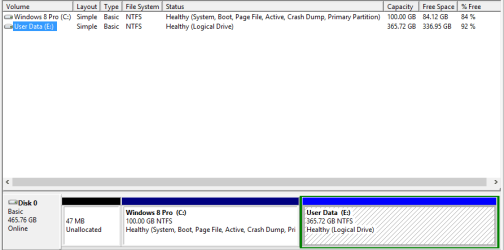
I don't really know how I did it, but take a look at the two snips... I went from a +150GB C: drive on my daughters laptop down to 15.88GB after our successful Windows 8 Pro upgrade. I did a lot of tweaking and moving things around before it got to this number. It sure seems low to me, but everything is working fine except the dell internal wireless driver, which will not go faster than 54 Mbps (we were accustomed to a fairly consistent 270 Mbps on this laptop before). We still have a couple of items to install, but I don't think they'll take up more than 2-3 GBs.

There was only one big game (approximately 19GB) and we ended up uninstalling it since it hadn't been played in many months. If my daughter decides to reinstall it later there's plenty of room.

The user data, mostly music, music videos and photos, came out to about 29GB. A big surprise to me (and a huge space saver), was the reduction of the WinSxS folder: Before the Win 8 upgrade it was 18.5GB; now it is approximately 6GB. Twelve gigs here and 19gigs there adds up really fast.

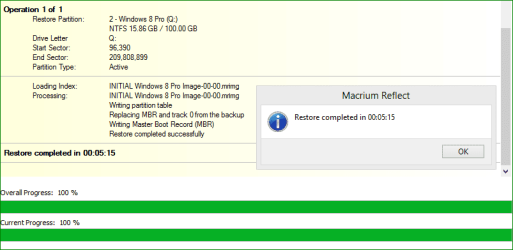
Anyway, all of our computers are now much leaner than before and thanks to this forum and this thread in particular, whs, I now have a solid system imaging and data backup effort underway. It's still not perfect, but I feel really confident about it, and would highly recommend Macrium for any one looking to start a backup program or change an existing one.

5 minutes and 15 seconds vs. a day or two... it's a 'no-brainer!'
 

Attachments

  • cmgmt.png
    cmgmt.png
    8.4 KB · Views: 14
  • 5min15.png
    5min15.png
    12.2 KB · Views: 15

My Computer My Computer

At a glance

Windows 8.1 Pro with Media CenterIntel Core i7-860 processor, (8MB Cache, 2.80...8GB DDR3 SDRAM at 1333MHz-4x2GBnVidia GeForce GTS240, 1024MB GDDR3
Computer type
PC/Desktop
Computer Manufacturer/Model Number
Dell Studio XPS 8100
OS
Windows 8.1 Pro with Media Center
CPU
Intel Core i7-860 processor, (8MB Cache, 2.80GHz)
Motherboard
Dell (Chicony - DH57M01)
Memory
8GB DDR3 SDRAM at 1333MHz-4x2GB
Graphics Card(s)
nVidia GeForce GTS240, 1024MB GDDR3
Sound Card
OEM Integrated
Monitor(s) Displays
Dell ST2410, 24" Flat Panel Monitor
Hard Drives
256GB Samsung SSD 840 Pro, MZ-7PD256BW
Western Digital 1TB Caviar Blue, WD10EALX
Seagate Baracuda 750GB, ST3750528AS (OEM)
Western Digital 2TB Black, WD2003FZEX
PSU
OEM - Max Output Power 350W
Case
OEM
Cooling
OEM
That looks good. Glad you were successful.
 

My Computer My Computer

At a glance

Vista, Windows7, Mint Mate, Zorin, Windows 8from 1.6GHz Duo to i7
Computer Manufacturer/Model Number
HP, Dell, Gateway, Toshiba - 4 laptops and 2 desktops
OS
Vista, Windows7, Mint Mate, Zorin, Windows 8
CPU
from 1.6GHz Duo to i7
Monitor(s) Displays
2x HP w2207
Hard Drives
5x HDD, 7x SSD, 12x Externals
Keyboard
with trackball - no mices
Mouse
Trackball mice
Internet Speed
DSL 6000
Backup aborted - Result code 0x8000ffff

I just installed a Samsung 840Pro 128GB SSD on an older PC and Macrium gave me this error when I attempted to perform the basic Windows (sys reserved + OS) image.
Backup aborted - Failed to create Volume snapshot Result code 0x8000ffff
When I ran the imaging a 2nd time it went ok:confused:

It's like being let down by an old friend. Volume Shadow Copy service set to manual like it always has been.
I 'm running the latest version of free Macrium. Has anyone come across this type of error?
 

My Computer My Computer

At a glance

Windows 7x64 Home Premium SP1Intel i7 2600kG.Skill Ripjaws (DDR3-1600) 2x4GBNvidia GeForce GTS 450; Intel HD Graphics 300...
Computer type
PC/Desktop
Computer Manufacturer/Model Number
Own build
OS
Windows 7x64 Home Premium SP1
CPU
Intel i7 2600k
Motherboard
ASUS P8Z68 Deluxe
Memory
G.Skill Ripjaws (DDR3-1600) 2x4GB
Graphics Card(s)
Nvidia GeForce GTS 450; Intel HD Graphics 3000(GT2+)
Monitor(s) Displays
Dell Ultrasharp IPS panel U2311H, Samsung SyncMaster P2350
Screen Resolution
1920x1080
Hard Drives
Samsung 850 Pro SSD 256GB, Samsung SSD 840 120GB, Seagates 1TB Barracuda ST31000528AS x2
PSU
Seasonic M12II 520W
Case
Lian Li Lancool PC-K60
Cooling
Case: 1x120mm, 3x140mm CPU: Hyper 212+
Keyboard
Logitech MK520 (wireless)
Mouse
Logitech MK520
Internet Speed
6-7 Mbps
Antivirus
Norton Security Premium, Malwarebytes on 2 (MSE on 3rd PC)
Browser
FireFox
Other Info
Audio: Logitech Z523 2.1

My Computer My Computer

At a glance

Microsoft Windows 7 Home Premium 64-bit Servi...Intel(R) Core(TM) i3 CPU M 330 @ 2.13GHz8 GB DDR3Intel(R) HD Graphics
Computer type
Laptop
Computer Manufacturer/Model Number
Hewlett-Packard/G62-107SA Notebook
OS
Microsoft Windows 7 Home Premium 64-bit Service Pack 1
CPU
Intel(R) Core(TM) i3 CPU M 330 @ 2.13GHz
Motherboard
Hewlett-Packard 1425
Memory
8 GB DDR3
Graphics Card(s)
Intel(R) HD Graphics
Sound Card
Realtek High Definition Audio
Monitor(s) Displays
Builtin
Screen Resolution
1366 x 768 x 32 bits (4294967296 colors) @ 60 Hz
Hard Drives
250 GB SATA Hard Disk Drive 7200 rpm
2TB Seagate GoFlex USB 2 Drive
1TB Iomega Prestige USB 2 Drive
1.5TB Iomega Prestige USB 2 Drive (Samsung)
2TB WD MyBook Live NAS.
Mouse
Logitech Anywhere MX
Internet Speed
152 Mbs download 10 Mbs upload
Antivirus
Norton 360
Browser
Chrome
Back
Top