Solved Image your system with free Macrium

So ReDeploy is not needed if I only change the HDD (to a new, different brand, size, speed etc.)?

OK, I think I asked too many questions, got too much info and am now overwhelmed. :D Thank you! I will install and test Macrium in the following days, when I have some time.
 

My Computer My Computer

OS
Windows 7 Ultimate x64 SP1
Good idea to be informed, but on-hands experience is best. :D
 

My Computer My Computer

Computer type
PC/Desktop
Computer Manufacturer/Model Number
Home Built Desktop By DataTech
OS
Windows 7 Ultimate X64 SP1
CPU
Intel i5-2550K, Differing ~4.4-4.8GHz No built in GPU
Motherboard
ASUS P8Z68-V PRO/GEN3
Memory
16GB G.Skill Sniper 1866MHz @ 2133MHz 2x8GB
Graphics Card(s)
ASUS GTX650TIB-DC2OC-2GD5, (650TI Boost)
Sound Card
Onboard Realtek 5-1
Monitor(s) Displays
Samsung P2570HD
Screen Resolution
1920x1080
Hard Drives
Samsung 840 Pro 256GB SSD for OS, 500GB Seagate Constellation (Enterprise drive) for Data
PSU
Corsair HX650W
Case
Inwin Dragon Rider
Cooling
Hyper 212 EVO w/two Noctua fans, push-pull, @1300 RPM
Keyboard
E-Z Eyes, bright yellow keys with large characters
Mouse
steelseries SENSEI Laser Pro Gaming
Internet Speed
48-51Mbs Mbs down, 11 Mbs up Xfinity Cable
Antivirus
Norton Internet Security 2013
Browser
IE 10, Opera, Pale Moon if needed
Other Info
4 case fans, LG BluRay-RE, ASUS DVD-RW, Mr. Fusion power supply, 1.21 gigawatts.

My Computer My Computer

Computer type
PC/Desktop
Computer Manufacturer/Model Number
Custom Build
OS
Win 7 Ultimate 64 bit
CPU
Intel i7-3930K
Motherboard
ASUS P9X79 WS
Memory
Kingston HyperX Genesis 32GB Kit (8x4GB Modules) 1600MHz DDR
Graphics Card(s)
MSI R7850 Twin Frozr 2GD5/OC Radeon HD 7850 2GB 256-bit GDDR
Sound Card
Asus Xonar Essence STX
Monitor(s) Displays
3x Asus VG248QE 24", Vizio 32" TV
Screen Resolution
1920 x 1080, ?
Hard Drives
Samsung 128GB 840 Pro SSD (1),
Samsung 4TB 850 EVO SSDs (4)
Samsung 4TB 850 EVO SSDs (16) external backup drives used in 2.5" hot swap bays in the computer.
PSU
Corsair HX750w
Case
Antec Two Hundred v2 (modified)
Cooling
Cooler Master GeminII S524 120mm (fan replaced with a 140mm)
Keyboard
Logitech G510s
Mouse
Logitech M525 (two in use)
Internet Speed
=< 32Mbps down, 8Mbps up
Antivirus
AVAST!, MBAM, SAS, Spybot S&D (all but MBAM free) Glary Util
Browser
IE11
Other Info
LSI 9211-8i HBA card (8 SATA III ports), 2.5" & 3.5" Hot Swap Bays, HooToo HT-CR001 PCI-E to USB 3.0 Internal Hub + 6 Slot Card Reader, and LG Model CH12LS28 BD-ROM Optical Drive. Also, ScanSnap S1500 ADF duplexing scanner, Canon 9000F flat bed scanner, Corsair SP2500 2.1 speakers, Samsung CLP 415nw laser color printer, Cyberpower PP2200SW UPS
Odd, I have ReflectService.exe running, and I have no auto scheduled back up set.
That is probably the check for updates. Look into the startups what it is.
It's for mounting the image file as "virtual disk" so you can read it with windows file explorer.
 

My Computer My Computer

Computer type
Laptop
Computer Manufacturer/Model Number
ACER ASPIRE 5742G
OS
Microsoft Windows 7 Home Premium 64-bits 7601 Multiprocessor Free Service Pack 1
CPU
Intel(R) Core(TM) i3 CPU M 370 @ 2.40GHz
Motherboard
Acer Aspire 5742G
Memory
4,00 GB
Graphics Card(s)
ATI Mobility Radeon HD 5400 Series
Sound Card
(1) AMD High Definition Audio Device (2) Realtek High Defi
Screen Resolution
1366 x 768 x 32 bits (4294967296 colors) @ 60 Hz
Hard Drives
WDC WD5000BEVT-22ZAT0
OK, I need another quick advice from you guys.

Friend gave me his laptop for repair (it's filled with junk, unresponsive, BSODs etc.) and he's running Vista 32-bit. He wants to save his programs and data before formatting.

I will install Macrium Free (32-bit version of course) on the laptop and make an image of his HDD to my external USB HDD.

Then I will format his laptop and install Windows 7 32-bit on it and then install Macrium Free again so that I can mount the image from the external HDD and then browse, copy etc. the data he wants saved back on his laptop with freshly installed Windows 7.

Will this go smooth? Or should I manually copy his files to the external USB HDD? I'm afraid because maybe his HDD is corrupted. It seems I will test Macrium on someone else's PC first. :D

Thank you!
 

My Computer My Computer

OS
Windows 7 Ultimate x64 SP1
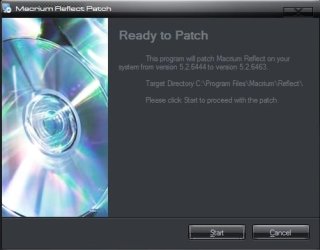
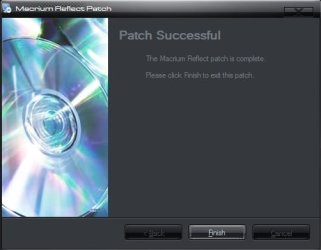
I just updated build 6463 :)

000722.jpg

000723.jpg
 

My Computer My Computer

Computer type
PC/Desktop
Computer Manufacturer/Model Number
Home Built
OS
Win 7 Pro x64, Win 10 Pro x64, Linux Light x86
CPU
Core i7 3770K
Motherboard
Gigabyte GA-Z77P-D3
Memory
Crucial Ballistix Sport 8GB
Graphics Card(s)
ASUS GeForce GTX 650 Ti
Sound Card
On board
Monitor(s) Displays
ASUS 22 W/S
Screen Resolution
1920 x 1080
Hard Drives
Intel 320 Series SSD, WD Caviar Black 1TB
PSU
Corsair CX 750w
Case
Black Night
Cooling
120mm fans front/back, Coolermaster Hyper 212 Evo
Keyboard
Razer Blackwidow Expert 2013 Mechanical Keyboard
Mouse
Logitech G300 Gaming Mouse
Internet Speed
20mb Unlimited
Antivirus
ZA Antivirus + Firewall
Browser
Cyberfox
Other Info
Powered USB Hub, External Drives 3 x 1TB, Phone Dock.
PS: PE 3 components is for Windows 7 x86 and x64, right? I see the option to download PE 4 and PE 5 also, but PE 3 is right for me? Thanx!
 

My Computer My Computer

OS
Windows 7 Ultimate x64 SP1
OK, I need another quick advice from you guys.

Friend gave me his laptop for repair (it's filled with junk, unresponsive, BSODs etc.) and he's running Vista 32-bit. He wants to save his programs and data before formatting.

I will install Macrium Free (32-bit version of course) on the laptop and make an image of his HDD to my external USB HDD.

Then I will format his laptop and install Windows 7 32-bit on it and then install Macrium Free again so that I can mount the image from the external HDD and then browse, copy etc. the data he wants saved back on his laptop with freshly installed Windows 7.

Will this go smooth? Or should I manually copy his files to the external USB HDD? I'm afraid because maybe his HDD is corrupted. It seems I will test Macrium on someone else's PC first. :D

Thank you!
Try to make the backup with macrium. Put checkmark at "verify image". In 99.99% of cases no error at all. Otherwise backup form outside vista.... with a recovery dvd. Still failing? Check the disk for errors
 

My Computer My Computer

Computer type
Laptop
Computer Manufacturer/Model Number
ACER ASPIRE 5742G
OS
Microsoft Windows 7 Home Premium 64-bits 7601 Multiprocessor Free Service Pack 1
CPU
Intel(R) Core(TM) i3 CPU M 370 @ 2.40GHz
Motherboard
Acer Aspire 5742G
Memory
4,00 GB
Graphics Card(s)
ATI Mobility Radeon HD 5400 Series
Sound Card
(1) AMD High Definition Audio Device (2) Realtek High Defi
Screen Resolution
1366 x 768 x 32 bits (4294967296 colors) @ 60 Hz
Hard Drives
WDC WD5000BEVT-22ZAT0
OK, I need another quick advice from you guys.

Friend gave me his laptop for repair (it's filled with junk, unresponsive, BSODs etc.) and he's running Vista 32-bit. He wants to save his programs and data before formatting.

I will install Macrium Free (32-bit version of course) on the laptop and make an image of his HDD to my external USB HDD.

Then I will format his laptop and install Windows 7 32-bit on it and then install Macrium Free again so that I can mount the image from the external HDD and then browse, copy etc. the data he wants saved back on his laptop with freshly installed Windows 7.

Will this go smooth? Or should I manually copy his files to the external USB HDD? I'm afraid because maybe his HDD is corrupted. It seems I will test Macrium on someone else's PC first. :D

Thank you!

Since you are going to install Win 7 on the laptop, I would manually copy his data to the external HDD. Using Reflect in this case would be more work than necessary. After you have copied the data and verified it all copied over without errors, I would delete the data only from the laptop, then make an image of the remaining System files on the odd chance the Win 7 installation goes south and you need to restore Vista.

After getting the data off the laptop HDD and the system files imaged, reformat the HDD and clean install Win 7. Once that has been done and all the updates finished, shrink the C: partition and create a data partition to copy the data on the external HDD into. Keeping the System and data on separate partitions will simplify backups and restores in the future since it is usually the System that goes wonky.
 

My Computer My Computer

Computer type
PC/Desktop
Computer Manufacturer/Model Number
Custom Build
OS
Win 7 Ultimate 64 bit
CPU
Intel i7-3930K
Motherboard
ASUS P9X79 WS
Memory
Kingston HyperX Genesis 32GB Kit (8x4GB Modules) 1600MHz DDR
Graphics Card(s)
MSI R7850 Twin Frozr 2GD5/OC Radeon HD 7850 2GB 256-bit GDDR
Sound Card
Asus Xonar Essence STX
Monitor(s) Displays
3x Asus VG248QE 24", Vizio 32" TV
Screen Resolution
1920 x 1080, ?
Hard Drives
Samsung 128GB 840 Pro SSD (1),
Samsung 4TB 850 EVO SSDs (4)
Samsung 4TB 850 EVO SSDs (16) external backup drives used in 2.5" hot swap bays in the computer.
PSU
Corsair HX750w
Case
Antec Two Hundred v2 (modified)
Cooling
Cooler Master GeminII S524 120mm (fan replaced with a 140mm)
Keyboard
Logitech G510s
Mouse
Logitech M525 (two in use)
Internet Speed
=< 32Mbps down, 8Mbps up
Antivirus
AVAST!, MBAM, SAS, Spybot S&D (all but MBAM free) Glary Util
Browser
IE11
Other Info
LSI 9211-8i HBA card (8 SATA III ports), 2.5" & 3.5" Hot Swap Bays, HooToo HT-CR001 PCI-E to USB 3.0 Internal Hub + 6 Slot Card Reader, and LG Model CH12LS28 BD-ROM Optical Drive. Also, ScanSnap S1500 ADF duplexing scanner, Canon 9000F flat bed scanner, Corsair SP2500 2.1 speakers, Samsung CLP 415nw laser color printer, Cyberpower PP2200SW UPS
OK, I need another quick advice from you guys.

Friend gave me his laptop for repair (it's filled with junk, unresponsive, BSODs etc.) and he's running Vista 32-bit. He wants to save his programs and data before formatting.

I will install Macrium Free (32-bit version of course) on the laptop and make an image of his HDD to my external USB HDD.

Then I will format his laptop and install Windows 7 32-bit on it and then install Macrium Free again so that I can mount the image from the external HDD and then browse, copy etc. the data he wants saved back on his laptop with freshly installed Windows 7.

Will this go smooth? Or should I manually copy his files to the external USB HDD? I'm afraid because maybe his HDD is corrupted. It seems I will test Macrium on someone else's PC first. :D


Thank you!

Hopefully such a defunct system will cooperate. But if it does not work, let me kmow. Then I upload a 32bit version of the WinPE .iso from which you can burn a CD or a stick and image with that.
 

My Computer My Computer

Computer Manufacturer/Model Number
HP, Dell, Gateway, Toshiba - 4 laptops and 2 desktops
OS
Vista, Windows7, Mint Mate, Zorin, Windows 8
CPU
from 1.6GHz Duo to i7
Monitor(s) Displays
2x HP w2207
Hard Drives
5x HDD, 7x SSD, 12x Externals
Keyboard
with trackball - no mices
Mouse
Trackball mice
Internet Speed
DSL 6000
What is the spec of the laptop. is it powerful enough for Windows 7?
 

My Computer My Computer

Computer type
Laptop
Computer Manufacturer/Model Number
Hewlett-Packard/G62-107SA Notebook
OS
Microsoft Windows 7 Home Premium 64-bit Service Pack 1
CPU
Intel(R) Core(TM) i3 CPU M 330 @ 2.13GHz
Motherboard
Hewlett-Packard 1425
Memory
8 GB DDR3
Graphics Card(s)
Intel(R) HD Graphics
Sound Card
Realtek High Definition Audio
Monitor(s) Displays
Builtin
Screen Resolution
1366 x 768 x 32 bits (4294967296 colors) @ 60 Hz
Hard Drives
250 GB SATA Hard Disk Drive 7200 rpm
2TB Seagate GoFlex USB 2 Drive
1TB Iomega Prestige USB 2 Drive
1.5TB Iomega Prestige USB 2 Drive (Samsung)
2TB WD MyBook Live NAS.
Mouse
Logitech Anywhere MX
Internet Speed
152 Mbs download 10 Mbs upload
Antivirus
Norton 360
Browser
Chrome
Not sure if I should start a new thread for this, but the thread title is entirely relevant.

Quite a few of you using macrium.

Why?

Some of you have the free version. What is it you like about it - more to the point, what do you expect from a free imaging program ?

Some of you have the paid version. Why? Is it because you used it for a while and just felt you ought to buy the thing? If you bought it for extra features, which features ?

I am curious because I am interested in this disk management stuff. It seems odd that , for exampple the paid Paragons offer a huge number of features some of them not available anywhere else, yet there aren't many paragon users here.

I also recall paragon used to include file&folder backup in their free version. That didn't seem to create a great impression here either. File and folder backup is not something I do a great deal of. But as far as I tell it is the only kind of backup Joe public does. Most users have no idea what imaging is.
 

My Computers My Computers

System One System Two

  • Computer type
    PC/Desktop
    OS
    7 X64
    CPU
    i5 8400
    Motherboard
    gigabyte b365m ds3h
    Memory
    2x8gb 3200mhz
    Hard Drives
    various
    PSU
    pure power 11 400w cm
    Case
    Coolermaster
    Cooling
    cryorig m9i
  • Computer type
    PC/Desktop
    OS
    7x64
    CPU
    g5400
    Motherboard
    ga b365m ds3h
    Memory
    8gb ddr4 2400
    PSU
    xfx pro 450w
At the time Si Macrium was the only decent free imaging program. I bought the paid version for the incremental/differential imaging which I do daily. I think on a future machine I might use AOMEI which has those features.
 

My Computer My Computer

Computer type
Laptop
Computer Manufacturer/Model Number
Hewlett-Packard/G62-107SA Notebook
OS
Microsoft Windows 7 Home Premium 64-bit Service Pack 1
CPU
Intel(R) Core(TM) i3 CPU M 330 @ 2.13GHz
Motherboard
Hewlett-Packard 1425
Memory
8 GB DDR3
Graphics Card(s)
Intel(R) HD Graphics
Sound Card
Realtek High Definition Audio
Monitor(s) Displays
Builtin
Screen Resolution
1366 x 768 x 32 bits (4294967296 colors) @ 60 Hz
Hard Drives
250 GB SATA Hard Disk Drive 7200 rpm
2TB Seagate GoFlex USB 2 Drive
1TB Iomega Prestige USB 2 Drive
1.5TB Iomega Prestige USB 2 Drive (Samsung)
2TB WD MyBook Live NAS.
Mouse
Logitech Anywhere MX
Internet Speed
152 Mbs download 10 Mbs upload
Antivirus
Norton 360
Browser
Chrome
I initially bought the paid version of MR because I needed differential and incremental backups at the time. I no longer need those features but the Pro version does have some other features I do use now, such as recovery from Windows boot menu (very handy), free support, etc. (I'm not sure anymore which features I use are not in the free version). An additional feature the Pro version has is restore to dissimilar hardware which may come in handy someday should my MOBO, etc. die.
 

My Computer My Computer

Computer type
PC/Desktop
Computer Manufacturer/Model Number
Custom Build
OS
Win 7 Ultimate 64 bit
CPU
Intel i7-3930K
Motherboard
ASUS P9X79 WS
Memory
Kingston HyperX Genesis 32GB Kit (8x4GB Modules) 1600MHz DDR
Graphics Card(s)
MSI R7850 Twin Frozr 2GD5/OC Radeon HD 7850 2GB 256-bit GDDR
Sound Card
Asus Xonar Essence STX
Monitor(s) Displays
3x Asus VG248QE 24", Vizio 32" TV
Screen Resolution
1920 x 1080, ?
Hard Drives
Samsung 128GB 840 Pro SSD (1),
Samsung 4TB 850 EVO SSDs (4)
Samsung 4TB 850 EVO SSDs (16) external backup drives used in 2.5" hot swap bays in the computer.
PSU
Corsair HX750w
Case
Antec Two Hundred v2 (modified)
Cooling
Cooler Master GeminII S524 120mm (fan replaced with a 140mm)
Keyboard
Logitech G510s
Mouse
Logitech M525 (two in use)
Internet Speed
=< 32Mbps down, 8Mbps up
Antivirus
AVAST!, MBAM, SAS, Spybot S&D (all but MBAM free) Glary Util
Browser
IE11
Other Info
LSI 9211-8i HBA card (8 SATA III ports), 2.5" & 3.5" Hot Swap Bays, HooToo HT-CR001 PCI-E to USB 3.0 Internal Hub + 6 Slot Card Reader, and LG Model CH12LS28 BD-ROM Optical Drive. Also, ScanSnap S1500 ADF duplexing scanner, Canon 9000F flat bed scanner, Corsair SP2500 2.1 speakers, Samsung CLP 415nw laser color printer, Cyberpower PP2200SW UPS
what do you expect from a free imaging program ?
All I need is reliability and that is very good with Macrium. I never had an image fail (and I made a lot of recoveries when I was teaching a Macrium class at the computer club).

I have no need for any fancy functions. I always make full images because they are easiest to manage and disk spcae is not my issue.

Keith, I was trying AOMEI. It worked well on my desktop with 64bit Windows 7 for imaging and recovery. But on my Asus Transformer with 32bit Windows 8.1, the recovery part did not work. From the installed program I could not find the partitions - it was just a gobble and it also did not produce a workable recovery stick.
 

My Computer My Computer

Computer Manufacturer/Model Number
HP, Dell, Gateway, Toshiba - 4 laptops and 2 desktops
OS
Vista, Windows7, Mint Mate, Zorin, Windows 8
CPU
from 1.6GHz Duo to i7
Monitor(s) Displays
2x HP w2207
Hard Drives
5x HDD, 7x SSD, 12x Externals
Keyboard
with trackball - no mices
Mouse
Trackball mice
Internet Speed
DSL 6000
At the time Si Macrium was the only decent free imaging program.

Yes, good move by macrium. I think they realised the only way for them get among the established players was to offer a free version better than the others. Partition Wiz took a similar approach.

restore to dissimilar hardware

How does that work - have you tried it . What is the process? Does it adjust a macrium image during the restore?

That is of course different from "make os bootable on different hardware" or "physical to physical adjust" as Paragon call it.

The latter is independent of the image restore process. It can be pointed an OS that has been restored from any other imaging program, or an OS on an HD that has been moved form another machine.
 

My Computers My Computers

System One System Two

  • Computer type
    PC/Desktop
    OS
    7 X64
    CPU
    i5 8400
    Motherboard
    gigabyte b365m ds3h
    Memory
    2x8gb 3200mhz
    Hard Drives
    various
    PSU
    pure power 11 400w cm
    Case
    Coolermaster
    Cooling
    cryorig m9i
  • Computer type
    PC/Desktop
    OS
    7x64
    CPU
    g5400
    Motherboard
    ga b365m ds3h
    Memory
    8gb ddr4 2400
    PSU
    xfx pro 450w
...
restore to dissimilar hardware

How does that work - have you tried it . What is the process? Does it adjust a macrium image during the restore?

That is of course different from "make os bootable on different hardware" or "physical to physical adjust" as Paragon call it.

The latter is independent of the image restore process. It can be pointed an OS that has been restored from any other imaging program, or an OS on an HD that has been moved form another machine.

I've never had cause to use it but it's supposed to allow one to restore an image to hardware other that what was used to make the image, such as restore an image to a system that had the MOBO replaced after the image was made. This is how Macrium explains it on their website:

Restore to new hardware
new.png

Includes Macrium ReDeploy™ to move Windows to a new or virtual PC.
Including Windows Server!
 

My Computer My Computer

Computer type
PC/Desktop
Computer Manufacturer/Model Number
Custom Build
OS
Win 7 Ultimate 64 bit
CPU
Intel i7-3930K
Motherboard
ASUS P9X79 WS
Memory
Kingston HyperX Genesis 32GB Kit (8x4GB Modules) 1600MHz DDR
Graphics Card(s)
MSI R7850 Twin Frozr 2GD5/OC Radeon HD 7850 2GB 256-bit GDDR
Sound Card
Asus Xonar Essence STX
Monitor(s) Displays
3x Asus VG248QE 24", Vizio 32" TV
Screen Resolution
1920 x 1080, ?
Hard Drives
Samsung 128GB 840 Pro SSD (1),
Samsung 4TB 850 EVO SSDs (4)
Samsung 4TB 850 EVO SSDs (16) external backup drives used in 2.5" hot swap bays in the computer.
PSU
Corsair HX750w
Case
Antec Two Hundred v2 (modified)
Cooling
Cooler Master GeminII S524 120mm (fan replaced with a 140mm)
Keyboard
Logitech G510s
Mouse
Logitech M525 (two in use)
Internet Speed
=< 32Mbps down, 8Mbps up
Antivirus
AVAST!, MBAM, SAS, Spybot S&D (all but MBAM free) Glary Util
Browser
IE11
Other Info
LSI 9211-8i HBA card (8 SATA III ports), 2.5" & 3.5" Hot Swap Bays, HooToo HT-CR001 PCI-E to USB 3.0 Internal Hub + 6 Slot Card Reader, and LG Model CH12LS28 BD-ROM Optical Drive. Also, ScanSnap S1500 ADF duplexing scanner, Canon 9000F flat bed scanner, Corsair SP2500 2.1 speakers, Samsung CLP 415nw laser color printer, Cyberpower PP2200SW UPS
what do you expect from a free imaging program ?
All I need is reliability and that is very good with Macrium. I never had an image fail (and I made a lot of recoveries when I was teaching a Macrium class at the computer club).

I have no need for any fancy functions. I always make full images because they are easiest to manage and disk spcae is not my issue.

Keith, I was trying AOMEI. It worked well on my desktop with 64bit Windows 7 for imaging and recovery. But on my Asus Transformer with 32bit Windows 8.1, the recovery part did not work. From the installed program I could not find the partitions - it was just a gobble and it also did not produce a workable recovery stick.

I have restored with it but only on a 64bit system.
 

My Computer My Computer

Computer type
Laptop
Computer Manufacturer/Model Number
Hewlett-Packard/G62-107SA Notebook
OS
Microsoft Windows 7 Home Premium 64-bit Service Pack 1
CPU
Intel(R) Core(TM) i3 CPU M 330 @ 2.13GHz
Motherboard
Hewlett-Packard 1425
Memory
8 GB DDR3
Graphics Card(s)
Intel(R) HD Graphics
Sound Card
Realtek High Definition Audio
Monitor(s) Displays
Builtin
Screen Resolution
1366 x 768 x 32 bits (4294967296 colors) @ 60 Hz
Hard Drives
250 GB SATA Hard Disk Drive 7200 rpm
2TB Seagate GoFlex USB 2 Drive
1TB Iomega Prestige USB 2 Drive
1.5TB Iomega Prestige USB 2 Drive (Samsung)
2TB WD MyBook Live NAS.
Mouse
Logitech Anywhere MX
Internet Speed
152 Mbs download 10 Mbs upload
Antivirus
Norton 360
Browser
Chrome
...
restore to dissimilar hardware

How does that work - have you tried it . What is the process? Does it adjust a macrium image during the restore?

That is of course different from "make os bootable on different hardware" or "physical to physical adjust" as Paragon call it.

The latter is independent of the image restore process. It can be pointed an OS that has been restored from any other imaging program, or an OS on an HD that has been moved form another machine.

I've never had cause to use it but it's supposed to allow one to restore an image to hardware other that what was used to make the image, such as restore an image to a system that had the MOBO replaced after the image was made. This is how Macrium explains it on their website:

Restore to new hardware
new.png

Includes Macrium ReDeploy™ to move Windows to a new or virtual PC.
Including Windows Server!

Restore to dissimilar hardware requires the PRO or sever versions (expensive).
 

My Computer My Computer

Computer type
Laptop
Computer Manufacturer/Model Number
Hewlett-Packard/G62-107SA Notebook
OS
Microsoft Windows 7 Home Premium 64-bit Service Pack 1
CPU
Intel(R) Core(TM) i3 CPU M 330 @ 2.13GHz
Motherboard
Hewlett-Packard 1425
Memory
8 GB DDR3
Graphics Card(s)
Intel(R) HD Graphics
Sound Card
Realtek High Definition Audio
Monitor(s) Displays
Builtin
Screen Resolution
1366 x 768 x 32 bits (4294967296 colors) @ 60 Hz
Hard Drives
250 GB SATA Hard Disk Drive 7200 rpm
2TB Seagate GoFlex USB 2 Drive
1TB Iomega Prestige USB 2 Drive
1.5TB Iomega Prestige USB 2 Drive (Samsung)
2TB WD MyBook Live NAS.
Mouse
Logitech Anywhere MX
Internet Speed
152 Mbs download 10 Mbs upload
Antivirus
Norton 360
Browser
Chrome
Keith,

Does it adjust the image during restore - or is it independent of the image?
 

My Computers My Computers

System One System Two

  • Computer type
    PC/Desktop
    OS
    7 X64
    CPU
    i5 8400
    Motherboard
    gigabyte b365m ds3h
    Memory
    2x8gb 3200mhz
    Hard Drives
    various
    PSU
    pure power 11 400w cm
    Case
    Coolermaster
    Cooling
    cryorig m9i
  • Computer type
    PC/Desktop
    OS
    7x64
    CPU
    g5400
    Motherboard
    ga b365m ds3h
    Memory
    8gb ddr4 2400
    PSU
    xfx pro 450w
Back
Top