Solved Image your system with free Macrium

I verify on rare occasions when I'm bored. I'm guessing any problems would be down to hardware issues which would show themselves in other ways.
 

My Computer My Computer

At a glance

Windows 7x64 Home Premium SP1Intel i7 2600kG.Skill Ripjaws (DDR3-1600) 2x4GBNvidia GeForce GTS 450; Intel HD Graphics 300...
Computer type
PC/Desktop
Computer Manufacturer/Model Number
Own build
OS
Windows 7x64 Home Premium SP1
CPU
Intel i7 2600k
Motherboard
ASUS P8Z68 Deluxe
Memory
G.Skill Ripjaws (DDR3-1600) 2x4GB
Graphics Card(s)
Nvidia GeForce GTS 450; Intel HD Graphics 3000(GT2+)
Monitor(s) Displays
Dell Ultrasharp IPS panel U2311H, Samsung SyncMaster P2350
Screen Resolution
1920x1080
Hard Drives
Samsung 850 Pro SSD 256GB, Samsung SSD 840 120GB, Seagates 1TB Barracuda ST31000528AS x2
PSU
Seasonic M12II 520W
Case
Lian Li Lancool PC-K60
Cooling
Case: 1x120mm, 3x140mm CPU: Hyper 212+
Keyboard
Logitech MK520 (wireless)
Mouse
Logitech MK520
Internet Speed
6-7 Mbps
Antivirus
Norton Security Premium, Malwarebytes on 2 (MSE on 3rd PC)
Browser
FireFox
Other Info
Audio: Logitech Z523 2.1
Have any of you looked at ocster recently.

Been a while since I checked it out.

They are doing a giveaway atm ( don't worry, you can reinstall it later in spite of initial appearances)

Giveaway of the Day - free licensed software daily. Ocster 1-Click Backup 2 - Backup as it should be: one click to set up, automatic afterwards.

I have only had a very quick look , it seems to be a mixture of clunkiness and a few good ideas.

If you want to give it a try , there is a tedious online registration process.

Fortunately, they send an email which can be used to reinstall any time , and you can download the trial version from their site which will accept your key.

They also have a giant boot media download over 500mb. Bit ridiculous, there is probably a way to make your own pe to avoid that. Haven't had time to try that yet.

Backup format is vmdk which is handy.
 

My Computers My Computers

  • At a glance

    7 X64i5 84002x8gb 3200mhz
    Computer type
    PC/Desktop
    OS
    7 X64
    CPU
    i5 8400
    Motherboard
    gigabyte b365m ds3h
    Memory
    2x8gb 3200mhz
    Hard Drives
    various
    PSU
    pure power 11 400w cm
    Case
    Coolermaster
    Cooling
    cryorig m9i
  • At a glance

    7x64g54008gb ddr4 2400
    Computer type
    PC/Desktop
    OS
    7x64
    CPU
    g5400
    Motherboard
    ga b365m ds3h
    Memory
    8gb ddr4 2400
    PSU
    xfx pro 450w
Hello again!

I finally got some spare time and tried the Macrium Reflect Free! I found out it's easier to use that it seems (I don't really like the GUI so much, but I like the functionality a lot). As a side note, I discovered that it's background service is absoultely unnecessary if you're not scheduling backups so I disabled it and all's working fine.

I made a full image backup (all 3 partitions off my HDD), it took about twice the time it used to when I was doing it with the Windows 7 integrated image/backup solution. I set it to verify files before creating the image. After the image was created I verified it using the Verify Image (red shield with a tick) under Image Restore tab. Verification took quite some time again and it said the file is OK. Then I browsed it and tried some files which opened nicely. I guess that means the image is working and won't let me down. :) Is it enough to just verify it next time instead of browsing it and stuff? This is quite a time consuming procedure, even though I'm only making a full HDD image once a month.

Anyway, I also made a rescue CD - Win PE, 64-bit version (does that mean I can't use that CD to restore a 32-bit computer?), then booted from it but it couldn't find my USB 3.0 HDD - until I disconnected if from the USB 3.0 port and connected to USB 2.0 port. Then I searched for the USB 3.0 driver and found it and it recognised it too. But if my internal HDD dies and I get a new one there won't be any drivers on it. Ah, in that case I'll just restore from an USB 2.0 port. :)

Another thing concerning speed. As I said, I made a full disk image (hidden system partition + C partition + D partition), 193 GB alltogether. So I created the image on an external USB 3.0 HDD and it took 1,5 hour to do it. Transfer rates were from 43 MB/s to 35 MB/s when writing to the external HDD. Isn't that kind of slow for an USB 3.0 drive?

All in all I like Macrium Free, I changed some settings too (no compression etc.), I hope it will serve me well. And I apologise but I will ask this again as it's very important to me (and I can't test it right now) - are you 100% sure that Macrium Reflect Free is able to restore to a smaller drive (in my case there's 193 GB of data taken off a 500 GB HDD - so can I restore all three partitions worth of 193 GB to a new 250 GB drive)?

Any comments, suggestions, warnings etc. are much appreciated! :)

Thank you very much for all the help!
 

My Computer My Computer

At a glance

Windows 7 Ultimate x64 SP1
OS
Windows 7 Ultimate x64 SP1
My perspective.
You will only have full confidence when you restore a system image and the operating system partition in particular. Doing a system image restore to a spare/new HDD with the others unplugged is the acid test - does it boot ok.

Imaging every partition may be ok once when it takes 1.5 hours but generally your OS partition should be imaged more regularly and if it takes much more than 30 min I find it unacceptable. There are other ways to backup more static data partitions.

Macrium provides some substantial compression that Windows inbuilt image does not and I have found it at least comparable in speed. I have found Macrium image restores can take a fair bit longer depending on the actual size of the partition.
 

My Computer My Computer

At a glance

Windows 7x64 Home Premium SP1Intel i7 2600kG.Skill Ripjaws (DDR3-1600) 2x4GBNvidia GeForce GTS 450; Intel HD Graphics 300...
Computer type
PC/Desktop
Computer Manufacturer/Model Number
Own build
OS
Windows 7x64 Home Premium SP1
CPU
Intel i7 2600k
Motherboard
ASUS P8Z68 Deluxe
Memory
G.Skill Ripjaws (DDR3-1600) 2x4GB
Graphics Card(s)
Nvidia GeForce GTS 450; Intel HD Graphics 3000(GT2+)
Monitor(s) Displays
Dell Ultrasharp IPS panel U2311H, Samsung SyncMaster P2350
Screen Resolution
1920x1080
Hard Drives
Samsung 850 Pro SSD 256GB, Samsung SSD 840 120GB, Seagates 1TB Barracuda ST31000528AS x2
PSU
Seasonic M12II 520W
Case
Lian Li Lancool PC-K60
Cooling
Case: 1x120mm, 3x140mm CPU: Hyper 212+
Keyboard
Logitech MK520 (wireless)
Mouse
Logitech MK520
Internet Speed
6-7 Mbps
Antivirus
Norton Security Premium, Malwarebytes on 2 (MSE on 3rd PC)
Browser
FireFox
Other Info
Audio: Logitech Z523 2.1
I also made a rescue CD - Win PE, 64-bit version (does that mean I can't use that CD to restore a 32-bit computer?),
That is correct. But most PCs can do 64bit today. Only very old PCs may be 32bit only.

Isn't that kind of slow for an USB 3.0 drive?


USB3 is slow, try eSata, that is faster. But it also depends how fast your HDD can feed it.

are you 100% sure that Macrium Reflect Free is able to restore to a smaller drive (in my case there's 193 GB of data taken off a 500 GB HDD - so can I restore all three partitions worth of 193 GB to a new 250 GB drive)?

It used not to be possible, but now they say it is possible. I think several guys have dome that already.

But even if it does not work, it is not a real problem. All you do is mount the image, shrink the mounted drive with Partition Wizard to the size you want and reimage the shrunk mounted volume.

Here are my transfer rates and the time it took to image my 38GB C partition. I made that image just now to show the data. But I am never worried about the time it takes to make the image. I just 'hide' Macrium and go on doing other things. I also never do any verifies and after appr. 100 restores I never had a problem - knock on wood.

2014-02-04_2018.png
 

Attachments

  • 2014-02-04_2025.png
    2014-02-04_2025.png
    13.7 KB · Views: 31

My Computer My Computer

At a glance

Vista, Windows7, Mint Mate, Zorin, Windows 8from 1.6GHz Duo to i7
Computer Manufacturer/Model Number
HP, Dell, Gateway, Toshiba - 4 laptops and 2 desktops
OS
Vista, Windows7, Mint Mate, Zorin, Windows 8
CPU
from 1.6GHz Duo to i7
Monitor(s) Displays
2x HP w2207
Hard Drives
5x HDD, 7x SSD, 12x Externals
Keyboard
with trackball - no mices
Mouse
Trackball mice
Internet Speed
DSL 6000
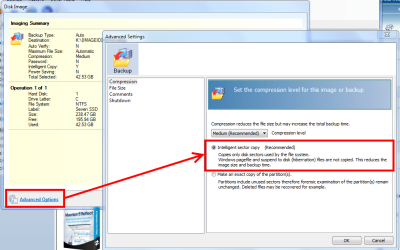
I can confirm you can restore an image from a large drive to a smaller one with no problems. When creating the image you can click on Advanced
options and select Intelligent Sector Copy. This includes only drive sectors in use in the image. I have used Reflect to take my whole OS and programs from a 500GB HDD and restored to a 64GB SSD, but I had only 35GB used.

Capture.PNG
 

My Computer My Computer

At a glance

Windows 7 Ultimate X64 SP1Intel i5-2550K, Differing ~4.4-4.8GHz No buil...16GB G.Skill Sniper 1866MHz @ 2133MHz 2x8GBASUS GTX650TIB-DC2OC-2GD5, (650TI Boost)
Computer type
PC/Desktop
Computer Manufacturer/Model Number
Home Built Desktop By DataTech
OS
Windows 7 Ultimate X64 SP1
CPU
Intel i5-2550K, Differing ~4.4-4.8GHz No built in GPU
Motherboard
ASUS P8Z68-V PRO/GEN3
Memory
16GB G.Skill Sniper 1866MHz @ 2133MHz 2x8GB
Graphics Card(s)
ASUS GTX650TIB-DC2OC-2GD5, (650TI Boost)
Sound Card
Onboard Realtek 5-1
Monitor(s) Displays
Samsung P2570HD
Screen Resolution
1920x1080
Hard Drives
Samsung 840 Pro 256GB SSD for OS, 500GB Seagate Constellation (Enterprise drive) for Data
PSU
Corsair HX650W
Case
Inwin Dragon Rider
Cooling
Hyper 212 EVO w/two Noctua fans, push-pull, @1300 RPM
Keyboard
E-Z Eyes, bright yellow keys with large characters
Mouse
steelseries SENSEI Laser Pro Gaming
Internet Speed
48-51Mbs Mbs down, 11 Mbs up Xfinity Cable
Antivirus
Norton Internet Security 2013
Browser
IE 10, Opera, Pale Moon if needed
Other Info
4 case fans, LG BluRay-RE, ASUS DVD-RW, Mr. Fusion power supply, 1.21 gigawatts.
Thanks Gary for confirming that. I had no occasion to try that yet.
 

My Computer My Computer

At a glance

Vista, Windows7, Mint Mate, Zorin, Windows 8from 1.6GHz Duo to i7
Computer Manufacturer/Model Number
HP, Dell, Gateway, Toshiba - 4 laptops and 2 desktops
OS
Vista, Windows7, Mint Mate, Zorin, Windows 8
CPU
from 1.6GHz Duo to i7
Monitor(s) Displays
2x HP w2207
Hard Drives
5x HDD, 7x SSD, 12x Externals
Keyboard
with trackball - no mices
Mouse
Trackball mice
Internet Speed
DSL 6000
Yes, they have all been doing that for quite a while, Aomei, Paragon, Drive Snaopshot, Partition Guru, etc.

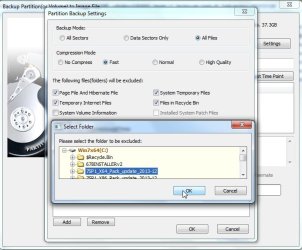
If you are going to restore to a drive smaller than the source used space, the trick is to use a program that excludes files/folders you select. I think only paragon and partition guru have free versions which do that. Paragon takes a while building an exclusion list. I have no idea what paragon is doing, because partition guru gets on with the imaging immediately. Pguru is for advanced users, though.

pguru.jpg
 

My Computers My Computers

  • At a glance

    7 X64i5 84002x8gb 3200mhz
    Computer type
    PC/Desktop
    OS
    7 X64
    CPU
    i5 8400
    Motherboard
    gigabyte b365m ds3h
    Memory
    2x8gb 3200mhz
    Hard Drives
    various
    PSU
    pure power 11 400w cm
    Case
    Coolermaster
    Cooling
    cryorig m9i
  • At a glance

    7x64g54008gb ddr4 2400
    Computer type
    PC/Desktop
    OS
    7x64
    CPU
    g5400
    Motherboard
    ga b365m ds3h
    Memory
    8gb ddr4 2400
    PSU
    xfx pro 450w
Anyway, I also made a rescue CD - Win PE, 64-bit version (does that mean I can't use that CD to restore a 32-bit computer?), then booted from it but it couldn't find my USB 3.0 HDD - until I disconnected if from the USB 3.0 port and connected to USB 2.0 port. Then I searched for the USB 3.0 driver and found it and it recognised it too. But if my internal HDD dies and I get a new one there won't be any drivers on it. Ah, in that case I'll just restore from an USB 2.0 port. :)
USB 3 is fine. To load the drivers manually:
http://www.sevenforums.com/backup-r...p-via-usb-3-0-external-drive.html#post1640570
It may be a little different for you but the principle is the same. Windows inbuilt and Macrium allow you to load the drivers manually.
Store the drivers on a USB flash drive and install them manually just before a restore.
They can be incorporated into the Macrium pe resore CD/USB.

The speed difference over USB 2 is ~x3. If you have a USB 3 ext HDD and USB 3 ports use them.

You can fiddle around with this exercise until the Macrium rescue CD/USB recognizes the USB 3 drive without risk.
 

My Computer My Computer

At a glance

Windows 7x64 Home Premium SP1Intel i7 2600kG.Skill Ripjaws (DDR3-1600) 2x4GBNvidia GeForce GTS 450; Intel HD Graphics 300...
Computer type
PC/Desktop
Computer Manufacturer/Model Number
Own build
OS
Windows 7x64 Home Premium SP1
CPU
Intel i7 2600k
Motherboard
ASUS P8Z68 Deluxe
Memory
G.Skill Ripjaws (DDR3-1600) 2x4GB
Graphics Card(s)
Nvidia GeForce GTS 450; Intel HD Graphics 3000(GT2+)
Monitor(s) Displays
Dell Ultrasharp IPS panel U2311H, Samsung SyncMaster P2350
Screen Resolution
1920x1080
Hard Drives
Samsung 850 Pro SSD 256GB, Samsung SSD 840 120GB, Seagates 1TB Barracuda ST31000528AS x2
PSU
Seasonic M12II 520W
Case
Lian Li Lancool PC-K60
Cooling
Case: 1x120mm, 3x140mm CPU: Hyper 212+
Keyboard
Logitech MK520 (wireless)
Mouse
Logitech MK520
Internet Speed
6-7 Mbps
Antivirus
Norton Security Premium, Malwarebytes on 2 (MSE on 3rd PC)
Browser
FireFox
Other Info
Audio: Logitech Z523 2.1

My Computers My Computers

  • At a glance

    7 X64i5 84002x8gb 3200mhz
    Computer type
    PC/Desktop
    OS
    7 X64
    CPU
    i5 8400
    Motherboard
    gigabyte b365m ds3h
    Memory
    2x8gb 3200mhz
    Hard Drives
    various
    PSU
    pure power 11 400w cm
    Case
    Coolermaster
    Cooling
    cryorig m9i
  • At a glance

    7x64g54008gb ddr4 2400
    Computer type
    PC/Desktop
    OS
    7x64
    CPU
    g5400
    Motherboard
    ga b365m ds3h
    Memory
    8gb ddr4 2400
    PSU
    xfx pro 450w
Another thing concerning speed. As I said, I made a full disk image (hidden system partition + C partition + D partition), 193 GB alltogether. So I created the image on an external USB 3.0 HDD and it took 1,5 hour to do it. Transfer rates were from 43 MB/s to 35 MB/s when writing to the external HDD. Isn't that kind of slow for an USB 3.0 drive?

That seems about right to me.

I can image/restore at ~3 GB/minute to ~4 GB/minute using internal HDDs.
External HDDs will be slower.
 

My Computer My Computer

At a glance

W7 Ultimate SP1, LM19.2 MATE, W10 Home 1703, ...AMD Phenom II x6 1100T, 3.3 GHz12GB DDR3 1333 G-Skill (4GB x 2), G-Skill (2G...NVIDIA GeForce GTX 660
Computer type
PC/Desktop
Computer Manufacturer/Model Number
n/a
OS
W7 Ultimate SP1, LM19.2 MATE, W10 Home 1703, W10 Pro 1703 VM, #All 64 bit
CPU
AMD Phenom II x6 1100T, 3.3 GHz
Motherboard
ASUS M4A88T-M/USB3 (AM3)
Memory
12GB DDR3 1333 G-Skill (4GB x 2), G-Skill (2GB x 2)
Graphics Card(s)
NVIDIA GeForce GTX 660
Sound Card
Realtek?
Monitor(s) Displays
Samsung S23B350
Screen Resolution
1920x1080
Hard Drives
WD Green 2TB (SATA), WD Green 3TB (SATA), WD Blue 4TB (SATA), WD Blue 6TB (SATA)
PSU
Cooler Master
Case
Antec GX300 Tower
Cooling
3x Antec TRICOOL 120mm Fans
Mouse
Wired Optical
Internet Speed
DSL
Antivirus
Avast
Browser
Pale Moon (64 bit)
Other Info
2018-12-27 Upgraded HDDs
2015-12-10 Upgraded case, graphics card, storage
2015-08-15 Upgraded motherboard & RAM
2015-07-15 Upgraded LM17.1 to LM17.2
I also made a rescue CD - Win PE, 64-bit version (does that mean I can't use that CD to restore a 32-bit computer?),
That is correct. But most PCs can do 64bit today. Only very old PCs may be 32bit only.
In my view that is an exceptionally dangerous assumption.

A 32 bit application can run on a 64 bit Windows 7 system.
A 32 bit WinPE can be loaded into 64 bit wide RAM and restore an image read from a USB serial external drive to restore through a SATA or IDE interface to your internal drive.

A 64 bit application uses 64 bit wide RAM and uses 64 bit wide instruction codes to can reach beyond the addressing limits of a 32 bit system.

64 bit WinPE needs only a few hundred MB of RAM to execute,
but has the capability of addressing more than 4 GB of RAM.

It is more than probable that when Macrium runs on a full blown live 64 bit Windows system it will use 64 bit wide instruction codes,
and when Macrium creates WinPE it is unlikely to restrict itself to 32 bit wide instruction codes,
and your 64 bit WinPE CD will be unable to load 64 bit instructions into a 32 bit wide RAM.

What is safe to assume is that a 32 bit WinPE will successfully restore an image to a 64 bit system.
I have actually used an old WinPE created under 32 bit XP to restore 64 bit Windows 7 images.
 
Last edited:

My Computer My Computer

At a glance

Windows 7 Ultimate 64 bit SP1 x64AMD Phenom X4 95008 GBATI Radeon HD 4600 Series
Computer Manufacturer/Model Number
ASUSTeK Computer INC. M3A32-MVP DELUXE (CPU 1)
OS
Windows 7 Ultimate 64 bit SP1 x64
CPU
AMD Phenom X4 9500
Motherboard
ASUSTeK M3A32-MVP Deluxe (CPU 1)
Memory
8 GB
Graphics Card(s)
ATI Radeon HD 4600 Series
Sound Card
AMD High Definition Audio Device
Monitor(s) Displays
SyncMaster (1680x1050@60Hz)
Hard Drives
59GB OCZ-VERTEX2 ATA Device
+
977GB SAMSUNG HD103SJ ATA Device
+
625GB WDC WD6401AALS-00L3B2 ATA Device
I think verify checks the hash total. What else could it be doing.

I'm thinking mounting the image and comparing to the original. Verification takes too long to just be checking hash totals. It takes almost as long to verify the image as it does to make it.
Actually there is no single hash checksum - there are thousands of them.
I think the checksums are computed and embedded in the file every ? MBYte
(Macrium have published the interval but I cannot remember).

It is VERY WISE when restoring to select the image file and NOT restore until you verify.
Your image file might be corrupted and it would be sad to have the restore operation first erase C:\ and then restore the first half of your Windows and then abort, leaving you with an UN-bootable system.

N.B.
If a backup is corrupted and you really want to restore regardless of corruption,
there is a simple registry fix to disregard errors,
and perhaps you could create a WinPE CD that would restore a corrupted image.
I truly hope to never be in that position.

Regards
Alan
 

My Computer My Computer

At a glance

Windows 7 Ultimate 64 bit SP1 x64AMD Phenom X4 95008 GBATI Radeon HD 4600 Series
Computer Manufacturer/Model Number
ASUSTeK Computer INC. M3A32-MVP DELUXE (CPU 1)
OS
Windows 7 Ultimate 64 bit SP1 x64
CPU
AMD Phenom X4 9500
Motherboard
ASUSTeK M3A32-MVP Deluxe (CPU 1)
Memory
8 GB
Graphics Card(s)
ATI Radeon HD 4600 Series
Sound Card
AMD High Definition Audio Device
Monitor(s) Displays
SyncMaster (1680x1050@60Hz)
Hard Drives
59GB OCZ-VERTEX2 ATA Device
+
977GB SAMSUNG HD103SJ ATA Device
+
625GB WDC WD6401AALS-00L3B2 ATA Device
Thank you for all the comments, it seems I'm doing things right. :)

There's a thing though - since I used Reflect I have WmiPrvSE.exe running in the background all the time. I never had that before. I googled it and it says it's a process that's used in the enterprise environment - but I am a home user. What's that about? Can I disable it?
 

My Computer My Computer

At a glance

Windows 7 Ultimate x64 SP1
OS
Windows 7 Ultimate x64 SP1
Right click on it and see whether the path is C:\Windows\System32\wbem - if yes, then it is OK and legit.
 

My Computer My Computer

At a glance

Vista, Windows7, Mint Mate, Zorin, Windows 8from 1.6GHz Duo to i7
Computer Manufacturer/Model Number
HP, Dell, Gateway, Toshiba - 4 laptops and 2 desktops
OS
Vista, Windows7, Mint Mate, Zorin, Windows 8
CPU
from 1.6GHz Duo to i7
Monitor(s) Displays
2x HP w2207
Hard Drives
5x HDD, 7x SSD, 12x Externals
Keyboard
with trackball - no mices
Mouse
Trackball mice
Internet Speed
DSL 6000
The path is right and the file is legit, I tested it at VirusTotal. The thing is it wasn't running before I used Macrium. So do I have to have this process running all the time to use Macrium once a month?
 

My Computer My Computer

At a glance

Windows 7 Ultimate x64 SP1
OS
Windows 7 Ultimate x64 SP1
No idea - and it is not really 'running'. It is just sitting there doing no harm. Why would you want to muck around with it.

When you eliminate it, the best that can happen is that you save a few bytes in RAM - the worst that can happen is that you brick your system.
 

My Computer My Computer

At a glance

Vista, Windows7, Mint Mate, Zorin, Windows 8from 1.6GHz Duo to i7
Computer Manufacturer/Model Number
HP, Dell, Gateway, Toshiba - 4 laptops and 2 desktops
OS
Vista, Windows7, Mint Mate, Zorin, Windows 8
CPU
from 1.6GHz Duo to i7
Monitor(s) Displays
2x HP w2207
Hard Drives
5x HDD, 7x SSD, 12x Externals
Keyboard
with trackball - no mices
Mouse
Trackball mice
Internet Speed
DSL 6000
Another thing concerning speed. As I said, I made a full disk image (hidden system partition + C partition + D partition), 193 GB alltogether. So I created the image on an external USB 3.0 HDD and it took 1,5 hour to do it. Transfer rates were from 43 MB/s to 35 MB/s when writing to the external HDD. Isn't that kind of slow for an USB 3.0 drive?

That seems about right to me.

I can image/restore at ~3 GB/minute to ~4 GB/minute using internal HDDs.
External HDDs will be slower.
An update on speed.
I just imaged 47GB to one of my external USB3 WD 1 TB MyBook Essentials HDDs and it took 10min 21 secs. Also, the ext HDD had ~230MB free. If the HDD had been empty the image time would have been lower.
 

My Computer My Computer

At a glance

Windows 7x64 Home Premium SP1Intel i7 2600kG.Skill Ripjaws (DDR3-1600) 2x4GBNvidia GeForce GTS 450; Intel HD Graphics 300...
Computer type
PC/Desktop
Computer Manufacturer/Model Number
Own build
OS
Windows 7x64 Home Premium SP1
CPU
Intel i7 2600k
Motherboard
ASUS P8Z68 Deluxe
Memory
G.Skill Ripjaws (DDR3-1600) 2x4GB
Graphics Card(s)
Nvidia GeForce GTS 450; Intel HD Graphics 3000(GT2+)
Monitor(s) Displays
Dell Ultrasharp IPS panel U2311H, Samsung SyncMaster P2350
Screen Resolution
1920x1080
Hard Drives
Samsung 850 Pro SSD 256GB, Samsung SSD 840 120GB, Seagates 1TB Barracuda ST31000528AS x2
PSU
Seasonic M12II 520W
Case
Lian Li Lancool PC-K60
Cooling
Case: 1x120mm, 3x140mm CPU: Hyper 212+
Keyboard
Logitech MK520 (wireless)
Mouse
Logitech MK520
Internet Speed
6-7 Mbps
Antivirus
Norton Security Premium, Malwarebytes on 2 (MSE on 3rd PC)
Browser
FireFox
Other Info
Audio: Logitech Z523 2.1
That is about in-line with the times I am seeing => 7.4 min for 38.4GB. But we have our systems on SSDs. That may make a difference.
 

My Computer My Computer

At a glance

Vista, Windows7, Mint Mate, Zorin, Windows 8from 1.6GHz Duo to i7
Computer Manufacturer/Model Number
HP, Dell, Gateway, Toshiba - 4 laptops and 2 desktops
OS
Vista, Windows7, Mint Mate, Zorin, Windows 8
CPU
from 1.6GHz Duo to i7
Monitor(s) Displays
2x HP w2207
Hard Drives
5x HDD, 7x SSD, 12x Externals
Keyboard
with trackball - no mices
Mouse
Trackball mice
Internet Speed
DSL 6000
Interesting

There's a thing though - since I used Reflect I have WmiPrvSE.exe running in the background all the time. I never had that before. I googled it and it says it's a process that's used in the enterprise environment - but I am a home user. What's that about? Can I disable it?
I don't have that service (WmiPrvSE.exe) running constantly on my PC. :confused:

I get a few instances (4 - 7) of WmiPrvSE.exe, if I run hardware monitors (e.g. Speccy or SIW.exe).
 

My Computer My Computer

At a glance

W7 Ultimate SP1, LM19.2 MATE, W10 Home 1703, ...AMD Phenom II x6 1100T, 3.3 GHz12GB DDR3 1333 G-Skill (4GB x 2), G-Skill (2G...NVIDIA GeForce GTX 660
Computer type
PC/Desktop
Computer Manufacturer/Model Number
n/a
OS
W7 Ultimate SP1, LM19.2 MATE, W10 Home 1703, W10 Pro 1703 VM, #All 64 bit
CPU
AMD Phenom II x6 1100T, 3.3 GHz
Motherboard
ASUS M4A88T-M/USB3 (AM3)
Memory
12GB DDR3 1333 G-Skill (4GB x 2), G-Skill (2GB x 2)
Graphics Card(s)
NVIDIA GeForce GTX 660
Sound Card
Realtek?
Monitor(s) Displays
Samsung S23B350
Screen Resolution
1920x1080
Hard Drives
WD Green 2TB (SATA), WD Green 3TB (SATA), WD Blue 4TB (SATA), WD Blue 6TB (SATA)
PSU
Cooler Master
Case
Antec GX300 Tower
Cooling
3x Antec TRICOOL 120mm Fans
Mouse
Wired Optical
Internet Speed
DSL
Antivirus
Avast
Browser
Pale Moon (64 bit)
Other Info
2018-12-27 Upgraded HDDs
2015-12-10 Upgraded case, graphics card, storage
2015-08-15 Upgraded motherboard & RAM
2015-07-15 Upgraded LM17.1 to LM17.2
Back
Top