Solved Image your system with free Macrium

Could anyone please provide me with link to Macrium Reflect WinPE Rescue ISO file.
When I tried to create an ISO, the program asked me permission download WinPE files. It could be simple if the Rescue ISO could be downloaded directly from the official site. I have just created a Image of 'C:' and System Reserved partition.
( I downloaded Macrium Reflect 5.3through here: http://www.filehorse.com/download-macrium-reflect-64/ )
 

My Computer My Computer

Computer type
Laptop
Computer Manufacturer/Model Number
Dell XPS L502x
OS
Windows 7 Home Premium 64bit
CPU
Intel Core i7 2670QM
Motherboard
Intel HM67 Mobile Express Chipset
Memory
Samsung 8GB 1333Mhz
Graphics Card(s)
nVidia Geforce 540M GT 2GB
Sound Card
Realtek High Definition Audio
Monitor(s) Displays
15.6" Dell Standard RGB-LED Backlit Display
Screen Resolution
1366x768
Hard Drives
Seagate Momentus 2.5" 750GB HDD 5400rpm
Internet Speed
3.1 Mbits/s
Antivirus
AVG Free, Kaspersky
Browser
Google chrome

My Computer My Computer

Computer type
Laptop
Computer Manufacturer/Model Number
Hewlett-Packard/G62-107SA Notebook
OS
Microsoft Windows 7 Home Premium 64-bit Service Pack 1
CPU
Intel(R) Core(TM) i3 CPU M 330 @ 2.13GHz
Motherboard
Hewlett-Packard 1425
Memory
8 GB DDR3
Graphics Card(s)
Intel(R) HD Graphics
Sound Card
Realtek High Definition Audio
Monitor(s) Displays
Builtin
Screen Resolution
1366 x 768 x 32 bits (4294967296 colors) @ 60 Hz
Hard Drives
250 GB SATA Hard Disk Drive 7200 rpm
2TB Seagate GoFlex USB 2 Drive
1TB Iomega Prestige USB 2 Drive
1.5TB Iomega Prestige USB 2 Drive (Samsung)
2TB WD MyBook Live NAS.
Mouse
Logitech Anywhere MX
Internet Speed
152 Mbs download 10 Mbs upload
Antivirus
Norton 360
Browser
Chrome
It doesn't exist. WinPE contains licensed components of the Windows operating system. Others would have to pay MS to distribute WinPE.

EDIT - seems it does exist, but not legally imo.
 

My Computer My Computer

Computer type
PC/Desktop
Computer Manufacturer/Model Number
PC Specialist Custom
OS
Windows 7 Pro 64 bit
CPU
Intel i5
Motherboard
ASUS® H81M-PLUS
Memory
8GB KINGSTON DUAL-DDR3 1600MHz
Graphics Card(s)
2GB AMD RADEON™ R7 250
Hard Drives
120GB KINGSTON V300 SSD
1TB WD CAVIAR BLACK WD1003FZEX

My Computer My Computer

Computer Manufacturer/Model Number
HP, Dell, Gateway, Toshiba - 4 laptops and 2 desktops
OS
Vista, Windows7, Mint Mate, Zorin, Windows 8
CPU
from 1.6GHz Duo to i7
Monitor(s) Displays
2x HP w2207
Hard Drives
5x HDD, 7x SSD, 12x Externals
Keyboard
with trackball - no mices
Mouse
Trackball mice
Internet Speed
DSL 6000
There is nothing illegal about the WinPE iso. Here is the link again.
So you say. Here is part of the EULA downloaded with the WAIK -

[FONT=&quot]4. Scope of License[/FONT][FONT=&quot].[/FONT][FONT=&quot] The software is licensed, not sold. This agreement only gives you some rights to use the software. Microsoft reserves all other rights. Unless applicable law gives you more rights despite this limitation, you may use the software only as expressly permitted in this agreement. In doing so, you must comply with any technical limitations in the software that only allow you to use it in certain ways. You may not[/FONT]
· [FONT=&quot]work around any technical limitations in the software;[/FONT]
· [FONT=&quot]reverse engineer, decompile or disassemble the software, except and only to the extent that applicable law expressly permits, despite this limitation;[/FONT]
· [FONT=&quot]make more copies of the software than specified in this agreement or allowed by applicable law, despite this limitation;[/FONT]
· [FONT=&quot]publish the software for others to copy;[/FONT]
· [FONT=&quot]rent, lease or lend the software;[/FONT]
· [FONT=&quot]transfer the software or this agreement to any third party; or[/FONT]
· [FONT=&quot]use the software for commercial software hosting services[/FONT][FONT=&quot].

[/FONT]
Your links should be removed by the Administrators[FONT=&quot]
[/FONT]
 

My Computer My Computer

Computer type
PC/Desktop
Computer Manufacturer/Model Number
PC Specialist Custom
OS
Windows 7 Pro 64 bit
CPU
Intel i5
Motherboard
ASUS® H81M-PLUS
Memory
8GB KINGSTON DUAL-DDR3 1600MHz
Graphics Card(s)
2GB AMD RADEON™ R7 250
Hard Drives
120GB KINGSTON V300 SSD
1TB WD CAVIAR BLACK WD1003FZEX
It seems you haven't read what you posted.
 

My Computers My Computers

System One System Two

  • Computer type
    PC/Desktop
    OS
    7 X64
    CPU
    i5 8400
    Motherboard
    gigabyte b365m ds3h
    Memory
    2x8gb 3200mhz
    Hard Drives
    various
    PSU
    pure power 11 400w cm
    Case
    Coolermaster
    Cooling
    cryorig m9i
  • Computer type
    PC/Desktop
    OS
    7x64
    CPU
    g5400
    Motherboard
    ga b365m ds3h
    Memory
    8gb ddr4 2400
    PSU
    xfx pro 450w
You can turn a blind eye towards this if you choose but, looked at objectively, it is pretty clear that offering to anyone who wants it an ISO of WinPE, that can only be created with the WAIK when running on a properly licensed system, is at the very least against the spirit of the licence if not its letter. If it was within the licence why on Earth would Paragon not offer it when they do offer the Linux version?

You don't have to answer ;)
 

My Computer My Computer

Computer type
PC/Desktop
Computer Manufacturer/Model Number
PC Specialist Custom
OS
Windows 7 Pro 64 bit
CPU
Intel i5
Motherboard
ASUS® H81M-PLUS
Memory
8GB KINGSTON DUAL-DDR3 1600MHz
Graphics Card(s)
2GB AMD RADEON™ R7 250
Hard Drives
120GB KINGSTON V300 SSD
1TB WD CAVIAR BLACK WD1003FZEX
What are licensing conditions for Windows PE 3.0 distribution? - Technet Forums

The Windows PE 3 EULA (License agreement) is included with WAIK and explains clearly the scope where/how Windows PE can be used.
You can use WinPE for other purposes and distribute your own version, granted the fact that Microsoft expressly allows this action (mentioned in EULA).

EDIT - Maybe Macrium got permission to use WinPE for thier Rescue disc.
 

My Computer My Computer

Computer type
Laptop
Computer Manufacturer/Model Number
Dell XPS L502x
OS
Windows 7 Home Premium 64bit
CPU
Intel Core i7 2670QM
Motherboard
Intel HM67 Mobile Express Chipset
Memory
Samsung 8GB 1333Mhz
Graphics Card(s)
nVidia Geforce 540M GT 2GB
Sound Card
Realtek High Definition Audio
Monitor(s) Displays
15.6" Dell Standard RGB-LED Backlit Display
Screen Resolution
1366x768
Hard Drives
Seagate Momentus 2.5" 750GB HDD 5400rpm
Internet Speed
3.1 Mbits/s
Antivirus
AVG Free, Kaspersky
Browser
Google chrome
I notice that when you copied and pasted that vague bit of info you omitted to include this -

I noticed that MS indeed licensed particular uses of Windows PE 2 when Vista was released but has not been licensing customized Windows PE 3 versions. However, you can get in contact with a MS representative and ask his opinion about this matter, this should be the first step for you to get a legal authorization to distribute WinPE 3.

Also Macrium, aka Paragon, do NOT issue a WinPE based rescue disk. You should be asking yourself why.
 

My Computer My Computer

Computer type
PC/Desktop
Computer Manufacturer/Model Number
PC Specialist Custom
OS
Windows 7 Pro 64 bit
CPU
Intel i5
Motherboard
ASUS® H81M-PLUS
Memory
8GB KINGSTON DUAL-DDR3 1600MHz
Graphics Card(s)
2GB AMD RADEON™ R7 250
Hard Drives
120GB KINGSTON V300 SSD
1TB WD CAVIAR BLACK WD1003FZEX
Can we please stop this discussion. It is just polluting my tutorial thread.
 

My Computer My Computer

Computer Manufacturer/Model Number
HP, Dell, Gateway, Toshiba - 4 laptops and 2 desktops
OS
Vista, Windows7, Mint Mate, Zorin, Windows 8
CPU
from 1.6GHz Duo to i7
Monitor(s) Displays
2x HP w2207
Hard Drives
5x HDD, 7x SSD, 12x Externals
Keyboard
with trackball - no mices
Mouse
Trackball mice
Internet Speed
DSL 6000
Yes it will work with images from that version.
 

My Computer My Computer

Computer Manufacturer/Model Number
HP, Dell, Gateway, Toshiba - 4 laptops and 2 desktops
OS
Vista, Windows7, Mint Mate, Zorin, Windows 8
CPU
from 1.6GHz Duo to i7
Monitor(s) Displays
2x HP w2207
Hard Drives
5x HDD, 7x SSD, 12x Externals
Keyboard
with trackball - no mices
Mouse
Trackball mice
Internet Speed
DSL 6000
I'm wondering exactly which driver files I need to add when making my Macrium (free) rescue flash drive.

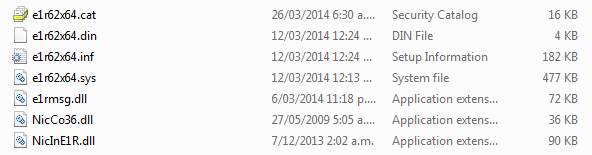
The two controllers I need to manually insert drivers for are my Intel i350 NIC and the Intel USB 3.0 controller. Do I need any files other than the .inf, .sys and .cat files? For example, the NIC driver package include all these for the i350:

5XKlCu1.png


And most of them are shown in device manager:

QhMciOn.png


Do I need the .din and .dll files, or should I only copy e1r62x64.inf, e1r62x64.sys and e1r62x64.cat?

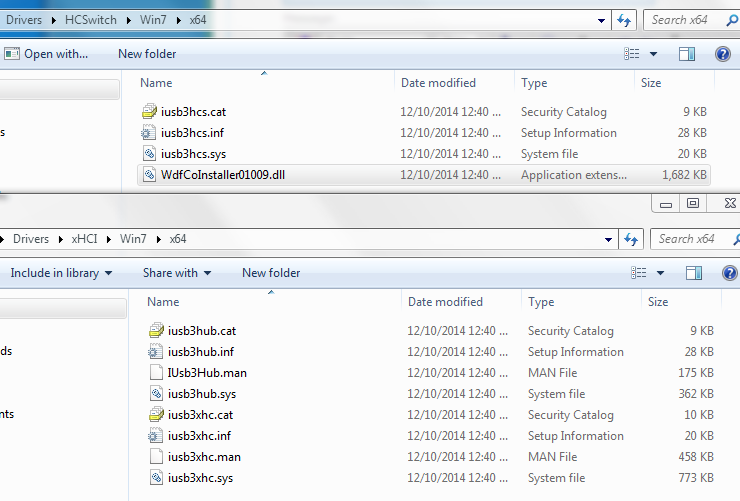
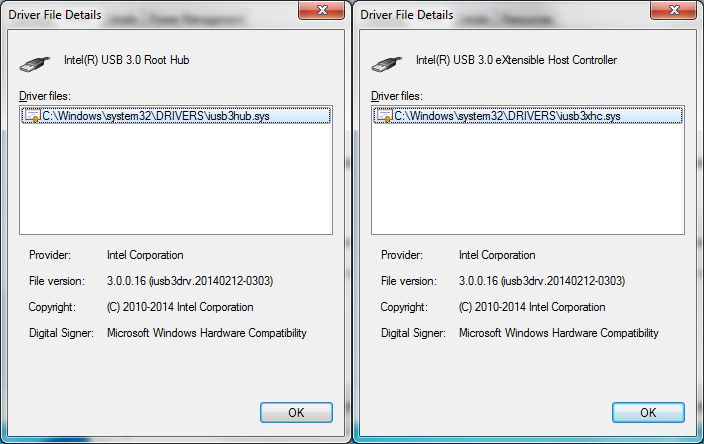
And then there's the USB 3.0 drivers. There are two devices a 'Root Hub' and 'eXtensible Host Controller'. Do I need to install drivers for both these USB 3.0 devices, and again which files are necessary?

Driver Packages:
s5pmIIh.png


DevMan:
0HytBH4.png


Also, is there any merit to adding the latest Intel RST AHCI driver? The drives are Samsung 840 Pro SSDs.
 

My Computer My Computer

OS
Windows 7 x64 Home Premium
This is a great program. I just used it to recover an image from a damaged drive, and it worked perfectly. The free version is very powerful, and the company is so-customer friendly that I will definitely buy from them down the road, as opposed to anyone else.
 

My Computer My Computer

Computer type
PC/Desktop
Computer Manufacturer/Model Number
Gateway GT5656
OS
Windows 7 x64 SP1
CPU
AMD Athlon 64 X2 6000+ / 3.0 GHz
Motherboard
NVIDIA GeForce 6150 SE
Memory
6 GB
Monitor(s) Displays
Lenovo LED
Screen Resolution
1920 X 1080
Hard Drives
Windows on 500 GB spinner; Ubuntu 16 on Sandisk 250GB SSD; Bodhi5 on Samsung 250GB SSD; another old spinner for fooling around.
PSU
Original that came with computer
Keyboard
Logitech wireless
Mouse
Logitech wireless
Antivirus
Microsoft Sec Essentials
Browser
Vivaldi
I'm wondering exactly which driver files I need to add when making my Macrium (free) rescue flash drive.

The two controllers I need to manually insert drivers for are my Intel i350 NIC and the Intel USB 3.0 controller. Do I need any files other than the .inf, .sys and .cat files? For example, the NIC driver package include all these for the i350:

5XKlCu1.png


And most of them are shown in device manager:

QhMciOn.png


Do I need the .din and .dll files, or should I only copy e1r62x64.inf, e1r62x64.sys and e1r62x64.cat?

And then there's the USB 3.0 drivers. There are two devices a 'Root Hub' and 'eXtensible Host Controller'. Do I need to install drivers for both these USB 3.0 devices, and again which files are necessary?

Driver Packages:
s5pmIIh.png


DevMan:
0HytBH4.png


Also, is there any merit to adding the latest Intel RST AHCI driver? The drives are Samsung 840 Pro SSDs.
I added my USB 3 drivers from a winpe I made by downloading WAIK and using DISM. Macrium free may be a bit more user friendly now for adding drivers in a simpler way. I suggest you make a new post asking the same question for the Macrium experts.
 

My Computer My Computer

Computer type
PC/Desktop
Computer Manufacturer/Model Number
Own build
OS
Windows 7x64 Home Premium SP1
CPU
Intel i7 2600k
Motherboard
ASUS P8Z68 Deluxe
Memory
G.Skill Ripjaws (DDR3-1600) 2x4GB
Graphics Card(s)
Nvidia GeForce GTS 450; Intel HD Graphics 3000(GT2+)
Monitor(s) Displays
Dell Ultrasharp IPS panel U2311H, Samsung SyncMaster P2350
Screen Resolution
1920x1080
Hard Drives
Samsung 850 Pro SSD 256GB, Samsung SSD 840 120GB, Seagates 1TB Barracuda ST31000528AS x2
PSU
Seasonic M12II 520W
Case
Lian Li Lancool PC-K60
Cooling
Case: 1x120mm, 3x140mm CPU: Hyper 212+
Keyboard
Logitech MK520 (wireless)
Mouse
Logitech MK520
Internet Speed
6-7 Mbps
Antivirus
Norton Security Premium, Malwarebytes on 2 (MSE on 3rd PC)
Browser
FireFox
Other Info
Audio: Logitech Z523 2.1
Yes it will work with images from that version.

Thanks for helping.

I was able to restore the image after this problem http://www.sevenforums.com/bsod-help-support/351575-bsods-3-different-errors-weak-failing-hdd.html? . On my first try I only deleted the System Reserved and Windows partitions and restored the image successfully but it gave the error BOOTMGR is missing when I tried to bootup the system and the restored drive was given the 'G' drive letter when I checked from the recovery DVD menu.

Then I installed Windows and restored image again using the recovery DVD and this time it was able to bootup successfully.

Will there be any problems\errors with this restore method?
Is there a way to restore the backup without reinstalling Windows?
 

My Computer My Computer

Computer type
PC/Desktop
OS
Win7 Ultimate 32bit
Is there a way to restore the backup without reinstalling Windows?
Yes. If you have a system reserved partition you should restore it as well or else you will be unable to boot. I'm guessing the Windows reinstall just effectively gave you back system reserved.
If you select the Macrium option..."Create an image of the partition(s) required to backup and restore Windows" then you should be fine.
 

My Computer My Computer

Computer type
PC/Desktop
Computer Manufacturer/Model Number
Own build
OS
Windows 7x64 Home Premium SP1
CPU
Intel i7 2600k
Motherboard
ASUS P8Z68 Deluxe
Memory
G.Skill Ripjaws (DDR3-1600) 2x4GB
Graphics Card(s)
Nvidia GeForce GTS 450; Intel HD Graphics 3000(GT2+)
Monitor(s) Displays
Dell Ultrasharp IPS panel U2311H, Samsung SyncMaster P2350
Screen Resolution
1920x1080
Hard Drives
Samsung 850 Pro SSD 256GB, Samsung SSD 840 120GB, Seagates 1TB Barracuda ST31000528AS x2
PSU
Seasonic M12II 520W
Case
Lian Li Lancool PC-K60
Cooling
Case: 1x120mm, 3x140mm CPU: Hyper 212+
Keyboard
Logitech MK520 (wireless)
Mouse
Logitech MK520
Internet Speed
6-7 Mbps
Antivirus
Norton Security Premium, Malwarebytes on 2 (MSE on 3rd PC)
Browser
FireFox
Other Info
Audio: Logitech Z523 2.1
Is there a way to restore the backup without reinstalling Windows?
Yes. If you have a system reserved partition you should restore it as well or else you will be unable to boot. I'm guessing the Windows reinstall just effectively gave you back system reserved.
If you select the Macrium option..."Create an image of the partition(s) required to backup and restore Windows" then you should be fine.

Thanks for helping.

Yes thats why I reinstalled Windows because when I created 'System Reserved' and 'C' partitions using Windows setup and restored the backup the 'System Reserved' partition was not restored. Then I reinstalled Windows, restored same backup and it went fine. All options were the same and set to default both times.

I'm using version 4.2.3775 and created\restored the backup using deafult values which included the option of 'Include a backup of the System Reserved partition' with the 'C' drive. Next time should I create a seperate image of the System Reserved partition?

Is it possible to restore the Macrium backup without installing Windows first?

Can the backup be restored in the Unallocated space after deleting the partition? Or is it necessary to create the partitions first?
 

My Computer My Computer

Computer type
PC/Desktop
OS
Win7 Ultimate 32bit
If you have backed up the System reserved partition along with C you can restore both. I have done it many times.
 

My Computer My Computer

Computer type
Laptop
Computer Manufacturer/Model Number
Hewlett-Packard/G62-107SA Notebook
OS
Microsoft Windows 7 Home Premium 64-bit Service Pack 1
CPU
Intel(R) Core(TM) i3 CPU M 330 @ 2.13GHz
Motherboard
Hewlett-Packard 1425
Memory
8 GB DDR3
Graphics Card(s)
Intel(R) HD Graphics
Sound Card
Realtek High Definition Audio
Monitor(s) Displays
Builtin
Screen Resolution
1366 x 768 x 32 bits (4294967296 colors) @ 60 Hz
Hard Drives
250 GB SATA Hard Disk Drive 7200 rpm
2TB Seagate GoFlex USB 2 Drive
1TB Iomega Prestige USB 2 Drive
1.5TB Iomega Prestige USB 2 Drive (Samsung)
2TB WD MyBook Live NAS.
Mouse
Logitech Anywhere MX
Internet Speed
152 Mbs download 10 Mbs upload
Antivirus
Norton 360
Browser
Chrome
Back
Top