Images are more important than ever

I will make a decision in the next few days.
 

My Computer My Computer

At a glance

Microsoft Windows 7 Home Premium 64-bit Servi...Intel(R) Core(TM) i3 CPU M 330 @ 2.13GHz8 GB DDR3Intel(R) HD Graphics
Computer type
Laptop
Computer Manufacturer/Model Number
Hewlett-Packard/G62-107SA Notebook
OS
Microsoft Windows 7 Home Premium 64-bit Service Pack 1
CPU
Intel(R) Core(TM) i3 CPU M 330 @ 2.13GHz
Motherboard
Hewlett-Packard 1425
Memory
8 GB DDR3
Graphics Card(s)
Intel(R) HD Graphics
Sound Card
Realtek High Definition Audio
Monitor(s) Displays
Builtin
Screen Resolution
1366 x 768 x 32 bits (4294967296 colors) @ 60 Hz
Hard Drives
250 GB SATA Hard Disk Drive 7200 rpm
2TB Seagate GoFlex USB 2 Drive
1TB Iomega Prestige USB 2 Drive
1.5TB Iomega Prestige USB 2 Drive (Samsung)
2TB WD MyBook Live NAS.
Mouse
Logitech Anywhere MX
Internet Speed
152 Mbs download 10 Mbs upload
Antivirus
Norton 360
Browser
Chrome
Kado, if you take an image before you start the work, you can always bail yourself out in case things go sour. This is the most important step.
I suggest you image absolutely everything.
The operation is so simple in principle - I'd like to know if you go ahead and it works (ie. logical conversion).


It will work flawlessly, I've done it a couple dozen times without issue.
 

My Computer My Computer

At a glance

W 7 64-bit UltimateIntel Q9550 Yorkfield8GB Dominator 8500C5DATI : XFX 5870
Computer Manufacturer/Model Number
* BFK Customs *
OS
W 7 64-bit Ultimate
CPU
Intel Q9550 Yorkfield
Motherboard
ASUS P5Q Pro
Memory
8GB Dominator 8500C5D
Graphics Card(s)
ATI : XFX 5870
Sound Card
Realtek HD Audio 7-1
Monitor(s) Displays
1x 47" LCD HDMI & 3x 26" LCD HDMI
Screen Resolution
1920x1080P & 1920x1200
Hard Drives
1x 80GB Intel X25-M G2 SSD : 1x 500GB & 1x 640GB WD Caviar Black(s)
PSU
Corsair 620HX
Case
Cooler Master RC-690
Cooling
Tuniq Tower 120, 2x 140mm and 3x 120mm case fans
Keyboard
Microsoft 500
Mouse
Razer Diamondback 3G
Internet Speed
14 Mb/s
Other Info
1x Koutech 3Gb/s SATA HDD Hot Swap Rack
I will add to the confusion here for you Kado. LOL

If it were me, I would free up a partition slot by making the win7 partition system .

Then get rid of the 100mb thing to free up a partition slot.

You might prefer to do something different.
 

My Computers My Computers

  • At a glance

    7 X64i5 84002x8gb 3200mhz
    Computer type
    PC/Desktop
    OS
    7 X64
    CPU
    i5 8400
    Motherboard
    gigabyte b365m ds3h
    Memory
    2x8gb 3200mhz
    Hard Drives
    various
    PSU
    pure power 11 400w cm
    Case
    Coolermaster
    Cooling
    cryorig m9i
  • At a glance

    7x64g54008gb ddr4 2400
    Computer type
    PC/Desktop
    OS
    7x64
    CPU
    g5400
    Motherboard
    ga b365m ds3h
    Memory
    8gb ddr4 2400
    PSU
    xfx pro 450w
Yes SIW has another point.


You could use this information to mark the Windows 7 partition Active and do the 3 separate startup repairs to make the Windows partition the "System" partition.

Startup Repair - Run 3 Separate Times


Then use Windows disk management to shrink the Windows 7 partition to the right to create unallocated space that you could create as a Primary partition using Option One of this tutorial.

Partition Wizard : Use the Bootable CD

Or you could use disk management to create the default Extended partition and then you could create as many Logical drives within the Extended as there are available drive letters.


Is your head exploding yet? :geek: ;)
 

My Computer My Computer

At a glance

W 7 64-bit UltimateIntel Q9550 Yorkfield8GB Dominator 8500C5DATI : XFX 5870
Computer Manufacturer/Model Number
* BFK Customs *
OS
W 7 64-bit Ultimate
CPU
Intel Q9550 Yorkfield
Motherboard
ASUS P5Q Pro
Memory
8GB Dominator 8500C5D
Graphics Card(s)
ATI : XFX 5870
Sound Card
Realtek HD Audio 7-1
Monitor(s) Displays
1x 47" LCD HDMI & 3x 26" LCD HDMI
Screen Resolution
1920x1080P & 1920x1200
Hard Drives
1x 80GB Intel X25-M G2 SSD : 1x 500GB & 1x 640GB WD Caviar Black(s)
PSU
Corsair 620HX
Case
Cooler Master RC-690
Cooling
Tuniq Tower 120, 2x 140mm and 3x 120mm case fans
Keyboard
Microsoft 500
Mouse
Razer Diamondback 3G
Internet Speed
14 Mb/s
Other Info
1x Koutech 3Gb/s SATA HDD Hot Swap Rack
I not totally new to this stuff but maybe I made a silly mistake.
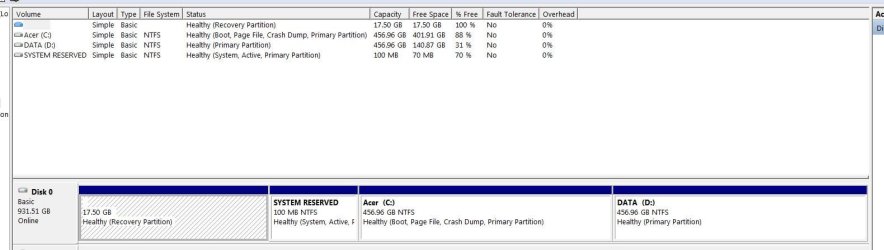
Original (& current) partition structure for ACER desktop:
main disk.JPG
Used PW 5.2 Bootable
(1) Made C: logical (modify>logical>apply....)
(2) Rebooted
(3) Wouldn't boot! (some time ago & can't remember the error but something to do with authentication.
(4) No repair would fix it.

Reimaged (even had to reimage the recovery partition).

Simple enough - where's the mistake?
 

My Computer My Computer

At a glance

Windows 7x64 Home Premium SP1Intel i7 2600kG.Skill Ripjaws (DDR3-1600) 2x4GBNvidia GeForce GTS 450; Intel HD Graphics 300...
Computer type
PC/Desktop
Computer Manufacturer/Model Number
Own build
OS
Windows 7x64 Home Premium SP1
CPU
Intel i7 2600k
Motherboard
ASUS P8Z68 Deluxe
Memory
G.Skill Ripjaws (DDR3-1600) 2x4GB
Graphics Card(s)
Nvidia GeForce GTS 450; Intel HD Graphics 3000(GT2+)
Monitor(s) Displays
Dell Ultrasharp IPS panel U2311H, Samsung SyncMaster P2350
Screen Resolution
1920x1080
Hard Drives
Samsung 850 Pro SSD 256GB, Samsung SSD 840 120GB, Seagates 1TB Barracuda ST31000528AS x2
PSU
Seasonic M12II 520W
Case
Lian Li Lancool PC-K60
Cooling
Case: 1x120mm, 3x140mm CPU: Hyper 212+
Keyboard
Logitech MK520 (wireless)
Mouse
Logitech MK520
Internet Speed
6-7 Mbps
Antivirus
Norton Security Premium, Malwarebytes on 2 (MSE on 3rd PC)
Browser
FireFox
Other Info
Audio: Logitech Z523 2.1
Hey guys, now you are really starting to put poor Kado into a tizzy. Yes, getting rid of one or 2 partitions would be nicer, but not easier. And apart from the boot partition, which one would you suggest to eliminate. Tools may come in handy and the recovery partition too - although not necessary with early images and burnt DVDs.
 

My Computer My Computer

At a glance

Vista, Windows7, Mint Mate, Zorin, Windows 8from 1.6GHz Duo to i7
Computer Manufacturer/Model Number
HP, Dell, Gateway, Toshiba - 4 laptops and 2 desktops
OS
Vista, Windows7, Mint Mate, Zorin, Windows 8
CPU
from 1.6GHz Duo to i7
Monitor(s) Displays
2x HP w2207
Hard Drives
5x HDD, 7x SSD, 12x Externals
Keyboard
with trackball - no mices
Mouse
Trackball mice
Internet Speed
DSL 6000
Yes, 4 primaries is the maximum. But that is easy to fix. We'll make C a logical partition. You can do that since you have the 100MB active boot partition. (check in disk management whether that is true).

Then you take the bootable CD of this program and change C: from primary to logical. The control is in the Partition tab > Modify. But you can only do it with the CD of PW because the C partition must be inactive in order to do that.

Now you can create a new Extended partition (best with Disk Management after you shrunk some space off C and then as many logical partitions as you have letters. Just right click on the unallocated space after you shrunk and you will see. Very easy.

Have a look at Method Two of this tutorial at the link below.


Partition / Extended : Logical Drives


We're just having fun! :shock:

TBH, this is the safest and easiest way to add additional storage space.
 

My Computer My Computer

At a glance

W 7 64-bit UltimateIntel Q9550 Yorkfield8GB Dominator 8500C5DATI : XFX 5870
Computer Manufacturer/Model Number
* BFK Customs *
OS
W 7 64-bit Ultimate
CPU
Intel Q9550 Yorkfield
Motherboard
ASUS P5Q Pro
Memory
8GB Dominator 8500C5D
Graphics Card(s)
ATI : XFX 5870
Sound Card
Realtek HD Audio 7-1
Monitor(s) Displays
1x 47" LCD HDMI & 3x 26" LCD HDMI
Screen Resolution
1920x1080P & 1920x1200
Hard Drives
1x 80GB Intel X25-M G2 SSD : 1x 500GB & 1x 640GB WD Caviar Black(s)
PSU
Corsair 620HX
Case
Cooler Master RC-690
Cooling
Tuniq Tower 120, 2x 140mm and 3x 120mm case fans
Keyboard
Microsoft 500
Mouse
Razer Diamondback 3G
Internet Speed
14 Mb/s
Other Info
1x Koutech 3Gb/s SATA HDD Hot Swap Rack
Kado, SIW may have a point. Since you are not sure whether you want to go thru all the steps, you could do this:

1. Burn the DVDs from the recovery partition. They are probably not of much use because you cannot do a Repair/Install with them after SP1. But for a complete reinstallation the are OK.

2. Make an image of your current system - better even 2 with 2 different imaging programs and to 2 different external disks.

3. Delete the recovery partition - that you can do with Disk Management. Shrink C some and throw the freespace of the recovery partition and the shrunk space of C together.

4. Now you have the space for the data partition. And you can do it without running into the 4 primaries limit.
 

My Computer My Computer

At a glance

Vista, Windows7, Mint Mate, Zorin, Windows 8from 1.6GHz Duo to i7
Computer Manufacturer/Model Number
HP, Dell, Gateway, Toshiba - 4 laptops and 2 desktops
OS
Vista, Windows7, Mint Mate, Zorin, Windows 8
CPU
from 1.6GHz Duo to i7
Monitor(s) Displays
2x HP w2207
Hard Drives
5x HDD, 7x SSD, 12x Externals
Keyboard
with trackball - no mices
Mouse
Trackball mice
Internet Speed
DSL 6000
I'm not sure what "all the steps" is meant to mean. It's a few minutes converting C: from primary to logical isn't it?
I'd be interested in feedback from anyone who has actually done this on a real store bought HP, Acer etc that came loaded with the OS.

Again Macrium does a good job of imaging the recovery partition if you are thinking of deleting it.
 

My Computer My Computer

At a glance

Windows 7x64 Home Premium SP1Intel i7 2600kG.Skill Ripjaws (DDR3-1600) 2x4GBNvidia GeForce GTS 450; Intel HD Graphics 300...
Computer type
PC/Desktop
Computer Manufacturer/Model Number
Own build
OS
Windows 7x64 Home Premium SP1
CPU
Intel i7 2600k
Motherboard
ASUS P8Z68 Deluxe
Memory
G.Skill Ripjaws (DDR3-1600) 2x4GB
Graphics Card(s)
Nvidia GeForce GTS 450; Intel HD Graphics 3000(GT2+)
Monitor(s) Displays
Dell Ultrasharp IPS panel U2311H, Samsung SyncMaster P2350
Screen Resolution
1920x1080
Hard Drives
Samsung 850 Pro SSD 256GB, Samsung SSD 840 120GB, Seagates 1TB Barracuda ST31000528AS x2
PSU
Seasonic M12II 520W
Case
Lian Li Lancool PC-K60
Cooling
Case: 1x120mm, 3x140mm CPU: Hyper 212+
Keyboard
Logitech MK520 (wireless)
Mouse
Logitech MK520
Internet Speed
6-7 Mbps
Antivirus
Norton Security Premium, Malwarebytes on 2 (MSE on 3rd PC)
Browser
FireFox
Other Info
Audio: Logitech Z523 2.1
The first hidden 17GB Acer recovery partition contains the factory set installation files. It can be made accessible by giving it a drive letter, but you possibly will need to use a 3rd party partition manager - I use the free Easeus Partition Master utility. The Windows Disk Management Console diskmgmt.msc may not be able to do this.

The 17GB volume (PQSERVICE on Acer, usually) can usually safely be shrunk to about 11GB, and the volume can be backed up elsewhere. Following this, the drive letter can be set to none, hiding the drive again.

You can explore the backup of the volume using the 7-Zip file manager, which will open windows image (.wim) and split image files (.swm), and compressed microsoft installer (.msi) executables too.

The 100MB SYSTEM RESERVED volume can be useful, and best left alone. I usually dual (multi) boot with XP, so I put CMDCONS, the XP recovery console on there. There is no benefit in shrinking it.

Your C:\ drive Acer volume is much bigger than you really need to keep your Windows folder and basic Windows structure files on. It could be reasonably be shrunk to 100GB.

I find that there are three main sorts of data files nowadays - Small if less than 50MB, Medium, 50 - 500MB, and large if greater than 500MB.

The large files, are often fragmented and slow down defragmentation and should never reside on your active C:\ drive.

These include the pagefile, hibernation file and memory crash dumps, any system images. I never use hibernation, so it is disabled, and there is no hiberfil.sys in the root of C:\. I create a small logical SWAP partition for pagefile.sys, about 2x installed RAM in size, turning off restore point and recycle bin there.

If there is sufficient space, create a logical partition for large files - disk images, virtual machine VHDs, ISO files, Movies, compressed backups, databases >500MB etc.

I'd also keep small files and mid-size files separate - they are much easier to keep defragmented that way.

Here's my Packard Bell dot s (basically, an Acer Machine) netbook partition map:
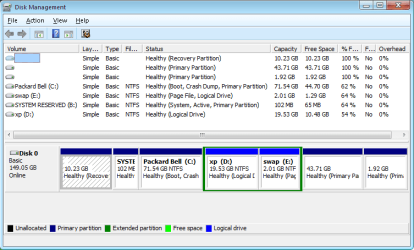
Disks.png

It has a Linux Mint installation in the primary 43.71 GB hidden volume, Linux swap primary 1.92 GB, PQSERVICE recovery partition 10.23 GB, Windows 7 Packard Bell primary C:\ 71.54 GB, XP logical D:\ drive 19.53 GB, and a swap logical E:\ drive of 2.01 GB. The SYSTEM RESERVED Primary drive I assigned B:\ since i am never likely to have a floppy drive, let alone two attached.

XP and Windows 7 share the swap partition, each overwriting the last pagefile.sys without problem. XP and swap are logical partitions in an extended partition.

Because I dual boot the Windows systems, the System Restore setup for each OS excludes the other Windows OS volume so that restore points are not overwritten by the other OS. I have yet to test this.

The Linux system can read and modify all the Windows drives and files, including the "hidden" drives.

Here's the view from XP:
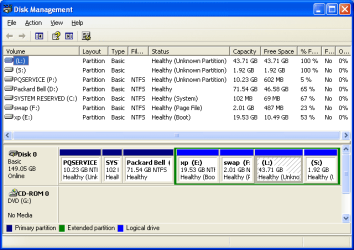
xpdisk.PNG

And just for fun from Gparted in Mint:
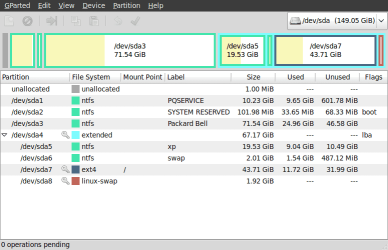
Screenshot--dev-sda - GParted.png
 
Last edited:

My Computer My Computer

At a glance

Win 7 Ult + Starter, XP Pro +Home, 2kAS, Linu...AMD 64 Athlon X2 , Intel Atom N450, Intel Cel...2.5GB ; 1GB; 2GBNvidia GeForce7000m; Intel; Intel
Computer Manufacturer/Model Number
Acer 7520, Packard Bell dot se, Acer travelmate 2423
OS
Win 7 Ult + Starter, XP Pro +Home, 2kAS, Linux Mint 8, SuperOS
CPU
AMD 64 Athlon X2 , Intel Atom N450, Intel Celeron M 1.50 Ghz
Motherboard
Acer Fuquene
Memory
2.5GB ; 1GB; 2GB
Graphics Card(s)
Nvidia GeForce7000m; Intel; Intel
Sound Card
Realtek AC57
Monitor(s) Displays
17" ;10.1"; 19"
Screen Resolution
1440x900;1024x600;1440x900;
Hard Drives
WD 80, WD 320;
PSU
19v
Case
Laptop
Cooling
Air
Internet Speed
9.7Mb/s down 0.99Mb/s up
Other Info
ISP VIRGINMEDIA 10M cable broadband - D-Link DIR615 wireless router, 3Com OfficeConnect ASDL router used as wireless extender switch

My Computer My Computer

At a glance

W 7 64-bit UltimateIntel Q9550 Yorkfield8GB Dominator 8500C5DATI : XFX 5870
Computer Manufacturer/Model Number
* BFK Customs *
OS
W 7 64-bit Ultimate
CPU
Intel Q9550 Yorkfield
Motherboard
ASUS P5Q Pro
Memory
8GB Dominator 8500C5D
Graphics Card(s)
ATI : XFX 5870
Sound Card
Realtek HD Audio 7-1
Monitor(s) Displays
1x 47" LCD HDMI & 3x 26" LCD HDMI
Screen Resolution
1920x1080P & 1920x1200
Hard Drives
1x 80GB Intel X25-M G2 SSD : 1x 500GB & 1x 640GB WD Caviar Black(s)
PSU
Corsair 620HX
Case
Cooler Master RC-690
Cooling
Tuniq Tower 120, 2x 140mm and 3x 120mm case fans
Keyboard
Microsoft 500
Mouse
Razer Diamondback 3G
Internet Speed
14 Mb/s
Other Info
1x Koutech 3Gb/s SATA HDD Hot Swap Rack
@fafhrd

I'm fully familiar with Acer's PQService, it's contents and system reserved.
PQService can be imaging and restored easily including to a new HDD.
What you have done is not what we have been discussing.
I (we?) have been talking about making the boot partition logical.

I find your 5 primary partions plus one extended puzzling.

@BFK
I'd like an answer to my post #45. Still waiting.
BFK have you done this on a store bought PC like an Acer or HP with preinstalled OEM OS?

Also, a separately bought OEM OS does not mean a OS supplied by a PC manufacturer.
 
Last edited:

My Computer My Computer

At a glance

Windows 7x64 Home Premium SP1Intel i7 2600kG.Skill Ripjaws (DDR3-1600) 2x4GBNvidia GeForce GTS 450; Intel HD Graphics 300...
Computer type
PC/Desktop
Computer Manufacturer/Model Number
Own build
OS
Windows 7x64 Home Premium SP1
CPU
Intel i7 2600k
Motherboard
ASUS P8Z68 Deluxe
Memory
G.Skill Ripjaws (DDR3-1600) 2x4GB
Graphics Card(s)
Nvidia GeForce GTS 450; Intel HD Graphics 3000(GT2+)
Monitor(s) Displays
Dell Ultrasharp IPS panel U2311H, Samsung SyncMaster P2350
Screen Resolution
1920x1080
Hard Drives
Samsung 850 Pro SSD 256GB, Samsung SSD 840 120GB, Seagates 1TB Barracuda ST31000528AS x2
PSU
Seasonic M12II 520W
Case
Lian Li Lancool PC-K60
Cooling
Case: 1x120mm, 3x140mm CPU: Hyper 212+
Keyboard
Logitech MK520 (wireless)
Mouse
Logitech MK520
Internet Speed
6-7 Mbps
Antivirus
Norton Security Premium, Malwarebytes on 2 (MSE on 3rd PC)
Browser
FireFox
Other Info
Audio: Logitech Z523 2.1
@BFK
I'd like an answer to my post #25. Still waiting.
BFK have you done this on a store bought PC like an Acer or HP with preinstalled OEM OS?

Post #25 is not yours, what's the question again?

No I have not but whs says he has several times.
 

My Computer My Computer

At a glance

W 7 64-bit UltimateIntel Q9550 Yorkfield8GB Dominator 8500C5DATI : XFX 5870
Computer Manufacturer/Model Number
* BFK Customs *
OS
W 7 64-bit Ultimate
CPU
Intel Q9550 Yorkfield
Motherboard
ASUS P5Q Pro
Memory
8GB Dominator 8500C5D
Graphics Card(s)
ATI : XFX 5870
Sound Card
Realtek HD Audio 7-1
Monitor(s) Displays
1x 47" LCD HDMI & 3x 26" LCD HDMI
Screen Resolution
1920x1080P & 1920x1200
Hard Drives
1x 80GB Intel X25-M G2 SSD : 1x 500GB & 1x 640GB WD Caviar Black(s)
PSU
Corsair 620HX
Case
Cooler Master RC-690
Cooling
Tuniq Tower 120, 2x 140mm and 3x 120mm case fans
Keyboard
Microsoft 500
Mouse
Razer Diamondback 3G
Internet Speed
14 Mb/s
Other Info
1x Koutech 3Gb/s SATA HDD Hot Swap Rack
Yes, I have for a couple of guys at the computer club. But I do not remember the make of the laptops. I think one was a Toshiba.
 

My Computer My Computer

At a glance

Vista, Windows7, Mint Mate, Zorin, Windows 8from 1.6GHz Duo to i7
Computer Manufacturer/Model Number
HP, Dell, Gateway, Toshiba - 4 laptops and 2 desktops
OS
Vista, Windows7, Mint Mate, Zorin, Windows 8
CPU
from 1.6GHz Duo to i7
Monitor(s) Displays
2x HP w2207
Hard Drives
5x HDD, 7x SSD, 12x Externals
Keyboard
with trackball - no mices
Mouse
Trackball mice
Internet Speed
DSL 6000
It certainly doesn't work on an ACER X1800.
Maybe it works on some but I think a bit of caution is warranted.
 

My Computer My Computer

At a glance

Windows 7x64 Home Premium SP1Intel i7 2600kG.Skill Ripjaws (DDR3-1600) 2x4GBNvidia GeForce GTS 450; Intel HD Graphics 300...
Computer type
PC/Desktop
Computer Manufacturer/Model Number
Own build
OS
Windows 7x64 Home Premium SP1
CPU
Intel i7 2600k
Motherboard
ASUS P8Z68 Deluxe
Memory
G.Skill Ripjaws (DDR3-1600) 2x4GB
Graphics Card(s)
Nvidia GeForce GTS 450; Intel HD Graphics 3000(GT2+)
Monitor(s) Displays
Dell Ultrasharp IPS panel U2311H, Samsung SyncMaster P2350
Screen Resolution
1920x1080
Hard Drives
Samsung 850 Pro SSD 256GB, Samsung SSD 840 120GB, Seagates 1TB Barracuda ST31000528AS x2
PSU
Seasonic M12II 520W
Case
Lian Li Lancool PC-K60
Cooling
Case: 1x120mm, 3x140mm CPU: Hyper 212+
Keyboard
Logitech MK520 (wireless)
Mouse
Logitech MK520
Internet Speed
6-7 Mbps
Antivirus
Norton Security Premium, Malwarebytes on 2 (MSE on 3rd PC)
Browser
FireFox
Other Info
Audio: Logitech Z523 2.1
MJF:

The Windows 7 Disk Management console misreads the Linux partitions as primary, they are actually set up as logical partitions in the same extended partition as the XP and Swap volumes, as the XP Disk Management view shows. (see my edited post)

Windows boot SYSTEM partitions must be Primary, Active. It's a Microsoft rule since DOS days.
 
Last edited:

My Computer My Computer

At a glance

Win 7 Ult + Starter, XP Pro +Home, 2kAS, Linu...AMD 64 Athlon X2 , Intel Atom N450, Intel Cel...2.5GB ; 1GB; 2GBNvidia GeForce7000m; Intel; Intel
Computer Manufacturer/Model Number
Acer 7520, Packard Bell dot se, Acer travelmate 2423
OS
Win 7 Ult + Starter, XP Pro +Home, 2kAS, Linux Mint 8, SuperOS
CPU
AMD 64 Athlon X2 , Intel Atom N450, Intel Celeron M 1.50 Ghz
Motherboard
Acer Fuquene
Memory
2.5GB ; 1GB; 2GB
Graphics Card(s)
Nvidia GeForce7000m; Intel; Intel
Sound Card
Realtek AC57
Monitor(s) Displays
17" ;10.1"; 19"
Screen Resolution
1440x900;1024x600;1440x900;
Hard Drives
WD 80, WD 320;
PSU
19v
Case
Laptop
Cooling
Air
Internet Speed
9.7Mb/s down 0.99Mb/s up
Other Info
ISP VIRGINMEDIA 10M cable broadband - D-Link DIR615 wireless router, 3Com OfficeConnect ASDL router used as wireless extender switch
MJF:

The Windows 7 Disk Management console misreads the Linux partitions as primary, they are actually set up as logical partitions in the same extended partition as the XP and Swap volumes, as the XP Disk Management view shows. (see my edited post)
That explains it.

Windows boot partitions must be Primary, Active. It's a Microsoft rule since DOS days.
In Windows 7 the boot partition can be logical, provide the bootmgr and BCD reside in a primary partition (the 100MB system reserved partition).
 

My Computer My Computer

At a glance

Windows 7x64 Home Premium SP1Intel i7 2600kG.Skill Ripjaws (DDR3-1600) 2x4GBNvidia GeForce GTS 450; Intel HD Graphics 300...
Computer type
PC/Desktop
Computer Manufacturer/Model Number
Own build
OS
Windows 7x64 Home Premium SP1
CPU
Intel i7 2600k
Motherboard
ASUS P8Z68 Deluxe
Memory
G.Skill Ripjaws (DDR3-1600) 2x4GB
Graphics Card(s)
Nvidia GeForce GTS 450; Intel HD Graphics 3000(GT2+)
Monitor(s) Displays
Dell Ultrasharp IPS panel U2311H, Samsung SyncMaster P2350
Screen Resolution
1920x1080
Hard Drives
Samsung 850 Pro SSD 256GB, Samsung SSD 840 120GB, Seagates 1TB Barracuda ST31000528AS x2
PSU
Seasonic M12II 520W
Case
Lian Li Lancool PC-K60
Cooling
Case: 1x120mm, 3x140mm CPU: Hyper 212+
Keyboard
Logitech MK520 (wireless)
Mouse
Logitech MK520
Internet Speed
6-7 Mbps
Antivirus
Norton Security Premium, Malwarebytes on 2 (MSE on 3rd PC)
Browser
FireFox
Other Info
Audio: Logitech Z523 2.1

My Computer My Computer

At a glance

Win 7 Ult + Starter, XP Pro +Home, 2kAS, Linu...AMD 64 Athlon X2 , Intel Atom N450, Intel Cel...2.5GB ; 1GB; 2GBNvidia GeForce7000m; Intel; Intel
Computer Manufacturer/Model Number
Acer 7520, Packard Bell dot se, Acer travelmate 2423
OS
Win 7 Ult + Starter, XP Pro +Home, 2kAS, Linux Mint 8, SuperOS
CPU
AMD 64 Athlon X2 , Intel Atom N450, Intel Celeron M 1.50 Ghz
Motherboard
Acer Fuquene
Memory
2.5GB ; 1GB; 2GB
Graphics Card(s)
Nvidia GeForce7000m; Intel; Intel
Sound Card
Realtek AC57
Monitor(s) Displays
17" ;10.1"; 19"
Screen Resolution
1440x900;1024x600;1440x900;
Hard Drives
WD 80, WD 320;
PSU
19v
Case
Laptop
Cooling
Air
Internet Speed
9.7Mb/s down 0.99Mb/s up
Other Info
ISP VIRGINMEDIA 10M cable broadband - D-Link DIR615 wireless router, 3Com OfficeConnect ASDL router used as wireless extender switch
images

Now that we learned that a Repair/Install of an SP1 system is impossible or very difficult ( http://www.sevenforums.com/tutorials/3413-repair-install-48.html#post1298885 ), it is more important than ever that people are being encouraged to image frequently.

I keep about 10 current images and stash away another set of older images all the way back to the initial installation. It is also a good strategy to keep images on 2 or 3 different disks and even use 2 different imaging programs - just to be on the safe side. The day you need an image to get yourself out of a tight spot, you will applaud yourself for these measures.

I thought You were talking about digital images. Anyway, I agree that you should always have another option for everything to avoid dealing with problems in case troubles arise :sarc:
 

My Computer My Computer

At a glance

Windows 7
OS
Windows 7
Definitions for system volume and boot volume

I admit that you are right, according to Microsoft above - the boot files reside on the System volume, and the System files reside on the Boot volume. Logical, or what? :)
No it's not logical is it (puns flying everywhere). Third party software often uses the logical terminology which is the reverse to MS.
 

My Computer My Computer

At a glance

Windows 7x64 Home Premium SP1Intel i7 2600kG.Skill Ripjaws (DDR3-1600) 2x4GBNvidia GeForce GTS 450; Intel HD Graphics 300...
Computer type
PC/Desktop
Computer Manufacturer/Model Number
Own build
OS
Windows 7x64 Home Premium SP1
CPU
Intel i7 2600k
Motherboard
ASUS P8Z68 Deluxe
Memory
G.Skill Ripjaws (DDR3-1600) 2x4GB
Graphics Card(s)
Nvidia GeForce GTS 450; Intel HD Graphics 3000(GT2+)
Monitor(s) Displays
Dell Ultrasharp IPS panel U2311H, Samsung SyncMaster P2350
Screen Resolution
1920x1080
Hard Drives
Samsung 850 Pro SSD 256GB, Samsung SSD 840 120GB, Seagates 1TB Barracuda ST31000528AS x2
PSU
Seasonic M12II 520W
Case
Lian Li Lancool PC-K60
Cooling
Case: 1x120mm, 3x140mm CPU: Hyper 212+
Keyboard
Logitech MK520 (wireless)
Mouse
Logitech MK520
Internet Speed
6-7 Mbps
Antivirus
Norton Security Premium, Malwarebytes on 2 (MSE on 3rd PC)
Browser
FireFox
Other Info
Audio: Logitech Z523 2.1
Back
Top