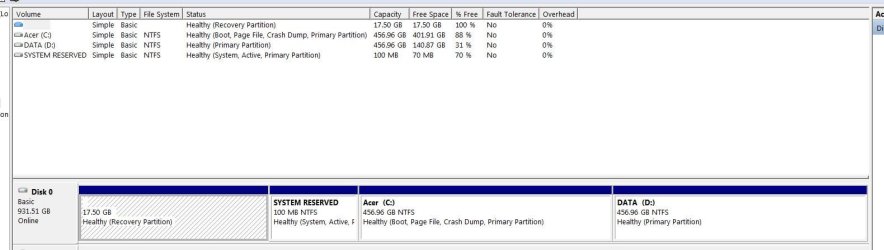
The first hidden 17GB Acer recovery partition contains the factory set installation files. It can be made accessible by giving it a drive letter, but you possibly will need to use a 3rd party partition manager - I use the free Easeus Partition Master utility. The Windows Disk Management Console diskmgmt.msc may not be able to do this.
The 17GB volume (PQSERVICE on Acer, usually) can usually safely be shrunk to about 11GB, and the volume can be backed up elsewhere. Following this, the drive letter can be set to none, hiding the drive again.
You can explore the backup of the volume using the 7-Zip file manager, which will open windows image (.wim) and split image files (.swm), and compressed microsoft installer (.msi) executables too.
The 100MB SYSTEM RESERVED volume can be useful, and best left alone. I usually dual (multi) boot with XP, so I put CMDCONS, the XP recovery console on there. There is no benefit in shrinking it.
Your C:\ drive Acer volume is much bigger than you really need to keep your Windows folder and basic Windows structure files on. It could be reasonably be shrunk to 100GB.
I find that there are three main sorts of data files nowadays - Small if less than 50MB, Medium, 50 - 500MB, and large if greater than 500MB.
The large files, are often fragmented and slow down defragmentation and should never reside on your active C:\ drive.
These include the pagefile, hibernation file and memory crash dumps, any system images. I never use hibernation, so it is disabled, and there is no hiberfil.sys in the root of C:\. I create a small logical SWAP partition for pagefile.sys, about 2x installed RAM in size, turning off restore point and recycle bin there.
If there is sufficient space, create a logical partition for large files - disk images, virtual machine VHDs, ISO files, Movies, compressed backups, databases >500MB etc.
I'd also keep small files and mid-size files separate - they are much easier to keep defragmented that way.
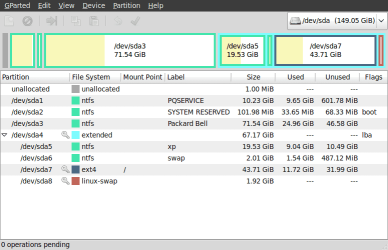
Here's my Packard Bell dot s (basically, an Acer Machine) netbook partition map:
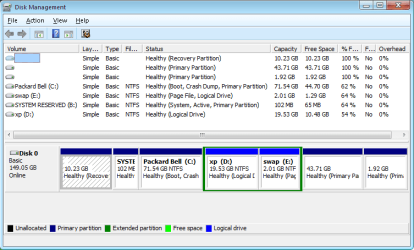
It has a Linux Mint installation in the primary 43.71 GB hidden volume, Linux swap primary 1.92 GB, PQSERVICE recovery partition 10.23 GB, Windows 7 Packard Bell primary C:\ 71.54 GB, XP logical D:\ drive 19.53 GB, and a swap logical E:\ drive of 2.01 GB. The SYSTEM RESERVED Primary drive I assigned B:\ since i am never likely to have a floppy drive, let alone two attached.
XP and Windows 7 share the swap partition, each overwriting the last pagefile.sys without problem. XP and swap are logical partitions in an extended partition.
Because I dual boot the Windows systems, the System Restore setup for each OS excludes the other Windows OS volume so that restore points are not overwritten by the other OS. I have yet to test this.
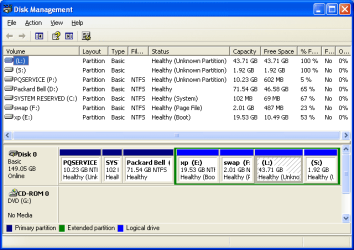
The Linux system can read and modify all the Windows drives and files, including the "hidden" drives.
Here's the view from XP:
And just for fun from Gparted in Mint: