Solved Import email contacts to WLM from gmail - how?

sonyvaio2012

New member
Member
Local time
1:11 PM
Messages
48
Hi,

I have saved my gmail contacts as a .csv file in excel. But, it does give this error message:

View attachment 236078

Although the data is there in excel:


Then I try to import to Windows Live Mail as so:


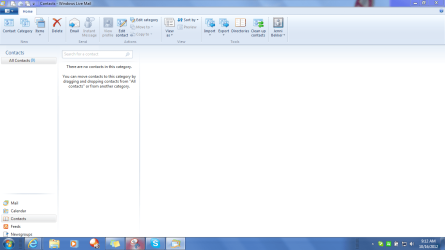
And it says "importing"..... and then nothing else. No contacts come in and no other message.

Please can somebody tell me what I'm doing wrong?
 
Last edited:

My Computer My Computer

At a glance

Windows 7 Home Premium 64 bitIntel (R) Core (TM) i5-2450M CPU @2.5GHz
Computer Manufacturer/Model Number
Sony Vaio
OS
Windows 7 Home Premium 64 bit
CPU
Intel (R) Core (TM) i5-2450M CPU @2.5GHz
Sorry - didn't see this thread.

Yeah, the import in WLM and Outlook suffer the same problem. there is no "select all".

So you have to tick each field you want to import.... each time you perform an import. It does remember some fileds, but not the ones you might expect, such as name.

anyway, the default mapping should suffice - just tick all fields and try again.
 

My Computer My Computer

At a glance

x64 (6.3.9600) Win8.1 Pro & soon dual boot x6...AMD A6-3420M APU with Radeon(tm) HD Graphics6.00 GBAMD Radeon(TM) HD 6520G
Computer type
Laptop
Computer Manufacturer/Model Number
HP Pavilion dv6-6c10us
OS
x64 (6.3.9600) Win8.1 Pro & soon dual boot x64 (6.1.7601) Win7_SP1 HomePrem
CPU
AMD A6-3420M APU with Radeon(tm) HD Graphics
Motherboard
Hewlett-Packard 1805
Memory
6.00 GB
Graphics Card(s)
AMD Radeon(TM) HD 6520G
Sound Card
(1) AMD High Definition Audio Device (2) IDT High Definiti
Monitor(s) Displays
HP W2072a 20" LCD (1600 x 900) @ 60 Hz
Screen Resolution
1366 x 768 x 32 bits (4294967296 colors) @ 60 Hz
Hard Drives
ST640LM0 00 HM641JI SATA Disk Device
Keyboard
Logitech k520 wireless KB
Mouse
Logitech m320 wireless mouse (bundled with KB)
Internet Speed
15/5 | 54 MB Wireless 'n'
Antivirus
Realtime: Defender or Avast | On-demand: Malwarebytes, ESET
Browser
IE 11 on Win8, IE 10 on win 7
Other Info
Media: [Gimp, Audacity, VLC] || Comm: [WEmail 2012, Skype] || Productivity: [OpenOffice,| Textpad] || Utils: [Sysinternals, cCleaner, Speccy, Defraggler]
Hi again Bill,

Thank you very much for your message. I have made the recommended adjustments!

Right, I will try again now with ticking all the boxes and see what happens.
 

My Computer My Computer

At a glance

Windows 7 Home Premium 64 bitIntel (R) Core (TM) i5-2450M CPU @2.5GHz
Computer Manufacturer/Model Number
Sony Vaio
OS
Windows 7 Home Premium 64 bit
CPU
Intel (R) Core (TM) i5-2450M CPU @2.5GHz
Okay,
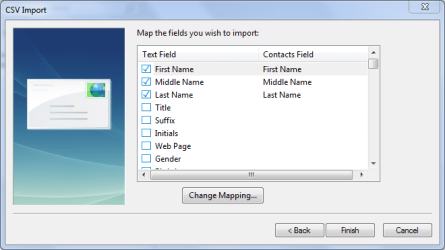
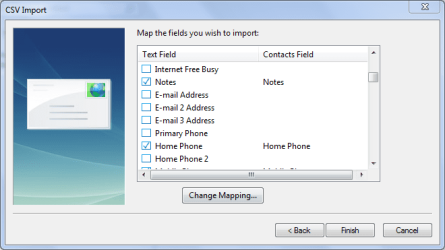
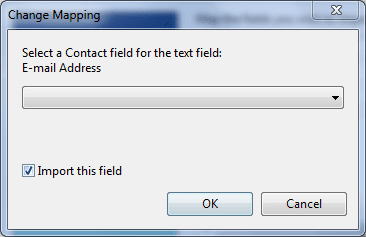
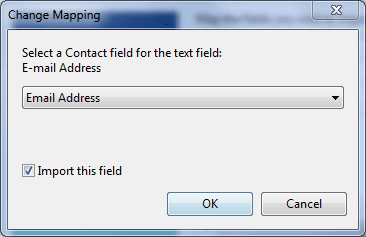
I saved the file again and I go through the following screens:
15oct1.PNG
15oct2.PNG
15oct3.PNG
15oct4.PNG
15oct5.PNG

I only added email address as it wasn't ticked.

Then when I click finish, a screen comes up saying "import in progress" but it's very quick so I can't capture it. Then it goes and I am left with an empty contacts list still!!
 

My Computer My Computer

At a glance

Windows 7 Home Premium 64 bitIntel (R) Core (TM) i5-2450M CPU @2.5GHz
Computer Manufacturer/Model Number
Sony Vaio
OS
Windows 7 Home Premium 64 bit
CPU
Intel (R) Core (TM) i5-2450M CPU @2.5GHz

My Computer My Computer

At a glance

Win7 H.Prem. 32bit+SP1
Computer Manufacturer/Model Number
Look in my Signature.
OS
Win7 H.Prem. 32bit+SP1
Well, I think you've stumped me. I checked the tutorial section and found this - it looks as though I essentially gave you the same steps, but you might want to read through it, just to be certain I didn't miss something.

The only thing I did notice is that not all of the fields were selected. Since you're having difficulty - eliminate one possibility, that one of the fields is needed to complet the import.

Try ticking all of the fields and use the default mapping WLM, i.e. don't change the mapping - if the .CSV file doesn't have the column, it will just skip that field.

If that doesn't work, try just one address. Make a copy of your .CSV file, edit the copy and delete everything below the first address, keep the header. Or create a dummy import file and test with either one.
Name,E-Mail Address,Phone
Bill,[email protected],555-1212
There might be a character in one of the rows that WLM doesn't like or the .CSV structure is out of whack.

If one entry gets imported..... we'll cross that bridge in a bit.
 

My Computer My Computer

At a glance

x64 (6.3.9600) Win8.1 Pro & soon dual boot x6...AMD A6-3420M APU with Radeon(tm) HD Graphics6.00 GBAMD Radeon(TM) HD 6520G
Computer type
Laptop
Computer Manufacturer/Model Number
HP Pavilion dv6-6c10us
OS
x64 (6.3.9600) Win8.1 Pro & soon dual boot x64 (6.1.7601) Win7_SP1 HomePrem
CPU
AMD A6-3420M APU with Radeon(tm) HD Graphics
Motherboard
Hewlett-Packard 1805
Memory
6.00 GB
Graphics Card(s)
AMD Radeon(TM) HD 6520G
Sound Card
(1) AMD High Definition Audio Device (2) IDT High Definiti
Monitor(s) Displays
HP W2072a 20" LCD (1600 x 900) @ 60 Hz
Screen Resolution
1366 x 768 x 32 bits (4294967296 colors) @ 60 Hz
Hard Drives
ST640LM0 00 HM641JI SATA Disk Device
Keyboard
Logitech k520 wireless KB
Mouse
Logitech m320 wireless mouse (bundled with KB)
Internet Speed
15/5 | 54 MB Wireless 'n'
Antivirus
Realtime: Defender or Avast | On-demand: Malwarebytes, ESET
Browser
IE 11 on Win8, IE 10 on win 7
Other Info
Media: [Gimp, Audacity, VLC] || Comm: [WEmail 2012, Skype] || Productivity: [OpenOffice,| Textpad] || Utils: [Sysinternals, cCleaner, Speccy, Defraggler]
I keep reading and find nothing that indicates you're doing anything wrong. so, we'll have to dig a little deeper. I suspect that your contacts DB might be corrupt.

1st thing to try (this is just a short way to run WLM repair - instead of control panel, program & features)
type wlarp.exe into the search box on the start menu and hit enter
select repair

Try importing the small or dummy import.csv - if succesful, import the full file.
if not successful......
Next thing if repair doesn't fix it for you:
Please provide a screenshot of what's in the following folders (you'll need to view hidden system files)
C:\Users\YourName\AppData\Local\Microsoft\Windows Live\Contacts
and
C:\Users\YourName\AppData\Local\Microsoft\Windows Live\Contacts\default

there are two choices
1) use a big hammer to remove the "corrupt" contacts file - this might cause more issues down the line or other issues might be lurking
2) export any email you want to retain, uninstall WLM, remove trace folders, and reinstall WLM 2012 - you'll have to import any email you exported and the .aif and .csv files. - I prefer the standard uninstall install route, but that's up to you. It's probably easiest since teh machine is relatively new - not too much to import.

I'll provide more information on the processes above if the repair doesn't solve the problem.
But see if the wlarp repair helped first.
 

My Computer My Computer

At a glance

x64 (6.3.9600) Win8.1 Pro & soon dual boot x6...AMD A6-3420M APU with Radeon(tm) HD Graphics6.00 GBAMD Radeon(TM) HD 6520G
Computer type
Laptop
Computer Manufacturer/Model Number
HP Pavilion dv6-6c10us
OS
x64 (6.3.9600) Win8.1 Pro & soon dual boot x64 (6.1.7601) Win7_SP1 HomePrem
CPU
AMD A6-3420M APU with Radeon(tm) HD Graphics
Motherboard
Hewlett-Packard 1805
Memory
6.00 GB
Graphics Card(s)
AMD Radeon(TM) HD 6520G
Sound Card
(1) AMD High Definition Audio Device (2) IDT High Definiti
Monitor(s) Displays
HP W2072a 20" LCD (1600 x 900) @ 60 Hz
Screen Resolution
1366 x 768 x 32 bits (4294967296 colors) @ 60 Hz
Hard Drives
ST640LM0 00 HM641JI SATA Disk Device
Keyboard
Logitech k520 wireless KB
Mouse
Logitech m320 wireless mouse (bundled with KB)
Internet Speed
15/5 | 54 MB Wireless 'n'
Antivirus
Realtime: Defender or Avast | On-demand: Malwarebytes, ESET
Browser
IE 11 on Win8, IE 10 on win 7
Other Info
Media: [Gimp, Audacity, VLC] || Comm: [WEmail 2012, Skype] || Productivity: [OpenOffice,| Textpad] || Utils: [Sysinternals, cCleaner, Speccy, Defraggler]
If that doesn't work, try just one address. Make a copy of your .CSV file, edit the copy and delete everything below the first address, keep the header. Or create a dummy import file and test with either one.
Name,E-Mail Address,Phone
Bill,[email protected],555-1212
There might be a character in one of the rows that WLM doesn't like or the .CSV structure is out of whack.

If one entry gets imported..... we'll cross that bridge in a bit.[/QUOTE]

Yes, it worked. I deleted loads of stuff and left just First Name, Last Name and E-mail Address with just one entry....and it imported!!!

So, until I hear from you again, I will try it with a couple more in the same layout and let you know. One thing I noticed is that some of my phone numbers are displaying oddly.

Most of my numbers start with a "+" or a "0". they look like that in the edit bar of excel, but in the actual spreadsheet some of them show like this:

2.59E+11

Maybe, it didn't like these numbers? I'll try the original list without the numbers too, and let you know.
 

My Computer My Computer

At a glance

Windows 7 Home Premium 64 bitIntel (R) Core (TM) i5-2450M CPU @2.5GHz
Computer Manufacturer/Model Number
Sony Vaio
OS
Windows 7 Home Premium 64 bit
CPU
Intel (R) Core (TM) i5-2450M CPU @2.5GHz
Before exporting/importing contacts from Gmail to WLM, you should do this first. View attachment 236869

Thanks Roderunner,

I had actually found your post to another reader with this help file and read it and tried it. I seem to be doing everything right. Very puzzling.
 

My Computer My Computer

At a glance

Windows 7 Home Premium 64 bitIntel (R) Core (TM) i5-2450M CPU @2.5GHz
Computer Manufacturer/Model Number
Sony Vaio
OS
Windows 7 Home Premium 64 bit
CPU
Intel (R) Core (TM) i5-2450M CPU @2.5GHz
Good news Jenni,

Interesting..... your difficulty importing might be due to using Excel to edit the .CSV file. I don't recall having this issue in the past, but who knows?

2.59E+11 is just Excel's way of displaying large numbers. To "fix" that, select all cells (upper left box on sheet, or Ctrl-A) and format cells - change format to text. Take a look at the results and if they look good (phone number, dates, etc - anything with numbers) then save as... .CSV

Probably the easiest thing to do is export to a new .CSV file and don't use Excel to look at it - use a text editor. Notepad works fine and it's on every Windows system.

I like Textpad, it's a trial version that doesn't really expire. I became so used to it that I eventually paid for it. Note that I had some problems with the latest & greatest Textpad v6, so I installed Textpad v 5.4.2

Bill
.....
Yes, it worked. I deleted loads of stuff and left just First Name, Last Name and E-mail Address with just one entry....and it imported!!!

So, until I hear from you again, I will try it with a couple more in the same layout and let you know. One thing I noticed is that some of my phone numbers are displaying oddly.

Most of my numbers start with a "+" or a "0". they look like that in the edit bar of excel, but in the actual spreadsheet some of them show like this:

2.59E+11

.....


My Computer My Computer

At a glance

x64 (6.3.9600) Win8.1 Pro & soon dual boot x6...AMD A6-3420M APU with Radeon(tm) HD Graphics6.00 GBAMD Radeon(TM) HD 6520G
Computer type
Laptop
Computer Manufacturer/Model Number
HP Pavilion dv6-6c10us
OS
x64 (6.3.9600) Win8.1 Pro & soon dual boot x64 (6.1.7601) Win7_SP1 HomePrem
CPU
AMD A6-3420M APU with Radeon(tm) HD Graphics
Motherboard
Hewlett-Packard 1805
Memory
6.00 GB
Graphics Card(s)
AMD Radeon(TM) HD 6520G
Sound Card
(1) AMD High Definition Audio Device (2) IDT High Definiti
Monitor(s) Displays
HP W2072a 20" LCD (1600 x 900) @ 60 Hz
Screen Resolution
1366 x 768 x 32 bits (4294967296 colors) @ 60 Hz
Hard Drives
ST640LM0 00 HM641JI SATA Disk Device
Keyboard
Logitech k520 wireless KB
Mouse
Logitech m320 wireless mouse (bundled with KB)
Internet Speed
15/5 | 54 MB Wireless 'n'
Antivirus
Realtime: Defender or Avast | On-demand: Malwarebytes, ESET
Browser
IE 11 on Win8, IE 10 on win 7
Other Info
Media: [Gimp, Audacity, VLC] || Comm: [WEmail 2012, Skype] || Productivity: [OpenOffice,| Textpad] || Utils: [Sysinternals, cCleaner, Speccy, Defraggler]
I have been fiddling and testing and I seem to have found two problems. When I exported the contacts from Google, it saved on the spreadsheet with the header, and then a blank line, and then the lists started.

When I deleted this line, it imported!!

However, when it imports my phone numbers that have gone into that standard notation, they come in in that exact format. So, they're not much use.

So, for now I am just editing the names etc and deleting duplicates. Then, in the morning I will import the whole list of e-mail address, so at least I will be operational again.

Then, I need to find out why my phone numbers go into that funny format. Any ideas?

I will let you know if I am sucessful tomorrow, Thank you so much.
 

My Computer My Computer

At a glance

Windows 7 Home Premium 64 bitIntel (R) Core (TM) i5-2450M CPU @2.5GHz
Computer Manufacturer/Model Number
Sony Vaio
OS
Windows 7 Home Premium 64 bit
CPU
Intel (R) Core (TM) i5-2450M CPU @2.5GHz
Good troubleshooting, Jenni

I exported my few contact entires(3) from Gmail and imported with no problem. Even though an internatinal phone number was in the data, Excel did NOT assign it to a cell formatted with scientific notation. I was probably more careful when I selected the CSV options (basically just comma seperated, not tabs, not spaces - and no text delimited with "quotes"), but who knows. It's moot at this point - you're using manual methods to ensure the integrity of the data. I hope you don't have too many contacts that need correction - if you do...... consider exporting Gmail again (did you already do that? How many times does Bill want me to export these contacts? :))

At first I thought "Maybe the export option Gmail CSV format is different from the Windows CSV format" - I didn't notice anything, but I didn't look that closely. The Gmail CSV format probably just has additional column headings specific to Gmail.

I was really looking to see how you got a blank line in your file. Still no answer on that - no blank line when I exported. The Gmail export might have hiccuped on an entry in your Gmail contact list.

Yeah, Excel helps you when you import it opens a CSV file. It tries to figure out the best way to put data into a cell. Since CSV is "special" you have to be certain how the data is represented in the file. Normally, as the name suggests, data is delimited by commas (Comma seperated values). Depending on the what application created the file, text might be delimited with "quotation marks" or not. On top of all that, the application that opens the CSV file has it's own rules and you have to look at what they are to get good data. And finally, sometimes the data is wonkey - text fileds that are not quote deleimited might contain commas - Sheesh! More inoformtion than you need, but it's always nice to have a basis going forward.

Anyway..... a text editor won't mess with your data. It's hard to modify (all those empty fields,,,,,,,,,,,,,,,)
It's safer just to import the exported data without trying to sort it or remove duplicates. Beleive me, I've tried to sort out all the duplicates from all of my contact exports and, while tempting, it's really hard work. some entries have the same name, but different address or phone number, while other entires have the same name and different notes or birthdays or what ever. Trying to merge all of the John Smith entries into one almost cost me my sanity - maybe that's where I lost it come to think of it. :)

I have to hand it you though, you are a trooper.

Bill
.

 
Last edited:

My Computer My Computer

At a glance

x64 (6.3.9600) Win8.1 Pro & soon dual boot x6...AMD A6-3420M APU with Radeon(tm) HD Graphics6.00 GBAMD Radeon(TM) HD 6520G
Computer type
Laptop
Computer Manufacturer/Model Number
HP Pavilion dv6-6c10us
OS
x64 (6.3.9600) Win8.1 Pro & soon dual boot x64 (6.1.7601) Win7_SP1 HomePrem
CPU
AMD A6-3420M APU with Radeon(tm) HD Graphics
Motherboard
Hewlett-Packard 1805
Memory
6.00 GB
Graphics Card(s)
AMD Radeon(TM) HD 6520G
Sound Card
(1) AMD High Definition Audio Device (2) IDT High Definiti
Monitor(s) Displays
HP W2072a 20" LCD (1600 x 900) @ 60 Hz
Screen Resolution
1366 x 768 x 32 bits (4294967296 colors) @ 60 Hz
Hard Drives
ST640LM0 00 HM641JI SATA Disk Device
Keyboard
Logitech k520 wireless KB
Mouse
Logitech m320 wireless mouse (bundled with KB)
Internet Speed
15/5 | 54 MB Wireless 'n'
Antivirus
Realtime: Defender or Avast | On-demand: Malwarebytes, ESET
Browser
IE 11 on Win8, IE 10 on win 7
Other Info
Media: [Gimp, Audacity, VLC] || Comm: [WEmail 2012, Skype] || Productivity: [OpenOffice,| Textpad] || Utils: [Sysinternals, cCleaner, Speccy, Defraggler]
Thanks Bill,

I've been away, but I can now report that all my e-mail contacts are correctly in my WLM at last. Phew, what a mission that all turned out to be!

I will work on the CSV file and get the phone numbers etc sorted out...in time. Right now, I am just so very grateful for all your help getting me up and running with my e-mails.

All the best,
Jenni
 

My Computer My Computer

At a glance

Windows 7 Home Premium 64 bitIntel (R) Core (TM) i5-2450M CPU @2.5GHz
Computer Manufacturer/Model Number
Sony Vaio
OS
Windows 7 Home Premium 64 bit
CPU
Intel (R) Core (TM) i5-2450M CPU @2.5GHz
You are welcome Jenni, it was a pleasue working with you.

Do me a favor and mark this thread as solved - thanks.

and I'm out!

Bill
.
 

My Computer My Computer

At a glance

x64 (6.3.9600) Win8.1 Pro & soon dual boot x6...AMD A6-3420M APU with Radeon(tm) HD Graphics6.00 GBAMD Radeon(TM) HD 6520G
Computer type
Laptop
Computer Manufacturer/Model Number
HP Pavilion dv6-6c10us
OS
x64 (6.3.9600) Win8.1 Pro & soon dual boot x64 (6.1.7601) Win7_SP1 HomePrem
CPU
AMD A6-3420M APU with Radeon(tm) HD Graphics
Motherboard
Hewlett-Packard 1805
Memory
6.00 GB
Graphics Card(s)
AMD Radeon(TM) HD 6520G
Sound Card
(1) AMD High Definition Audio Device (2) IDT High Definiti
Monitor(s) Displays
HP W2072a 20" LCD (1600 x 900) @ 60 Hz
Screen Resolution
1366 x 768 x 32 bits (4294967296 colors) @ 60 Hz
Hard Drives
ST640LM0 00 HM641JI SATA Disk Device
Keyboard
Logitech k520 wireless KB
Mouse
Logitech m320 wireless mouse (bundled with KB)
Internet Speed
15/5 | 54 MB Wireless 'n'
Antivirus
Realtime: Defender or Avast | On-demand: Malwarebytes, ESET
Browser
IE 11 on Win8, IE 10 on win 7
Other Info
Media: [Gimp, Audacity, VLC] || Comm: [WEmail 2012, Skype] || Productivity: [OpenOffice,| Textpad] || Utils: [Sysinternals, cCleaner, Speccy, Defraggler]
Cheers Bill,

Stay well
 

My Computer My Computer

At a glance

Windows 7 Home Premium 64 bitIntel (R) Core (TM) i5-2450M CPU @2.5GHz
Computer Manufacturer/Model Number
Sony Vaio
OS
Windows 7 Home Premium 64 bit
CPU
Intel (R) Core (TM) i5-2450M CPU @2.5GHz
Back
Top