Impossible USB HDD Issue.

enkei

New member
Local time
3:04 PM
Messages
15
Hello boys and girls. About one year ago, my 500GB Western Digital MyBook hard drive died when I unplugged it from my motherboard. It lived a long life. It was time for it to die. I figured maybe a power surge killed it since I didn't "Safely remove the hardware". The computer it died on was built by myself. It was an Asus motherboard and a Windows 7 Ultimate 64-bit OS. I was convinced that my data was lost, so I bought a 500GB Toshiba Canvio portable USB drive in the color black. I plugged it into a rear USB 2.0 port. It was recognized for about three seconds, and then Windows displayed a yellow popup from the bottom right corner of the taskbar saying "The device has malfunctioned". A new hard drive? Come on. I brought it downstairs to my dads Vista machine, and it worked just fine. I scratched my head, and for kicks, I tried my "dead" MyBook on the same machine. It worked! I could see all my data!

After this, I figured it was a bad motherboard. Since none of the ports on the computer were working with it. (Mind you, mice, flashdrives, printers, keyboards, hubs, etc. were all functioning fine on the system). It was ONLY mass storage USB devices that were not working. I waited about a year and built a new computer. New EVERYTHING. Windows 7 OS, Asus motherboard, and all that good stuff. I was so excited to finally be able to use my USB hard drive again. I missed my data. But... It didn't work. It makes the usb "Bee-boop" but will not display in "My Computer". Mice, keyboards, flashdrives etc. are all working on it. But neither hard drive is working. It is not being assigned a drive letter. When I try to assign it one, Disk Management says "Cannot assign drive letter because the window is not refreshed". When I refresh the window, it says the same error still.

I took the 500GB Canvio to my workplace. I plugged it into a USB extension on a machine with the same OS as me. It didn't work. So, I plugged it into an onboard USB port. It worked like a charm! I could add/remove data. I posted a thread on this forum and someone recommended that I get a powered USB hub. So I did. But no dice. It still does the same thing.

I am very confused. The drive works. The ports work. The OS is a brand new install. It's a brand new computer. All the up to date drivers are installed. I don't know where the problem even lies. The drive works on other machines. But not mine. And it's not my OS because it works on the SAME OS at my workplace. And it's not my computer because it is brand new, and everything else is working fine.

Does anybody know?
 

My Computer

OS
Windows 7 Ultimate 64-bit
Hi,

That is odd. Can you please check something? Note check, do not change any value yet:

What value is stored in your registry under:

HKEY_LOCAL_MACHINE\SYSTEM\CurrentControlSet\Services\USBSTOR

Regards,
Golden
 

My Computer

Computer type
PC/Desktop
Computer Manufacturer/Model Number
Golden Mk. I.4
OS
Windows 10 Pro x64 ; Xubuntu x64
CPU
Intel i7 860 @ 2.80 GHz O/C'ed to 4.0GHz
Motherboard
Gigabyte P55A-UD3R Rev.1. Award BIOS F13
Memory
16GB Corsair Vengance DDR3 @ 661 MHz Dual Channel (9-9-9-24)
Graphics Card(s)
EVGA NVidia GTX 560 1024MB
Sound Card
Realtek Integrated
Monitor(s) Displays
Dual Samsung SyncMaster 2494HS
Screen Resolution
1920*1080 and 1920*1080
Hard Drives
1*Samsung 840 EVO 120GB SSD;
1*OCZ Vertex 2 60GB SSD;
2*Samsung F3 SpinPoint 1TB in RAID0;
1*Samsung F1 SpinPoint 1TB;
2*Western Digital 1TB External USB 3.0
1*Western Digital 500GB External USB 3.0
1*Seagate 500GB External USB 2.0
PSU
Thermaltake ToughPower QFan 750W
Case
Thermaltake Element S VK60001W2Z
Cooling
Corsair H60 Water Cooling, 2*230mm and 2*80mm case fans
Keyboard
Logitech G110
Mouse
Logitech MX518
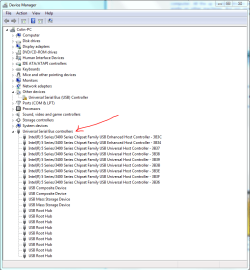
Also, can you check your Device Manager and see if there are any yellow exclamation marks under the USB section (see image).
 

Attachments

  • Capture.PNG
    Capture.PNG
    25 KB · Views: 25

My Computer

Computer type
PC/Desktop
Computer Manufacturer/Model Number
Golden Mk. I.4
OS
Windows 10 Pro x64 ; Xubuntu x64
CPU
Intel i7 860 @ 2.80 GHz O/C'ed to 4.0GHz
Motherboard
Gigabyte P55A-UD3R Rev.1. Award BIOS F13
Memory
16GB Corsair Vengance DDR3 @ 661 MHz Dual Channel (9-9-9-24)
Graphics Card(s)
EVGA NVidia GTX 560 1024MB
Sound Card
Realtek Integrated
Monitor(s) Displays
Dual Samsung SyncMaster 2494HS
Screen Resolution
1920*1080 and 1920*1080
Hard Drives
1*Samsung 840 EVO 120GB SSD;
1*OCZ Vertex 2 60GB SSD;
2*Samsung F3 SpinPoint 1TB in RAID0;
1*Samsung F1 SpinPoint 1TB;
2*Western Digital 1TB External USB 3.0
1*Western Digital 500GB External USB 3.0
1*Seagate 500GB External USB 2.0
PSU
Thermaltake ToughPower QFan 750W
Case
Thermaltake Element S VK60001W2Z
Cooling
Corsair H60 Water Cooling, 2*230mm and 2*80mm case fans
Keyboard
Logitech G110
Mouse
Logitech MX518
If you have room in your computer for another HDD, then you would attempt taking the External apart and placing the HDD in there to see if the problem continues. The changes are it is has a SATA drive hookup. I had the same problem put on a HP system. I could hook the external drive up to my iMac 27" and it worked just fine. So I placed into the HP hooking up to SATA, and the darn thing hasn't had a problem since.
 

My Computer

Computer Manufacturer/Model Number
HP Pavilion a4302f
OS
Win 7 Pro x64, VM Win XP, Win7 Pro Sandbox, Kubuntu 11
CPU
AMD Athlon(tm) II X4 640 @ 3.0 Gbz
Memory
12GB 1066MHz DDR3 SDRAM - 2x4GB, 2x2GB
Graphics Card(s)
ATI Radeon HD 4350 HD Graphics/Audio with 512MB
Sound Card
Realtek High Definition Audio
Monitor(s) Displays
1. Dell 23" SP2307, 2. Mitsublishi 40" HDTV, Hannspree 25"
Screen Resolution
1. 2048x1152, 2. 1920-1080, 3. 1920x1200
Hard Drives
Int: 1 120 Gig SSD i
1 - 2.5" 500 USB External HDD
1 -1 Tb USB External HDD
Case
Mid Tower
Cooling
Standard Fans - 5 fans (very quiet)
Keyboard
Microsoft Wireless 2000
Mouse
Microsoft Wireless Mouse 5000
Internet Speed
10 Mbit (realistically 500 Kbit - 1.2 Mbit)
Other Info
Speakers - Bose Desktop (Excellent Sound)
1 external CD|DVD\Blue-ray Recorders/Players (Sony)
To Lee:
That is a great idea, but then it wouldn't be portable anymore :/ The whole idea is to bring it to LAN parties.

To Golden:
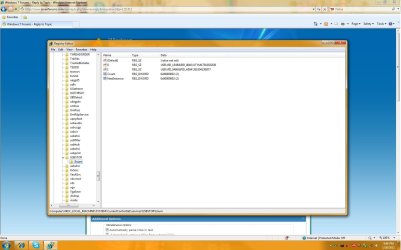
There is a folder in that area named: Enum

Check out the attachment for a screenshot.

Also, no yellow marks appear in device manager.
 

Attachments

  • Untitled.jpg
    Untitled.jpg
    122.7 KB · Views: 17
Last edited:

My Computer

OS
Windows 7 Ultimate 64-bit
Can you hear the drive spin up? (stick your ear to it when you plug it in - no I'm not trying to be funny)

Also, something simple to try;
Open an elevated command prompt
type cmd in start menu > right click cmd.exe run as administrator

>diskpart
>list disk

if you see it by chance (don't confuse it with your main drive)
>select disk n (n is the new number for the usb disk)
> list volume (see what it says)
>assign (will give it a floating letter assignment)
>exit

maybe worth a try.
 

My Computer

Computer type
PC/Desktop
Computer Manufacturer/Model Number
Own build
OS
Windows 7x64 Home Premium SP1
CPU
Intel i7 2600k
Motherboard
ASUS P8Z68 Deluxe
Memory
G.Skill Ripjaws (DDR3-1600) 2x4GB
Graphics Card(s)
Nvidia GeForce GTS 450; Intel HD Graphics 3000(GT2+)
Monitor(s) Displays
Dell Ultrasharp IPS panel U2311H, Samsung SyncMaster P2350
Screen Resolution
1920x1080
Hard Drives
Samsung 850 Pro SSD 256GB, Samsung SSD 840 120GB, Seagates 1TB Barracuda ST31000528AS x2
PSU
Seasonic M12II 520W
Case
Lian Li Lancool PC-K60
Cooling
Case: 1x120mm, 3x140mm CPU: Hyper 212+
Keyboard
Logitech MK520 (wireless)
Mouse
Logitech MK520
Internet Speed
6-7 Mbps
Antivirus
Norton Security Premium, Malwarebytes on 2 (MSE on 3rd PC)
Browser
FireFox
Other Info
Audio: Logitech Z523 2.1
The disk spins up inside the casing. The light blinks for about five seconds, and then becomes solid. When i execute "List disk" it shows three disks.

Disk 0 = my 931GB internal drive
Disk 1 = my 7701MB flash drive
Disk 2 = my 465GB portable drive (The one that isn't working)

But when I select the disk and "List Volume" it does not display :/
 

My Computer

OS
Windows 7 Ultimate 64-bit
I have the same Hard drive and some times when plugging the HARD drive in the drive needs to be assigned a drive Letter, I only use this drive to back up my C drive,

I use Paragon Partition Manager™ 2010 Free Edition simple and works great, though you can do this in windows without other software with Disk Manager

1614d438a3bdc9ab.jpg
 

My Computer

Computer type
PC/Desktop
Computer Manufacturer/Model Number
Home Built Media Center PC
OS
Window pro 8 64bit
CPU
AMD PHENON 1090T 6 core
Motherboard
Gigabyte GA-890GPA-UD3H
Memory
16.00 GB mushkin 1333mhz
Graphics Card(s)
ATI RADEON HD 6850 1GB DDR5
Sound Card
On Board Realtec ALC880
Monitor(s) Displays
Samsung 27Inch IPS LED & LG 42 Inch Plasma
Screen Resolution
1920 - 1080
Hard Drives
C:/Windows Drive = Corsair Force III Series Solid State Drive, 240GB

2 X Hitachi 1TB Deskstar 7K1000.C SATA II Internal Drive Kit w/ 32MB Cache
2 X Hitachi 2TB Deskstar 7K1000.C SATA II Internal Drive Kit w/ 64MB Cache
LG Super-Multi 22x DVD Wri
PSU
Corsair 650
Case
Full Tower Antec ARMOR
Cooling
3 x 120 Fans
Keyboard
Microsoft Curve Keyboard
Mouse
Logitec T650 Touch pad
Internet Speed
Shaw 50 Mbs
Antivirus
Microsoft security Essentials
Browser
Crome
Other Info
A few updates March 2013
Unfortunately I get an error when assigning it a drive letter in Disk Manager.
 

My Computer

OS
Windows 7 Ultimate 64-bit
The disk spins up inside the casing. The light blinks for about five seconds, and then becomes solid. When i execute "List disk" it shows three disks.

Disk 0 = my 931GB internal drive
Disk 1 = my 7701MB flash drive
Disk 2 = my 465GB portable drive (The one that isn't working)

But when I select the disk and "List Volume" it does not display :/
Well the drive is visible which is good.
ie. the hardware & OS see the disk

so when you
>select disk 2
>assign (what happens after this?) ----this assigns a letter (just not fixed)
>exit

does a drive letter get assigned (see explorer)

When you do this
>diskpart
>list volume

what exactly is displayed
& post a disk management screen shot using the snipping tool
 
Last edited:

My Computer

Computer type
PC/Desktop
Computer Manufacturer/Model Number
Own build
OS
Windows 7x64 Home Premium SP1
CPU
Intel i7 2600k
Motherboard
ASUS P8Z68 Deluxe
Memory
G.Skill Ripjaws (DDR3-1600) 2x4GB
Graphics Card(s)
Nvidia GeForce GTS 450; Intel HD Graphics 3000(GT2+)
Monitor(s) Displays
Dell Ultrasharp IPS panel U2311H, Samsung SyncMaster P2350
Screen Resolution
1920x1080
Hard Drives
Samsung 850 Pro SSD 256GB, Samsung SSD 840 120GB, Seagates 1TB Barracuda ST31000528AS x2
PSU
Seasonic M12II 520W
Case
Lian Li Lancool PC-K60
Cooling
Case: 1x120mm, 3x140mm CPU: Hyper 212+
Keyboard
Logitech MK520 (wireless)
Mouse
Logitech MK520
Internet Speed
6-7 Mbps
Antivirus
Norton Security Premium, Malwarebytes on 2 (MSE on 3rd PC)
Browser
FireFox
Other Info
Audio: Logitech Z523 2.1
Hi,

This is potentially harware related. Can you fill out your full system specs please?

Regards,
Golden
 

My Computer

Computer type
PC/Desktop
Computer Manufacturer/Model Number
Golden Mk. I.4
OS
Windows 10 Pro x64 ; Xubuntu x64
CPU
Intel i7 860 @ 2.80 GHz O/C'ed to 4.0GHz
Motherboard
Gigabyte P55A-UD3R Rev.1. Award BIOS F13
Memory
16GB Corsair Vengance DDR3 @ 661 MHz Dual Channel (9-9-9-24)
Graphics Card(s)
EVGA NVidia GTX 560 1024MB
Sound Card
Realtek Integrated
Monitor(s) Displays
Dual Samsung SyncMaster 2494HS
Screen Resolution
1920*1080 and 1920*1080
Hard Drives
1*Samsung 840 EVO 120GB SSD;
1*OCZ Vertex 2 60GB SSD;
2*Samsung F3 SpinPoint 1TB in RAID0;
1*Samsung F1 SpinPoint 1TB;
2*Western Digital 1TB External USB 3.0
1*Western Digital 500GB External USB 3.0
1*Seagate 500GB External USB 2.0
PSU
Thermaltake ToughPower QFan 750W
Case
Thermaltake Element S VK60001W2Z
Cooling
Corsair H60 Water Cooling, 2*230mm and 2*80mm case fans
Keyboard
Logitech G110
Mouse
Logitech MX518
Asus M4A89GTD PRO w/USB 3.0 Motherboard
LG Blu-ray burner
Cougar SX Power Supply
AMD Phenom II X6 1100T Thuban 3.3GHz six-core processor
8GB of DDR3 RAM
ATI Radeon 5800 series video card

What else do you need to know? All that is from memory. Since I built this a week ago. If you need more, where do I find it?
 

My Computer

OS
Windows 7 Ultimate 64-bit
Hi,

You can run Speccy, and then post the results here.

Regards,
Golden
 

My Computer

Computer type
PC/Desktop
Computer Manufacturer/Model Number
Golden Mk. I.4
OS
Windows 10 Pro x64 ; Xubuntu x64
CPU
Intel i7 860 @ 2.80 GHz O/C'ed to 4.0GHz
Motherboard
Gigabyte P55A-UD3R Rev.1. Award BIOS F13
Memory
16GB Corsair Vengance DDR3 @ 661 MHz Dual Channel (9-9-9-24)
Graphics Card(s)
EVGA NVidia GTX 560 1024MB
Sound Card
Realtek Integrated
Monitor(s) Displays
Dual Samsung SyncMaster 2494HS
Screen Resolution
1920*1080 and 1920*1080
Hard Drives
1*Samsung 840 EVO 120GB SSD;
1*OCZ Vertex 2 60GB SSD;
2*Samsung F3 SpinPoint 1TB in RAID0;
1*Samsung F1 SpinPoint 1TB;
2*Western Digital 1TB External USB 3.0
1*Western Digital 500GB External USB 3.0
1*Seagate 500GB External USB 2.0
PSU
Thermaltake ToughPower QFan 750W
Case
Thermaltake Element S VK60001W2Z
Cooling
Corsair H60 Water Cooling, 2*230mm and 2*80mm case fans
Keyboard
Logitech G110
Mouse
Logitech MX518
Operating System
MS Windows 7 Ultimate 64-bit
CPU
AMD Phenom II X6 1100T
Thuban 45nm Technology
RAM
8.0GB Single-Channel DDR3 @ 620MHz (9-9-9-24)
Motherboard
ASUSTeK Computer INC. M4A89GTD-PRO/USB3 (AM3)
Graphics
DELL ST2010 (1600x900@60Hz)
LCD TV (1680x1050@60Hz)
ATI Radeon HD 5800 Series
Hard Drives
977GB Western Digital WDC WD10EADS-00P8B0 ATA Device (SATA) 36 °C
Optical Drives
HL-DT-ST BD-RE WH10LS30 ATA Device
Audio
Realtek High Definition Audio
 

My Computer

OS
Windows 7 Ultimate 64-bit
Have you any insight as to whether these specs will cause my drive to not work?
 

My Computer

OS
Windows 7 Ultimate 64-bit
enkei at 1st just tell me that u can see ur that particular disk connected in the bios or not. If it showed then please reply with a post.
 

My Computer

Computer Manufacturer/Model Number
self build/assembled
OS
windows 7 rtm ultimate build 7600 x86
CPU
intel pentium 4 HT 3GHz
Motherboard
intel 945 GZ Micro 775 SE
Memory
1 gb transcend 667 Mhz
Graphics Card(s)
Nvidea 8400 GS 512 MB
Sound Card
realtek inbuild
Monitor(s) Displays
23" samsung syncmaster P2370MS full HD 1080p
Screen Resolution
1920x1080
Hard Drives
hitachi 160gb sata+Samsung 500gb sata
PSU
Zebronics 450W
Case
trendsonic
Cooling
two extra fans taken from damaged PSUs
Keyboard
Microsoft
Mouse
Microsoft
Internet Speed
512Kbps
I was leading you through your problem when you stopped responding.
 

My Computer

Computer type
PC/Desktop
Computer Manufacturer/Model Number
Own build
OS
Windows 7x64 Home Premium SP1
CPU
Intel i7 2600k
Motherboard
ASUS P8Z68 Deluxe
Memory
G.Skill Ripjaws (DDR3-1600) 2x4GB
Graphics Card(s)
Nvidia GeForce GTS 450; Intel HD Graphics 3000(GT2+)
Monitor(s) Displays
Dell Ultrasharp IPS panel U2311H, Samsung SyncMaster P2350
Screen Resolution
1920x1080
Hard Drives
Samsung 850 Pro SSD 256GB, Samsung SSD 840 120GB, Seagates 1TB Barracuda ST31000528AS x2
PSU
Seasonic M12II 520W
Case
Lian Li Lancool PC-K60
Cooling
Case: 1x120mm, 3x140mm CPU: Hyper 212+
Keyboard
Logitech MK520 (wireless)
Mouse
Logitech MK520
Internet Speed
6-7 Mbps
Antivirus
Norton Security Premium, Malwarebytes on 2 (MSE on 3rd PC)
Browser
FireFox
Other Info
Audio: Logitech Z523 2.1
Back
Top